
Ease of Use
I would rate the overall ease of use of the Divi theme as 3.5/5.
Here’s why:
- It's user-friendly with no need for extra plugins.
- Beginners might find the initial setup less intuitive.
- Divi offers various options for page creation, great for those experienced in website building.
Overall, Divi's user-friendly installation is balanced by its lack of a setup wizard and the potentially time-consuming process of manual page creation.
Installation Process
Installing the Divi theme itself is simpler since there’s no free theme to install and then follow it up with a pro “Divi Builder” plugin.
To get started, you need to download the zip theme file first from your Elegant Themes account on the members area page.
After that, go through the usual method of uploading and installing a theme from the dashboard:
- Go to appearance > themes > upload theme button
- Browse through your files and upload the Divi theme
- Click the install now button
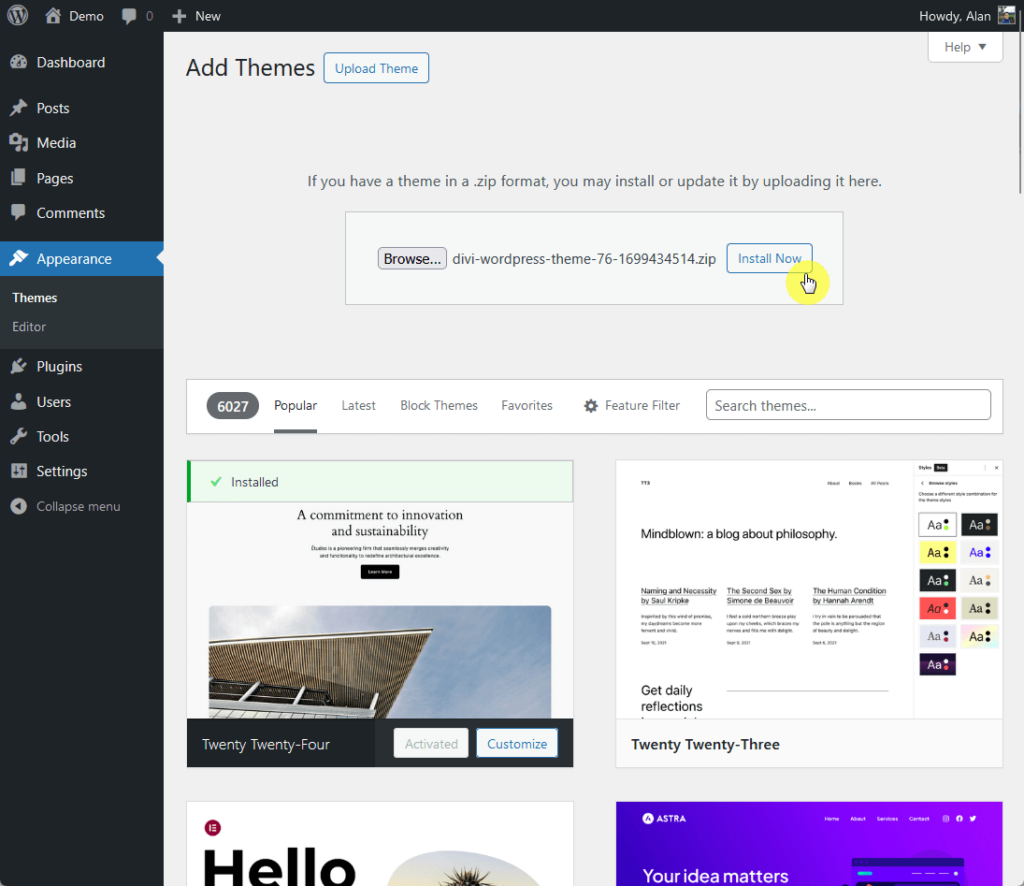
After activating the theme, you need to head back to your Divi account to get the API key and link it to the theme.
Generate a new API key first from the members area > account tab > API keys, copy the new key, and then do the following:
- Go to Divi > theme options > updates on your admin dashboard
- Enter your username and paste the API key
- Click the save changes button
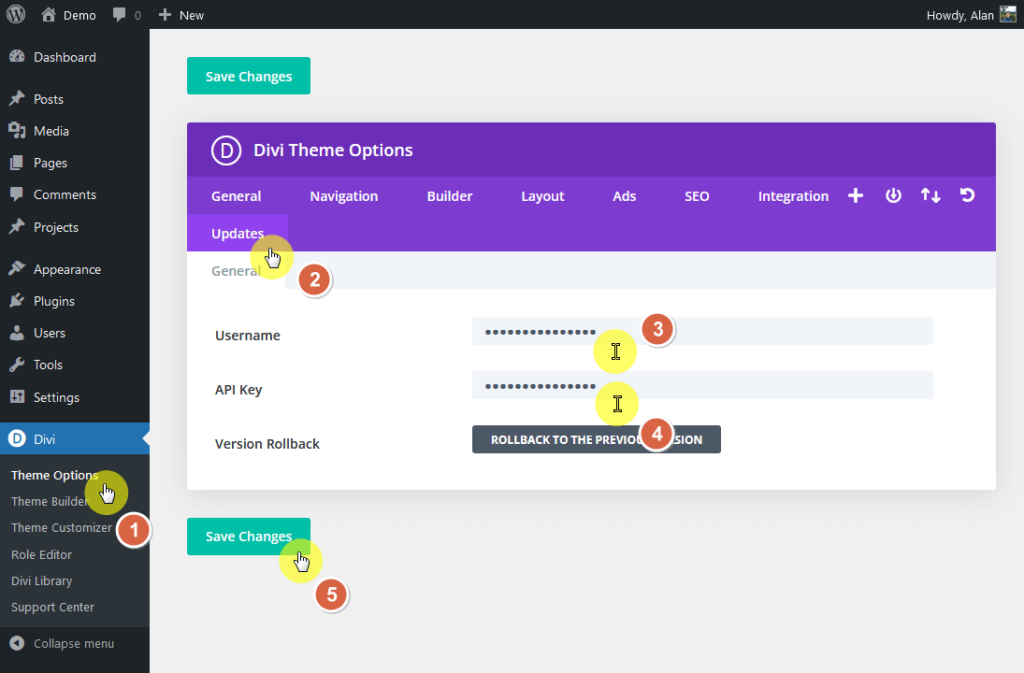
This will now link the Divi theme installed on your website and your Elegant Themes membership and receive future updates.
Theme Setup
In terms of theme setup, there are two things you need to know here:
- Unlike other themes, there is no setup wizard or any process that enables you to import a whole site demo or starter site.
- On the other hand, all pages and posts on your website are fair game and can be edited using the Divi builder.
That means you will have to create all the pages and posts yourself (compared to importing them from a starter/demo website).
When you create a new post or page, you will be able to choose to use the Divi builder to create the layout.
You will then see this:
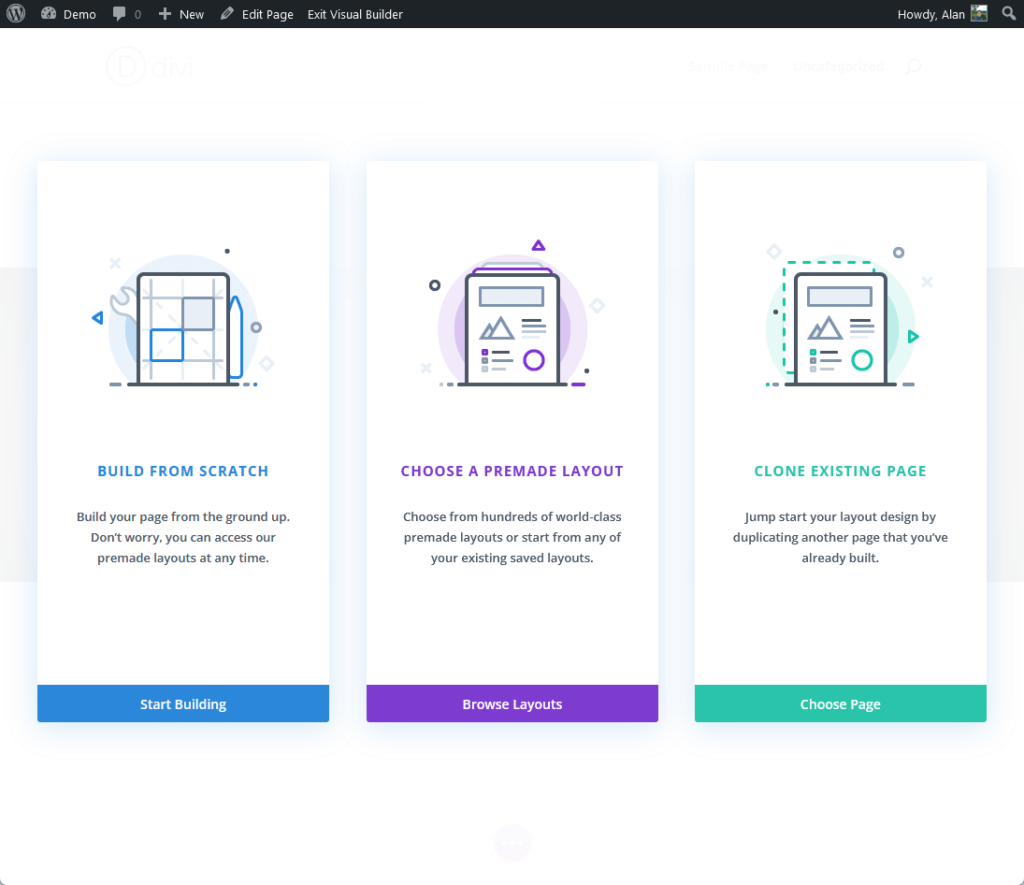
From what you can see, you will be able to create from scratch (using the Divi builder), start from a premade layout, or clone an existing page.
Here’s what will happen:
- If you choose to start from scratch, the insert row popup will automatically appear.
- If layouts, then you will have to choose from hundreds of layouts.
- If you choose to clone an existing page, you will have to choose from your existing pages.
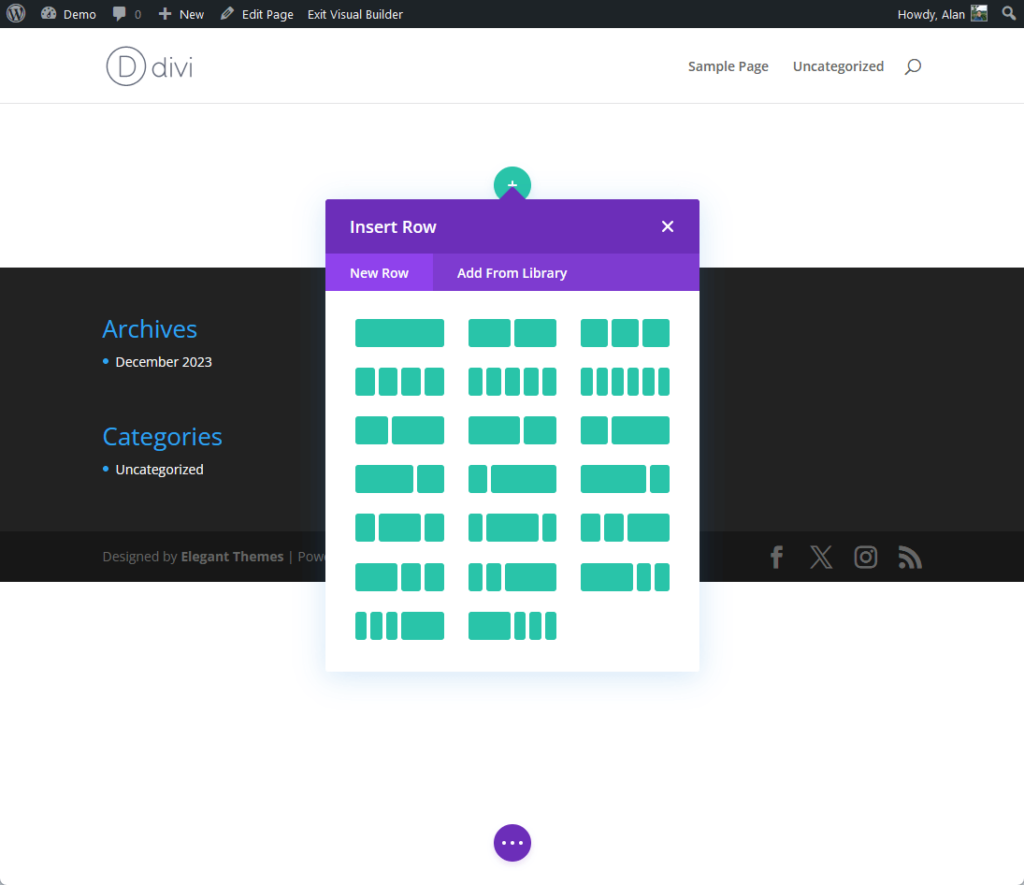
The good news here is that you can always do any of the three options wherever you are in the page creation process.
👋 My thoughts here
The installation is smooth with no problems whatsoever. As for theme setup, I would say that it’s inconvenient (almost non-existent, actually).
On the positive side:
- I like the fact the Divi theme offers a straightforward installation process (unlike others that require you to install a theme and a pro plugin).
- You also have a lot of freedom in terms of creating pages and posts (from scratch, from a premade layout, or from an existing page).
Unfortunately, there are a lot of areas that I wish Divi would improve in the future.
Here are some of the downsides:
- Unlike other themes, Divi doesn’t offer any setup wizard or process that allows users to import a whole site demo or starter site.
- Users have to create all the pages and posts themselves, which can be time-consuming compared to importing them from a starter/demo website.
For people like me and Darrel who already have experience with building websites from scratch, using the Divi theme isn’t much of a challenge. 🤷
However, for beginners, this could make the initial setup process more challenging (especially for those who aren’t familiar with website building).
Having explored the ease of use of the Divi theme, it's crucial to consider the foundation that powers your WordPress site – the hosting service.
Just as Divi aims to simplify your website design, Hostinger strives to make your hosting experience seamless and efficient.

Discover the Hostinger advantage for your WordPress site:
- Enjoy a 99.9% uptime guarantee
- Affordable pricing at just $2.49/month (use the code darrel10 to get a discount)
- Global performance and reach with Hostinger's optimized hosting platform
Embrace the power of Divi and the reliability of Hostinger to create a stunning, high-performing WordPress website.
Features
I would rate the overall features of the Divi theme at 4/5.
Here’s why:
- Divi offers extensive customization in the live customizer and theme options, providing design flexibility.
- It's a powerful, user-friendly tool for versatile page building without coding skills.
- Divi has a rich selection of premade layouts, enhancing its feature set.
The score recognizes Divi's strong features but suggests improvements in whole-site importation and page layout setup efficiency.
Core features
Here are the core features of the Divi theme:
1. Live Customizer Options
At first, I thought that the live customizer options in the Divi theme would be empty since I saw some options in the Divi theme options.
But I'm glad to know that I was wrong 🥲 You would still find a lot of customization options in the theme customizer.
For example, the typography settings come with the usual options for the body/header text size, body line height, and header letter spacing (this setting is uncommon).
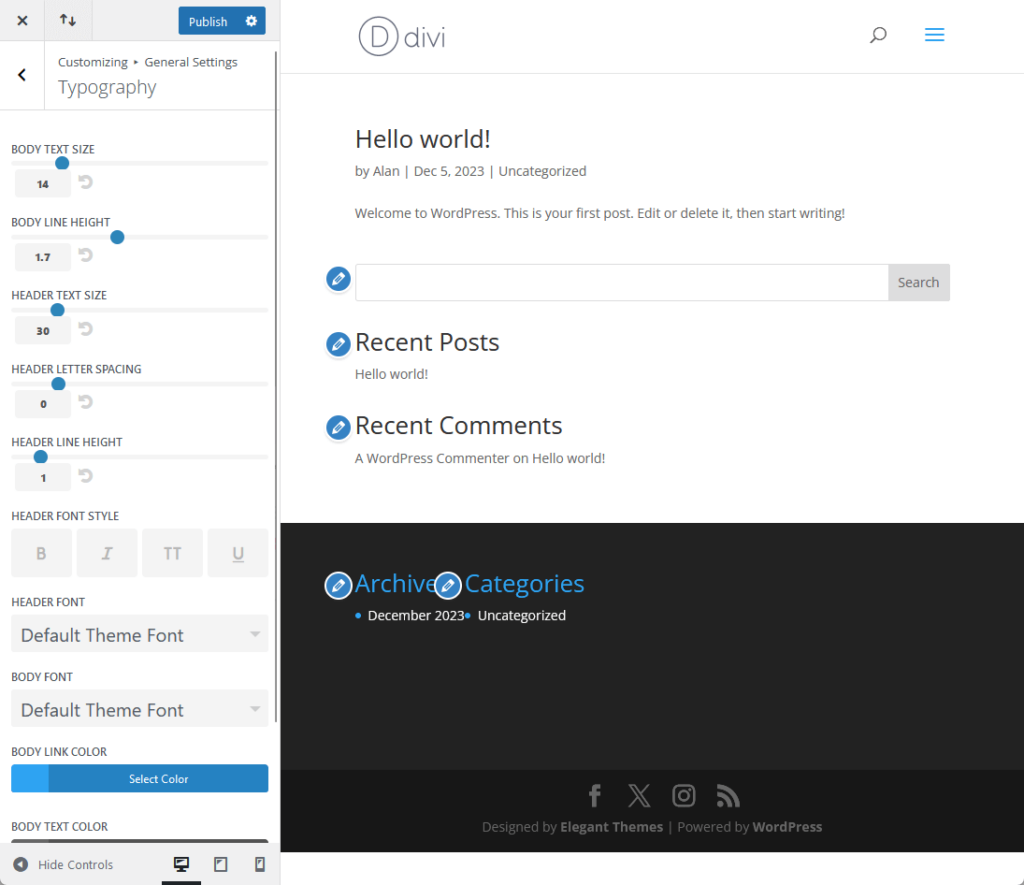
⚠️ Note: For any theme review, it’s important that we cover the live customizer options since those who won’t be using page builder will likely spend their time here.
I like the fact that you can apply a header font style here (some people like to put an underline on their headers).
For selecting the fonts, although you don’t have any predefined combinations, there are so many fonts available that I found all the fonts I usually use.
The only downside I see here when selecting fonts is that you have to literally scroll down until you see what you’re looking for.
Another one here is header and navigation:
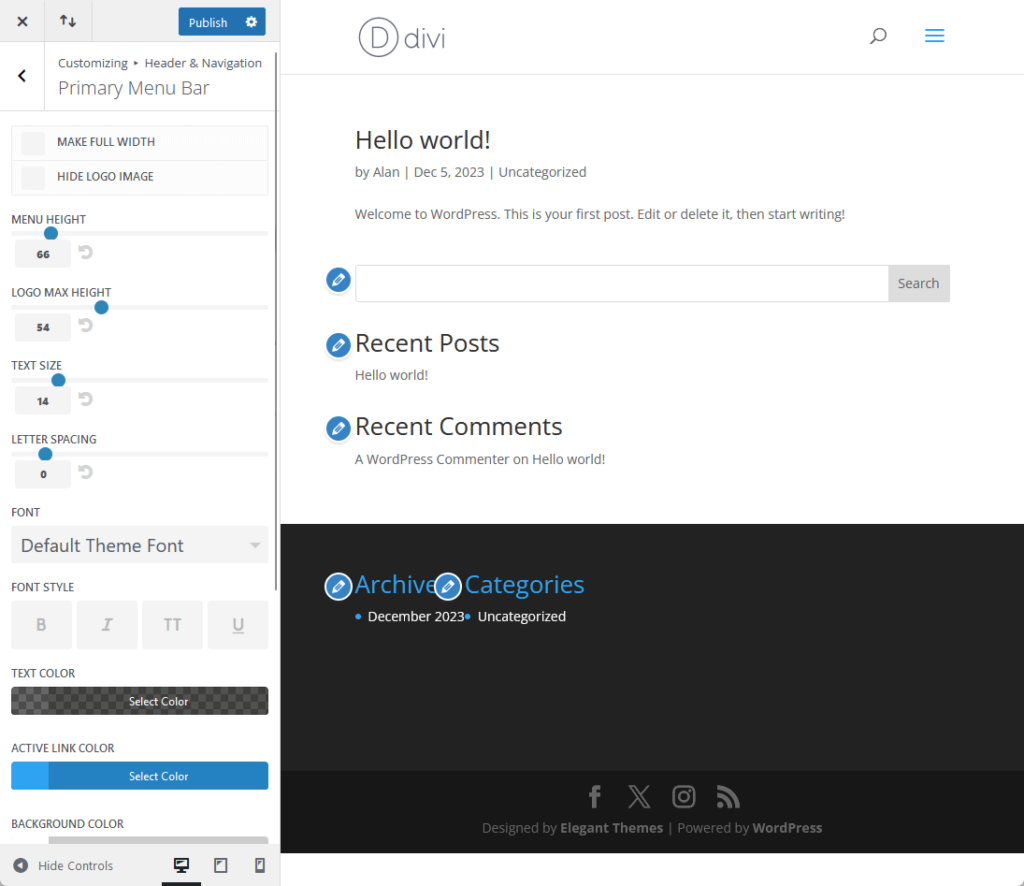
There are a lot of really good options here like:
- Enabling the full width of the header (disabled by default)
- Hiding the logo image
- Adjust the menu height, logo max height, text size, and more
- Setting up a different font for the header
You can’t see it from the screenshot above — but there are also options for coloring different elements like text, active link, background, dropdown menu, and more.
As for the blog options, I do find them a little underwhelming, unfortunately:
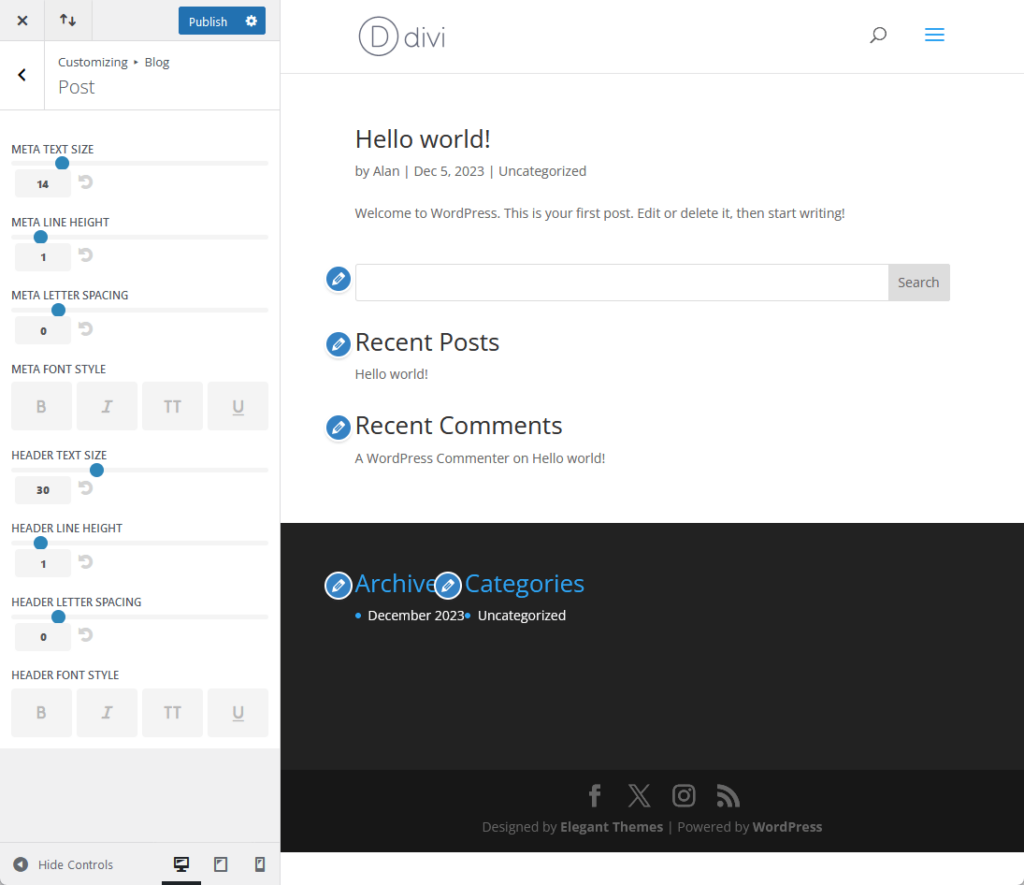
There are the usual settings for the metas (text size, line height, letter spacing, and font style) as well as for headers.
Besides that, nothing more. There are no options for container layout, grids, or sidebar (at least not in the vanilla, no add-ons Divi theme).
2. Divi Theme Options
You may have seen this earlier when connecting the Divi theme with your Elegant Themes account through an API key.
There are various options available under the Divi theme options inside the theme settings:
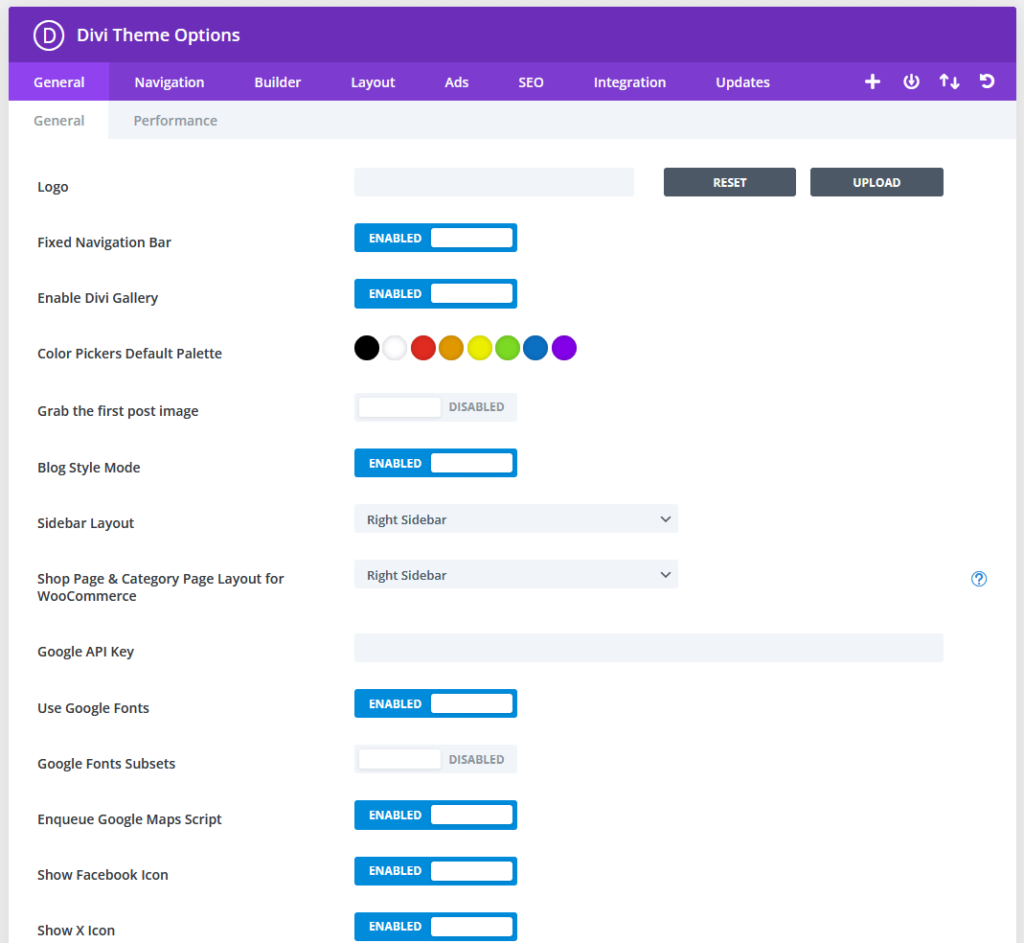
This is probably the reason why Divi’s live customizer options seem underwhelming in many parts since you can find extra options and features here.
Some examples of what you will find here include:
- Sidebar layout
- Social media profile link
- Number of posts displayed
- Back to top button
- Smooth scrolling
There’s also a separate tab in the general settings for performance-related settings like dynamic module framework, dynamic icons, disable emojis, and more.
I noted earlier that there are no sidebar layout settings in the customizer. While this holds, there is an option in the general settings for sidebar layout.
Another option that caught my attention is the one for search engine optimization:
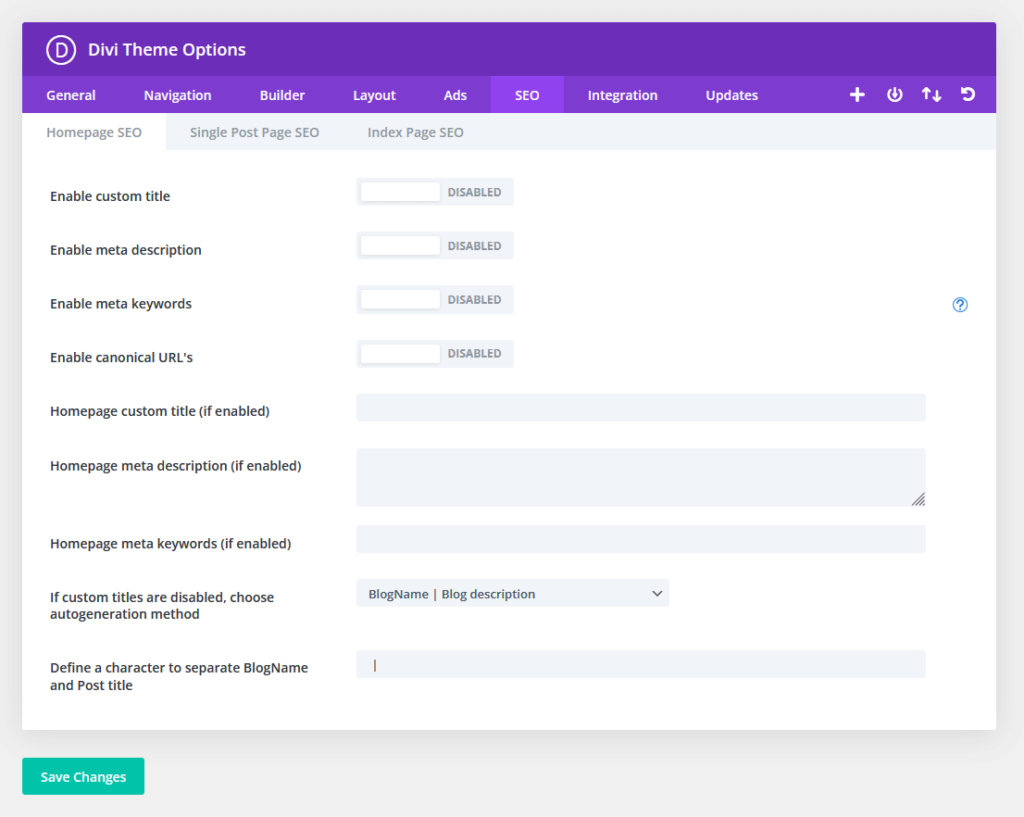
This is where you can enable adding custom meta (like title and meta description) without using any SEO plugins like Yoast.
Unfortunately, you will have to set it up first by adding the custom fields panel in the preferences settings of the post editor and then adding the custom fields.
There is a bit of work in the beginning here as you set everything up. But after that, it will be as easy as using other SEO plugins.
Besides the two tabs I showed you, there are other options available as well:
- Navigation: For navigation options in pages, categories, and general settings.
- Builder: This is where you enable the builder component on various post types and tweak some advanced features.
- Layout: For configuration of general layout options as well as in single posts and single pages.
- Ads: For managing un-widgetized advertisements on your WordPress site (like input banner images, destination links, and codes).
- Integration: If you need to add custom codes, you can do it here instead of installing new plugins.
3. Divi Theme Builder
The Divi theme builder is a tool that will allow you to create theme templates and use them on your pages and posts.
This is what it looks like:
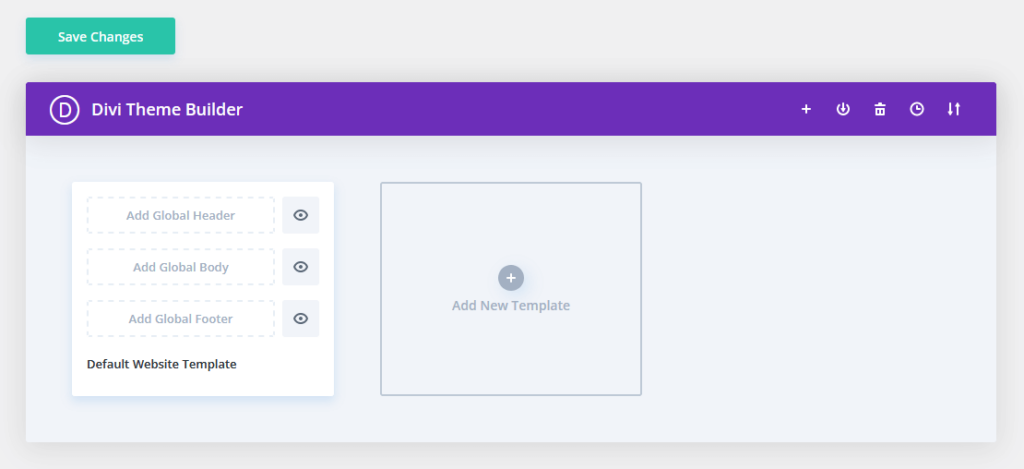
If you have used Elementor before, it’s similar (albeit a bit underpowered) to Elementor’s theme builder feature.
Unfortunately, unless you bought premade modules to help create your global header/body/footer, you would need to create them from scratch.
This is what you will see when creating your global layout elements:
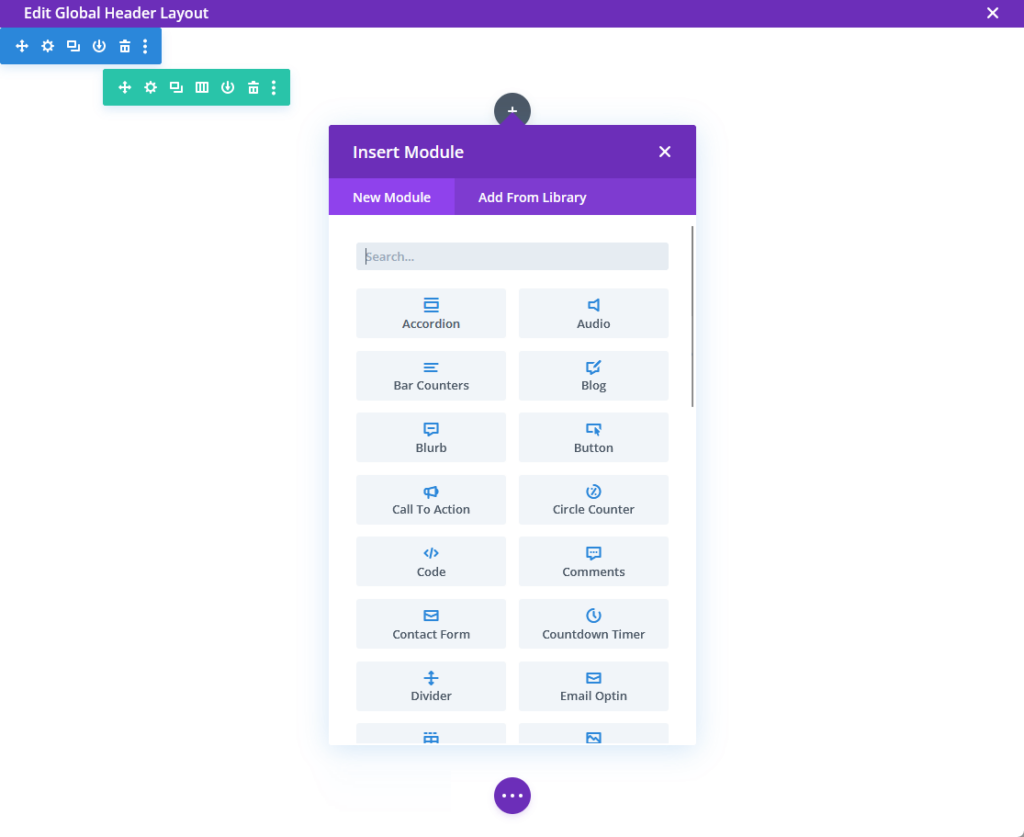
On the bright side, it’s much easier to use than other underpowered sites/theme builders from other themes since you will be using the Divi builder.
4. Divi Builder
Divi builder is a standout feature of the Divi theme, which lets you build and customize your WordPress website with ease without the need for coding skills.
I explained this earlier — but when you create a new post or page, you can opt to use the Divi builder instead of the default editor.
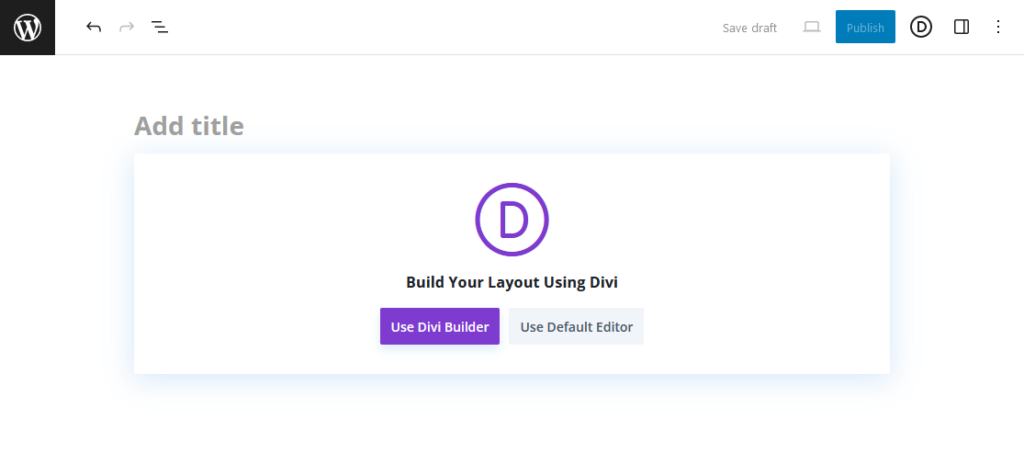
This will bring you to the page where you can select to start from:
- Scratch
- Premade layout
- Existing page (clone)
Now, unlike other page builders, the user interface is generally clean and empty of other buttons unless you click on an element.
In fact, your only clue that the visual builder is running is the small purple circle at the center bottom part of the page.
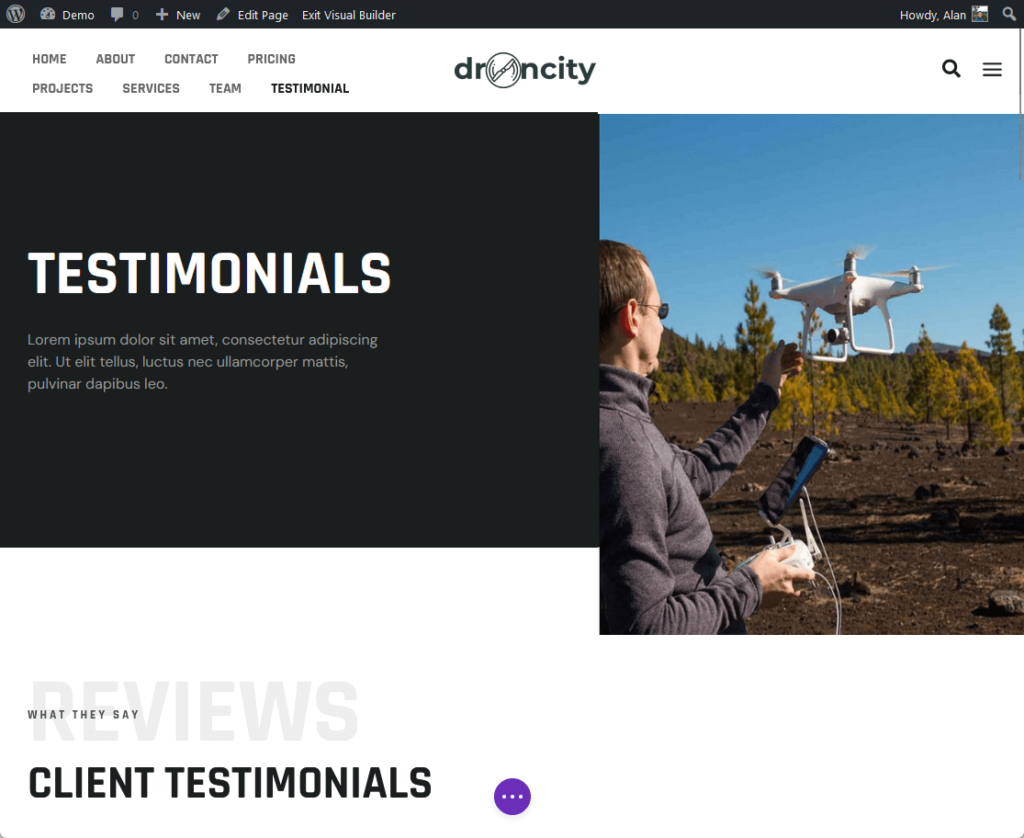
Using it is fairly simple — you simply add a new row on the target location and then select what module or block you want to put.
After you add the specific module, you will be able to configure its content, design, and advanced settings.
This is what the settings look like after adding the blog module:
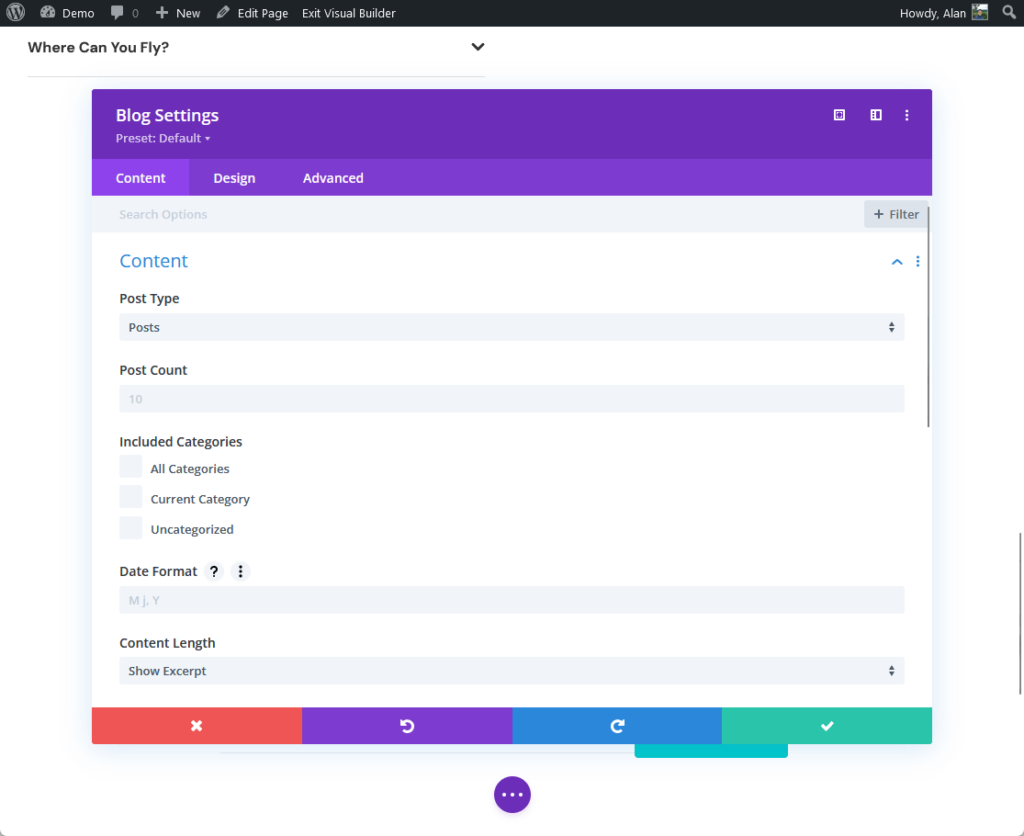
There are around 40 modules available — with many interesting ones like:
- Circle counter
- Contact form
- Email optin form
- Filterable portfolio
- Video slider
If you need more features, you will have to head over to the Divi marketplace and purchase the extensions with the modules that you need.
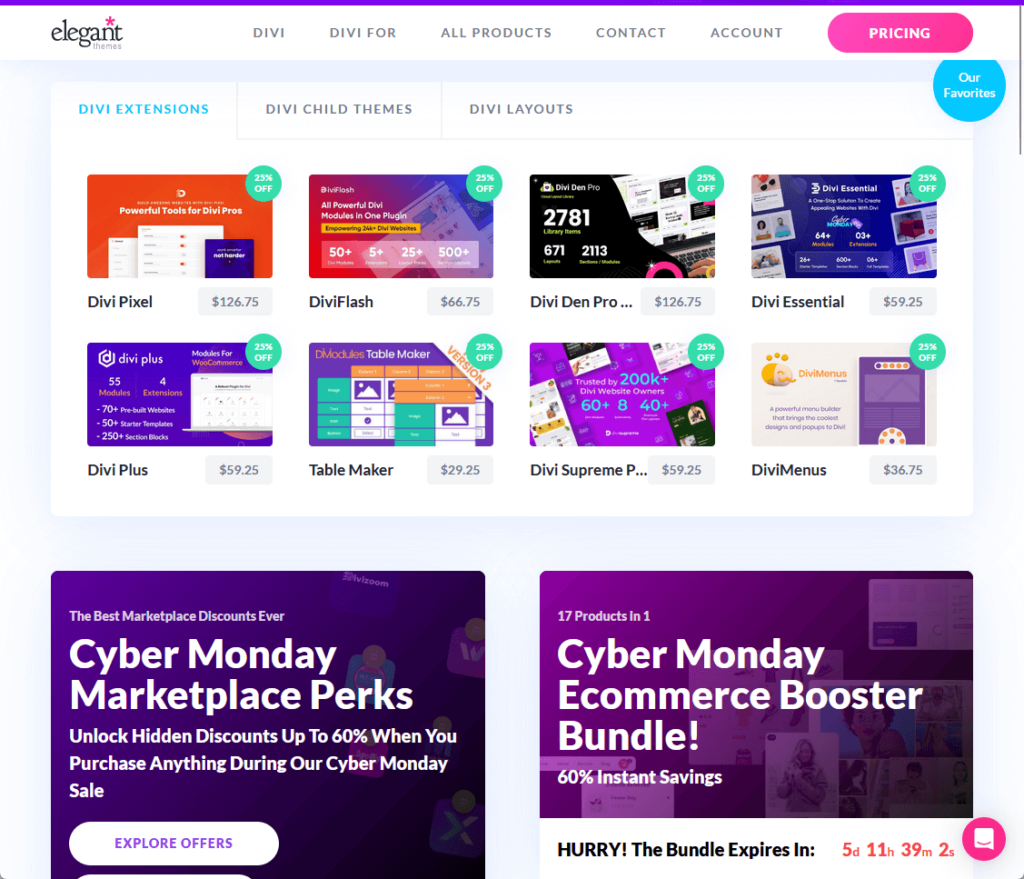
In terms of using the Divi builder, I want to iterate that it feels smooth. I tried editing a longer-than-average page and it was okay.
But similar to other builders out there, I can feel that it would get laggy the bigger the page is and the more modules it has to deal with.
Premade Websites/Layouts
Does Divi theme offer starter websites or templates that you can start with?
Technically, there are premade layouts available that you can import. However, they work on a per-page basis (instead of being able to import a whole website).
Here are examples of premade layouts:
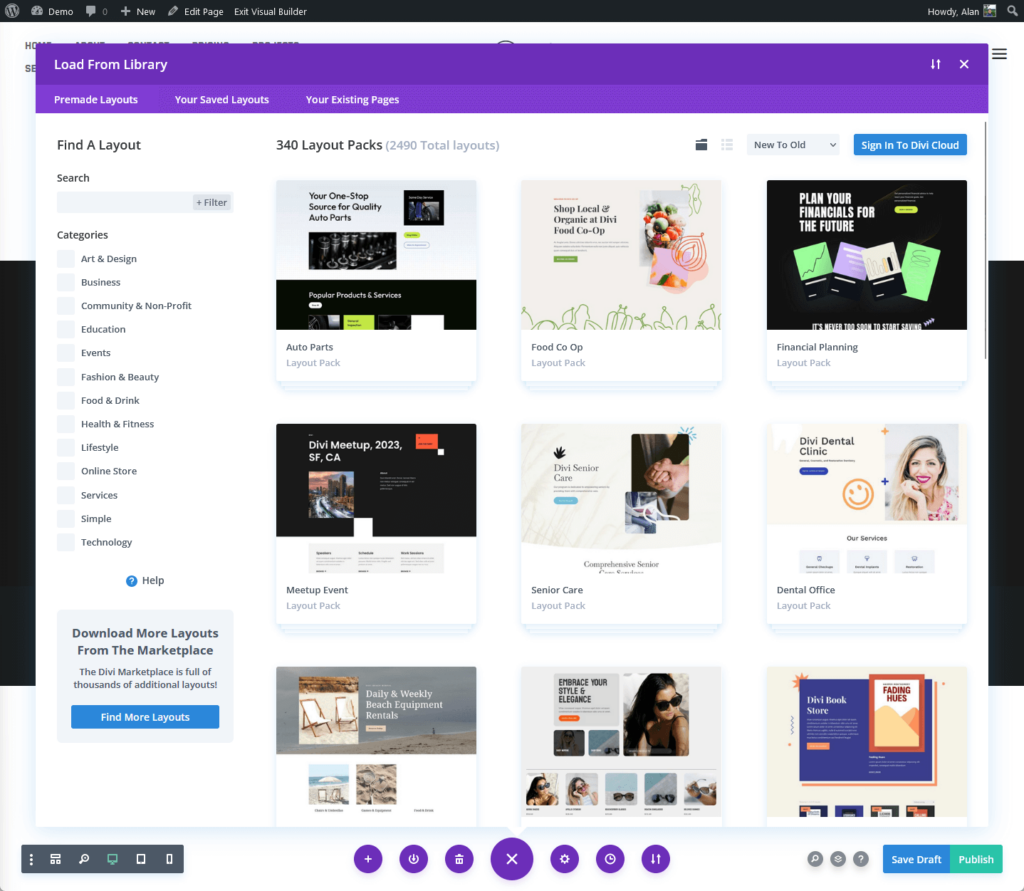
I explained earlier that the Divi theme doesn’t have any theme setup wizard or process that allows you to import a whole starter website.
However, you can import individual page layouts after selecting the website layout pack (website template) that you want to use.
Like this:
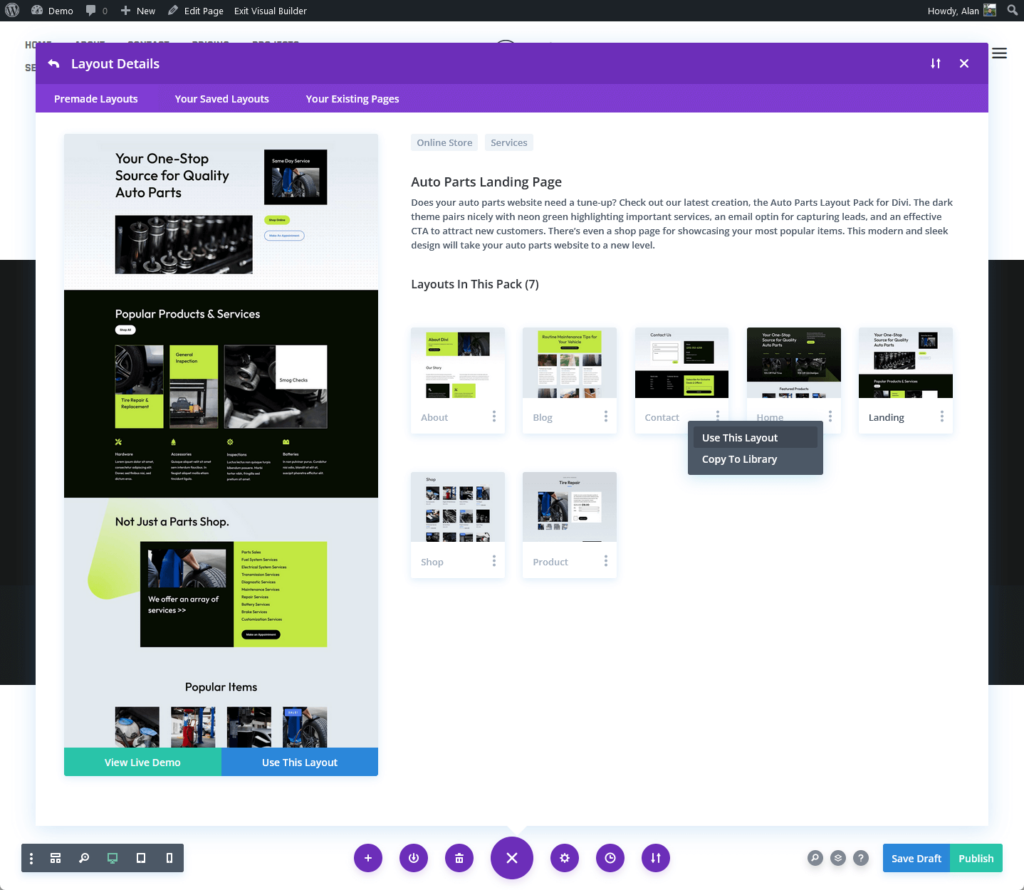
There are 340 of these website layout packs available — and you can technically mix and match the page layouts.
The downside to this is that creating a full website from these layouts will require you to create a new page for the site and manually import those layouts.
👋 My thoughts here
Don’t get me wrong — the Divi theme has a lot of customization features and a powerful builder to top it all up.
In fact, here are the best things about this theme that I like:
- The Divi builder looks really sleek, has a clean interface, and has a variety of modules to choose from — great for beginners.
- There are additional customization features that are not available in the live customizer which you can find in the theme options.
Unfortunately, there are some features that would greatly benefit the users if Divi were able to integrate them with the theme.
For example:
- In the live customizer, it would be helpful to add more options and make them easier to use (like putting a search functionality in finding the right font).
- It would help if users could import a whole website at once instead of doing it per page, eating up a lot of time in the process.
Users have to create a new page for the site and manually import those layouts, which can be a tedious process (and inefficient at that).
Maybe it has something to do with how they structured the theme and the builder? Since importing third-party packs requires the same thing.
Reliability
I would rate the overall reliability of the Divi theme as 3.5/5.
Here’s why:
- Divi scores ‘C' (72%) on GTmetrix, indicating average performance.
- Divi's frequent updates enhance reliability and currentness.
- Larger page size and moderate load time call for better speed and efficiency.
The score reflects Divi's solid maintenance and update track record balanced against its average performance metrics and potential for improved optimization.
Performance
Reviewing the performance of the Divi Theme is important, especially considering its popularity in the WordPress community.
To test the Divi theme and compare it with other themes, I used one of our Divi layouts (since the site is basically empty as there are no default layouts available).
I then ran the site through GTmetrix and got the following results:
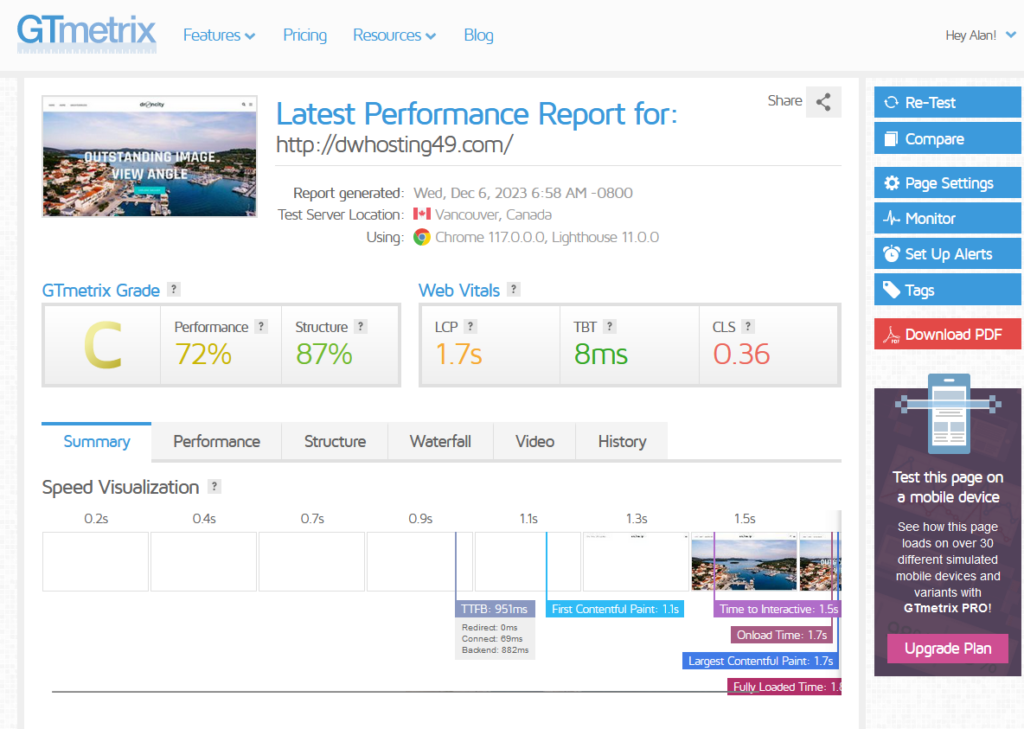
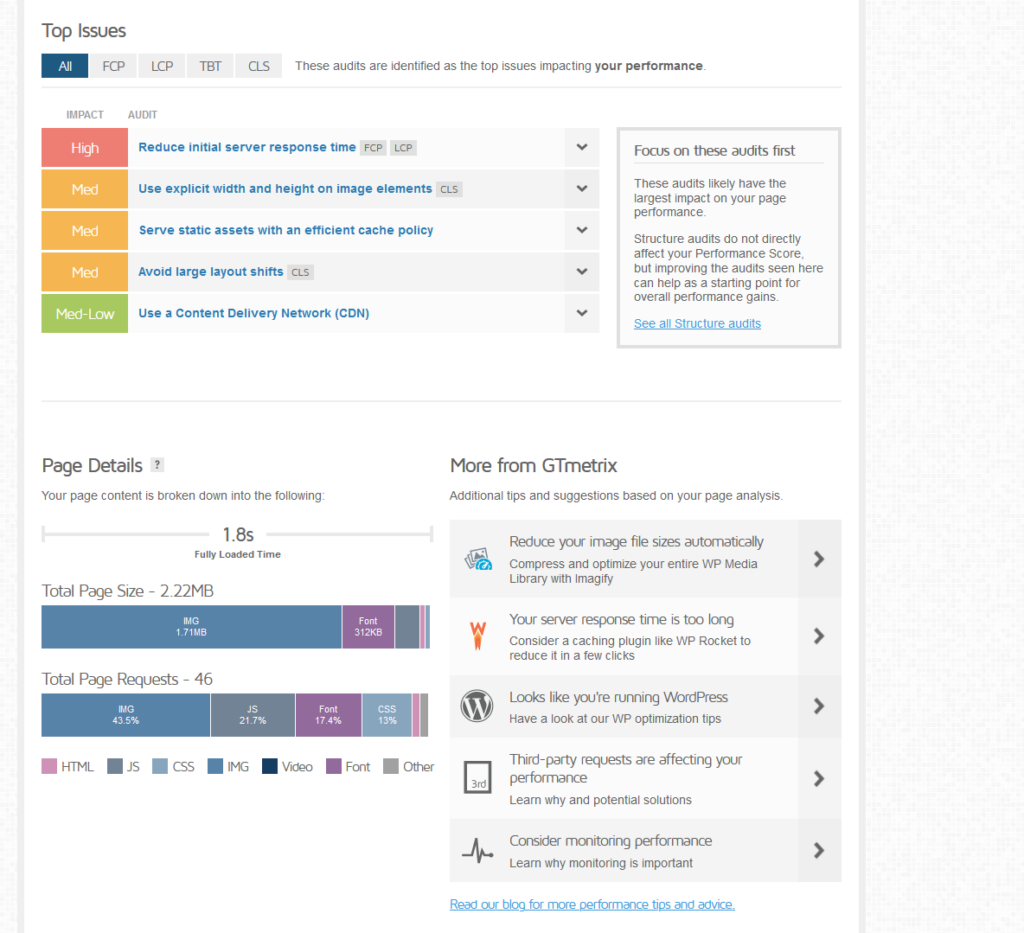
The website has received a ‘C' grade, indicating average performance.
Some details:
- The performance score is at 72 — it’s in the below-average area.
- The structure score is higher at 87% so the build quality is fairly solid.
Here’s how Divi stacks up against other multipurpose themes in WordPress that I ran through GTmetrix:
| Theme | Fully Loaded Time | Total Page Size | Total Page Requests |
| Elementor Simple Kit | 1.3 seconds | 1.51 MB | 53 |
| Elementor Pearl Kit | 3.7 seconds | 1.57 MB | 106 |
| Astra Theme — Outdoor Adventure Template | 905 milliseconds | 1.54 MB | 21 |
| Betheme Default Template | 1.6 seconds | 0.97 MB | 55 |
| Divi Theme | 1.8 seconds | 2.22 MB | 46 |
Here are some comments:
- Divi's performance is middle-of-the-pack — it's not the fastest with a load time of 1.8 seconds and has the largest page size at 2.22 MB, which may slow it down.
- It makes fewer requests than some themes, like the Elementor Pearl Kit, but more than the very efficient Astra Theme.
Users might choose Divi for its features but may need to optimize for speed, while Astra stands out for its balance of efficiency and functionality.
👉 Related: Astra Theme Review: Popular Choice or Just Overhyped?
⛔ Warning: The results from GTmetrix aren’t conclusive and won’t always hold true as the themes continue to update. However, they are a good indication of the themes’ performance and speed insights.
Updates and Maintenance
Divi theme has shown a strong commitment to updates and maintenance so it remains current and relevant.
In fact, they have several updates in the same year, giving a steady stream of improvements and refinements.
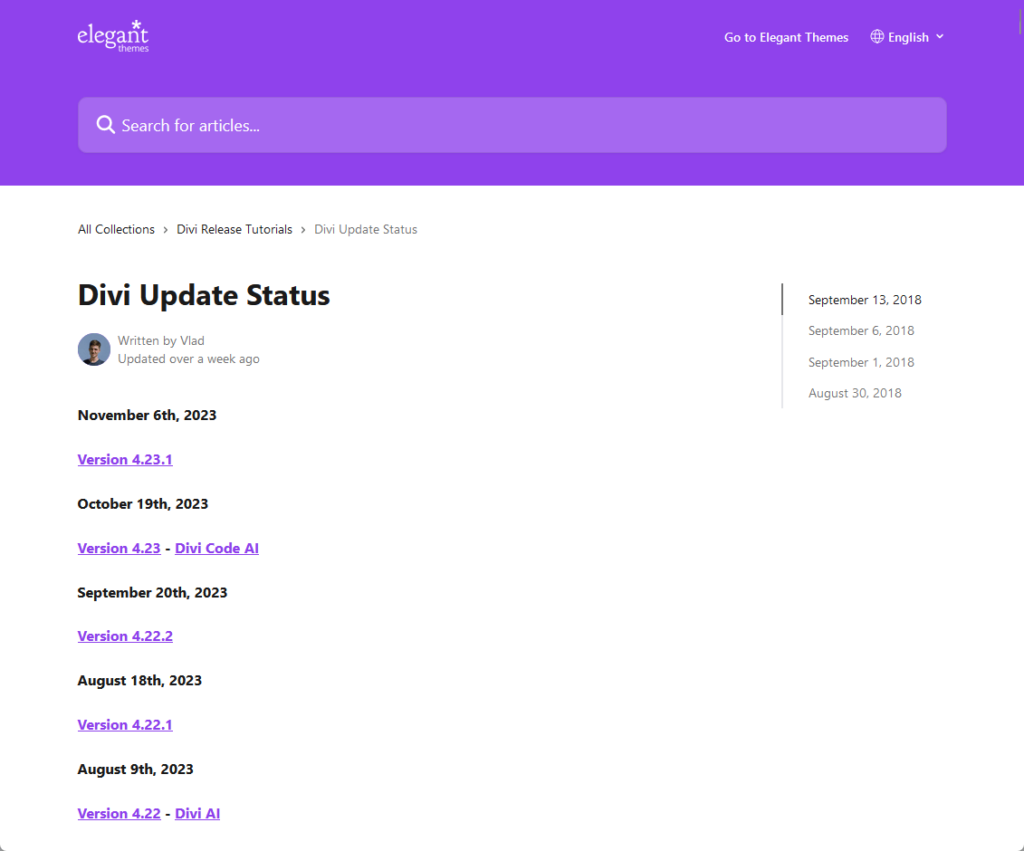
Here are some highlights:
- Updates are primarily centered on enhancing website performance, scalability, security, and extendibility.
- A significant milestone is the development of Divi 5.0, which is set to revamp the core technology of the theme.
- The updates include improvements in backward compatibility with Divi 4 modules and the fixing of various bugs.
Divi's updates and maintenance reflect a strong commitment to evolving with the needs of its users and the web development industry.
Their focus on performance, compatibility, user experience, and modern web standards, including Divi 5.0, shows this dedication.
👋 My thoughts here
Divi has some good points here when it comes to reliability.
Some of them include the following:
- While not the fastest, it performs reasonably well compared to other themes.
- It demonstrates a strong commitment to updates and maintenance, ensuring that the theme remains current and relevant for users.
Unfortunately, we have to talk about the cons too.
If you have read its performance results, it’s easy to see that it’s not really doing well in that area:
- With a performance score of 72%, there is room for Divi to improve its efficiency and speed to enhance reliability.
- A larger page size than its peers suggests the need for better optimization, leading to faster loading and more reliable performance.
While GTmetrix scores provide a snapshot, real-world use may vary.
Divi could focus on further refining the theme to perform reliably under a variety of real-world conditions, beyond default layouts and controlled testing environments.
Support
I would rate the overall support of the Divi theme as 4.5/5.
Here’s why:
- Divi provides diverse support channels, including a support center, 24/7 chat, documentation, a help center, and a Facebook group.
- The knowledge base is well-organized and extensive, with tutorials, GIFs, and videos for effective troubleshooting and learning.
- Integrating support resources for a unified experience and offering real-time support in multiple languages could enhance support further.
The high score reflects the robustness and variety of support options available to Divi theme users.
Customer Service
Divi theme offers a comprehensive and multi-channel customer service experience that caters to a wide range of user needs and preferences.
On the theme dashboard, there is a support center where you can:
- Enable remote access for the support team
- Find a portal to the documentation
- Enable safe mode (temporarily disables features and plugins)
- See an aggregation of log file contents (when enabled)
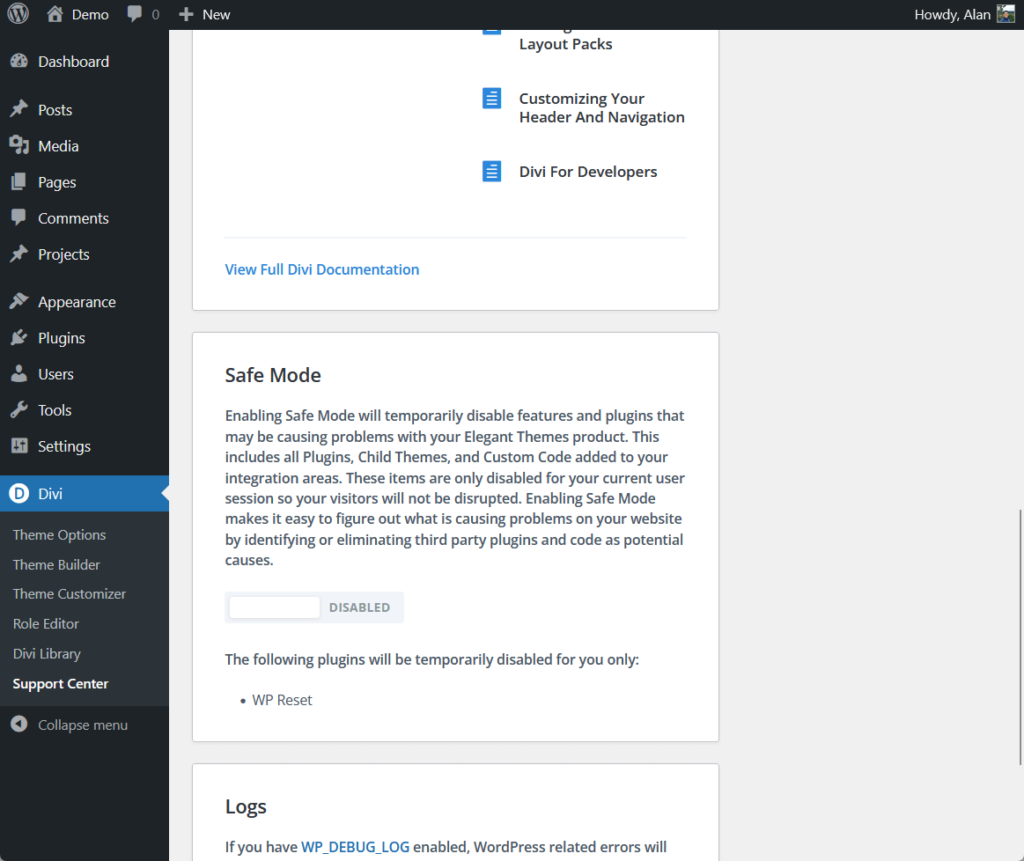
When you go to Elegant Themes’ website, you will be able to find different ways to either seek help or contact them.
This includes premium support (for paid users only), documentation, a help center, developer docs, a forum (for paid users only), and even a link to their Facebook group.
There’s also 24/7 chat support available on the website:
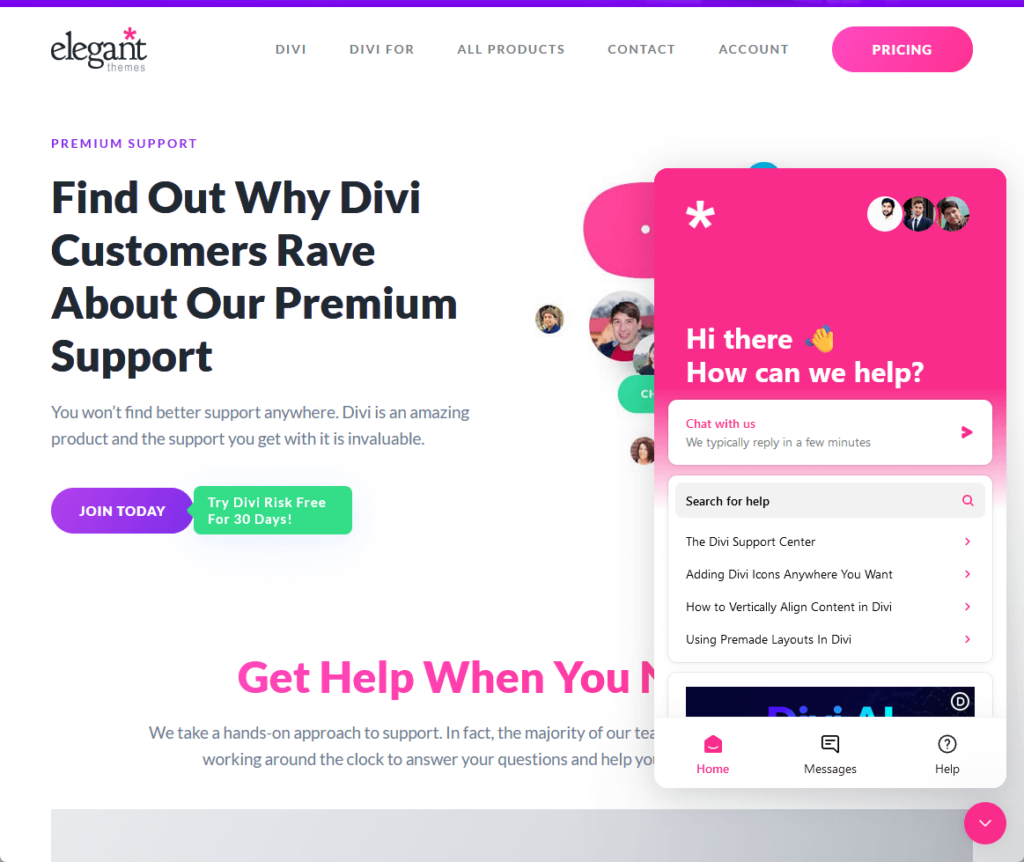
As for their Facebook group community, it seems really active.
Statistics alone, it has 75k+ total members with 17 new posts as of today, with 462 posts in the last month.
Here’s their Facebook group:
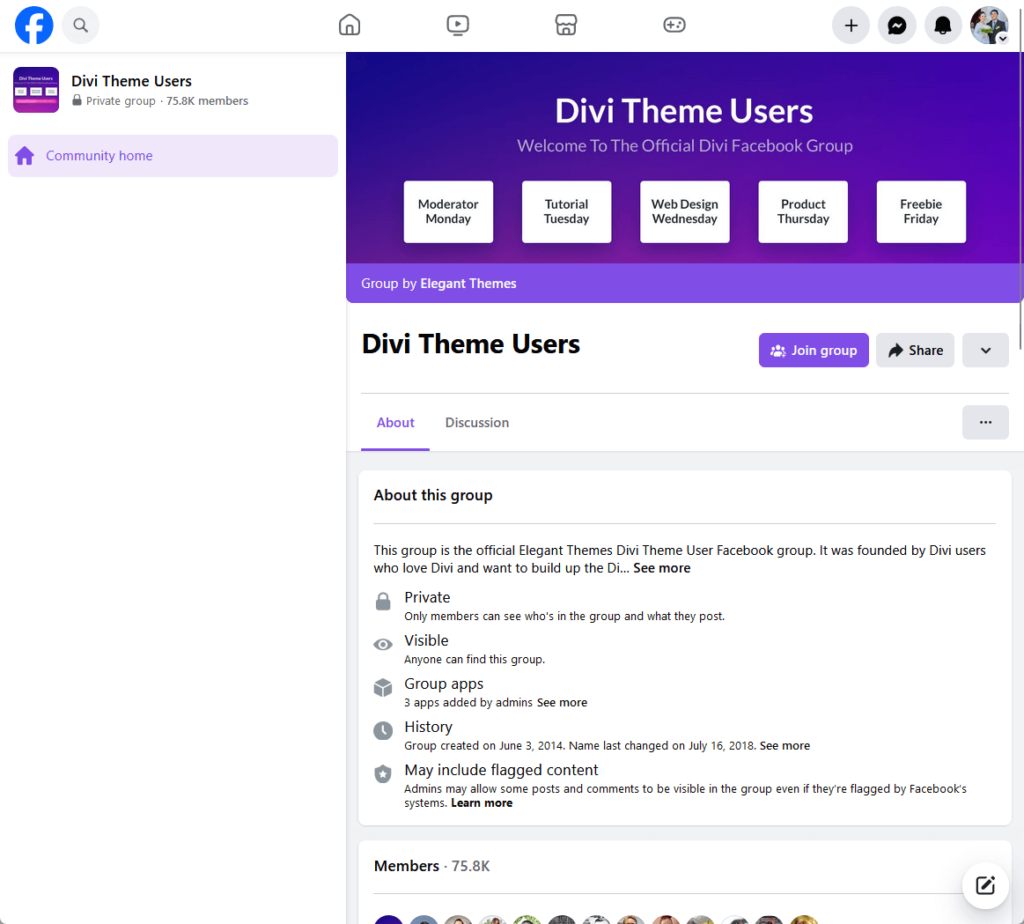
All in all, Divi theme’s customer service seems pretty strong.
Knowledge base
Divi theme does have a comprehensive knowledge base and documentation:
- Elegant Themes help center
- Divi theme documentation
When you go to their help center, you will notice that all the articles are divided by categories like Divi release tutorials, troubleshooting, and other articles for their other products.
Opening one category will reveal the different articles under that category (all articles are meant to answer frequently asked questions).
Here’s an example of the posts under their help center:
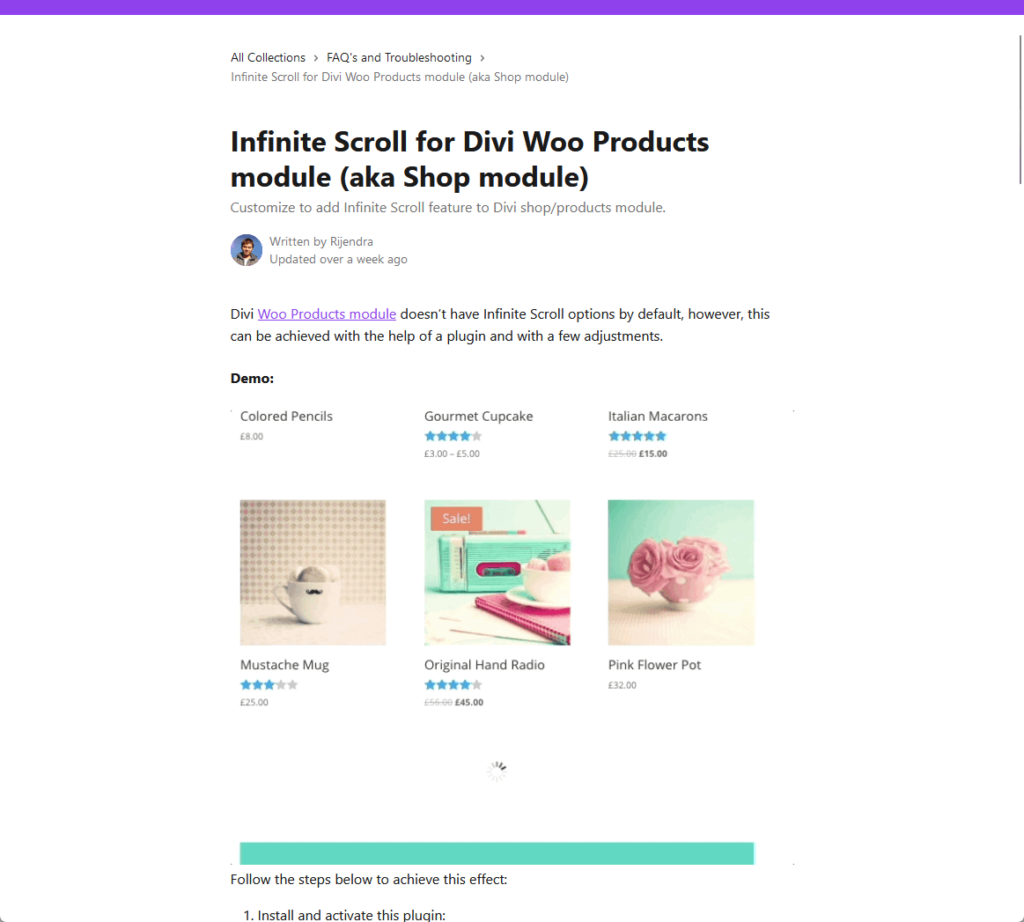
The article is also well written, complete with images and GIFs (I haven’t seen any videos so far though it’s not indicative that there are none).
The documentation is also organized the same way — in different categories, with different articles included in each category.
Articles in the documentation look more like a blog post (nicely done!) complete with images and videos (or link to its YouTube video).
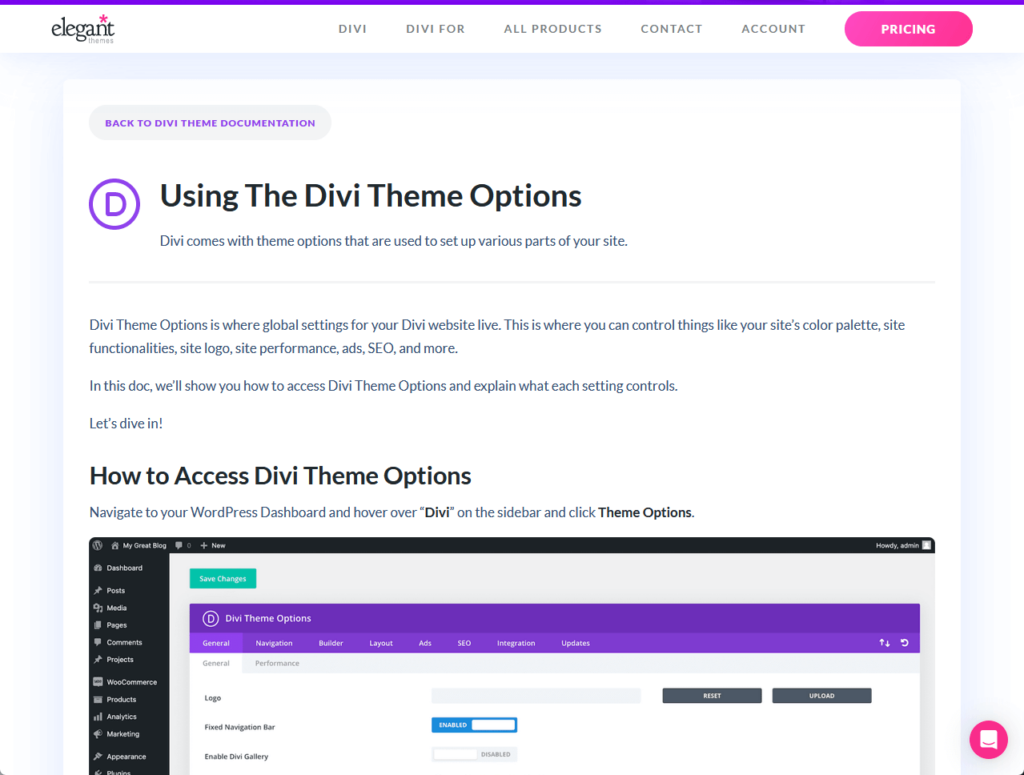
👉 Related: Best Divi Theme Tutorials for Beginners (Updated)
There is also developer documentation available that contains posts on divi modules, code references, hooks, and dev environment setup.
By the way, both the documentation area and the help center have a search functionality, each isolated in its environment.
👋 My thoughts here
Divi theme has a strong support system, complete with documentation, a knowledge base, chat support, a help center, and more.
Here are things I like:
- Divi offers a variety of support channels, including a support center on the dashboard, 24/7 chat, documentation, and more — catering to different user preferences.
- With a large and active Facebook group community, users can benefit from peer support and a shared knowledge base.
- The comprehensive knowledge base, featuring organized documentation, tutorials, GIFs, and videos, equips users with the tools to troubleshoot.
On the other hand, I have to make it fair and share my thoughts on the areas that the Divi theme could improve in terms of support.
Here are some of them:
- Integration of support resources
- Real-time support in different languages
Combining the documentation and help center search functions for a unified experience could enhance accessibility and user-friendliness.
If not already available, offering real-time support in multiple languages could significantly enhance the support experience for a global user base.
Pricing
I would rate the overall pricing of the Divi theme as 4/5.
Here’s why:
- Divi offers yearly and lifetime access, catering to different user needs.
- Even the basic Divi plan includes the Divi theme and builder, unlimited websites, and numerous website packs.
- Pro and agency plans are significantly pricier than the basic plan, potentially affecting affordability.
The score reflects a balance between the flexibility and inclusiveness of Divi's pricing structure and the higher costs of advanced plans.
Cost Breakdown
Divi offers three main pricing tiers:
- Divi: $89/year or $249 for the lifetime access
- Pro: $473/year or $633 for the lifetime access
- Agency: $761/year or $921 for the lifetime access
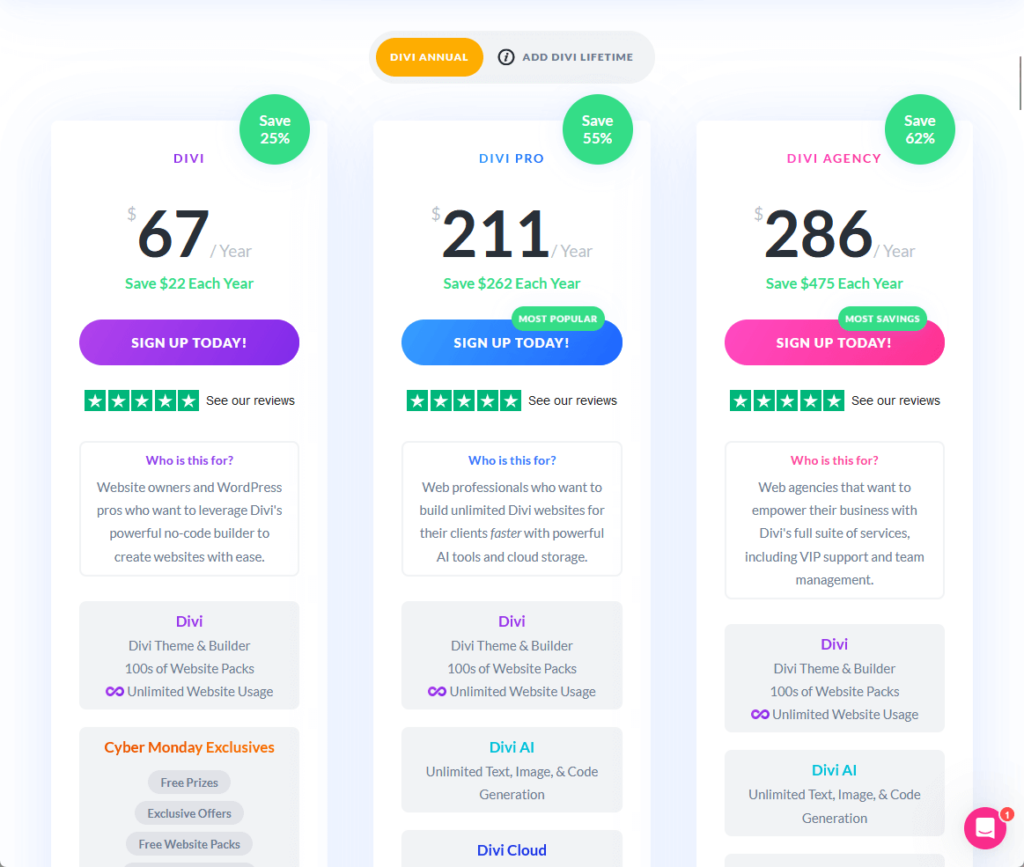
Here’s a table that summarizes what features are included in each tier:
| Feature | Divi | Divi Pro | Divi Agency |
| Divi Theme & Builder | Included | Included | Included |
| Unlimited Website Usage | Included | Included | Included |
| 100s of Website Packs | Included | Included | Included |
| 24/7 Support | Premium | Premium | VIP (under 30min response) |
| Extra, Bloom & Monarch Plugins | Included | Included | Included |
| AI Tools | Not Available | Included (Unlimited text, image, & code generation) | Included (Unlimited text, image, & code generation) |
| Cloud Storage | Not Available | Included (Unlimited cloud storage) | Included (Unlimited cloud storage) |
| VIP Support | Not Available | Not Available | Included |
| Team Management | Not Available | Not Available | Included (Up to 8 team members) |
The choice between these plans depends on your specific needs and goals.
For the tiers:
- If you’re a solopreneur (and in most cases), you’re good with the basic Divi plan.
- If you need AI tools and cloud capabilities, go with the pro plan.
- If you’re an agency and need VIP support, go with the agency plan.
The yearly plan suits short-term projects or testing, while the lifetime plan is cost-effective for long-term or multiple projects.
Money-Back Guarantee/Refund
Divi offers a money-back guarantee.
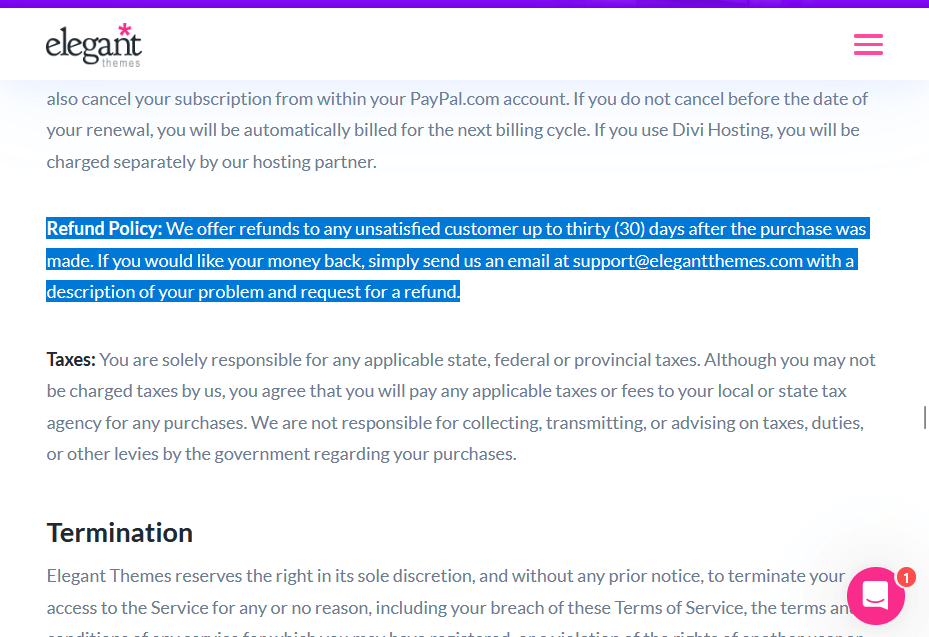
Here's what you need to know about their refund policy:
- 30-day money-back guarantee: Divi provides a 30-day money-back guarantee for any unsatisfied customer. This policy applies from the date of purchase.
- Refund request process: To request a refund, you need to send an email to Divi's support team with a description of your issue and your refund request.
- Applicability: The 30-day money-back guarantee applies to all purchases, including both the yearly access and lifetime access plans.
This refund policy provides user confidence by enabling them to try Divi's features and assess alignment with their needs and expectations without financial risk.
👋 My thoughts here
At first glance, the Divi theme’s pricing might seem more on the expensive side. However, it’s worth noting that it includes unlimited websites.
Here are the best aspects of Divi’s pricing:
- Divi offers both yearly and lifetime access across its plans (Divi, Pro, and Agency), catering to different user needs.
- Even the basic Divi plan includes core features like the Divi Theme & Builder, unlimited website usage, and hundreds of website packs.
- The 30-day money-back guarantee across all plans enhances customer confidence, allowing them to try Divi's features risk-free.
On the downside, I think that the pro and agency plans are significantly more expensive than the basic Divi plan.
If Divi could offer more frequent discounts or special offers, it might attract a wider range of customers who find the regular prices a bit steep.
Final Thoughts
The Divi theme is notable for its sleek design, clean interface, and diverse modules, making it beginner-friendly.
It offers additional customization features in the theme options, enhancing its appeal. However, it could improve in areas like the live customizer and website importing process.
Despite the average performance, Divi shows a strong commitment to updates and maintenance, ensuring its relevance and reliability.
Despite some drawbacks, Divi's strengths in customization and user experience make it a strong contender among WordPress themes.
After going deep into the specifics of the Divi theme, it's time to consider elevating your design experience further.
Divi's flexibility and ease, combined with layout packs, can transform your website creation process.
Darrel Wilson has an incredible offer that you simply can't ignore:
- Get lifetime access to all premium layout packs designed for Divi
- Complete with 2 years of dedicated support
- Only for $59/year (unlimited layout packs)
By incorporating Divi layouts into your toolkit, you're not just choosing — you're embracing a world of creative possibilities