
Ease of Use
My rating here is 3.5 out of 5.
Here’s why:
- cPanel is widely recognized and used across the hosting industry, offering a sense of familiarity and reliability for long-time website administrators and users.
- A noticeable drawback is the initial setup process for new users, especially those without prior experience with A2 Hosting.
- The client area lacks in aesthetic appeal and might come off as low-budget or outdated at first glance.
A2 Hosting offers a solid option for users who value the familiarity and extensive capabilities of cPanel.
Unfortunately, it may pose challenges for new users due to its initial setup complexity and the user interface's dated appearance.
Hosting Setup
For A2 Hosting, we already have a test hosting account — I can’t show you everything from the start, but I can show you how it looks now.
I’ll say this now while it’s early:
Unless you have used A2 before (I haven’t), you may have a hard time figuring things out as it’s not as intuitive and user-friendly as other hosts.
For example, if you want to create a new site, you have to go into the cPanel first:
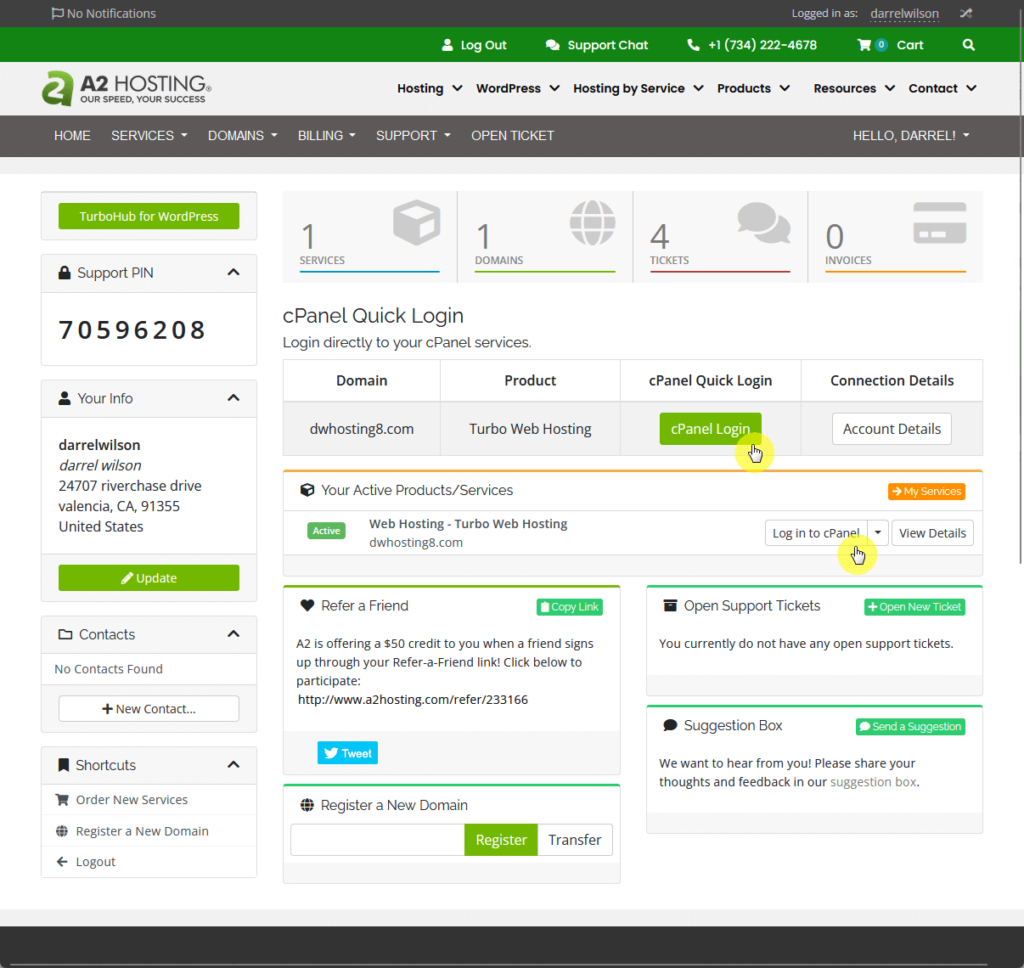
From the image above, you can see that there are 2 buttons that can take you directly to the cPanel (which is nice).
⛔ Warning: If you click the second button (the one under the “your active products/services” box, it will open the cPanel in the same browser tab.
Fun fact here:
I spent a few minutes trying to figure out how to create a new website, and I was even about to register a new domain as a last resort (which still won’t work). 😓
But anyway, once you get to the cPanel, you must find the site publisher tool, which you can find under the domains group.
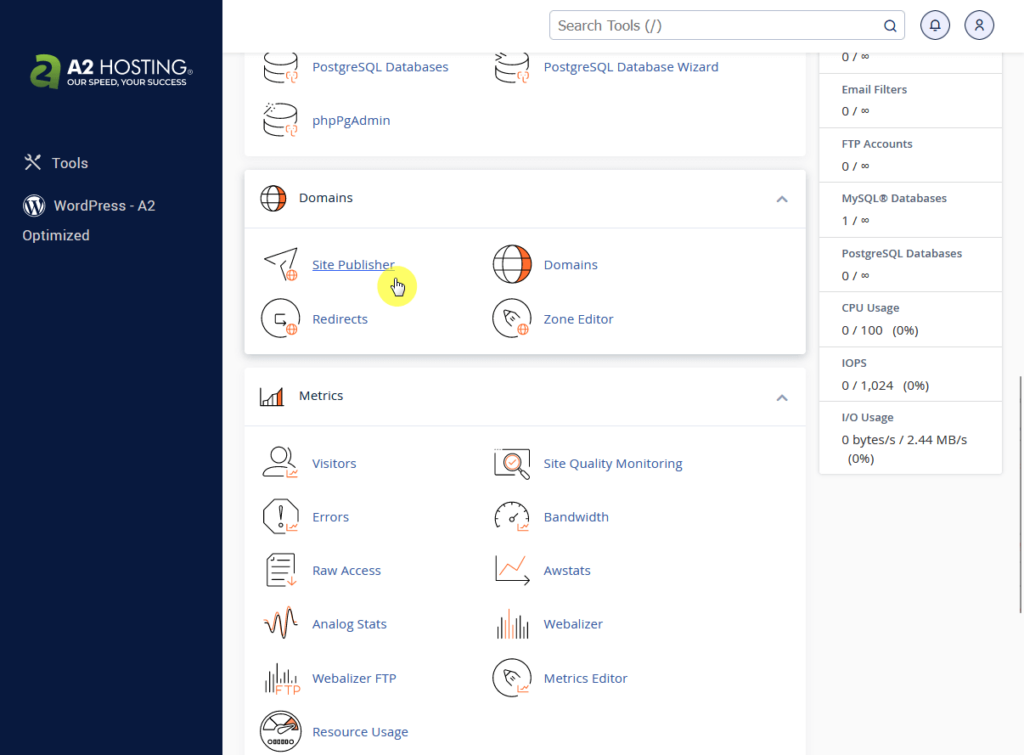
If you’re still starting out, make sure to have a domain with you as you need to add it here in the first step.
The rest of the steps are easy:
- Select a template (any will do as you can simply replace it later)
- Enter the site information
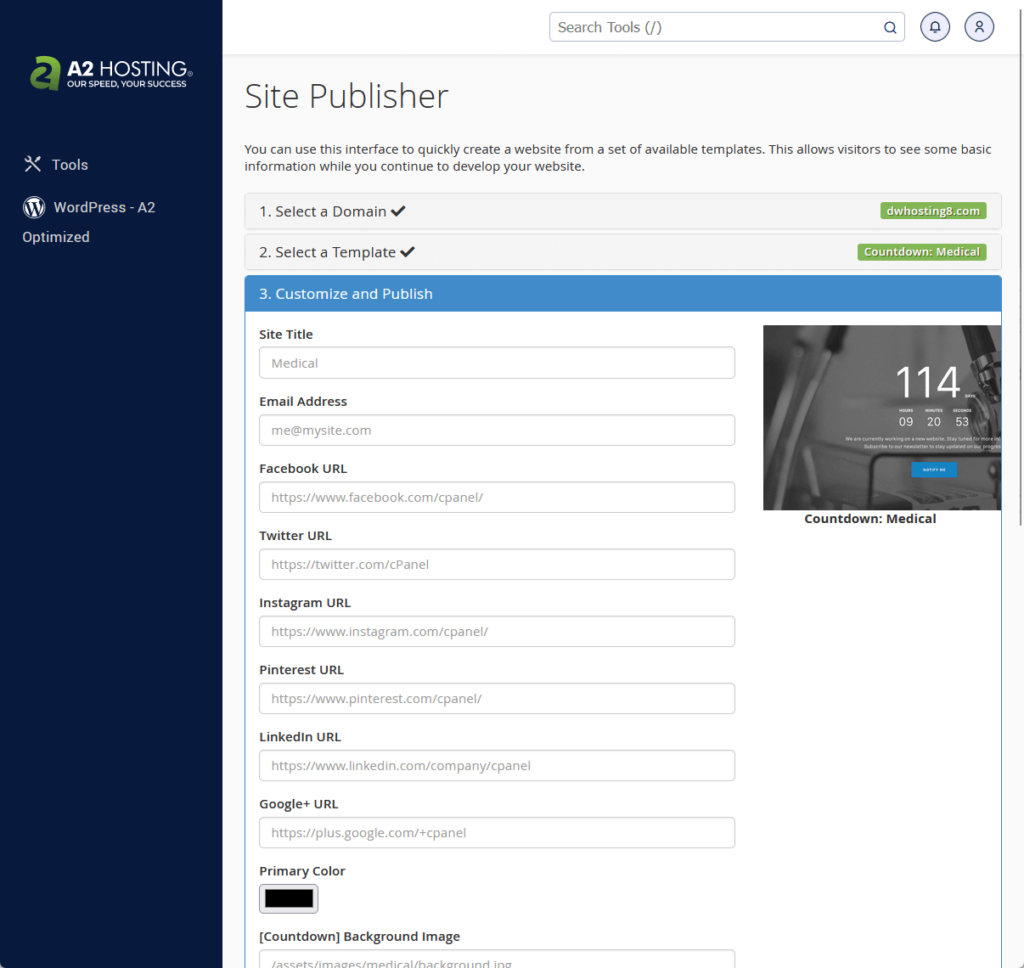
That’s it. 🙂
It may look easy now. But if you’re used to a host that has a clear “add a new site” button, you could get lost when using A2 Hosting.
User Interface
But what does A2 look like on the inside?
You have already seen the client area (the first screenshot you’ve seen here with the cPanel buttons) and you can see that it’s not the best in terms of looks.
Here’s another look:
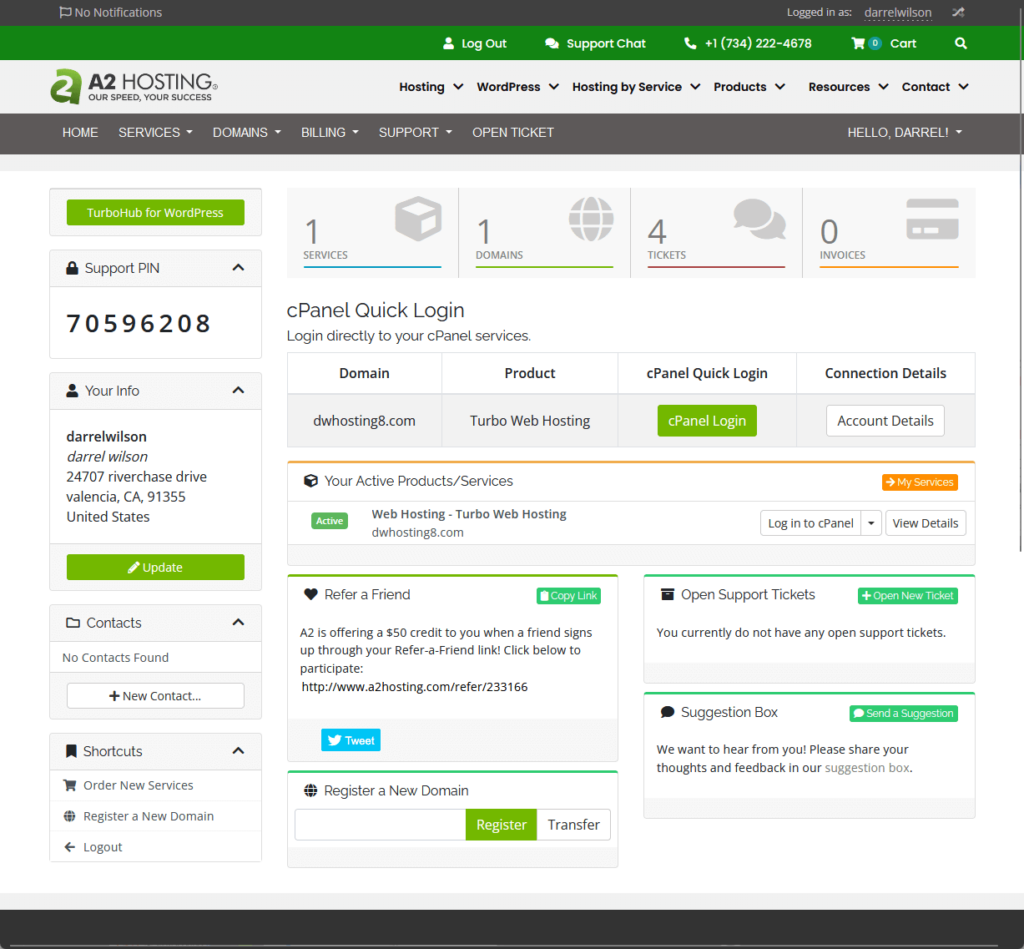
Anyway, there’s really nothing much in A2’s user interface besides a few important pages where you can:
- Manage domains and services
- Submit support tickets
- Manage your billing
If you want to manage your hosting, this is the page that you will see:
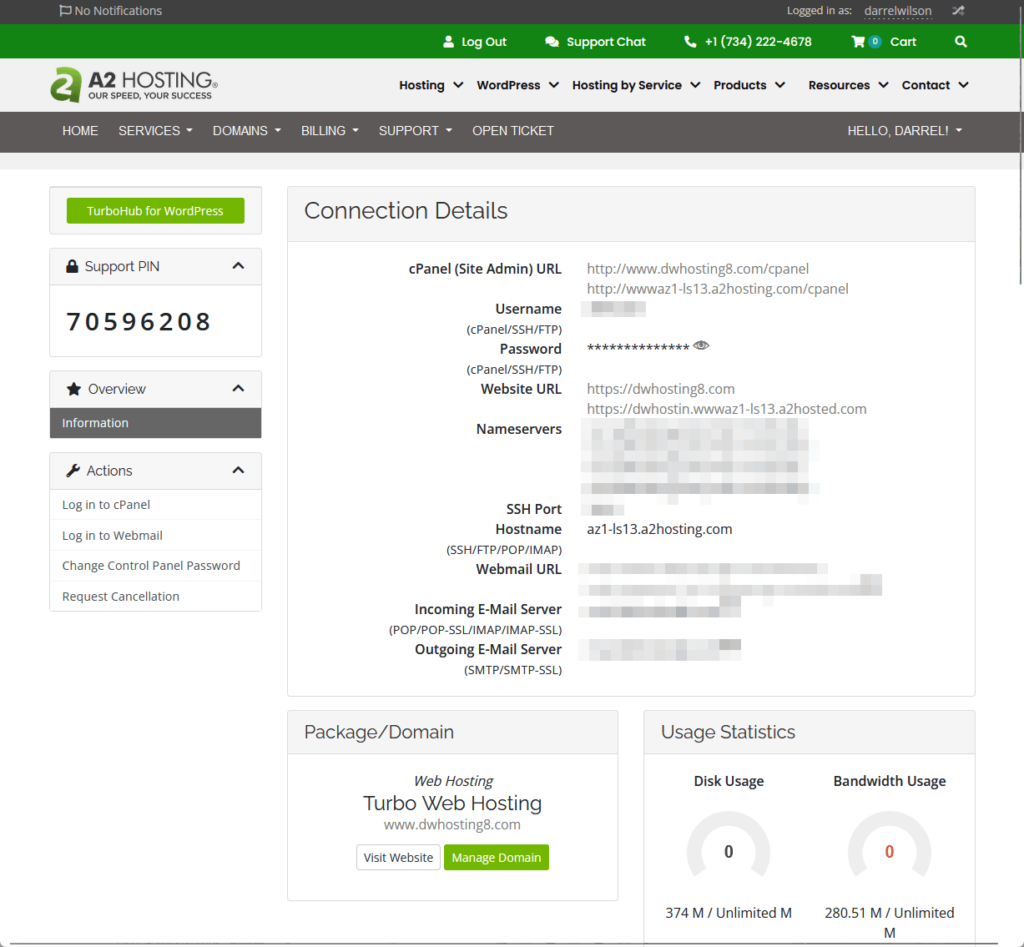
There are some options below the page that you can’t see from the screenshot like:
- Check blocked IPs
- Quick shortcuts (email accounts, forwards, file manager, etc.)
- Create a new email account
- Billing overview
The client area is where you can do most tasks that don’t include the website itself and the hosting unlike what you see on other hosts.
👋 My thoughts here
In terms of ease of use, A2 is one of those hosts that look like a low-budget tool, and you can immediately see that right after logging in. 😅
Here are my thoughts here:
- It would’ve been better if they added a shortcut to the site publisher right in the client area so newbies can easily see it.
- On the bright side, they use cPanel so you can pretty much do whatever you want that can be done with cPanel.
- Unless you’re actively buying new hosting packages and domains, you will be spending less time in the client area.
The best point I can see here is the usage of cPanel.
If you didn’t know, other hosts (like Kinsta) made their own hosting panel with mostly the same features and functionality as the cPanel.
Most long-time bloggers and website admins/users though are more familiar with cPanel, so having a cPanel feels like home, in a way. 🙂
While exploring hosting options, one standout choice is Hostinger.
Renowned for its affordability and performance, Hostinger ensures that your website is as strong as the features you plan to build upon it.

Discover the Hostinger advantage for your WordPress site:
- Enjoy a 99.9% uptime guarantee
- Affordable pricing at just $2.49/month (use the code darrel10 to get a discount)
- Global performance and reach with Hostinger's optimized hosting platform
With Hostinger, you're not just choosing a web hosting service:
You're selecting a platform that’s committed to providing the best possible environment for your website to thrive.
Features
A fair overall rating here would be 4.0 out of 5.
Here’s why:
- The A2 Optimized plugin stands out as a significant benefit, combining caching and security functionalities into one package.
- The anticipation of future updates to TurboHub suggests potential, but as of now, it acts more as a placeholder for what could significantly improve the feature set.
- A2 Hosting's free migration service represents a valuable offer, particularly for users transitioning from another hosting company.
A2 Hosting's features like the A2 Optimized plugin and the free migration service provide tangible benefits to users.
However, areas for improvement, highlight opportunities for A2 Hosting to further distinguish its offerings in the competitive hosting market.
⚠️ Note: If you’re looking for what each hosting plan brings to the table, you can find them in the pricing section of this review as what I’ll be talking about here are hosting features.
Here are some notable features of A2 Hosting:
1. A2 Optimized
At first, I was a little confused as to what A2 Optimized as I first saw it in the cPanel really means.
I then saw that it was actually a plugin that (suppose) can optimize web hosting for increased security and performance.
Here are the details:
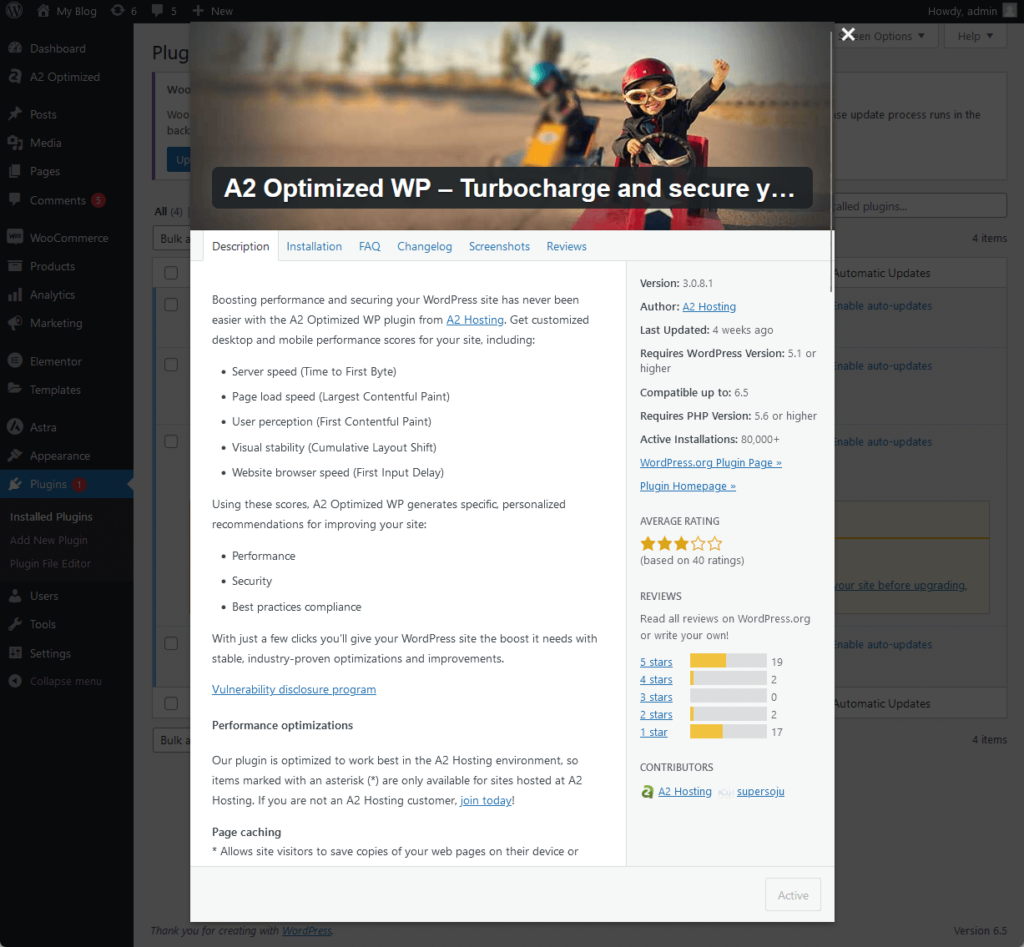
According to its landing page, it has the following features:
- Page, database, and object caching
- File and image compression
- Secure and faster memcached unix socket files
- Security features like login URL change and CAPTCHA
Here’s a look at what’s inside of the plugin right inside our test site on A2 Hosting:
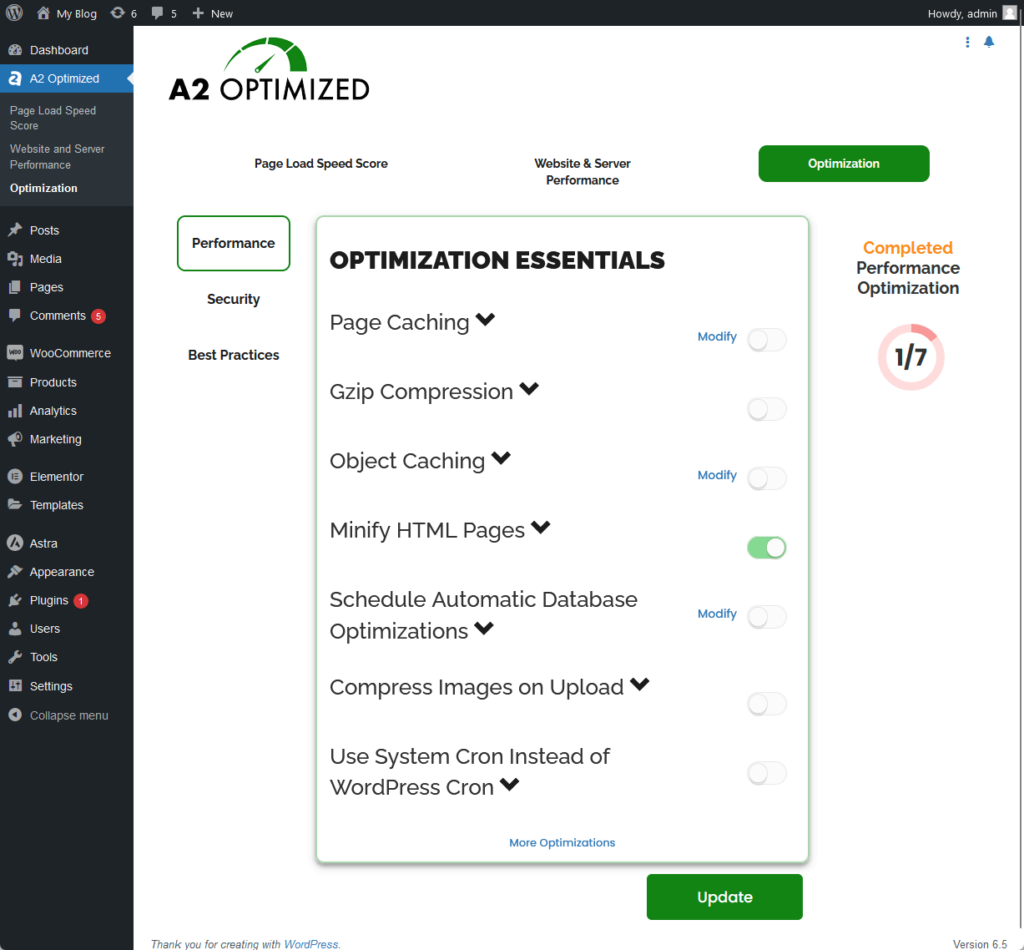
It’s basically a caching + semi-security plugin and since it’s already given by A2 Hosting, might as well use it instead of installing plugins with the same functionalities.
👉 Related: The Best WordPress Caching Plugins (Free and Paid Plugins)
2. TurboHub
I opened TurboHub earlier with hopes that it will have the option to add a new site too (unfortunately, that’s not the case).
It’s an exclusive, modern interface where you can manage sites and do different things like set up automatic plugin updates, see performance metrics, etc.
Here’s what it looks like:
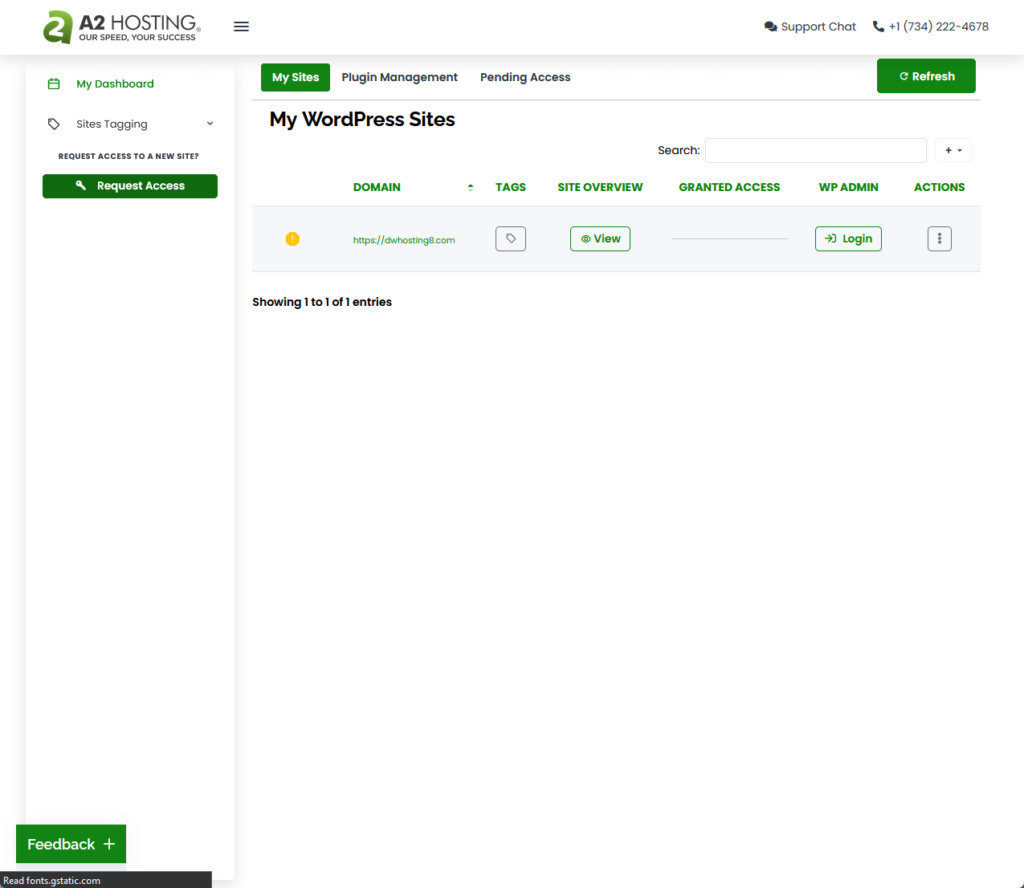
According to its knowledge base article, TurboHub can provide benefits including:
- Quick access to all sites
- Manage user access
- AI-powered optimizations
- Site notes and quick access to databases, files, and email
Now, I’m not sure when A2 rolled out TurboHub.
But if I have to guess, I would say that it’s still in its early stages since I can’t find the features that can offer those benefits. 🤔
At the very least, it’s a nice way to directly log into the wp-admin if you’re already in the client area anyways.
3. Free Migration
The last extra feature I want to show you is their free migration service.
In case you can’t find it right away (as with most options), you need to hover your mouse over support and then click the migrations option.
Below is an example of the third step that they require you to fill out when requesting a migration:
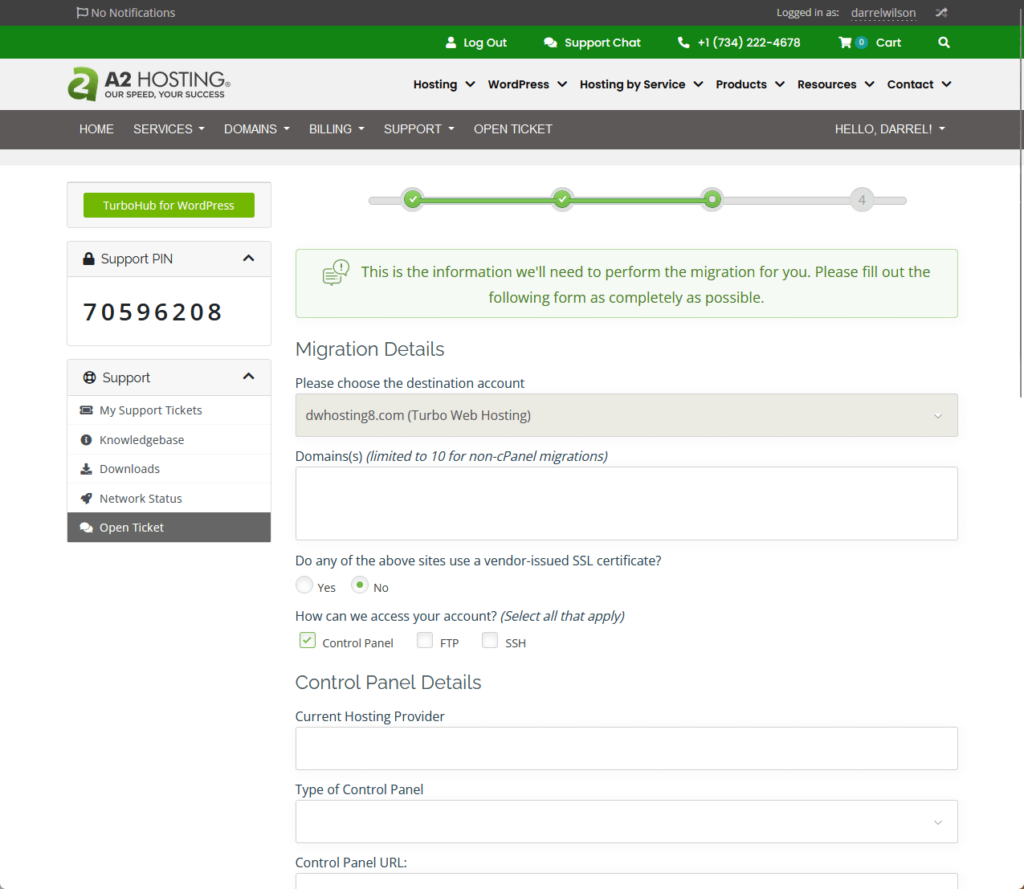
The steps are pretty standard when requesting a migration:
- Choosing the service (hosting) to migrate to
- Handing over the destination account
- Any special instructions
From how it looks, it doesn’t seem to be anything automated — like I guess there would be a real person that’s going to do the migration work.
I personally find it nice and reassuring since there’s still a slim chance that migration tools would mess up something.
This way, there is someone behind the reins who can fix things up in case something wrong happens. 🙂
👉 Related: Best Staging Plugins for WordPress: Free and Paid
👋 My thoughts here
A2 Hosting has okay features that I expect shared hosting providers have — not necessarily a bad thing, but it’s predictable.
Here are my thoughts here:
- The free plugin is a nice touch as I can see it easily replacing 2-3 plugins (mostly for security and caching).
- A free migration service with a real person behind the scenes is golden as you never know when something bad will happen.
- Their TurboHub feature, when fully realized, would be a nice addition to their features considering their client area feels a little old.
Personally, the TurboHub feature has that “managed WordPress hosting” feeling where you can easily manage your websites with a few clicks.
I may have to update this review once it fully rolls out. 😅
Reliability
I would rate its overall reliability 4.2 out of 5.
Here’s why:
- A2 Hosting's uptime of 99.98% over the past year is impressive, positioning it as a highly reliable web host.
- While A2 Hosting performs solidly in uptime, its average page load time, although better than some competitors, places it on the slower end among its peers.
- The system status page provided by A2 Hosting, while functional, is simple and lacks detailed graphics or real-time updates compared to some competitors.
A2 Hosting demonstrates strong reliability with its excellent uptime, which is a critical factor for any web host.
However, there is an opportunity to improve in areas such as page load speed and the presentation of the system status page.
Performance
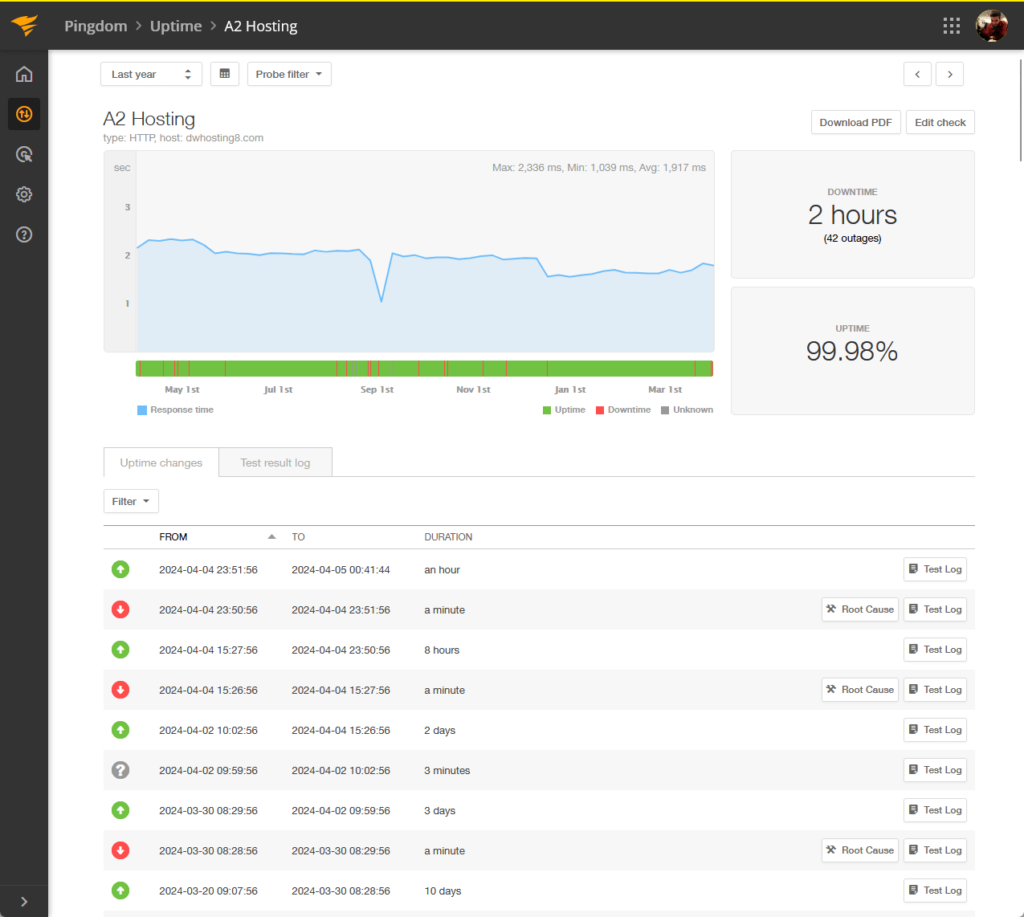
For the performance, I actually keep an eye out on 20+ web hosting services via Pingdom since they’re the ones we’re using in Darrel’s videos.
In terms of uptime, A2 was up for 99.98% of the time for the past year — it only got a downtime of 2 hours.
⚠️ Note: For the hosting plans, we usually get the cheapest one from each web hosting service. Well, if their lowest plans suck, we can’t expect much from their more expensive options, right? We also use the same Elementor template kit and plugins.
That’s a really good score and as you can see in a bit, it’s even better than some better-known hosting providers. 🙂
For the page speed, A2 had an average load time of 3.09 seconds and got a 76/100 performance grade from Pingdom.
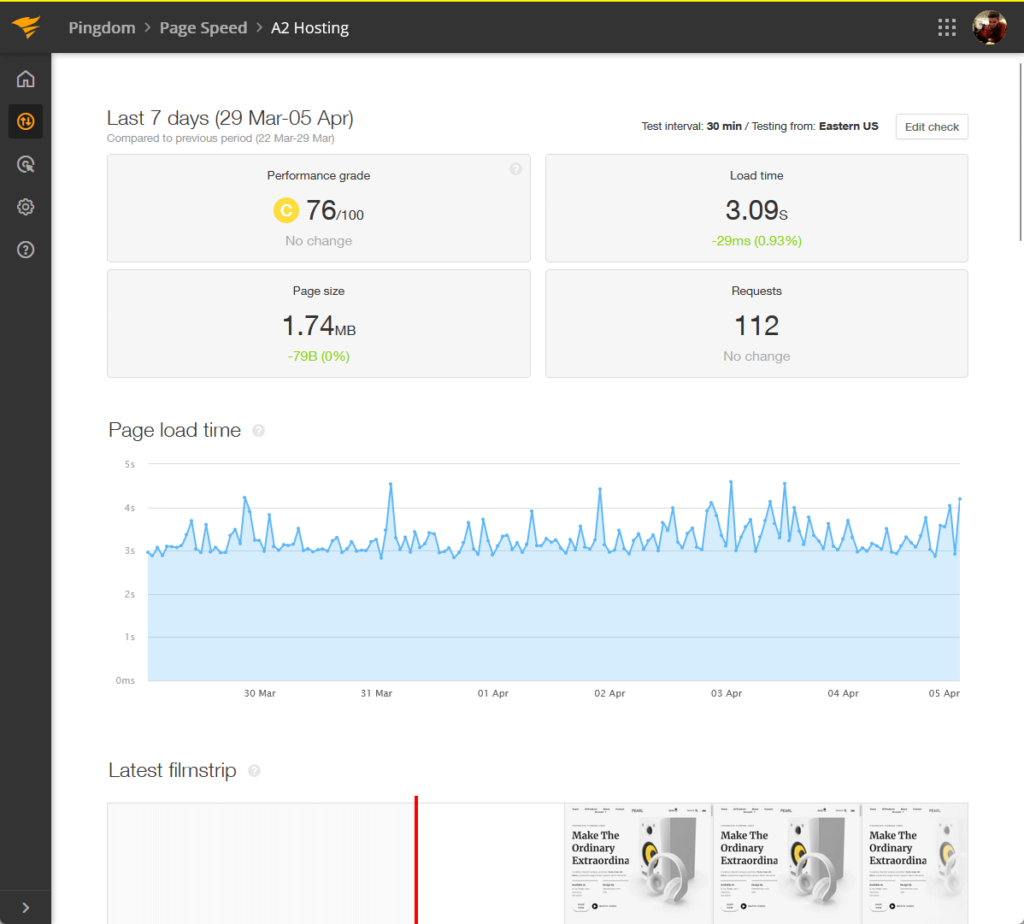
Now let’s compare A2 Hosting’s performance with other web hosting companies that are well known (maximum of 1 year time):
| Web Host | Uptime | Downtime | Performance | Load Time |
| A2 Hosting | 99.98% | 2 hours | 76/100 | 3.09 seconds |
| Kinsta | 99.99% | 24 minutes | 77/100 | 1.26 seconds |
| Hostinger | 99.96% | 3 hours | 84/100 | 1.32 seconds |
| Bluehost | 99.92% | 6 hours | 75/100 | 6.72 seconds |
| Siteground | 99.99% | 1 hour | 76/100 | 1.73 seconds |
Here are some observations:
- You can see from the table that A2 Hosting has good uptime, even better than Hostinger and Bluehost.
- For the performance, A2 doesn’t have the best score, but I would say that anything above 75 is still a good indication of a strong performance.
- A2 has the second worst load time in the table — on the good side, it’s better than Bluehost by around half.
It seems that this hosting provider is fighting back here in terms of performance, specifically in uptime, a stark contrast to its ease of use.
All these are indications that if you’re solely looking for a good performance without breaking the bank, A2 Hosting is worth the shot. 🙂
Updates and Maintenance
But can you trust A2 with updates and maintenance?
A2 might not have the fancy status page that Hostinger and Kinsta have, but at least they have a system status page you can check out.
Here’s what it looks like:
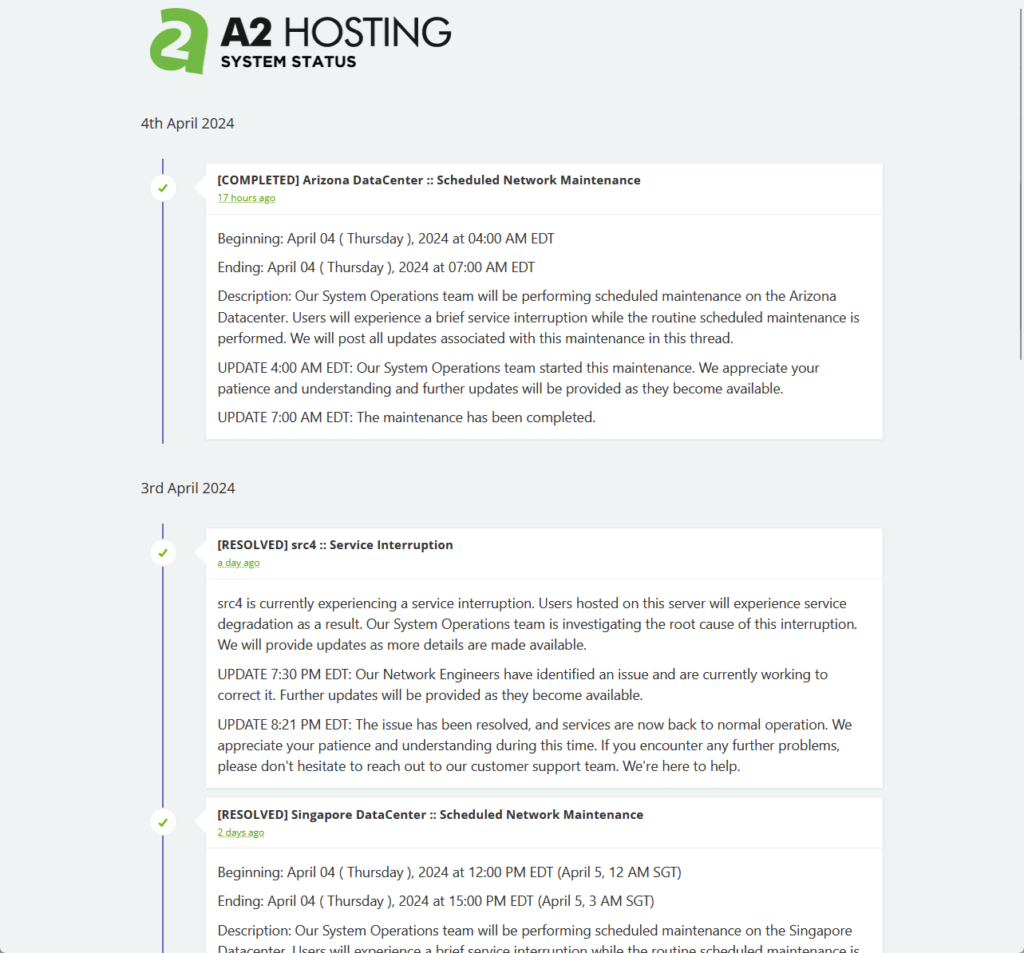
It doesn’t have all the nice graphics for now. However, you can see that it has complete info on the progress and time.
Unfortunately, that’s all there is to it — it’s simply a page for updates, although you can certainly see previous status pages.
⚠️ Note: While writing the support section, I recently learned that you can get service bulletin updates posted for your server.
👋 My thoughts here
For reliability, I admit that A2 Hosting caught me off guard since I didn’t expect it to perform as well as it did.
Here are my thoughts here:
- Its uptime may not be the best in my record — but for shared hosting, it showed off a really great performance. 🙂
- A2 also did well in terms of page speed, though it’s not that great, it’s still a solid performance.
- A2 also has its own system status page, though it looked a little old, it gets the job done (which is to inform its users).
On the other hand, I wish that A2 would update its system status page soon and make it easier for users to check the status.
But A2 has been consistent in its user interface so far, so I think if they update it, all of their user interfaces will get updated.
Support
My rating here is 4.1 out of 5.
Here’s why:
- A2 Hosting offers a comprehensive support system, including a ticketing system, live chat, and a knowledge base.
- While A2 Hosting's knowledge base is extensive and well-organized, it’s better to use full screenshots with annotations than cut-out images.
- The live chat feature's ability to function both as a real-time chat and a ticket creation tool offers a mixed experience.
A2 Hosting's support system is robust, featuring responsive ticket handling, a versatile live chat, and a comprehensive knowledge base.
However, enhancing the knowledge base with more detailed visual guides and clarifying the live chat feature's operation could further improve the user experience.
Customer Service
For customer support, you can see all the options directly from the client area.
Currently, A2 has the following support features:
- Ticketing system
- Support chat
- Knowledge base
Their ticketing system seems to be doing great, and I feel like it’s supposed to be their main method of resolving issues.
Darrel sent a ticket in 2020 and he also received a reply on the same day:
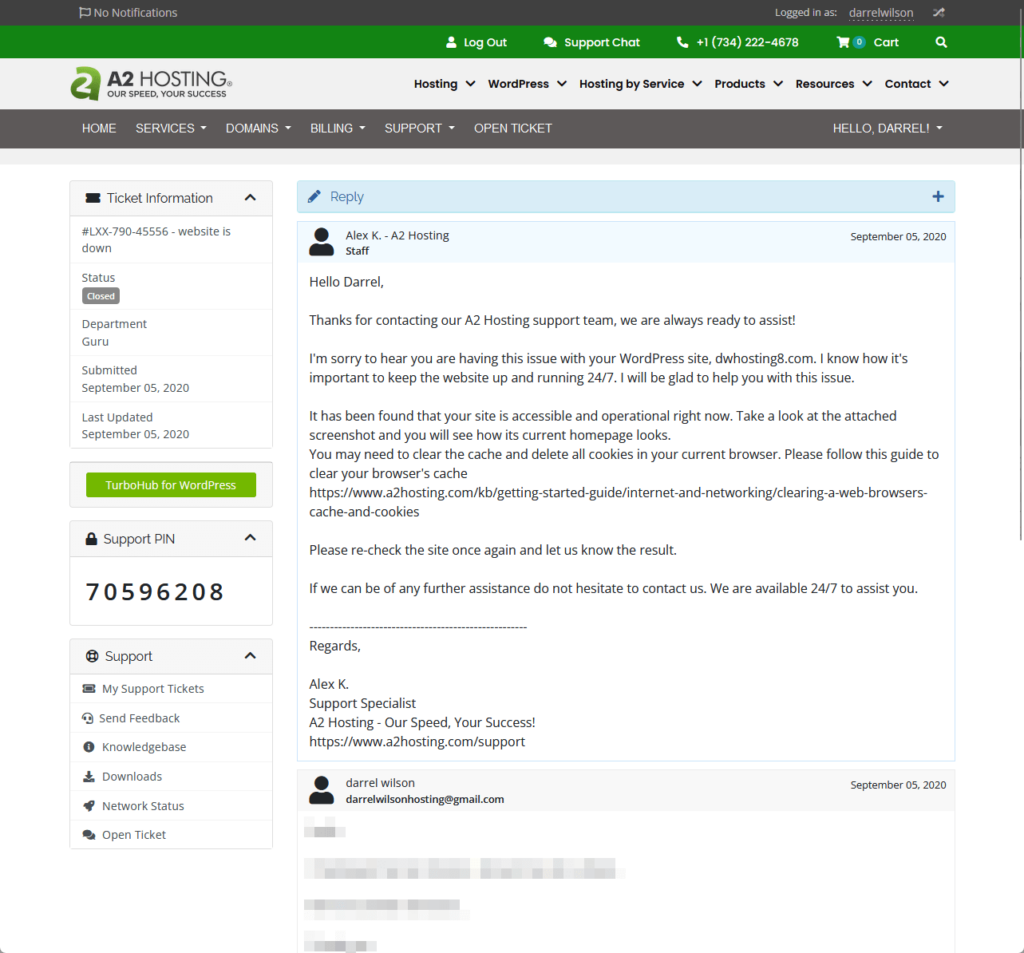
I also checked the other tickets that Darrel submitted and it seems that all of them were replied the same day they were submitted.
Moving forward, I was really surprised to find a live chat feature here in A2 Hosting’s client area, as you can see from the image below:
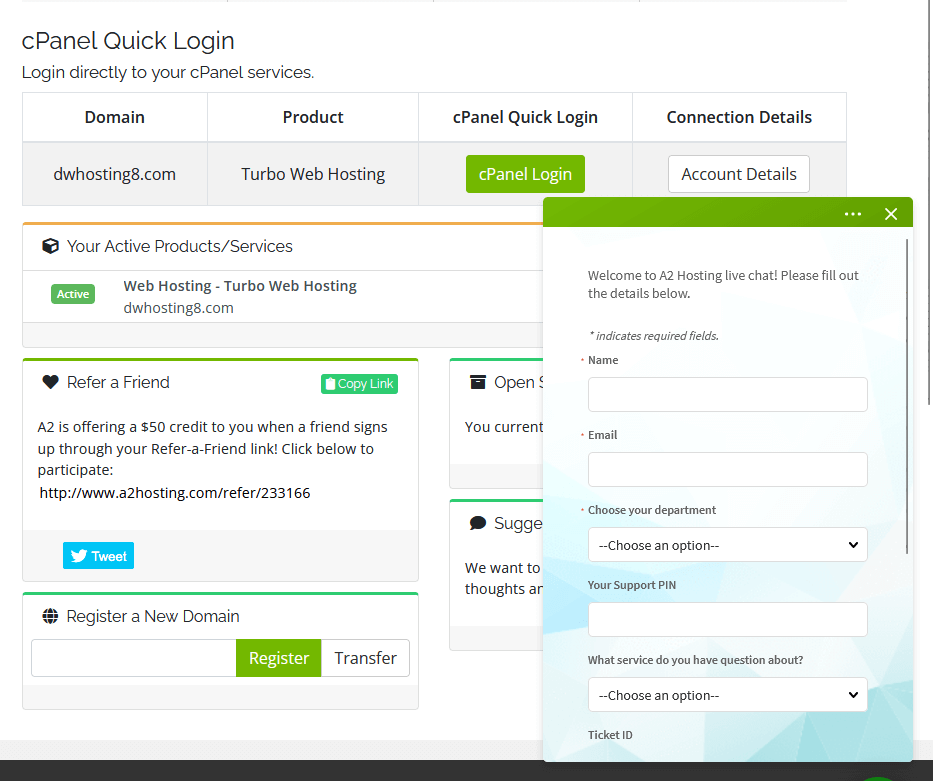
I first thought that it was only a message feature or an alternate way of creating a ticket.
But it seems that although it creates a ticket, you might actually be able to chat with the support as well like any live chat feature.
Nice! 🙂
Knowledge Base
As I pointed out earlier, A2 Hosting also has a knowledge base feature, which contains a lot of articles all grouped into categories.
Here’s what the home page looks like:
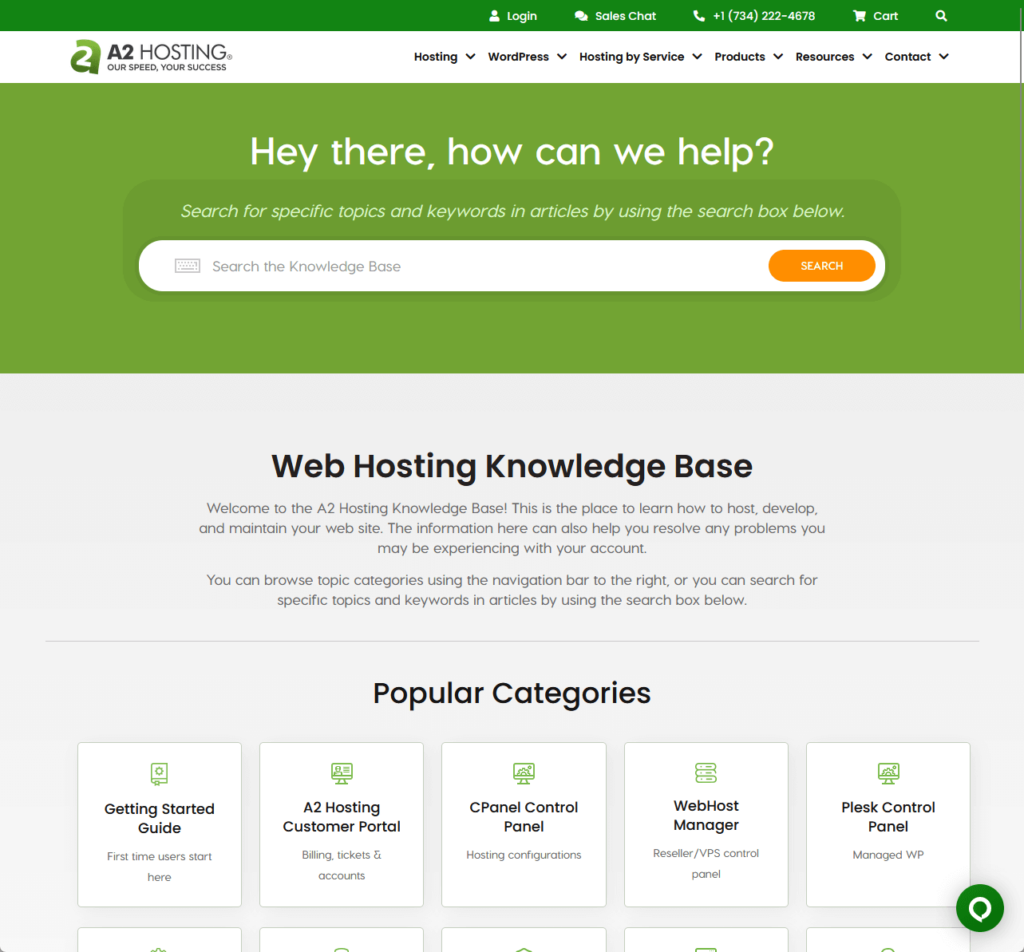
The articles are grouped into categories such as:
- Getting started guide
- A2 Hosting customer portal
- cPanel control panel
- Developer corner
There’s also a section below the categories that would show you the popular guides and articles in the KB (though I’m not sure if they’re being updated).
As for the articles themselves, here’s an example:
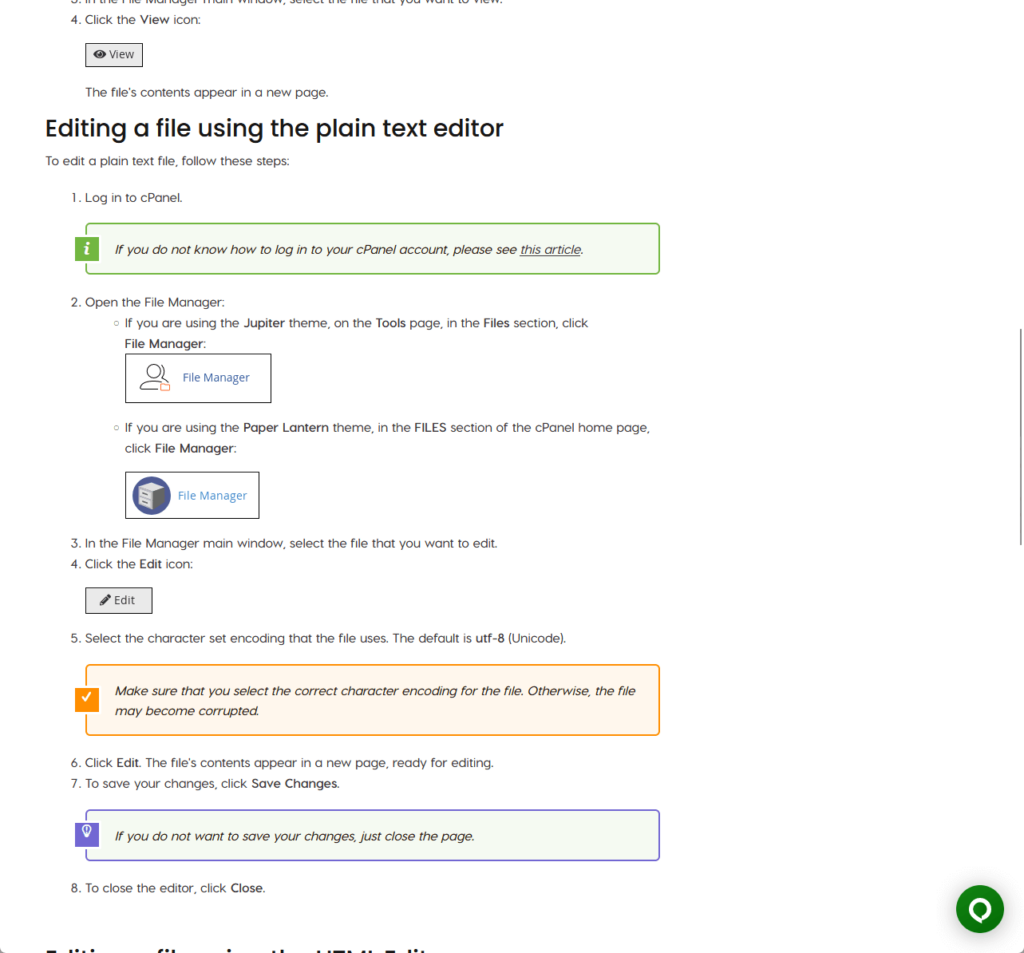
For the quality, you can see from the screenshot above that they’re written well, complete with images and call-out boxes.
I’m not sure though why they opted for cut-out images rather than posting a whole screenshot and annotating it. 🤷
I feel like having a screenshot, and then pointing out where the user must click, is more helpful than simply cutting out the exact button that the user should click.
👋 My thoughts here
All in all, A2 Hosting has great support options even if there aren’t that many of them (at least they have a live chat feature).
Here are my thoughts here:
- I like the fact that they have a live chat feature as it gives off the feeling that the user is being attended to right away.
- With the support personnel replying to the tickets on the same day is a good sign for me (unfortunately, I can’t see the hours it took them to reply).
- Their knowledge base articles are also written well, complete with cut-out images and call-out boxes.
Well, I explained it earlier, but I prefer if they use screenshots and annotate them to where the user must click.
It’s probably to keep the style? 🤔
Pricing
I would rate its overall pricing a 3.8 out of 5.
Here’s why:
- A2 Hosting offers a competitive range of shared hosting plans that cater to a variety of needs, from single websites to multiple website management.
- The multitude of hosting options introduces a level of complexity and potential confusion for customers, particularly with the VPS and dedicated server plans.
- A2 Hosting's refund policy provides a safety net for new users but also reflects positively on A2 Hosting's confidence in their offerings.
A2 Hosting's pricing strategy presents a well-thought-out range of services designed to meet diverse customer needs, from beginners to seasoned webmasters.
However, the complexity of the pricing structure for advanced hosting solutions could be simplified to enhance user understanding and decision-making.
1. Shared Hosting
A2 has a lot of products under its sleeve, starting with their shared hosting plans.
They have four tiers for their shared hosting:
- Startup (from $2.99/month)
- Drive (from $5.99/month)
- Turbo Boost (from $6.99/month)
- Turbo Max (from $14.99/month)

Most of the differences in each tier lie in the number of websites you can add, the storage capacity, and toolkit features.
Startup allows 1 website only, 100 GB SSD storage, and the free migration feature while Drive gives you unlimited websites and storage, and also gives you free automatic backups.
The Turbo plans allegedly include 20x faster page loads and can handle up to 9x more traffic, and they also used NVMe drive for the storage.
All plans include unlimited email accounts, cPanel, a free SSL certificate, a free website builder, website staging, and a choice of data center location.
2. VPS Hosting
A2 has both managed VPS hosting (pre-installed CloudLinux operating system) and unmanaged VPS hosting.
For managed:
- Takeoff (from $35.99/month)
- Soar (from $54.99/month)
For unmanaged:
- Launch (from $2.99/month)
- Ascent (from $29.99/month)

Each tier here has two plans (Takeoff 4 and Takeoff 8, Soar 8 and Soar 16, etc.)
The managed VPS hosting is more of a done-for-you service as it already has pre-configured settings with daily, automatic system updates.
The unmanaged plans are perfect for those who want to configure the settings themselves, armed with full root-level access and a command-line interface.
Most of the benefits are similar, though the Takeoff plans seem to have more freebies like a free SSL certificate, free cPanel control panel, etc.
3. Dedicated Server
If you prefer dedicated servers instead, A2 Hosting also has dedicated server plans, with their own servers and data centers.
Same with VPS hosting, there are managed and unmanaged plans:
- Warp (from $79.99/month)
- Turbo Warp (from $179.99/month)
- Hyper (from $79.99/month)
- Hyper Turbo (from $139.99/month)

Each plan is also subdivided into different plans, with turbo and non-turbo plans (seriously, it starts to get a little confusing). 😅
The differences between managed and unmanaged hosting are also similar to VPS hosting, with Turbo Warp having the most benefits.
4. Reseller Hosting
If you plan to start your own hosting business, you can go with A2’s reseller hosting plan (with turbo and non-turbo variations).
Here are the prices for the non-turbo variation for a 12-month contract:
- Kickstart (from $17.99/month)
- Launch (from $22.99/month)
- Grow (from $29.99/month)
- Scale (from $39.99/month)
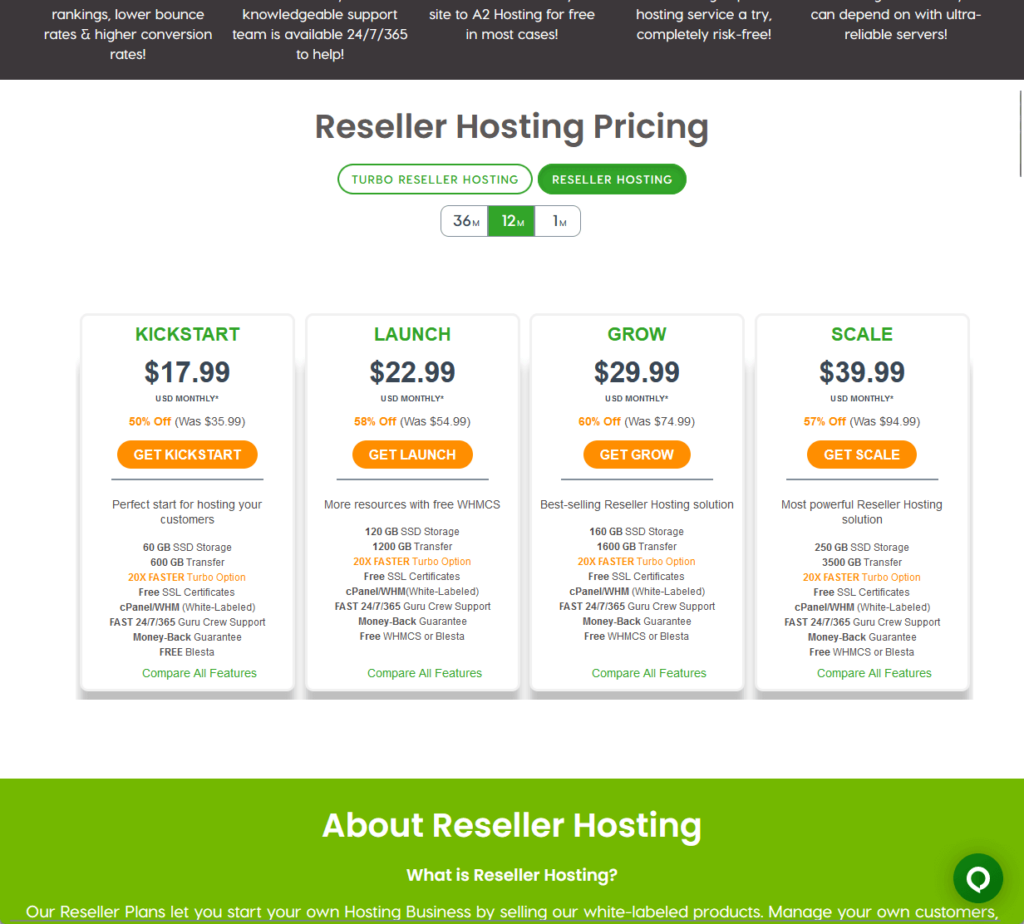
The basic difference between the plans is the storage and transfer limit (starting with 60 GB SSD storage and 600 GB transfer from the lowest plan).
All of them provide free SSL certificates, a cPanel white-labeled control panel, and a web hosting manager (naturally).
⚠️ Note: A2 also has other hosting products like domains, SSL certificates, and even a site builder tool.
Money Back Guarantee/Refund
What’s cool here is that A2 Hosting has a money-back guarantee that basically says if you cancel within 90 days, you will get a refund.
Here’s their money-back guarantee page:
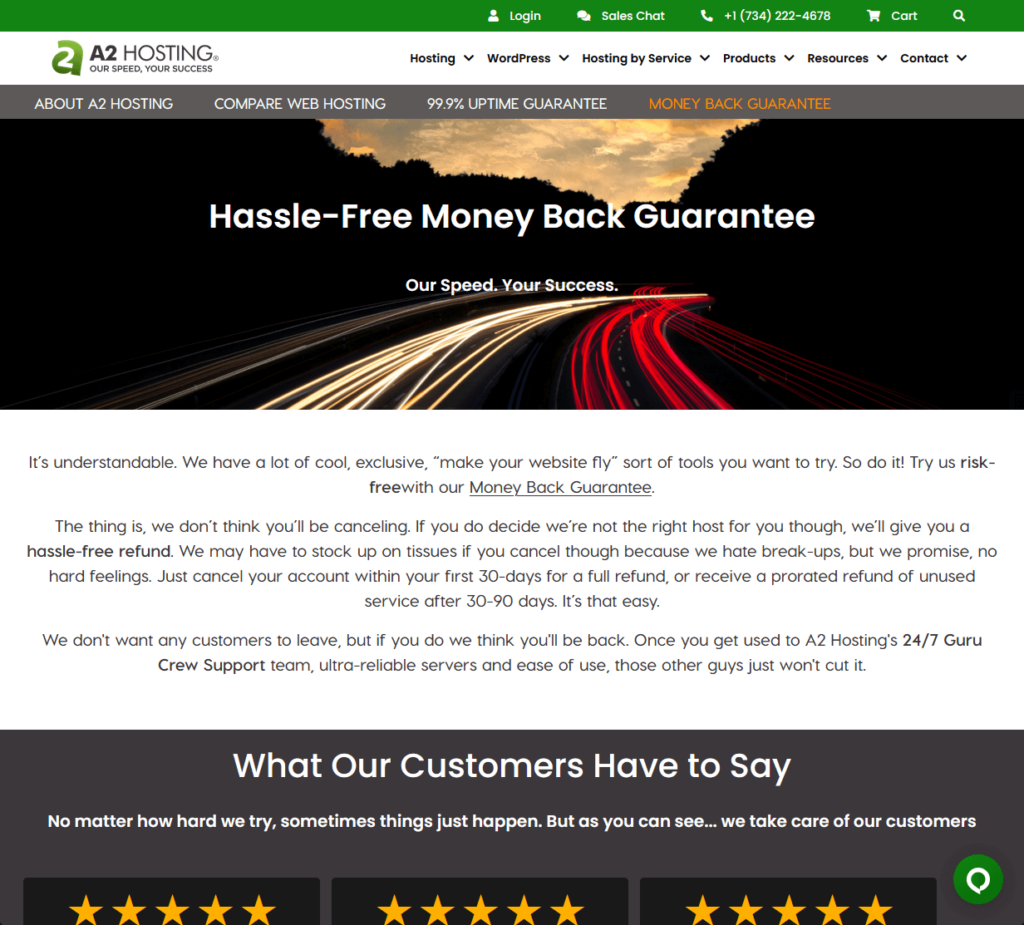
There’s actually a lot more details than what you can see from the screenshot, so here’s a summary of the important bits:
- You can get a full refund if you cancel your account within the first 30 days of signing up.
- If you cancel between 30-90 days after signing up, you will receive a prorated refund for the remaining unused service period.
- Fees like domain registration and migration fees are non-refundable so they will be excluded (and domain registration fees will be deducted from the refund amount).
But what’s important here is that you don’t feel trapped with A2 Hosting because they allow refunds (which also means they’re confident). 🙂
👋 My thoughts here
If you think about it, A2 Hosting actually has a strong lineup of hosting products, from shared hosting to reseller hosting.
Here are my thoughts here:
- Their shared hosting plans have prices that are just right (and considering the performance, they’re worth it).
- I’m not sure if it’s the usual, but the rest of their hosting products are priced rather complicatedly, with the different variations.
- The fact that they have a refund policy means they are either confident with their service and product, or it’s just a way to comfort would-be buyers.
The pricing plans from A2 Hosting feel like they were thought really well (and I learned that they have been in the space since 2001, which makes them one of the oldest).
Knowing these details, I’m a little confused as to why they didn’t take the time to modernize their client area even further. 🤔
Final Thoughts
Before making your decision, consider the specifics of your website's needs, especially in terms of performance and ease of use.
If you’re contemplating A2 Hosting plans, closely evaluate the details of each plan, particularly the advanced hosting options
This is to ensure you select a plan that not only aligns with your current needs but also accommodates future growth.
Wrapping up, it's clear that choosing the right web hosting is just one piece of the puzzle in building a successful online presence.
Another crucial aspect? Design. This is where Elementor Template Kits come into play.

Darrel Wilson has an incredible offer that you simply can't ignore:
- Get lifetime access to all premium template kits designed for Elementor
- Complete with 2 years of dedicated support
- Only for $99 — that's already for the lifetime access
Level up your website’s design with ease and confidence.
These kits are designed to streamline your site’s aesthetic overhaul, making it not only more visually appealing but also enhancing its functionality