
Want to start a blog?
By the end of this guide, you will learn all about blogging from selecting a niche, choosing a platform, to making money.
Here’s what we’ll cover here:
- Why start a blog
- Selecting your blog niche
- Getting a web hosting
Ready? Let’s get started!
Why start a blog?
Here’s the truth:
Starting a blog is challenging because it requires you to be more open about yourself and your interests — not counting the challenges you will go through.
But the benefits though are numerous as you will be able to:
- Share your passion and knowledge
- Build your personal brand
- Make money online
- Expand your network
- Improve your online presence
Even this year, blogging is still highly relevant due to its powerful role in information sharing and content marketing.
There are 1.9 billion websites worldwide, and 600 million of these websites are blogs that churn out 7.5 million blog posts daily.
If we’re talking about readership, well, 77% of internet users still read blogs according to the statistics that Ahrefs curated.
Step-by-Step Blogging Guide
Let’s break the entire process down into simple steps:
Step 1: Select your blog niche
Choose a topic that you’re passionate about and enjoy discussing — this will keep you motivated and make the blogging process enjoyable.
Some of the most popular blog niches include:
- Lifestyle
- Travel
- Culinary
- IT
- Gaming
- Fashion
From there, you can narrow your niche down into several subtopics.
On the other hand, it’s not always about interest—consider your skills and write about a subject that you’re knowledgeable about.
If you’re going for monetization, make sure to assess your competitors as a highly saturated niche might be challenging to break into.
🖐️ Tip: You can go around saturated niches by narrowing it down to a sub-niche that would help you establish a more defined audience.
Step 2: Choose a blogging platform
A blogging platform is a service that provides the tools and features necessary to create, manage, and publish content on a blog.
Blogging platforms are divided into two categories:
- Hosted
- Self-hosted
Hosted platforms, like website builders, are all-inclusive.
They generally come with all the tools needed to build a blog, without a need to purchase hosting and a blog domain name.
Meanwhile, self-hosted platforms require you to buy separate hosting solutions since they’re typically content management systems that offer extensive customization options.
Here are the key components to look out for in a blogging platform:
- Content management system (CMS): The core of a blogging platform is the CMS, which allows you to create, edit, and organize your blog posts and pages.
- Hosting services: While some blogging platforms provide hosting services, others require you to arrange your hosting.
- Themes and templates: Most platforms offer a variety of themes and templates that determine the visual appearance of your blog.
- Plugins and add-ons: These are additional tools that you can integrate into your blog to enhance its functionality.
- Support and community: Access to support and a community of users can help you troubleshoot issues, find inspiration, and stay updated on best practices.
Among thousands of systems, WordPress is the most popular option and it powers almost half of all websites on the internet.
Through this, you will have a self-hosted WordPress blog and do with it whatever you want (the WordPress blogging platform in your website becomes yours).
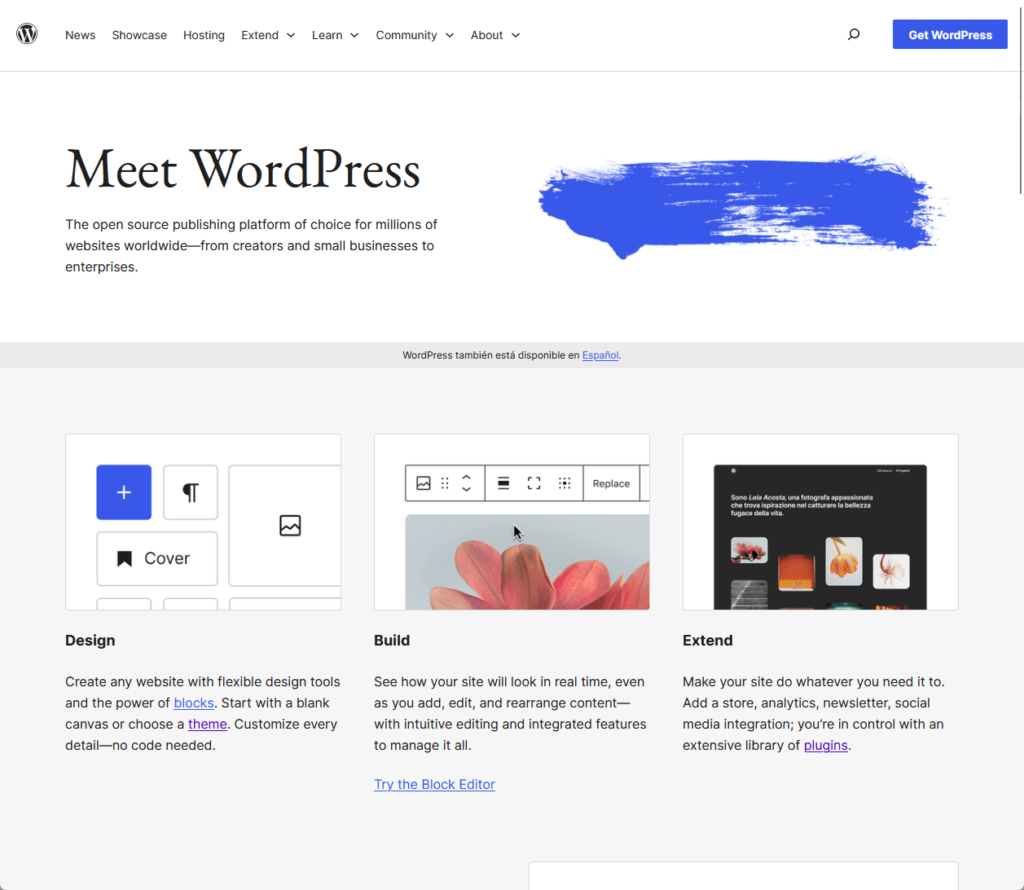
Because of its popularity, WordPress has a very large and active community base that churns out numerous options for paid and free themes and plugins.
👉 Related: Why Is WordPress Free: What You Need to Know
Step 3: Get web hosting
With a website, files and other content need to be stored on a server — this is where web or blog hosting providers come in offering hosting plans.
Although many new bloggers go for shared hosting, it’s a good idea to look at those that offer WordPress hosting services.
🖐️ Tip: Once the entire blog has grown, you can upgrade to VPS or cloud hosting — both offer more resources to scale your website and prevent downtime during high-traffic hours.
For starters, here’s what you need to consider when choosing a hosting service:
- Servers: High-powered computers that store your website's files and data and serve them to users when they visit your site.
- Storage: The amount of disk space allocated to your website on the server to store files, databases, and other necessary data.
- Bandwidth: The amount of data that can be transferred between the server and your users over a period, which determines how quick your site can load and handle traffic.
- Uptime: The reliability and availability of the server, typically measured as a percentage. High uptime ensures that your site is accessible to visitors most of the time.
- Support: Customer service provided by the hosting company to help you with technical issues and ensure your site runs smoothly.
If you’re up for a robust and reliable hosting service, we recommend Hostinger Cloud Hosting, known for its high uptime guarantees and fast loading speeds.
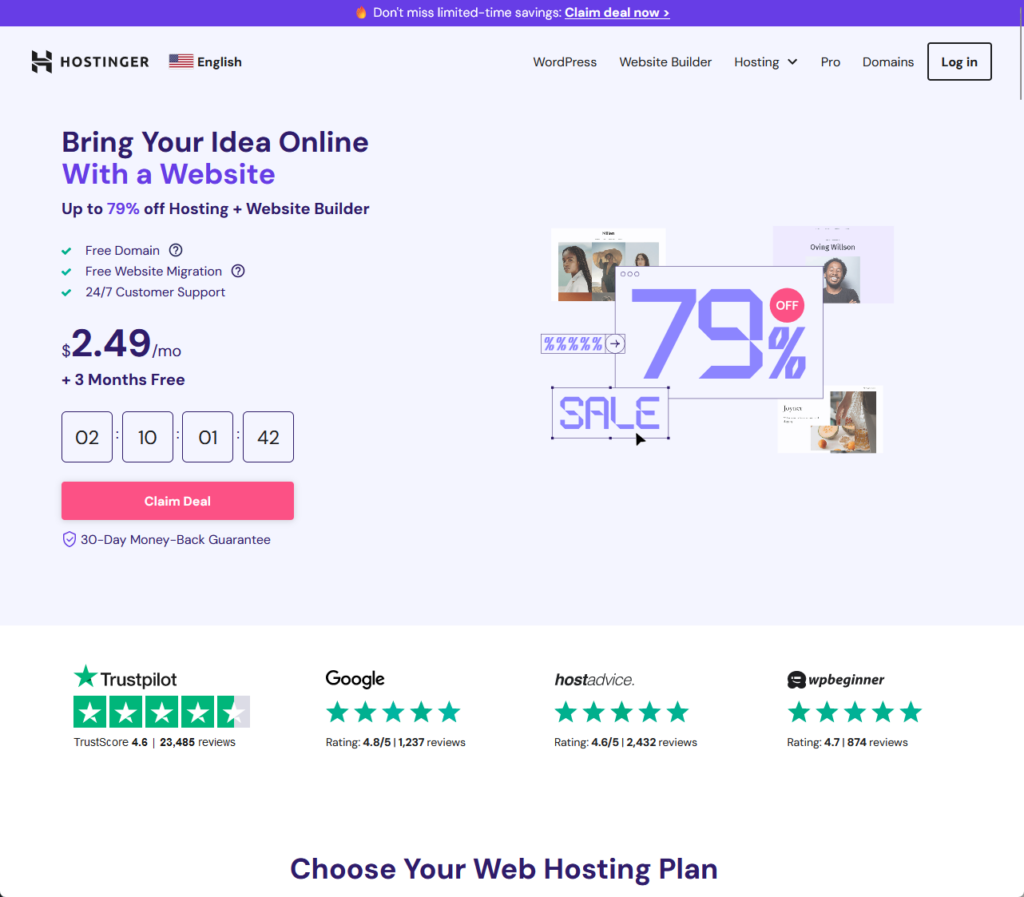
Hostinger also provides free domain registration and SSL certificates — and that’s only for the cheapest plan.
👉 Related: Hostinger Review: Budget-Friendly Hosting Powerhouse?
A dependable hosting service enhances your site's performance, ensuring a smooth and secure experience for your readers.
This is where Hostinger excels, offering a robust hosting solution that is both affordable and high-performing.
Discover the Hostinger advantage for your WordPress site:
- Enjoy a 99.9% uptime guarantee
- Affordable pricing at just $2.49/month (use the code darrel10 to get a discount)
- Global performance and reach with Hostinger's optimized hosting platform
Invest in a hosting service that prioritizes speed, stability, and top-notch performance for your website.
Step 4: Set up your blog
There are three key steps in creating a new WordPress blog:
- Installing the content management system
- Customizing its appearance
- Adding plugins
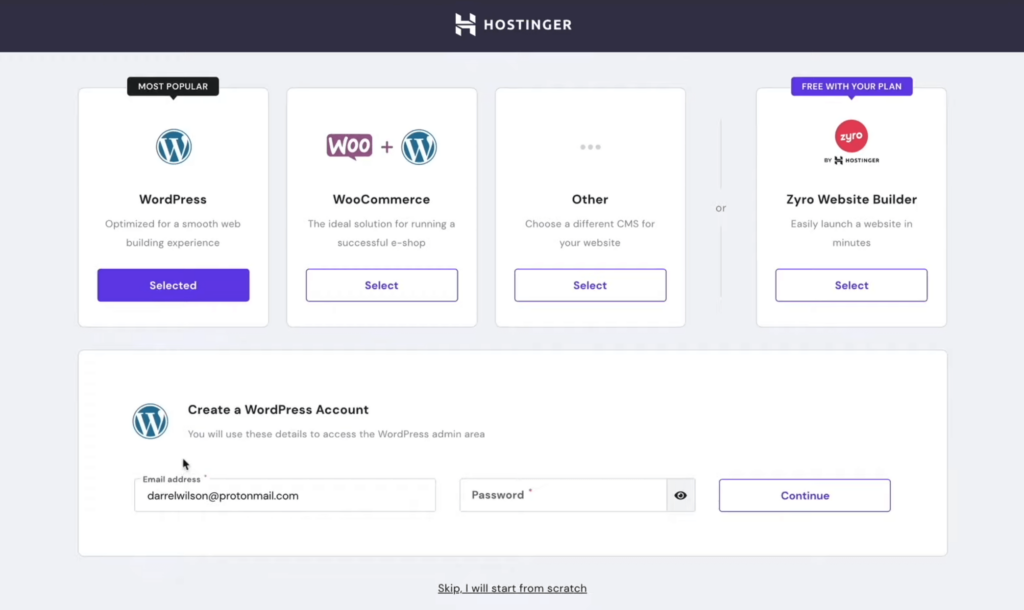
First, after purchasing your web hosting plan, you will have to install WordPress using the auto-installer provided by your web host through the control panel.
With Hostinger, WordPress is selected right away:
You will have to pick a WordPress theme that aligns with your blog niche, one that’s SEO-friendly and compatible with your plugins.
Some of the best themes you can find are:
- Blocksy
- Phlox
- Divi
Simply search for a theme in the repository (if it’s free) or upload it from its website if it's a premium theme.
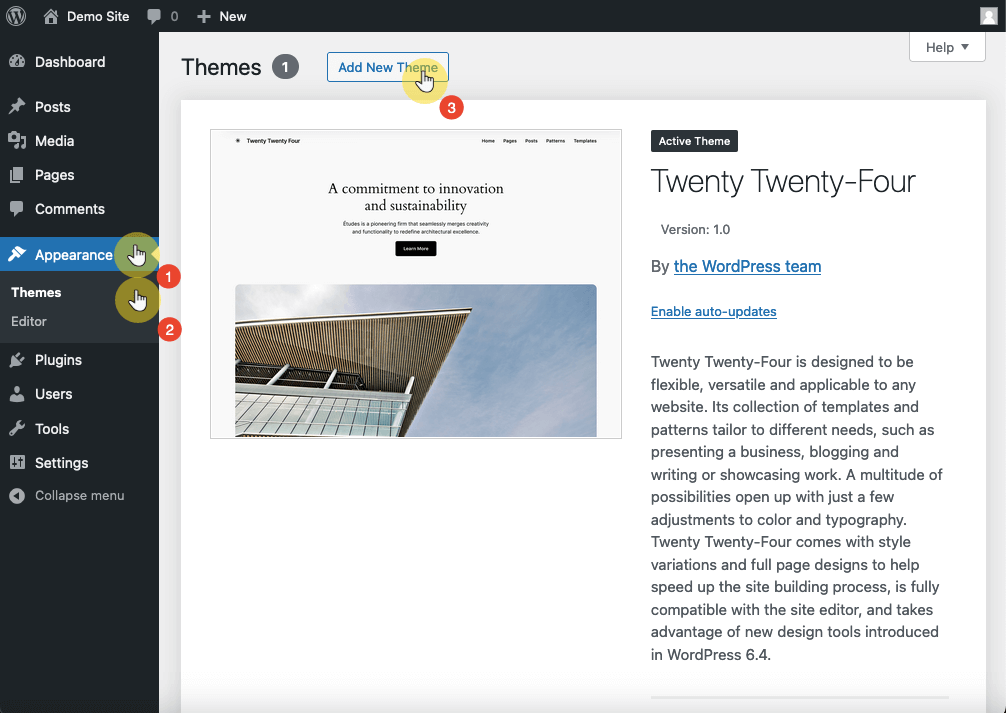
You can also pair them up with nice page builders like Elementor to supercharge your pages and design them however you want. 🙂
👉 Related: Best WordPress Themes: Handpicked and Ranked (Updated)
The next part is to install plugins that can make a difference in your website.
There are thousands of free or paid plugins, of all sorts and sizes, to extend your site’s features and functionality.
Similarly, you can install them from the repository (for free plugins) or upload them after downloading them from their websites.
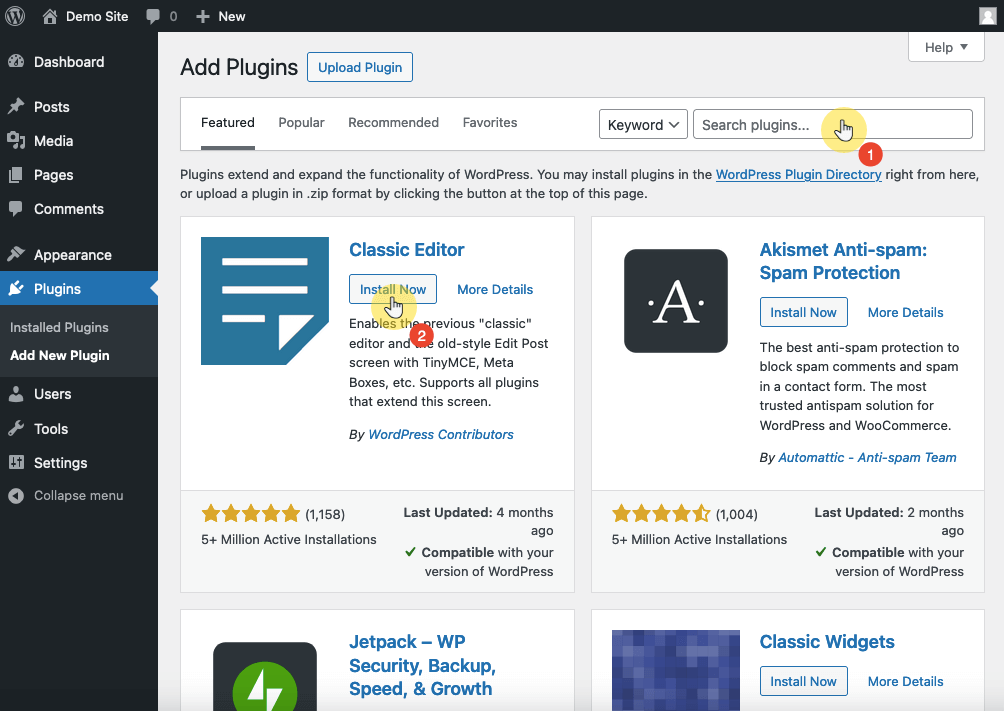
👉 Related: The Best Free WordPress Plugins: Essentials Plugins
With that said, don’t install too many plugins, especially ones that you don’t really need, since having too many plugins could slow down your website.
Step 5: Create the necessary pages and categories
The most common types of pages on blog websites are the following:
- Home page: The main landing page that introduces visitors to your blog, showcasing recent posts, featured content, and navigation links to other important sections.
- About page: Provides information about your blog online and its author(s), including the blog's mission, purpose, and background.
- Contact page: Includes a form or email address for visitors to reach out to you, and may also list social media profiles and other contact methods.
- Privacy policy: Details how you collect, use, and protect visitors' personal information, essential for legal compliance and building trust with your audience.
- Portfolio: Features your work, projects, or achievements, particularly useful for professional or creative bloggers looking to attract clients or employers.
In making the necessary pages and categories, make sure that they’re clear, consistent, and visually appealing, without losing your sense of distinct personal touch.
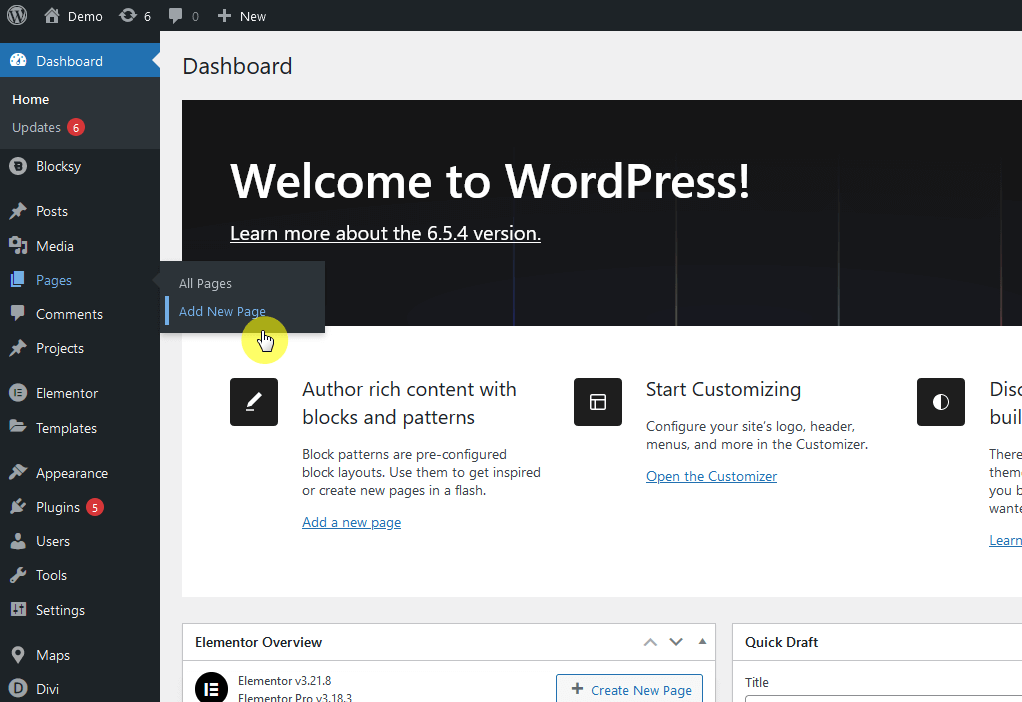
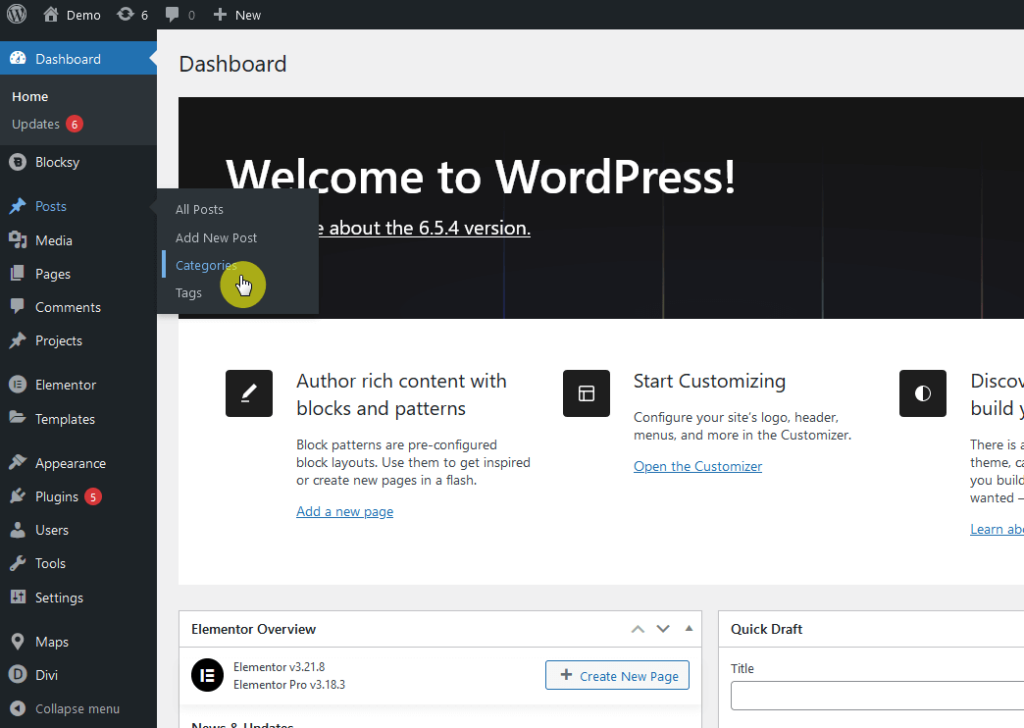
If you want to add a new page or category:
- Hover over the pages item in the dashboard > add new page
- Hover over the categories item in the dashboard > categories
Like this:
Alternatively, you can also add categories directly through the Gutenberg Editor during the writing process.
Step 6: Write high-ranking blog posts
Your blog wouldn’t be anything without any blog posts. 😅
Before you write your first blog post, you need to do the “pre-writing” workout where you need to figure out what you need to talk about.
The easiest way is to look at Google and try searching for the topic:
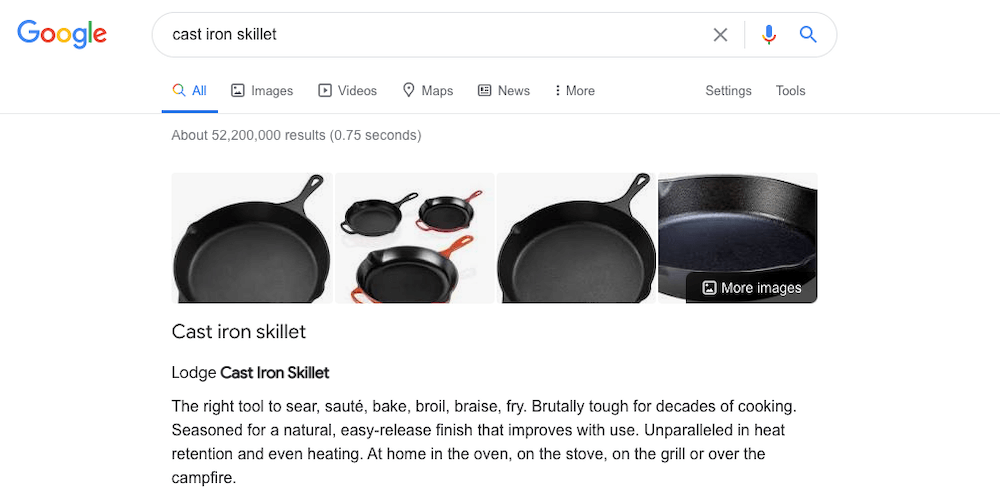
When searching for a topic in Google, pay attention to the people also ask and related search terms sections on the search results page.
Once you have some blog post ideas, you need to:
- Decide on the reader’s intent
- Decide on the content type
Only then should you write an outline for a topic:
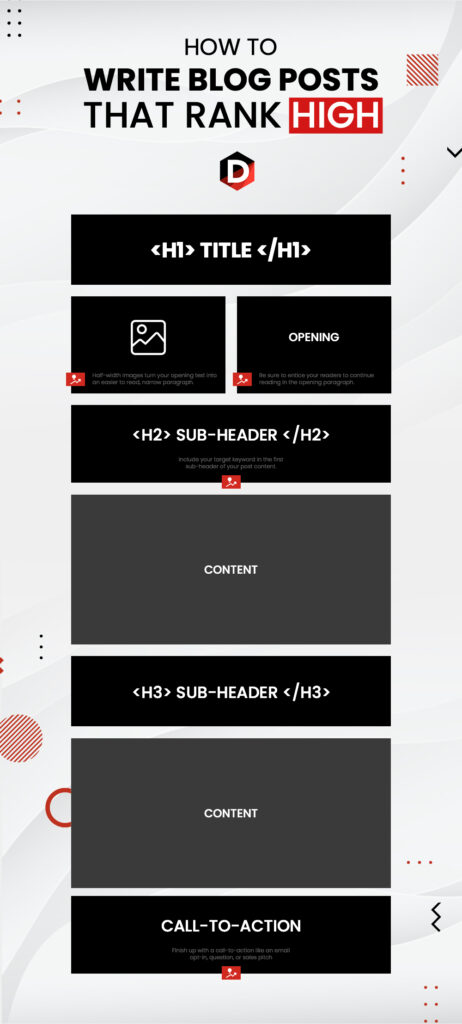
Some tips here:
- Write longer content
- Optimize your blog post images
- Use keywords smartly
- Don’t stuff your articles with keywords
- Interlink with other articles
There’s a lot that goes into writing blog posts that rank high in the search engines.
My suggestion is to read our guide to writing high-ranking blog posts that’s also aptly ranking high in the search engines. 🙂
👉 Related: How to Write High-Ranking Blog Posts (Like This Post)
Step 7: Promote consistently
For this, you will need to optimize your blog with SEO practices to increase the ranking of your website on search engines.
This is important since around 53% of all website traffic comes from organic searches by users whose keywords match that of your site.
Here are some focus areas:
- Keyword research: Use tools to find relevant keywords for your niche and focus on long-tail keywords that have lower competition.
- On-page SEO: Optimize the blog post title, meta description, heading, content, and image alt texts.
- Technical SEO: Improve site speed, ensure mobile-friendliness, use clean URLs, and maintain a sitemap and robots.txt file for better crawlability.
- Content quality: Create valuable, engaging, and informative blog content regularly, and use internal links to improve navigation and user retention.
- User experience (UX): Design an easy-to-navigate site with a clean layout and interactive elements to keep visitors engaged and reduce bounce rates.
Fortunately, there are a lot of search engine optimization plugins that can help. 🙂
👉 Related: Best SEO Plugins for WordPress: Free and Paid Options
Don’t limit yourself to your site alone and build your blog audience on social media and online forums through useful site integrations.
Some of the most popular social media platforms where you can get visitors include:
- Twitter (X)
- Tiktok
👉 Related: Best Social Media Plugins for WordPress: Handpicked
You can also explore email marketing, which involves sending emails to people to promote readership for your blog.
Like with social media integrations, you can expand your email lists by using handy plugins that allow users to sign up for emails and other updates.
👉 Related: The Best Opt-in Plugins for WordPress (Free and Paid)
🖐️ Tip: You can also resort to guest blogging which involves writing and publishing a post on another website or blog to reach a wider audience.
Step 8: Make money with your blog
More than just a hobby or passion, having a personal blog that has gained a considerable following opens up more monetization opportunities.
Here are some ways to make a profitable blog:
- Affiliate marketing: Promote products or services through affiliate links in your content and earn a commission for each sale made through your referral.
- Paid ads: Display ads on your own blog using ad networks like Google AdSense to generate revenue based on clicks or impressions.
- Sponsored posts: Partner with brands to create sponsored content and get paid to review or promote their products or services.
- Digital and physical products: Sell your own products, such as e-books, courses, merchandise, or handmade items, directly through your blog.
- User subscriptions: Offer premium content or exclusive access to parts of your blog through membership plugins, charging users a subscription fee.
Starting a blog requires massive time and effort, but it doesn’t have to be more stressful than it actually is.
Starting Your Blog Today
Focus on creating high-quality, engaging content that resonates with your audience.
Optimize your blog for search engines to increase visibility to get more readers, and engage with your audience by promoting your posts on social media.
If you dedicate time and effort, you can build a successful blog that stands out — you can even look at this blog as inspiration.
Wrapping up, it's also important to ensure that your site looks professional and engaging.
This is where Elementor Template Kits come in, offering an easy solution to level up your web design.
Secure lifetime access to all premium Elementor template kits:
- Get lifetime access to all premium template kits designed for Elementor
- Complete with 2 years of dedicated support
- Only for $99 — that's already for the lifetime access
With Elementor Template Kits, you can effortlessly maintain a stylish and up-to-date blog so that your site always stands out.