
Ease of Use
I rate its ease of use a 4 out of 5.
Here’s why:
- The setup process is simple and straightforward for most users.
- The need to manually enable certain features in the general settings can slow down the initial setup.
- The user interface is powerful and highly customizable, which is a plus for advanced users.
While it offers a smooth setup and powerful tools, its extensive settings can be daunting for beginners.
Balancing user-friendly features with customization makes it a great choice overall.
Initial Setup
W3 Total Cache’s free version is easily accessible from WordPress, but you can also access more features like lazy load, preload requests, and extension framework through its official site.
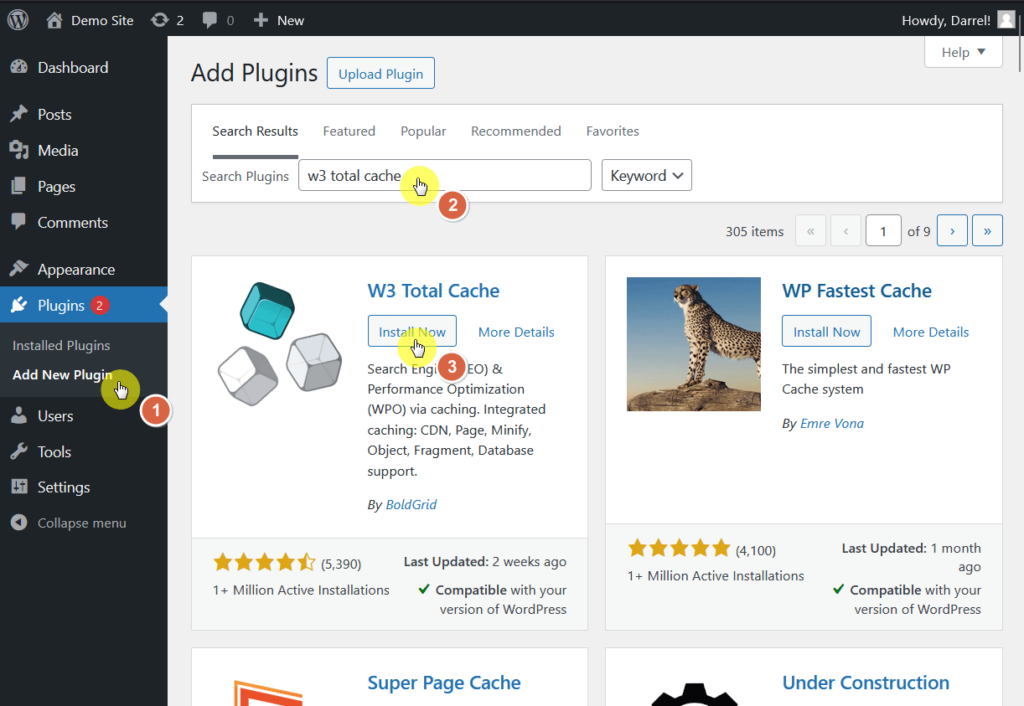
If you want to install the free version (especially if that’s all you need), you can find it in the plugin repository in the WordPress dashboard:
- Go to plugins > add new plugin
- Search for the W3 Total Cache plugin
- Install and activate the plugin
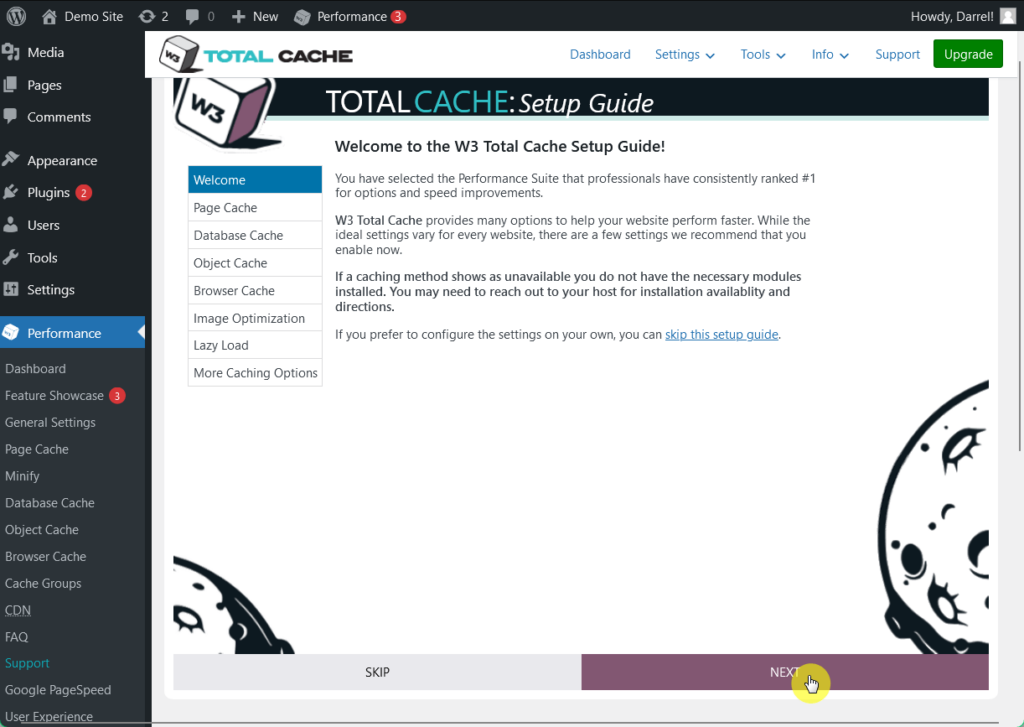
Once you activate it, the plugin will lead you directly to the setup guide.
Feel free to configure it, and just click next until you finish the setup.
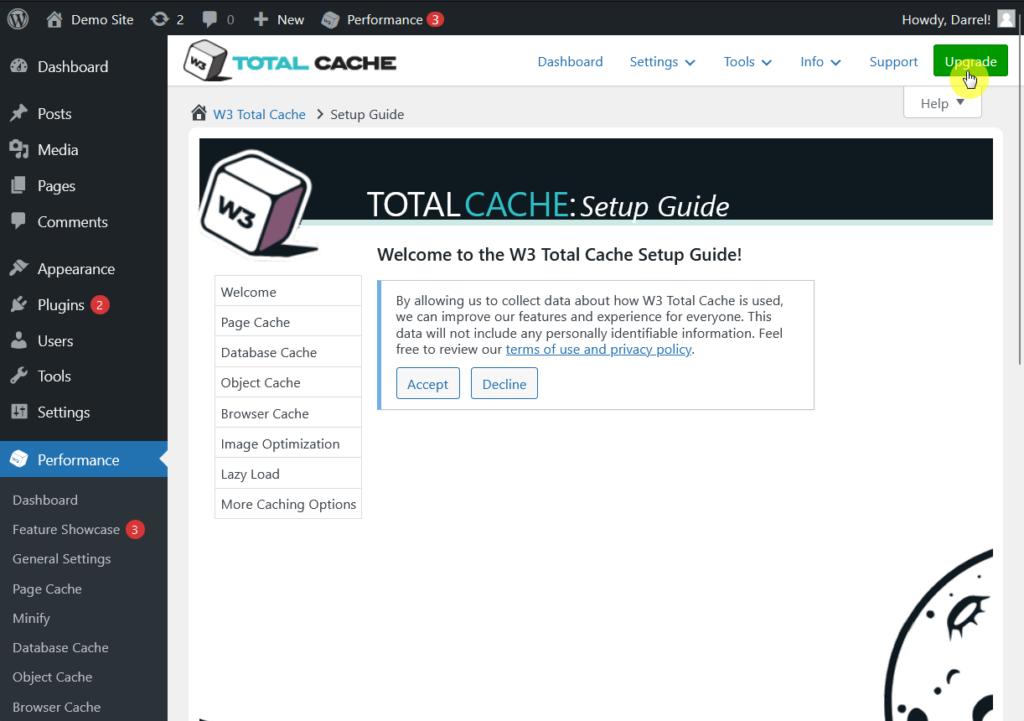
On the other hand, you can upgrade to the pro version easily through the plugin interface.
Click on the upgrade button in the top right corner of your screen.
A few delays here:
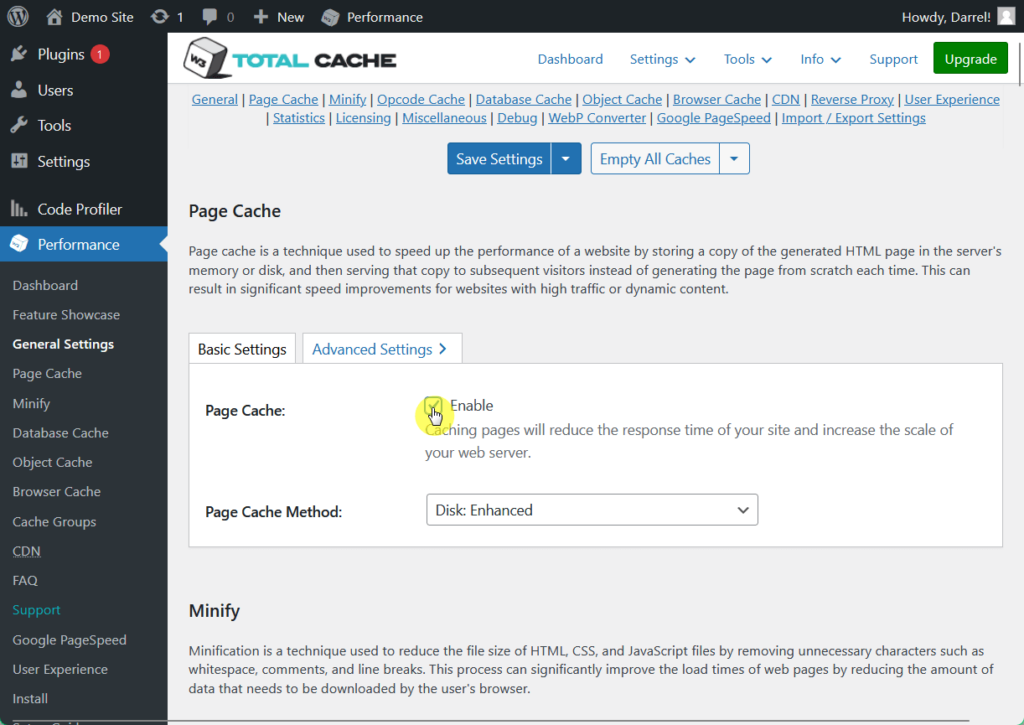
You will have to manually enable some features of W3 Total Cache in the general settings menu before you can actually use them.
You can enable these corresponding features by following these steps:
- Go to performance > general settings
- Scroll to the specific feature you want to enable
- Click enable
And that’s how quick it is to set up the W3 Total Cache plugin! 🤩
User Interface
W3 Total Cache’s user interface offers a wide array of settings and provides flexibility for users who want detailed control over their caching configurations.
This level of customization is particularly valuable for advanced users and developers, as it allows them to adjust various aspects of performance.
From the WordPress sidebar, here’s what the plugin’s dashboard looks like:
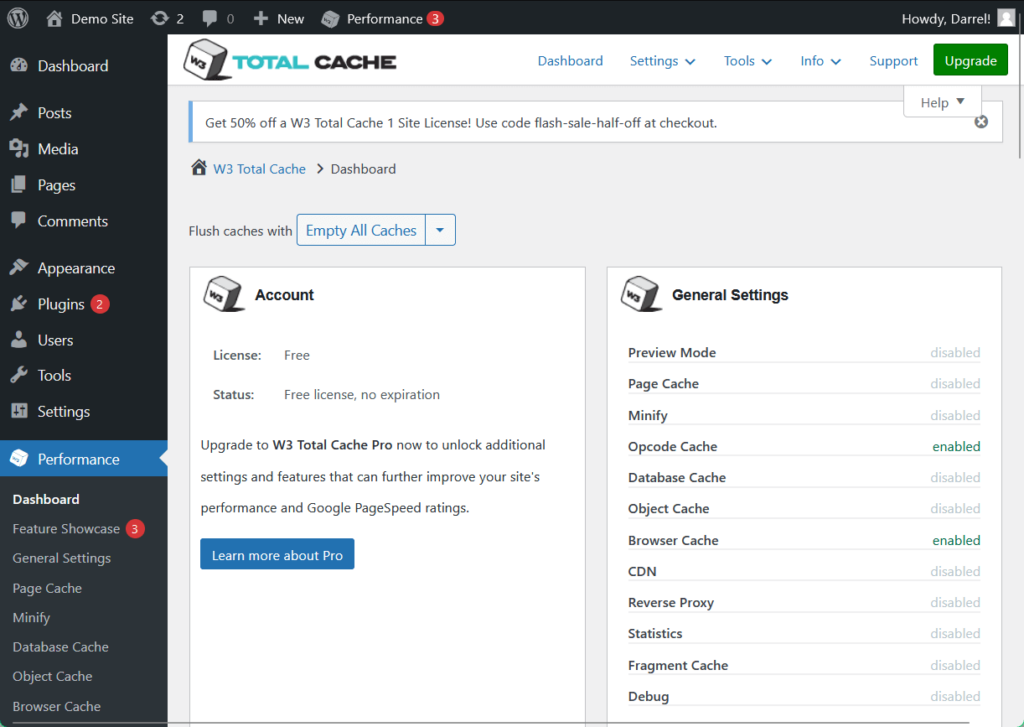
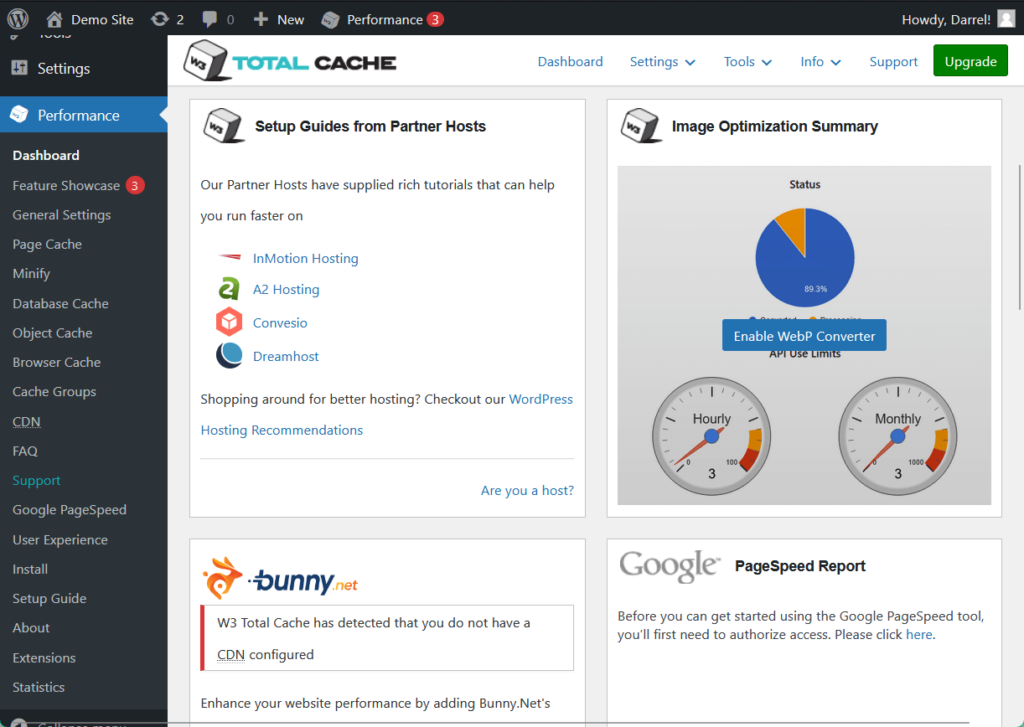
As you can see, the dashboard provides summaries and reports on the plugin’s features, as well as its general settings and setup guides from partner hosts.
👋 My thoughts here
W3 Total Cache's user interface is feature-packed and built for those who seek detailed options for website performance.
Here are my thoughts:
- For beginners, the extensive list of options can feel a bit overwhelming, so maximize the Setup Guide Wizard in initial configuration through essential settings and decisions.
- The interface includes numerous menus and settings, which might require a bit of time to fully understand and navigate.
- The need to manually enable some features in the general settings tab slowed down a bit the pace I had in setting it up, but from there on out, the plugin indeed ran smoothly.
W3 Total Cache is easy to use and doesn’t take a lot of time to get acquainted with while maintaining flexibility for more experienced users. ✅
It’s clear that a reliable hosting provider is essential for maximizing your website's performance and stability.
Hostinger, with its speed-focused plans and seamless integration, pairs perfectly with W3 Total Cache's optimization features.

Discover the Hostinger advantage for your WordPress site:
- Enjoy a 99.9% uptime guarantee
- Affordable pricing at just $2.49/month (use the code darrel10 to get a discount)
- Global performance and reach with Hostinger's optimized hosting platform
For fast, efficient, and smooth operations, Hostinger delivers the ideal hosting foundation to power W3 Total Cache's capabilities. 🚀
Best Features
My rating here is 4.3 out of 5.
Here’s why:
- The browser cache feature is easy to use and delivers immediate benefits, significantly improving page load times and reducing server load.
- The minify feature, while effective, can sometimes cause scripts or stylesheets to break.
- Google PageSpeed Insights integration is convenient and insightful.
It combines ease of use with advanced tools for performance enhancement, though some features need careful configuration to avoid issues.
Here are some notable features of W3 Total Cache:
1. Browser Cache
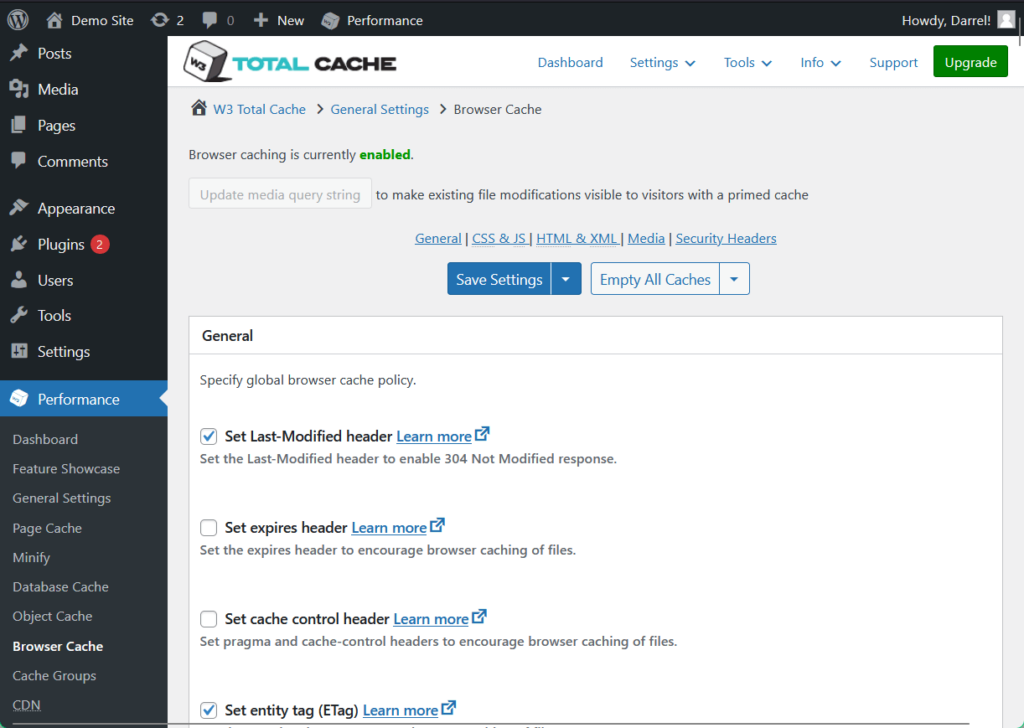
The browser cache feature instructs visitors' browsers to store static files like images, CSS, and JavaScript locally.
This feature reduces the need to re-download these static files on subsequent visits, leading to faster page load times and decreased server load.
Configuring browser caching can significantly improve user experience.
You can access this feature and other cache improvements through the performance menu:
Now into another tool that can help you speed up your site:
2. Minify
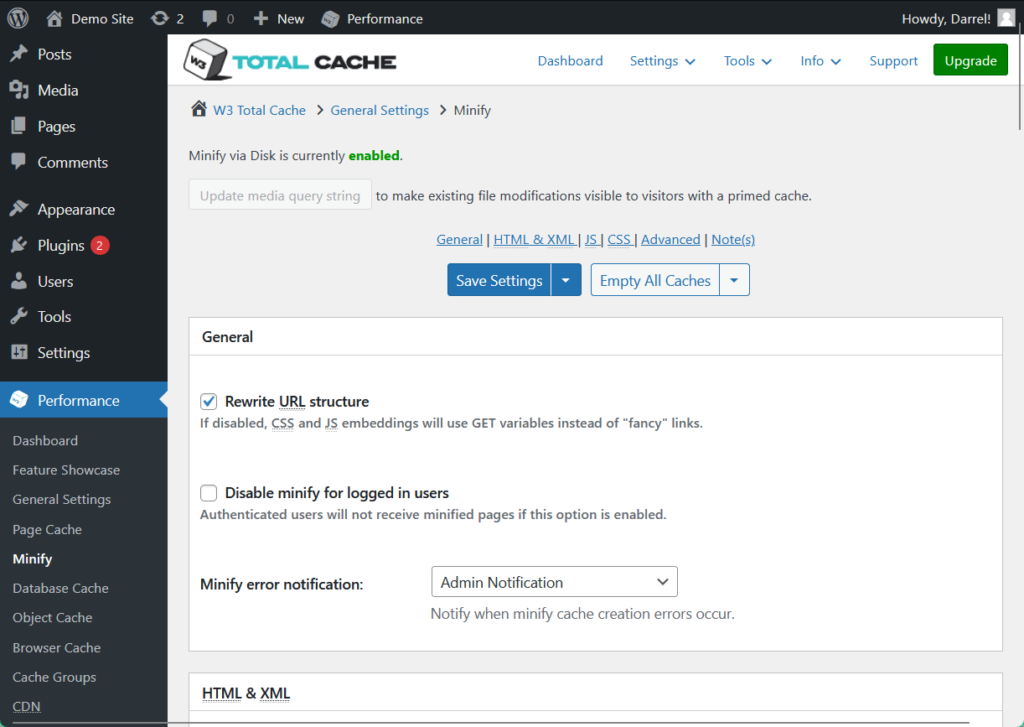
This reduces the size of HTML, CSS, and JavaScript files by removing unnecessary characters such as whitespace, comments, and unused CSS.
This process decreases file sizes and thus results in quicker downloads and improved page load speeds.
W3 Total Cache offers options to minify these files automatically or manually, providing flexibility based on user preference and technical expertise.
And to test your site’s speed:
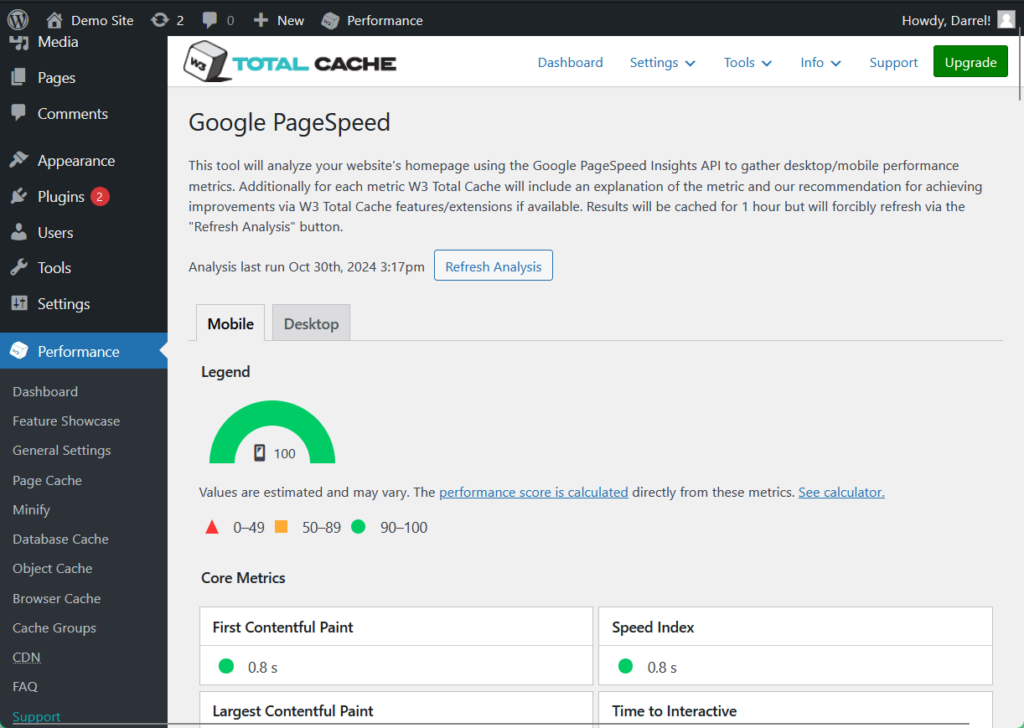
3. Google PageSpeed Analysis
W3TC integrates with Google PageSpeed Insights to allow users to analyze their website's performance directly from the WordPress dashboard.
This integration provides valuable insights into areas that may need optimization and offers recommendations to improve site speed and overall performance.
By addressing the suggestions from PageSpeed Insights, users can achieve better loading times and a more efficient website.
Besides this, there are also other awesome features like integration with content delivery networks as well as lazy loading.
👋 My thoughts here
Despite its apparent learning curve, W3 Total Cache has a huge impact on page performance through its powerful set of features.
Here are my thoughts:
- Browser caching is one of the most user-friendly features, as it’s straightforward to enable and produces immediate results.
- The same observations go for page cache, database cache, object cache, and other caching options.
- While minification is well-regarded, users have reported issues where scripts or stylesheets break due to minification settings (though I haven’t experienced it myself).
- Allowing users to perform PageSpeed tests without needing to leave the WordPress dashboard removes the hassle of monitoring and troubleshooting site speed issues.
Now that’s an all-in-one package! 🤩
Reliability
I rate it a 4 out of 5.
Here’s why:
- W3 Total Cache is actively maintained, with regular updates addressing bugs, security issues, and compatibility.
- The plugin’s high memory usage compared to competitors can strain server resources, which may lead to slower performance on high-traffic sites.
- While it performs well in terms of page speed, its processing times on the front end are slower than some alternatives.
Frequent updates and strong support make it dependable, but higher memory usage and occasional compatibility concerns may affect performance.
Performance
In terms of performance, while W3 Total Cache is still great, it seems to be performing less efficiently than that of its leading counterparts.
Here’s data from WP Hive when they checked the plugin using their own test script:
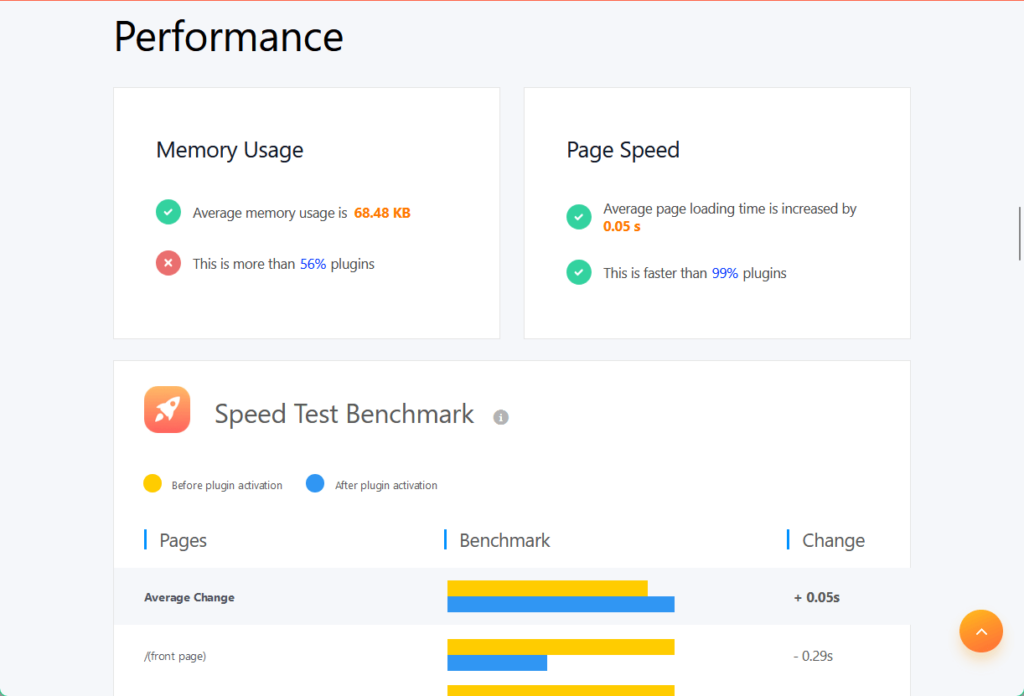
The average memory usage is 68.48 KB, while the average page loading time is increased by only 0.05 seconds.
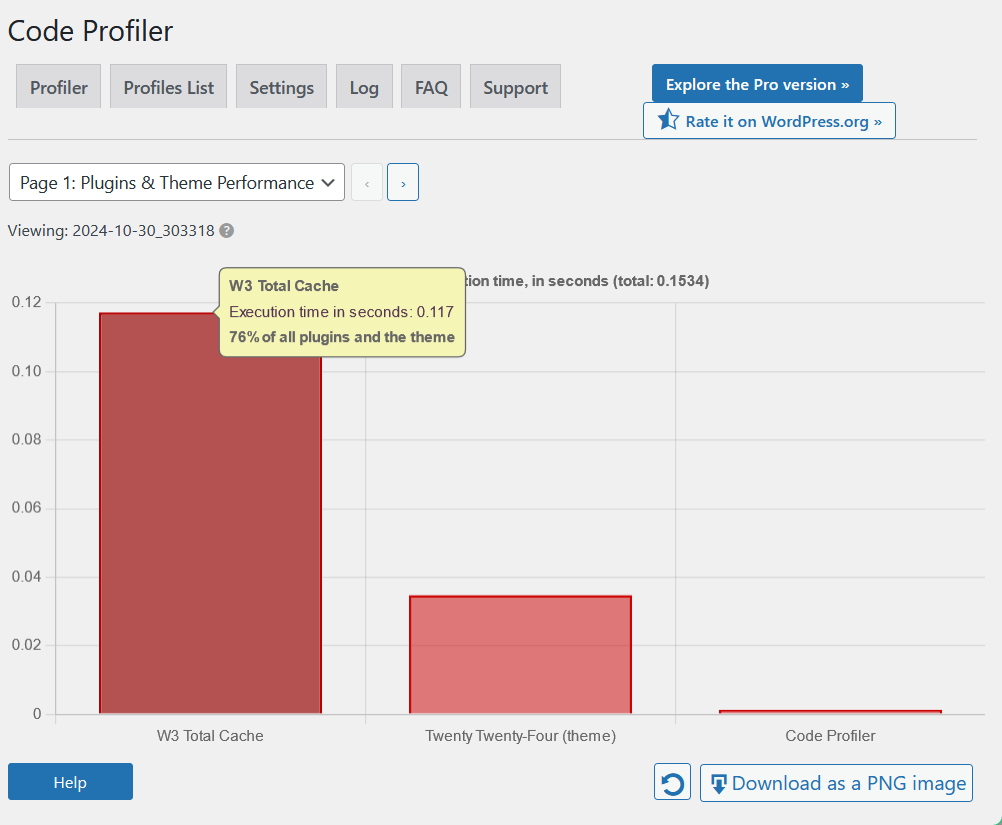
I also tested the W3 Total Cache using the Code Profiler plugin.
The results are:
- Frontend: 0.117 seconds
- Backend: 0.044 seconds
Let’s compare this with how other caching plugins went:
| Feature | W3 Total Cache | WP-Optimize | WP Fastest Cache |
| Page Speed | 0.05 seconds | 0.06 seconds | 0.03 seconds |
| Average Memory Usage | 68.48 KB | 35.06 KB | 18.84 KB |
| Code Profiler (front) | 0.117 seconds | 0.032 seconds | 0.005 seconds |
In terms of page speed, W3 Total Cache performs fairly quickly with 0.05 seconds, trailing second to WP Fastest Cache.
However, among the three plugins, W3 Total Cache consumes the highest memory usage and takes the longest to process code on the front end.
This means that it may be more demanding on server resources, which could be a concern for sites with high traffic and may negatively affect performance.
W3 Total Cache can still be a good choice if you need a robust plugin with extensive customization options, integrations, and various caching methods.
But if you prioritize minimal memory usage and the fastest response times, some other plugins might be a better fit.
Updates and Maintenance
W3 Total Cache is actively maintained, with updates released to address security vulnerabilities, introduce new features, and ensure compatibility with the latest WordPress versions.
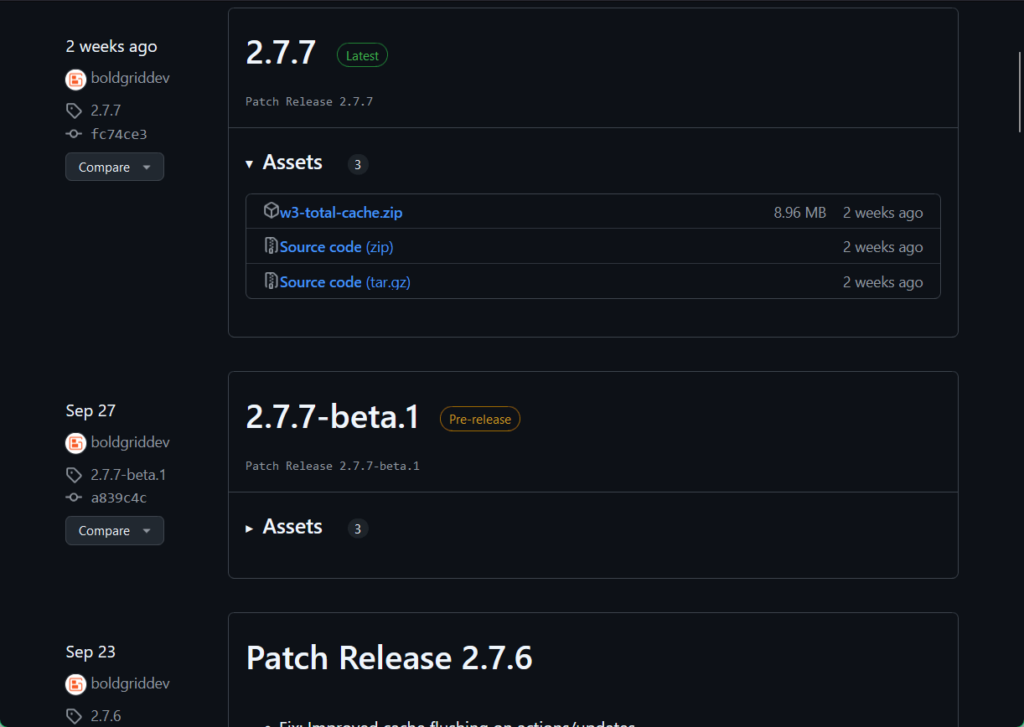
Its last major patch release in September 2024 included improvements on cache flushing, Google PageSpeed access, and API, as well as additional selections in the setup wizard.
I checked their GitHub changelog page and found that they’ve updated the plugin every month.
Here is what it looks like:
Nice! 🙂
👋 My thoughts here
Although W3 Total Cache lags in performance compared to its caching counterparts, it remains capable of its functions and benefits from regular updates and maintenance.
Here are my thoughts:
- W3 Total Cache’s vastly higher memory usage compared to other plugins due to object and database caching must be considered by its users before availing of the plugin.
- Some users have reported compatibility issues with other plugins and themes, especially with certain security plugins or themes that heavily rely on custom scripts.
- However, these errors are quickly identified and fixed because of W3 Total Cache’s continuous updates and development.
Despite these drawbacks, W3 Total Cache remains popular for its powerful caching capabilities and dedicated developing team.
Support
My rating here is 4.3 out of 5.
Here’s why:
- The support team responds within 24 hours, offering helpful and personable assistance that caters to a range of issues.
- Some advanced support articles and features are locked behind the pro version, which might limit accessibility for free users.
- While the knowledge base and forums are extensive, the lack of a search bar can make finding specific answers challenging.
Its fast response times, detailed documentation, and community forums provide a solid user experience.
On the other hand, pro-exclusive features and minor usability concerns in the knowledge base hold it back slightly.
Customer Service
For W3 Total Cache’s collection of support services and knowledge base, you can just scroll to the bottom of the plugin’s WordPress dashboard to access them.
Here is what it looks like:
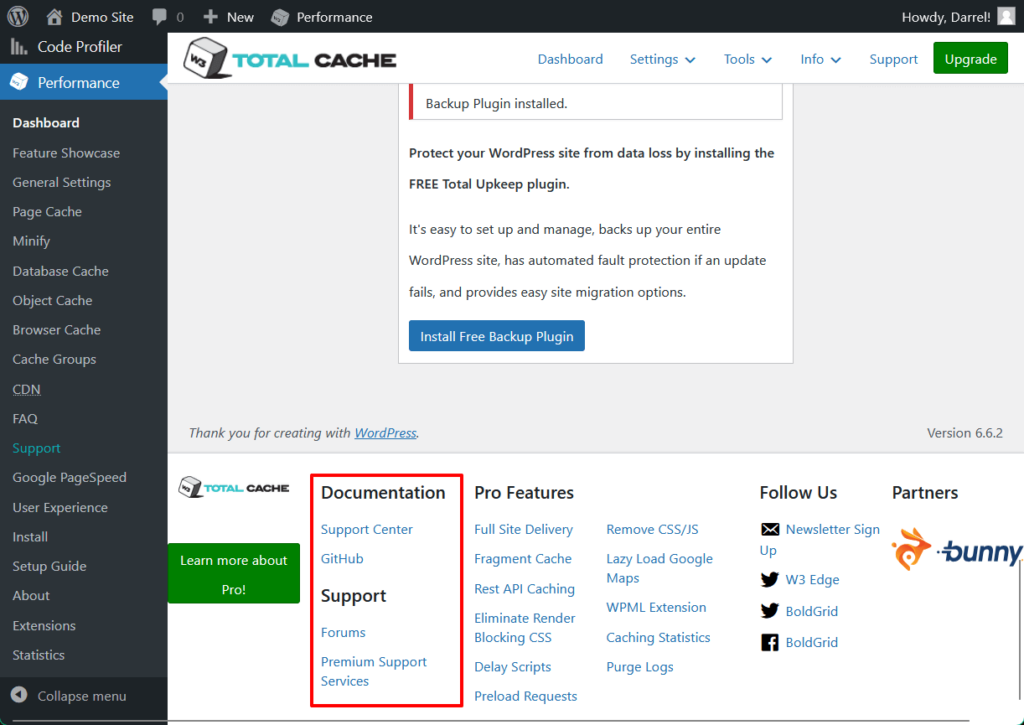
Its support team responds promptly. Replies are usually sent out only within 24 hours from submission of the query, with personable assistance provided.
Here is what customer service looks like from within the plugin itself:
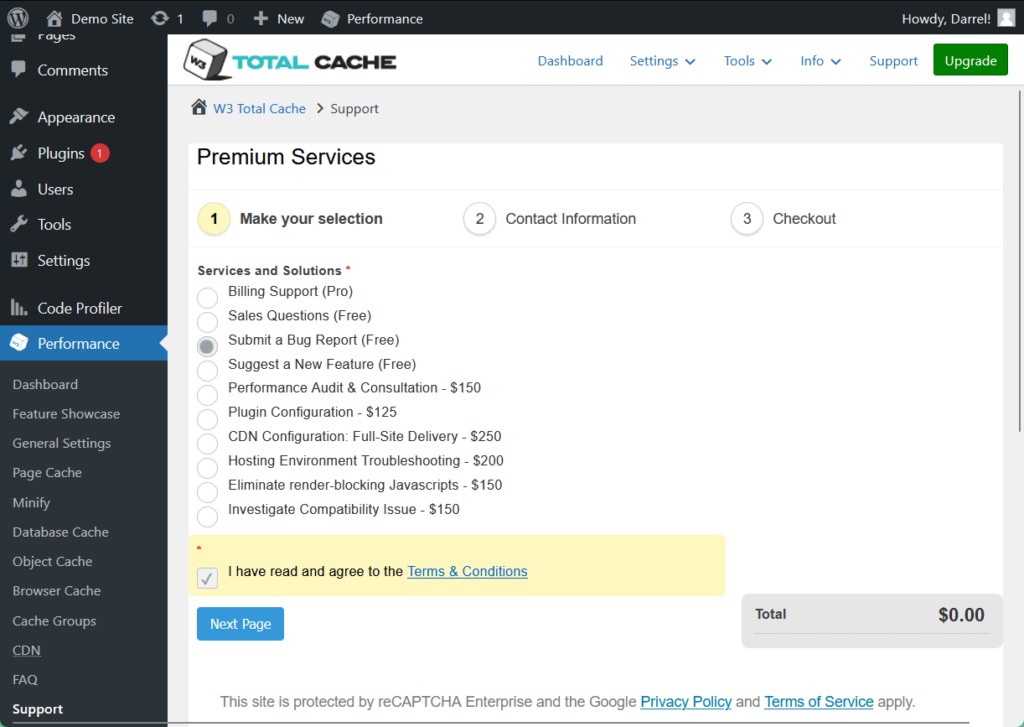
On the other hand, its developer BoldGrid also has a separate support center on their official site where you can also channel queries regarding the plugin.
Here's the page:
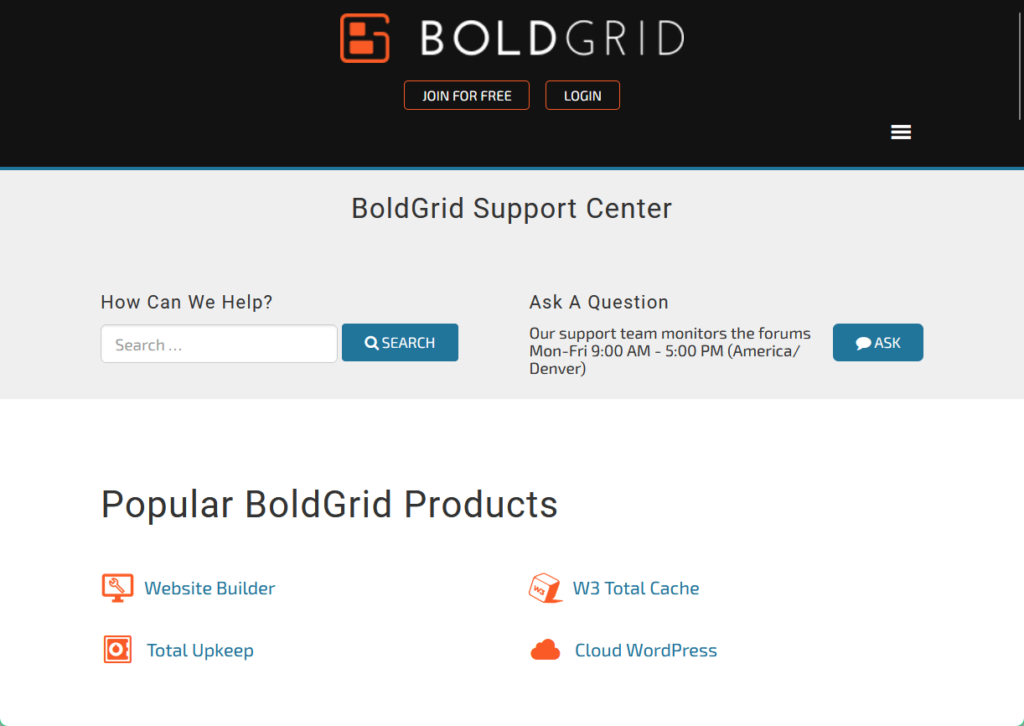
All good signs. 👍
Knowledge Base
W3 Total Cache maintains a knowledge base complete with different articles, from installing to configuring the plugin.
Here’s what the page looks like:
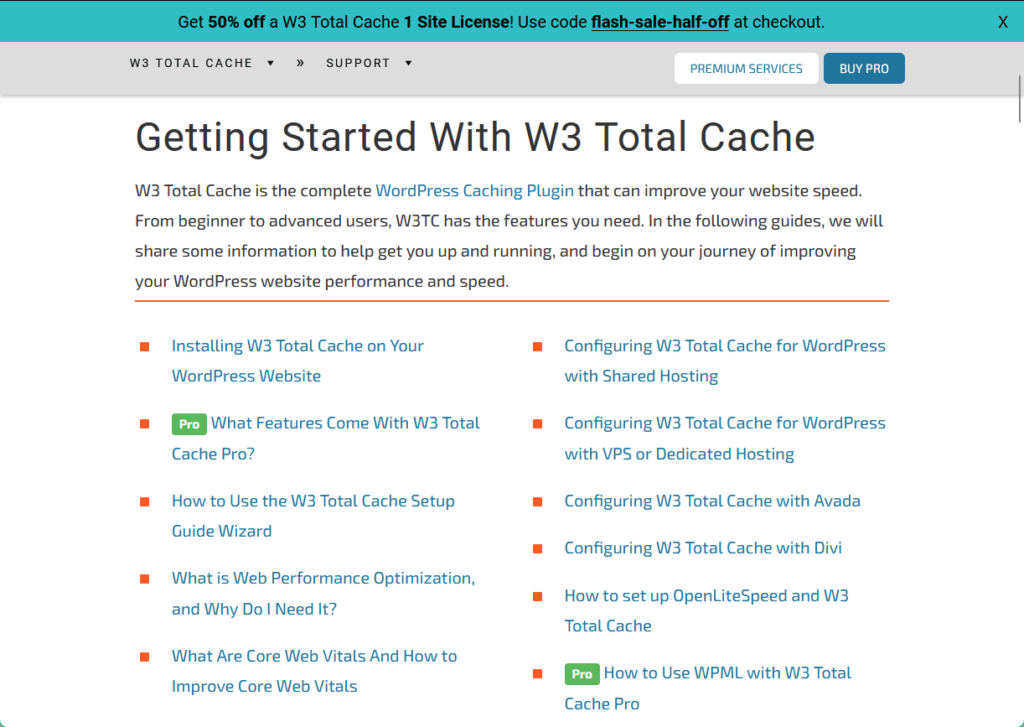
However, some articles are only available for pro users.
W3 Total Cache also has a forum where users can share their troubleshooting experiences, so you may check that out for similar issues that you’ll face.
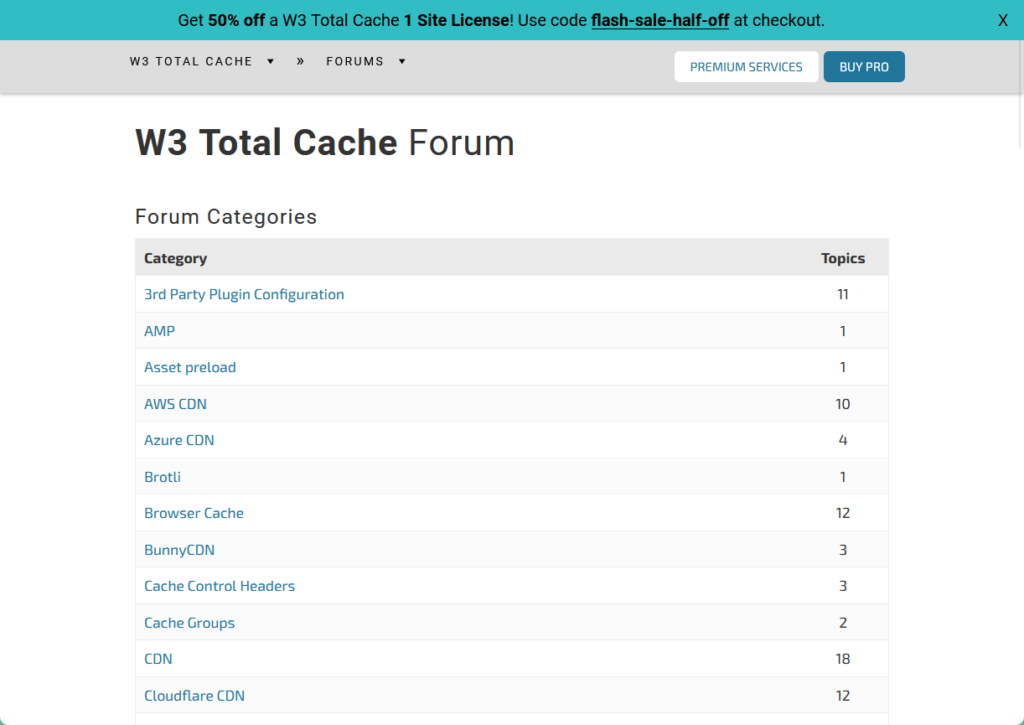
It’s nice especially if the knowledge base doesn’t have sufficient information on your problem, and others may have already experienced it.
👋 My thoughts here
W3 Total Cache’s support features are easily accessible and helpful, a strong supplement to its already powerful functions.
Here are my thoughts:
- The plugin has a comprehensive list of premium services for concerns of any kind, but some solutions come with additional expenses and are only in the pro version.
- Its knowledge base and forum lack a search bar, which may give users a hard time finding specific issues.
- Nevertheless, BoldGrid provides extensive documentation on W3 Total Cache, offering step-by-step instructions and best practices to facilitate users’ growth.
There is no shortage of support services and options in W3 Total Cache Pro, and its quality of responses suits websites and users of different scales and capabilities. 👍
Pricing
My rating here is 3.9 out of 5.
Here’s why:
- The free version is robust enough for basic caching needs, making it a valuable option for small sites or beginners.
- The $99 per year pro plan is more expensive than many competitors, which might deter budget-conscious users.
- The money-back-guarantee is straightforward and customer-friendly, but the lack of detailed refund policies may leave users with questions.
While the free version provides strong value, the pro plan’s cost may feel steep compared to alternatives.
Cost Breakdown
W3 Total Cache offers both free and premium plans to improve WordPress performance.
You can purchase one or multiple licenses for W3 Total Cache through their official site, with 1 site license starting at $99 per year.

The pro plan includes a 30-day money-back guarantee.
While the free version meets basic needs, the pro version delivers extra value for larger or more complex sites.
Note that support-related services may come with extra costs, so plan accordingly.
Money-Back Guarantee
W3 Total Cache Pro offers a simple refund process and you can request a refund within 30 days of purchase if you're unsatisfied.
Unfortunately, though, I can’t find a clear refund policy aside from what they say in their forum and the pricing page.

Here are the key steps to get a refund:
- Check the eligibility period
- Access the support section
- Choose Billing Support
- Submit your refund request
After submitting, the team will review your request.
Make sure you include your purchase information and remember that refunds are processed back to your original payment method.
👋 My thoughts here
When compared with other popular caching plugins, W3 Total Cache's pricing structure is simpler but offers fewer tiers and less flexibility for users with constrained budgets.
Here are my thoughts:
- For $99 per year, W3 Total Cache is a more costly alternative compared to its competitors.
- But if you only need minimal caching, its free version is already robust and capable of handling fundamental functions.
- Its money-back guarantee is straightforward and you can easily request refunds from within its support services.
W3 Total Cache offers a robust set of features with a straightforward pricing model that can be economical for long-term users. 😉
Final Thoughts
If you’re considering W3 Total Cache, start with the free version to see if it meets your site's needs.
For advanced features, evaluate whether your site’s complexity justifies the $99 per year upgrade and if yes, take full advantage of the 30-day money-back guarantee.
Otherwise, see if the free version is enough.
Boost your website's performance with Darrel Wilson’s Elementor Template Kits, tailored to streamline your WordPress experience.
These kits simplify site creation, delivering optimized designs with zero coding required.

Secure lifetime access to all premium Elementor template kits:
- Get lifetime access to all premium template kits designed for Elementor
- Complete with 2 years of dedicated support
- Only for $99 — that's already for the lifetime access
Pair these kits with W3 Total Cache to create a lightning-fast, professional site with ease. 🚀