
Ease of Use
I would rate its ease of use a 4.1 out of 5.
Here’s why:
- Duplicator Pro's installation process is straightforward and familiar, making it accessible for users who regularly work with WordPress plugins.
- The need to verify the license key in a specific setting can be a bit confusing for first-time users who may not immediately know where to look.
- While the interface is generally user-friendly, the absence of a dedicated dashboard may leave some users wishing for a more centralized layout, although it's still simple to navigate.
Duplicator Pro scores well on ease of use, with its intuitive setup process and clean interface.
Despite minor quirks, like license key verification and no dashboard, it offers a smooth experience for most users.
Initial Setup
To install Duplicator Pro, purchase a plan from their website first.
After that, navigate to your account, download the pro plugin (it’s the zip file), and go to plugins > add new > upload plugin on your WordPress website.
Then click on the install now button:
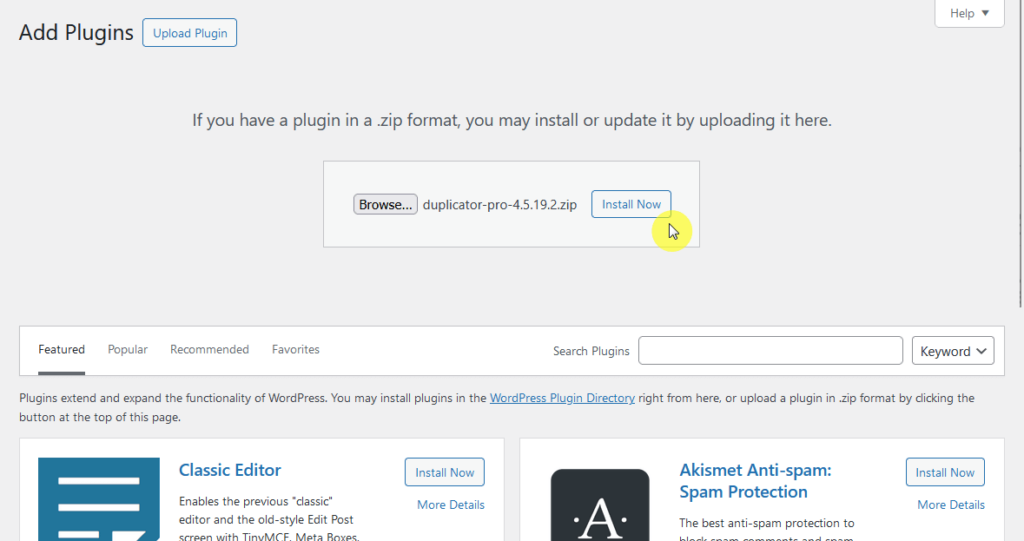
Check that the pro plugin downloaded is in a zip since some browser settings will automatically unzip zip files after downloading.
Although we’re talking about the pro version, Duplicator also has a free version.
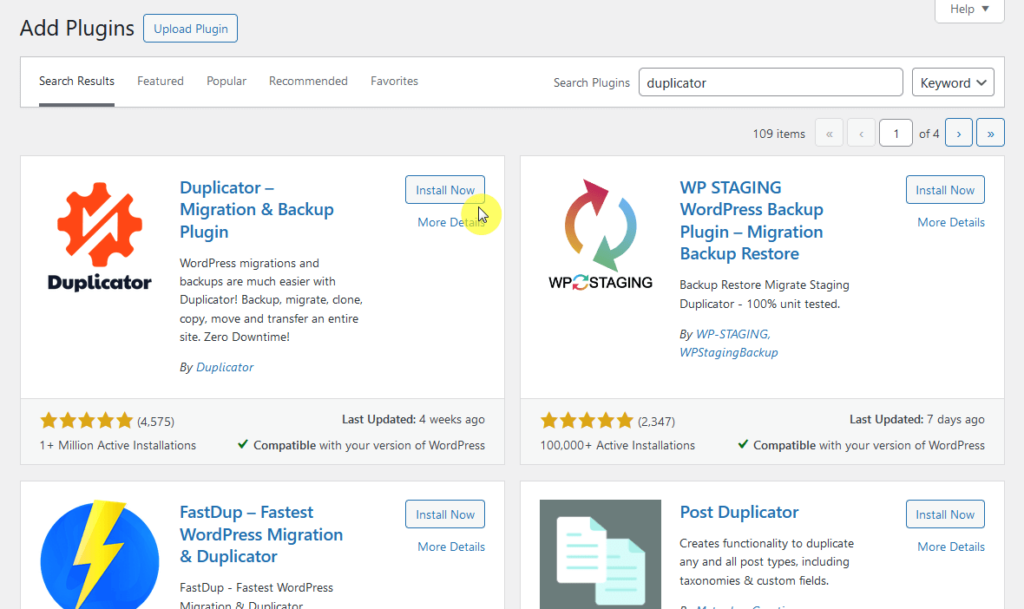
You can install it through plugins > add new, type “duplicator” into the search bar, and then press the enter key on your keyboard.
Install and activate the plugin:
For the pro plugin, you need to verify your license key to receive updates automatically as well as plugin support.
If you don’t know where to enter the license key, it’s the first setting in Duplicator Pro > Settings > General in the dashboard.
User Interface
If select it from the WordPress dashboard, you will see a user-friendly interface designed to make backups and site migrations easier.
Here’s the page you will see:
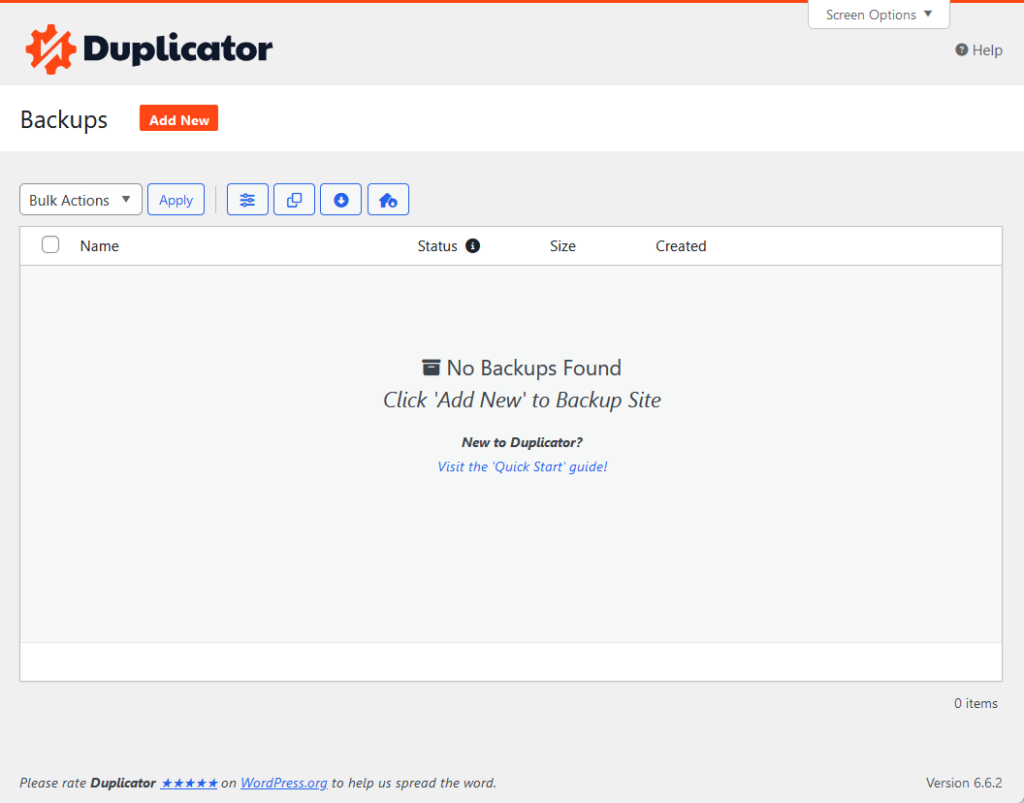
This is basically where you can create manual backups.
Like many plugins specifically dedicated to backups and migration, there’s no clear dashboard (though that’s not technically a bad thing).
In case you’re not sure how to proceed, there’s a link there that will take you to the “Quick Start” guide on the Duplicator website.
As for the settings page, this is what you will see:
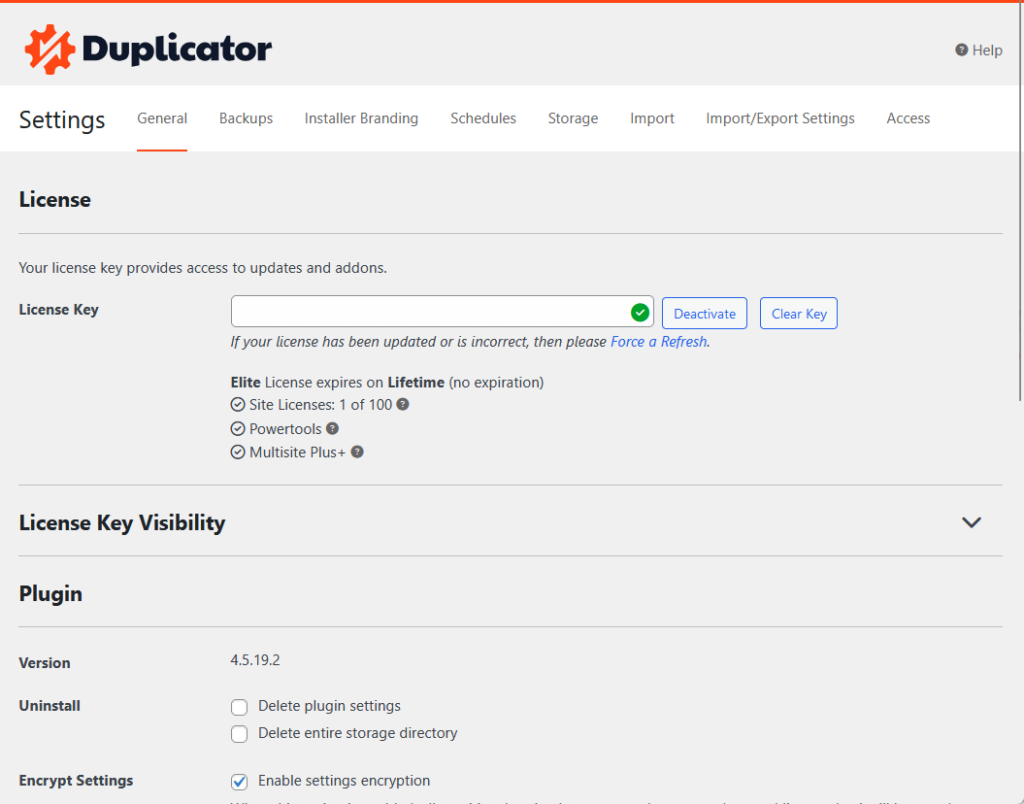
Overall, I had an easy time finding specific tools and features with the user interface of Duplicator Pro. 🙂
👋 My thoughts here
The initial setup and user interface is as standard as it gets.
Here are my thoughts:
- Installing both the pro and the free versions is straightforward to perform.
- There’s really not that many pages in the plugin section in the dashboard, so it’s easy to navigate and find what you’re looking for.
- Although there’s no dashboard, I don’t think there’s a need for one.
In other words, I approve. 🙂
It’s clear that a solid hosting provider is key to keeping your site running smoothly and securely.
Hostinger, with its budget-friendly plans and reliable service, is the perfect match for Duplicator Pro's backup and migration features.
Discover the Hostinger advantage for your WordPress site:
- Enjoy a 99.9% uptime guarantee
- Affordable pricing at just $2.49/month (use the code darrel10 to get a discount)
- Global performance and reach with Hostinger's optimized hosting platform
For smooth migrations and seamless backups, Hostinger provides the robust hosting foundation your WordPress site deserves.
Best Features
For the features, my rating here is 4.3 out of 5.
Here’s why:
- The scheduled backups feature is extremely flexible, allowing users to set up automatic backups on custom schedules.
- Some advanced features, like hourly scheduling, are restricted to higher-tier plans, which may feel limiting for users on lower-tier plans.
- Backup templates are highly useful for creating consistent backup routines, but setting them up may feel complex for new users who aren’t familiar with detailed backup settings.
Duplicator Pro delivers a robust feature set, especially for users who need automated, customizable backups.
While a few features are restricted to premium plans, the scheduling options, templates, and diagnostic tools make it an outstanding choice for efficient site management.
Here are some notable features of Duplicator Pro:
1. Scheduled Backups
From the name, scheduled backups allow you to automate the backup process.
You can set backups to run on a daily, weekly, monthly, or even hourly basis, depending on your needs.
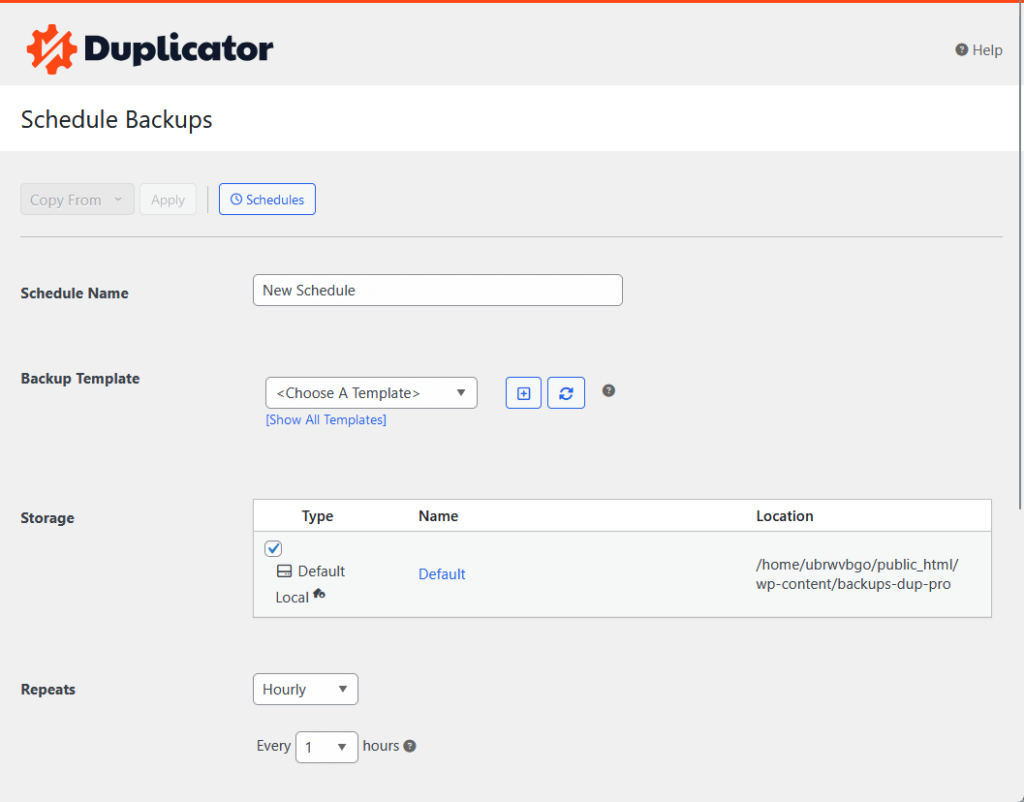
Here’s what makes this feature so useful:
- Choose custom schedules that fit your site’s update patterns
- Scheduled backups eliminate the need for manual backups
- You always have a recent version of your site to restore in case of an emergency
- Pair with cloud storage options, like Google Drive or Dropbox
It’s a nice feature that can give you peace of mind knowing that a current version of your site is always available for quick restoration.
This feature is especially helpful for sites with regular updates, as it reduces downtime and keeps data safe without extra effort.
2. Backup Templates
Backup templates allow you to save time by creating preset backup configurations that can be reused.
These let you define specific settings for different backup needs, so you don’t have to set up each backup from scratch.
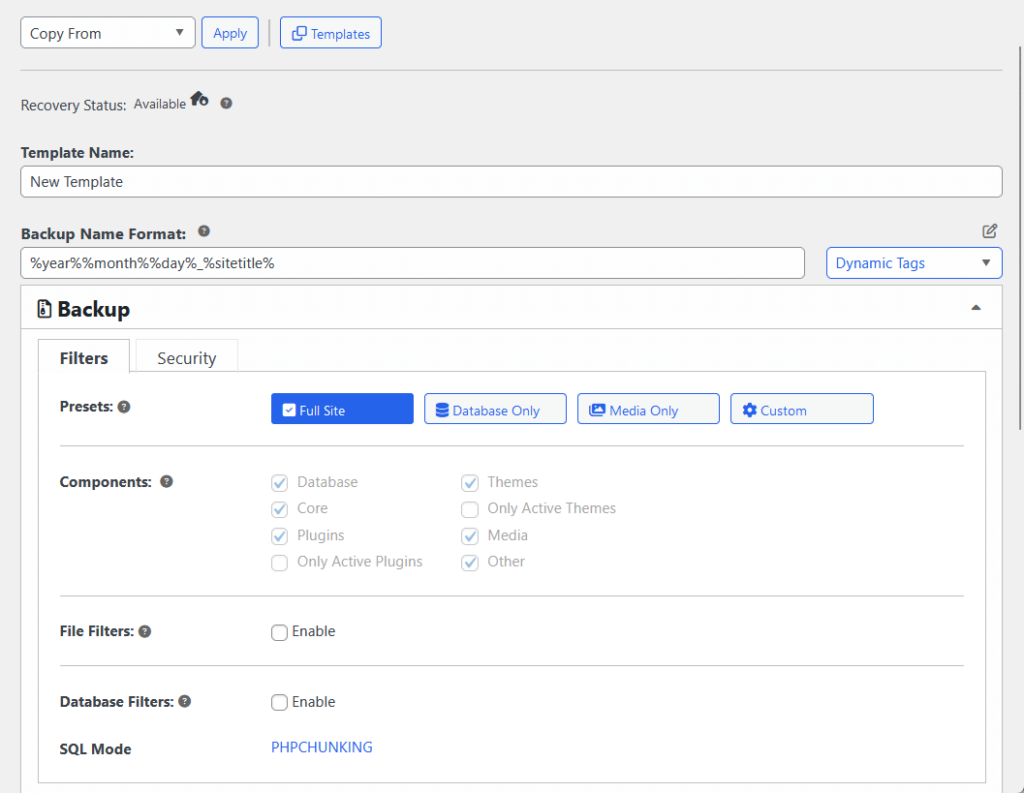
These are why backup templates are helpful:
- Define which files, folders, or database tables should be included or excluded
- Once a template is created, you can select it in one click
- Create multiple templates for various scenarios, such as full site backups, file-only backups, or database-only backups
- Ensures that backups are created with the same settings each time
Technically, when you create a manual backup or schedule a backup, you need to select a backup template (there’s a default one).
This feature is ideal for users who need varied backups for different purposes and prefer efficient, repeatable processes.
3. Duplicator Tools
Duplicator Pro includes a set of tools that give you more control over your site management.
These tools are designed to help you monitor, troubleshoot, and make processes easier within the plugin.
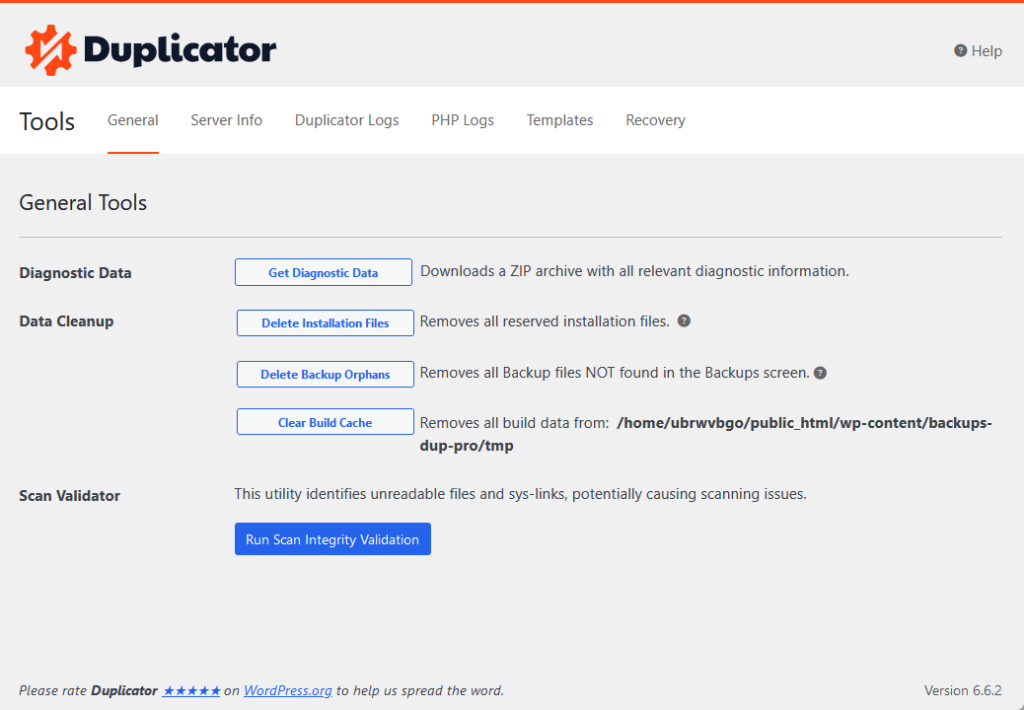
Here are examples of tools you can find here:
- Import and export settings
- Logging and debugging
- Database and file filters
- Cleanup tool
- Server compatibility checks
For example, there’s a scan validation tool that can help identify unreadable WordPress files and sys-links that can potentially cause scanning issues.
These options are ideal for users who want more control over backup settings and who need insights to resolve occasional issues quickly.
👋 My thoughts here
The features available in Duplicator are nice-to-haves, and all of them are easy to use.
Here are my thoughts:
- The scheduled backup feature is incredibly useful, especially for sites with frequent updates.
- The process of setting up multiple templates may feel a bit complex for new users who aren’t yet familiar with detailed backup configurations.
- Duplicator Pro’s tools, like logging, filtering, and cleanup options, make it easy for advanced users to customize backups and troubleshoot.
A bit of a spoiler here…
But unfortunately, some of the features, like scheduling backups, don’t feel complete in lower-tier plans (like how it doesn’t include hourly scheduling). 🙁
Reliability
My rating for Duplicator Pro’s reliability is around 4.0 out of 5.
Here’s why:
- Duplicator Pro has a strong track record of frequent updates and ongoing maintenance, which keeps it compatible with WordPress and ensures security improvements.
- The plugin has a slightly higher load impact on both the frontend and backend compared to some competitors, which may affect performance-sensitive sites.
- While performance differences are mostly negligible for general users, high-traffic sites may notice a small impact.
Duplicator Pro is a reliable tool with regular updates and solid performance for most users.
Though it has a minor impact on load times, its commitment to maintenance and compatibility makes it a dependable choice for WordPress sites.
Performance
To have an idea about how well Duplicator Pro performs, I used my favorite profiling plugin called “Code Profiler” and here are the results:
- Website frontend: 0.108 seconds
- Admin backend: 0.121 seconds
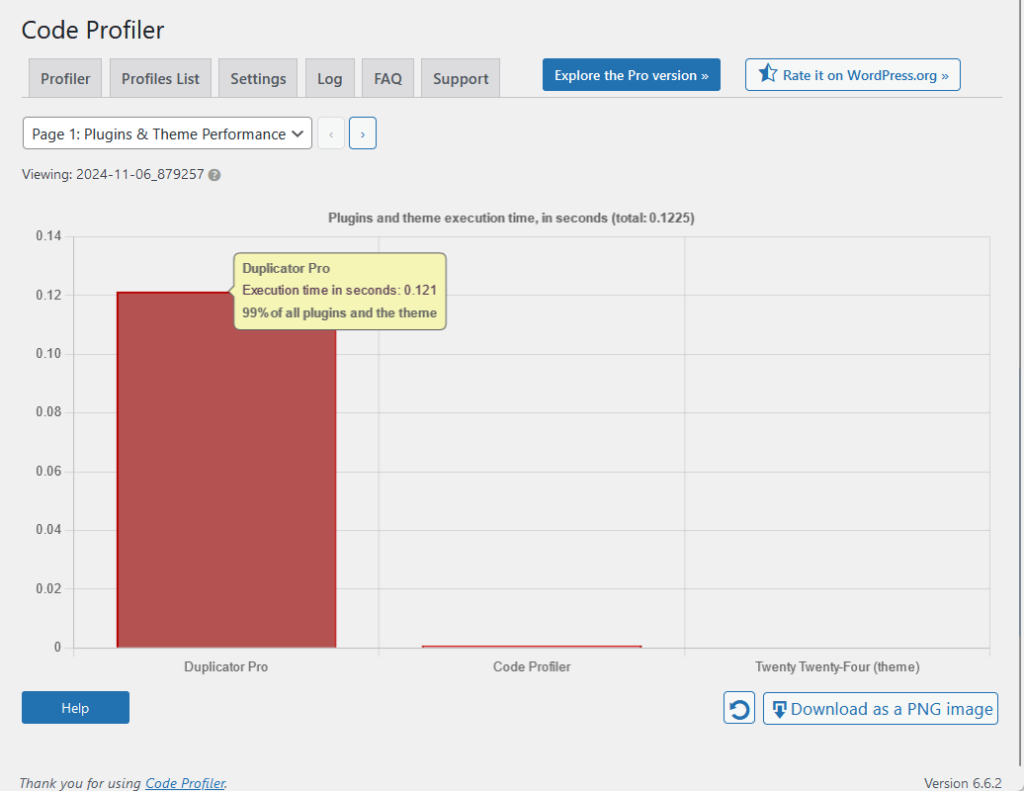
Naturally, this wouldn’t be complete without comparison with its competitors:
| Feature | Duplicator Pro | UpdraftPlus | WPvivid (Free) |
| Website Frontend | 0.108 seconds | 0.045 seconds | 0.04 seconds |
| Admin Backend | 0.121 seconds | 0.057 seconds | 0.102 seconds |
As you can see, Duplicator Pro seems to have a higher impact on the front end and back end than its competitors.
However, I can assure you that it’s completely negligible in real life as Duplicator Pro performs well and feels fast as well.
But if you’re concerned about the slightly higher load impact over advanced features, other backup plugins might be more suited for you.
Updates and Maintenance
Duplicator Pro is actively maintained, with regular updates that improve functionality, security, and compatibility with WordPress.
You can see more about the updates on their changelog:
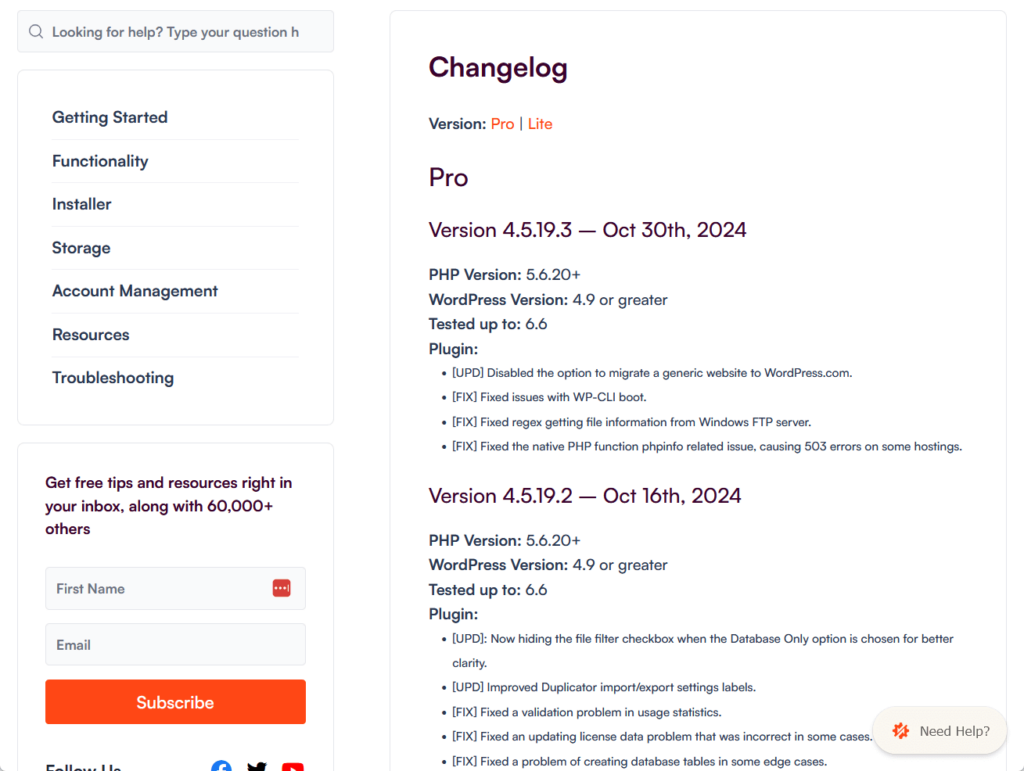
This ongoing maintenance ensures the plugin runs smoothly even with new WordPress versions and server configurations.
Here’s a breakdown of its maintenance practices:
- Frequently releases updates to introduce new features, address bugs, and enhance security
- The changelog documents each update, including new features, performance improvements, bug fixes, and compatibility changes
- Includes clear descriptions of each update, organized by version
The nice thing here is that the free version is also regularly updated.
While it may not include all Pro features, it receives essential maintenance, security fixes, and compatibility updates.
👋 My thoughts here
In terms of reliability, I don’t think there’s much to worry about Duplicator Pro.
Here are my thoughts here:
- The plugin’s commitment to updating both the pro and free versions ensures users can expect stable performance on various WordPress versions.
- Compared to some competitors, Duplicator Pro has a slightly higher impact on load times, especially on the backend.
- While this may not be noticeable for many users, those with high-traffic sites might prefer a lighter plugin if every millisecond counts.
It helps though that the plugin’s changelog is thorough, listing every update with clear descriptions of new features, bug fixes, and compatibility improvements.
But overall, I still feel that Duplicator Pro has good value.
Support
I would rate its support a 4.2 out of 5.
Here’s why:
- The dedicated support ticket system is a standout for pro users, offering priority assistance directly through the plugin for fast and effective help.
- While there’s a chatbot on the website, no real-time chat support with a live agent is available, which may limit immediate help for urgent issues.
- The knowledge base is comprehensive and detailed, with articles that make it easy to find solutions independently.
The well-maintained knowledge base is also a strong resource for users who prefer self-service solutions.
While real-time chat support would add more immediacy, the current support channels provide a dependable experience for most users.
Customer Service
Duplicator Pro offers multiple customer support options to assist users with any issues, from setup to advanced troubleshooting.
Wherever you are in the plugin, you will find the help button on the top-right corner:
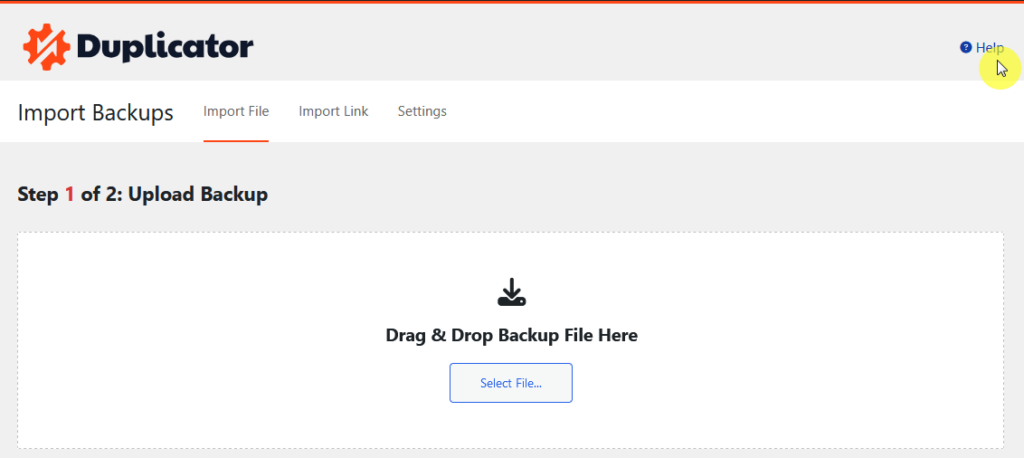
The team provides both general resources and dedicated help channels to make support accessible and effective.
After clicking the help button, this is what you will see:
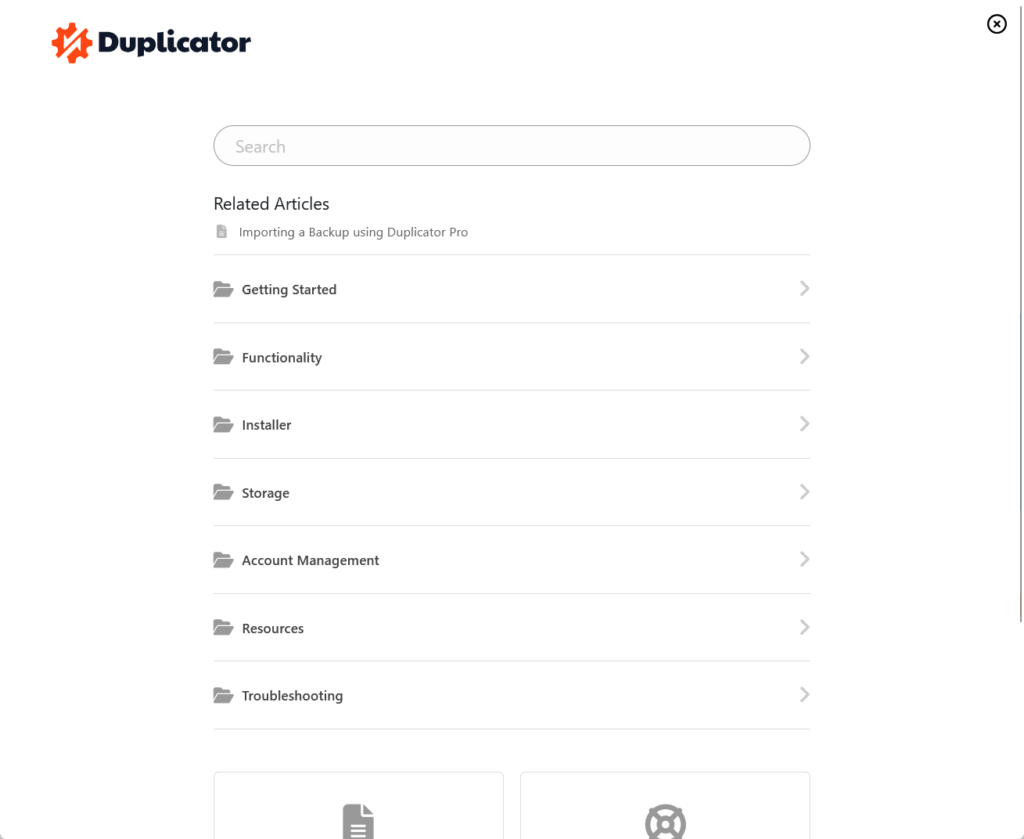
Here’s what’s available:
- Support ticket system
- Comprehensive knowledge base
- A community forum for free users
Reaching out for help is straightforward, especially for Pro users who have quick access to support from within the plugin’s dashboard.
The dedicated support ticket system is the best choice for Pro users, as it offers fast, priority support from the Duplicator team.
Knowledge Base
The knowledge base is a well-organized and detailed resource that covers everything from basic setup to advanced troubleshooting.
It’s designed to help users find answers quickly, whether you’re just starting or need specific guidance on using advanced features.
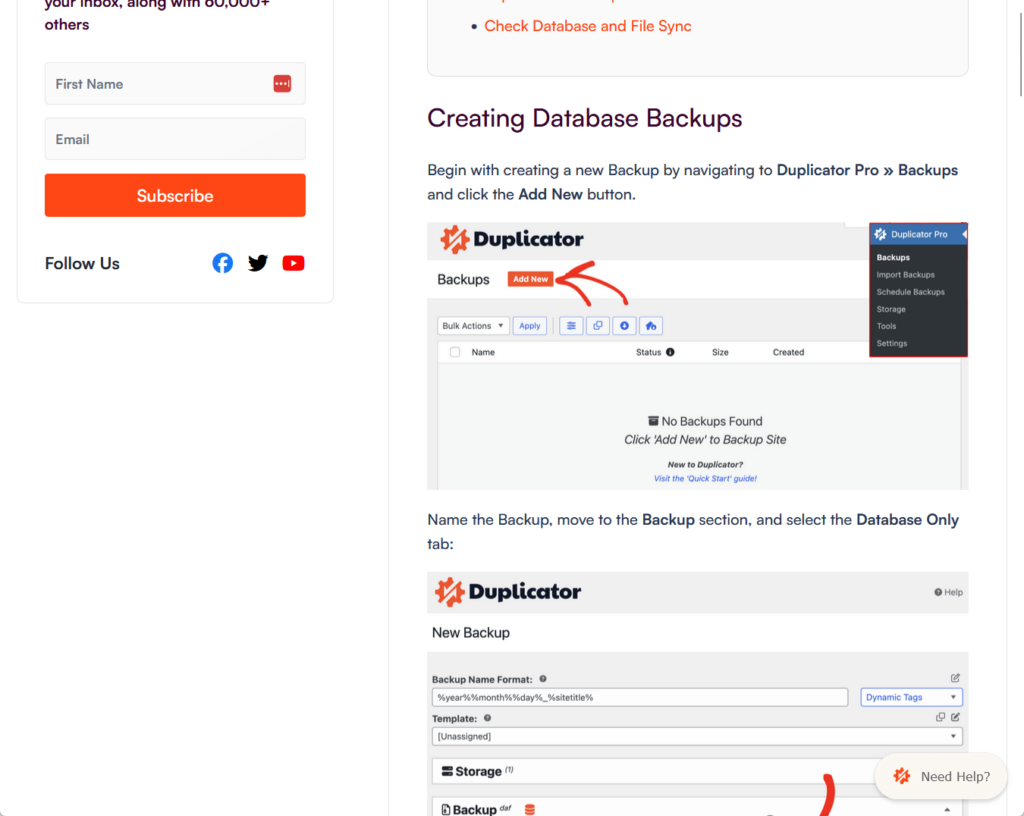
Here’s what makes it effective:
- Includes articles on every aspect, such as installation, backups, migrations, troubleshooting, and best practices
- Articles are concise and written in a straightforward way
- Many help articles include images and step-by-step screenshots
I like their knowledge base, it’s a reliable, user-friendly resource with well-written articles and visual aids. 👍
I think it would be helpful for users who prefer to resolve issues independently before reaching out to customer support.
👋 My thoughts here
When it comes to customer service and knowledge base, I don’t think Duplicator has a problem.
Here are my thoughts here:
- The dedicated support ticket system is excellent for pro users who need quick responses, especially with priority handling for critical issues.
- Free users have access to the community forum, but it may lack the immediacy and depth of the dedicated support available to pro users.
- While the support ticket system works well, there’s no real-time chat option, which some users might expect for faster resolutions.
There is a “chat” button on their website, but it’s only for a chatbot that’s been trained with their documentation articles.
I checked, and there’s no option or command in the chat to talk to a real person in case the documentation isn’t helpful.
Pricing
My rating for its pricing is 3.8 out of 5.
Here’s why:
- The four-tier pricing structure is flexible, allowing users to pick plans based on their site count and support needs, from individuals to large agencies
- Renewal costs are nearly double the introductory rates, which may be a drawback for users expecting steady annual pricing.
- Some essential features, like advanced scheduling, are locked behind higher tiers, which may not sit well with users looking for full functionality at every level.
The 14-day money-back guarantee provides a no-risk opportunity to explore the tool, which is valuable for those evaluating long-term use.
Overall, it offers solid value but may leave some users wishing for more inclusive features at the lower tiers.
Cost Breakdown
Duplicator Pro offers several pricing plans where users can choose a package that fits their needs.
Each plan varies based on the number of sites and level of support provided, making it flexible for individual users, freelancers, and agencies.
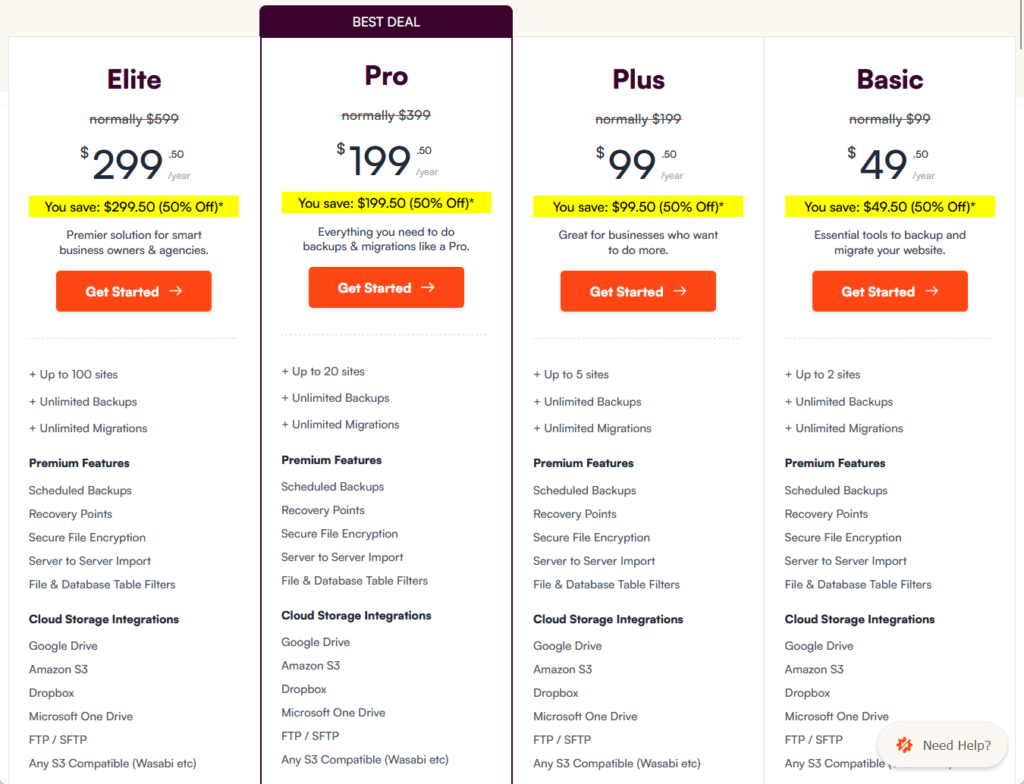
Duplicator Pro offers four plans:
- Basic: Starts at $49.50/year and renews at $99/year for 2 sites
- Plus: Starts at $99.50/year and renews at $199/year for 5 sites
- Pro: Starts at $199.50/year and renews at $399/year for 20 sites
- Elite: Starts at $299.50/year and renews at $599/year for 100 sites
There’s also a difference in the key features for each plan, like how features like hourly scheduling and installer branding start at the “plus” tier.
Each plan builds on the previous one, with more advanced scheduling, multisite support, and customer support access as you move up the tiers.
As for how the pro compares with the free version, the free version supports basic backups while the pro includes features like cloud storage, multisite support, and priority support.
Money Back Guarantee/Refund
Duplicator Pro offers a 14-day money-back guarantee, allowing users to receive a full refund if they’re unsatisfied within the first 14 days.
Here’s their documentation for refunds:
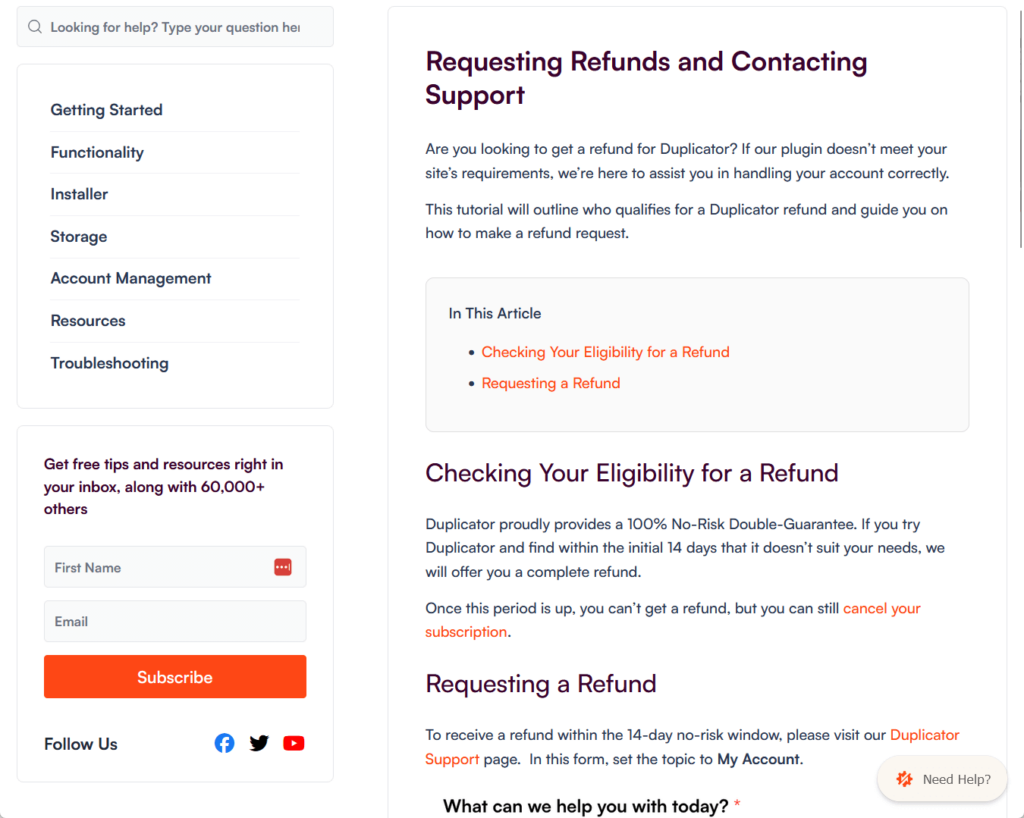
Here’s how the policy works:
- Refunds apply within 14 days of purchase, giving users a no-risk trial.
- Refunds can be requested via a support form on Duplicator’s website under “My Account.”
Someone from their support team will then respond as promptly as possible and will keep you informed about your refund status.
This guarantee lets users try Duplicator Pro with confidence, knowing they can request a refund if it doesn’t meet their needs.
👋 My thoughts here
Personally, I don’t prefer when premium features are locked behind tiers since well, even the lowest plan is still a “pro” plan, right?
Here are my thoughts here:
- With four plans available, Duplicator Pro offers flexibility to meet the needs of everyone from individual site owners to large agencies.
- The starting prices (e.g., $49.50/year for Basic) make Duplicator Pro accessible, but the renewal rates are nearly double.
- Some users might find it frustrating that advanced scheduling is not included at the basic level.
On the bright side, they do have a 14-day refund policy that allows users to test Duplicator Pro risk-free, which is ideal for those hesitant to commit.
But yeah, I have some reservations about not having all the features when buying the lowest-tier “pro” plan available.
Final Thoughts
When considering Duplicator Pro, think about your site’s specific needs and future growth.
If you manage multiple sites or need advanced features like multisite support and flexible scheduling, one of the higher-tier plans will be worth the investment for added functionality.
However, if you’re only running a couple of smaller sites, the basic plan might offer the essential features you need without the extra cost.
Level up your website management with Darrel Wilson’s Elementor Template Kits, designed to simplify professional web design.
These kits offer a quick, user-friendly solution to build beautiful sites without any coding.
Secure lifetime access to all premium Elementor template kits:
- Get lifetime access to all premium template kits designed for Elementor
- Complete with 2 years of dedicated support
- Only for $99 — that's already for the lifetime access
Whether you're focused on backups or creating a fresh design, these kits equip you to launch a sleek, professional site with ease.