
Ease of Use
My rating here is 4.3 out of 5.
Here’s why:
- The installation process is highly efficient, especially with the pro version automatically installing the free version.
- The user interface might be overwhelming for some users due to the vast number of elements and extensions available.
- Although the ability to toggle elements on or off is useful, the sheer volume of options may require a learning curve for those unfamiliar with the platform.
This rating reflects its efficient installation process, well-organized user interface, and the balance it strikes between functionality and user-friendliness.
Initial Setup
Essential Addons is a comprehensive plugin designed to extend the functionality of the popular WordPress page builder Elementor.
Meaning, to be able to use it, you first need to install Elementor (doesn’t have to be Elementor pro), which can either be its free or pro version.
After that, you can now install Essential Addons, which offers an effective free version and a pro version with more advanced features.
If you only want the free Elementor addon version, simply look for it in the plugins repository by going to plugins > add new plugin:
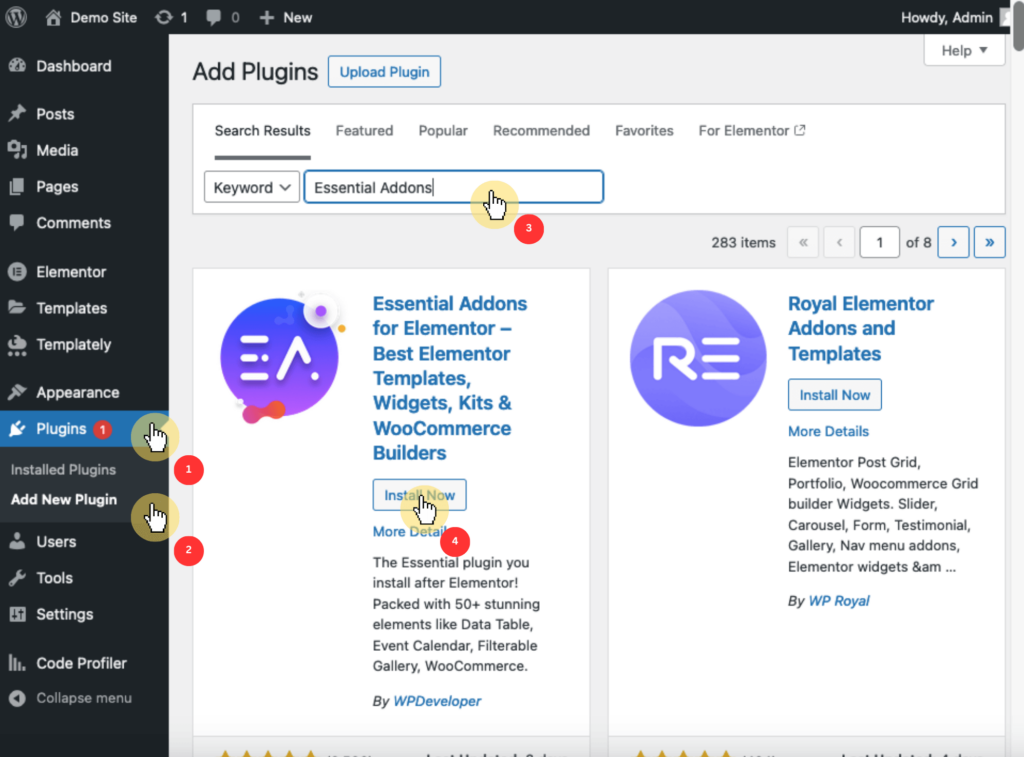
For the premium version, you need to purchase a plan first from their website and then download the pro plugin files from your account.
After that, you have to upload and install the plugin by doing the following:
- Go to plugins > add new plugin > upload plugin
- Browse through your files and select the plugin
- Click the install now button
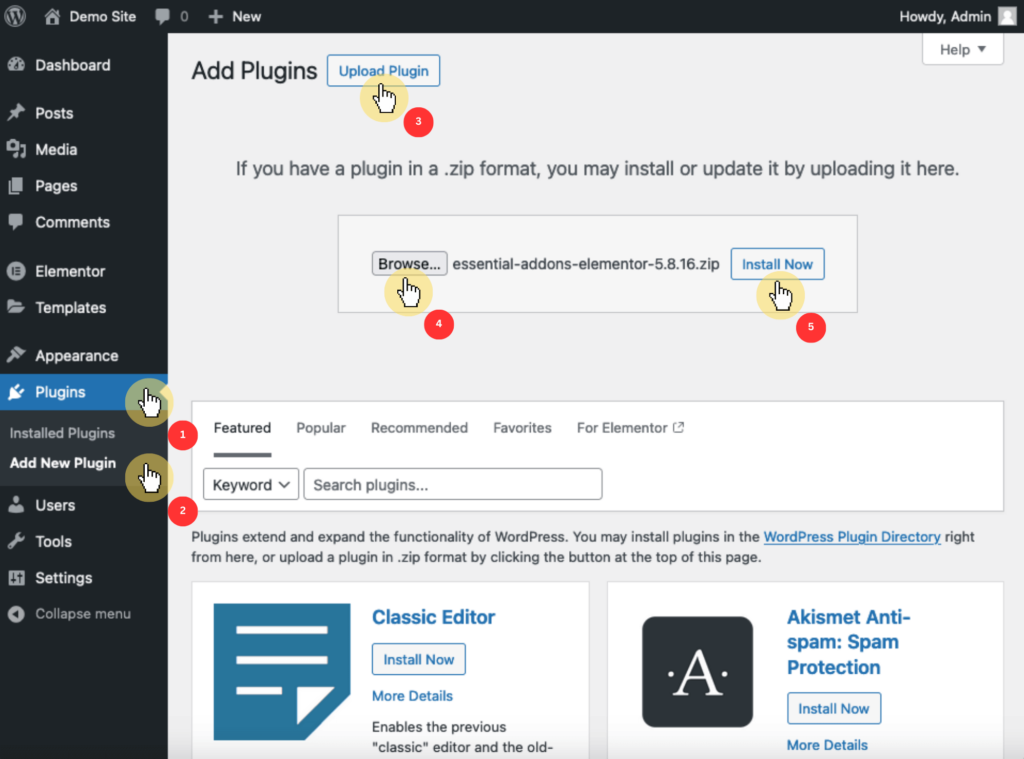
⚠️ Note: Although the free version is required for the pro version, installing the pro version actually installs the free version automatically. 🙂
Congratulations! You now have access to Essential Addons for Elementor! 🎉
User Interface
Upon activation, you can find the Essential Addons menu in the sidebar, which opens up a clean and organized interface.
It looks like this:
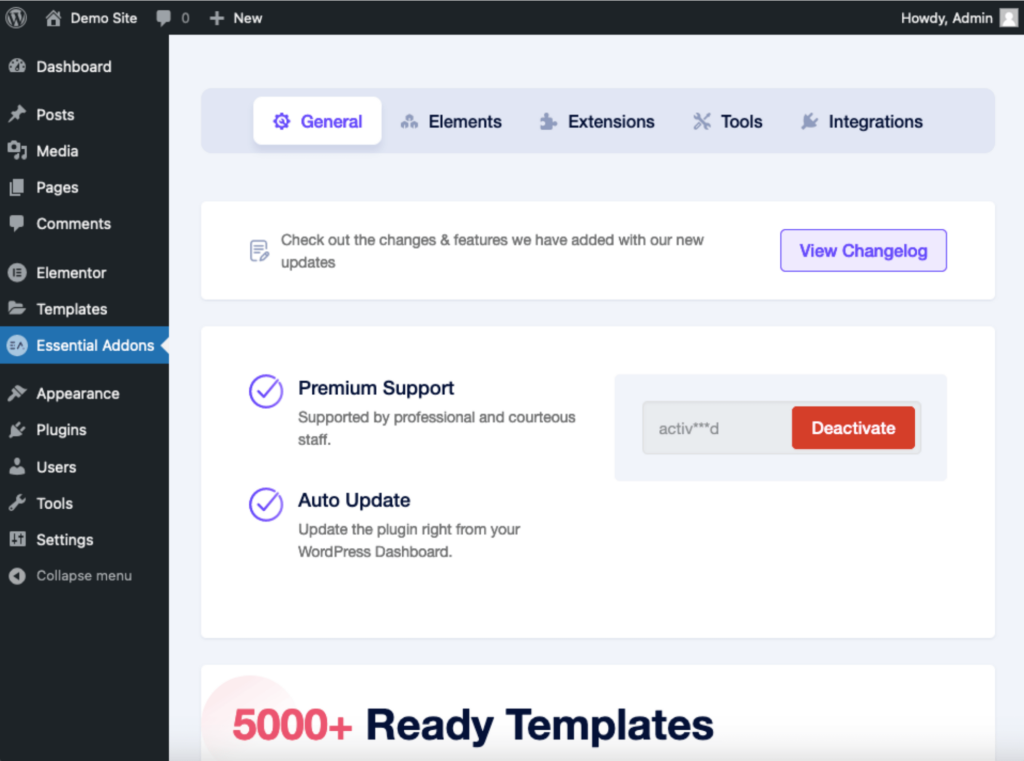
Unlike others where the dashboard only contains links to support features, Essential Addons offers a much richer experience with a variety of additional functionalities.
For example, the elements tab provides users the ability to manage the 87 elements, all categorized into various types each serving a unique purpose.
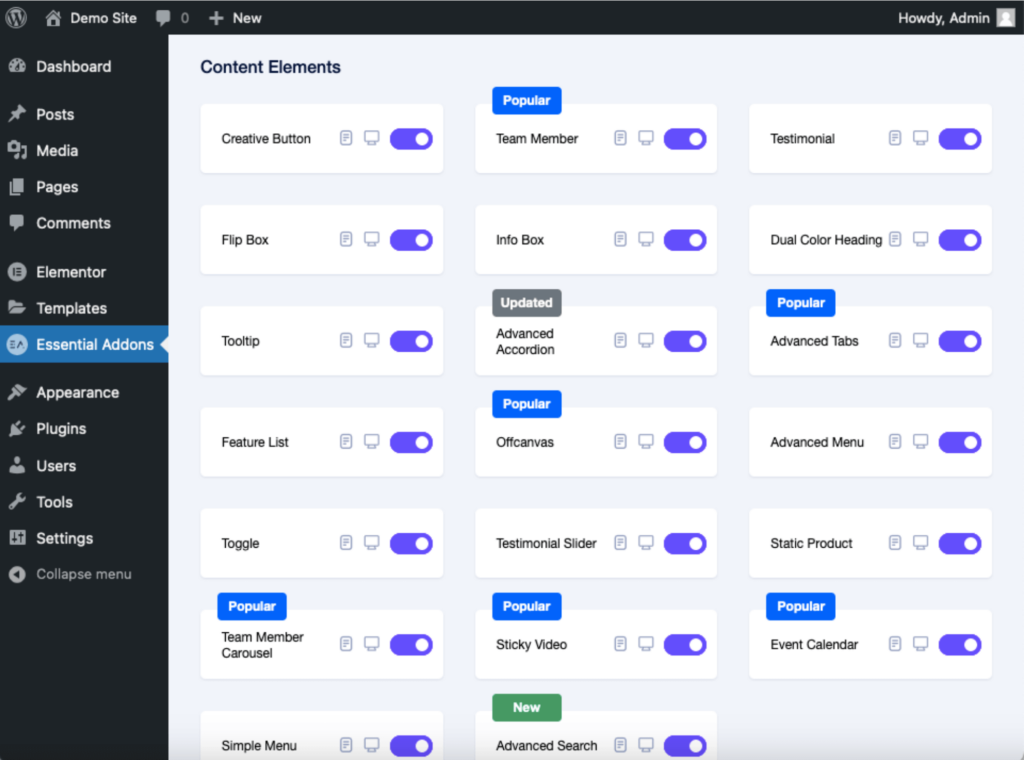
Each element can be toggled on or off with a simple switch to allow users to enable only the features they need.
You also have the option to disable or enable all the elements at once.
The same is true for the extensions tab, where users can pick and choose which of the 12 premium extensions to enable, disable, or enable all of them at once.
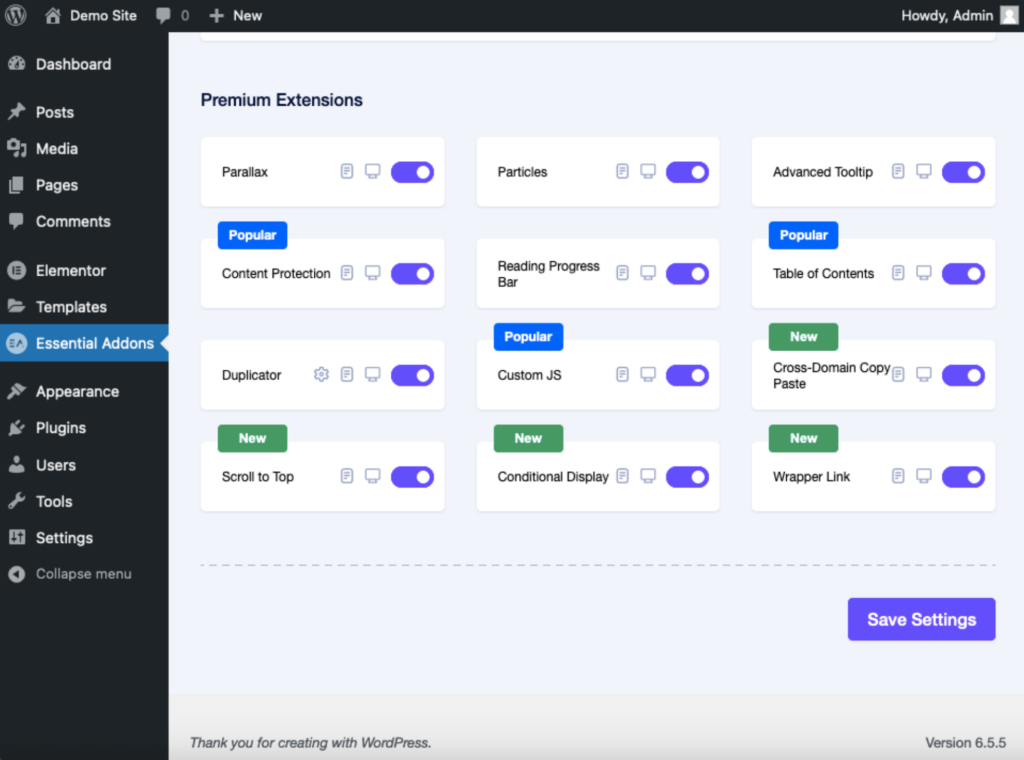
Users can also find documentation and demo buttons beside each element or extension, which are very helpful in understanding how each of them works.
Overall, the user interface of the Essential Addons dashboard is highly user-friendly (with the right balance of customization and simplicity). 🙂
👋 My thoughts here
I had a positive experience with both the installation process and the user interface of Essential Addons.
Here are some of the things I liked:
- Installing the pro version automatically installs the pre-requisite free version, so you won’t need to separately install it beforehand.
- There’s an option to disable or enable all elements and extensions at once.
- Each element and extension has buttons for viewing documentation or a demo, which provide very detailed tutorials on how to use them.
Even from this stage alone, I can already say that Essential Addons delivers top-notch functionality. 👍
It's also important to consider the foundation that powers your website—your web hosting service.
This is where Hostinger comes into play, offering an unbeatable combination of speed, security, and affordability.
Discover the Hostinger advantage for your WordPress site:
- Enjoy a 99.9% uptime guarantee
- Affordable pricing at just $2.49/month (use the code darrel10 to get a discount)
- Global performance and reach with Hostinger's optimized hosting platform
With Hostinger, you’re not just investing in a hosting service:
You’re securing a partner committed to delivering exceptional performance and reliability for your website.
Best Features
I give the Essential Addons’ best features a rating of 4.5 out of 5.
Here’s why:
- Essential Addons offers a vast library of 87 advanced elements and 12 extensions, each designed to enhance the functionality of your Elementor-powered website.
- While access to over 5,000 pre-made templates and blocks is a strong feature, not all of these templates are free.
- the sheer number of options available can be overwhelming for some users, requiring a bit of time and experimentation to fully understand and utilize the features.
While the additional cost for some templates may be a consideration, the overall value and functionality provided make it a top-tier choice.
Here are some notable features of Essential Addons:
1. Elements
Essential Addons offers a comprehensive library of 87 advanced elements, which function as widgets in the Elementor page builder.
They are categorized into various themes like:
- Content widgets
- Creative elements
- Marketing widgets
- Form styler widgets
- WooCommerce widgets
While Essential Addons doesn’t claim to have the most number of Elementor widgets (Element Pack, for instance, has 250+ widgets), I personally prefer its design and customizability.
Some of the standout elements for me are:
- Sticky videos
- Protected content
- Interactive circle
The sticky videos element, as its name suggests, allows you to embed videos from various sources and make them sticky on your WordPress website.
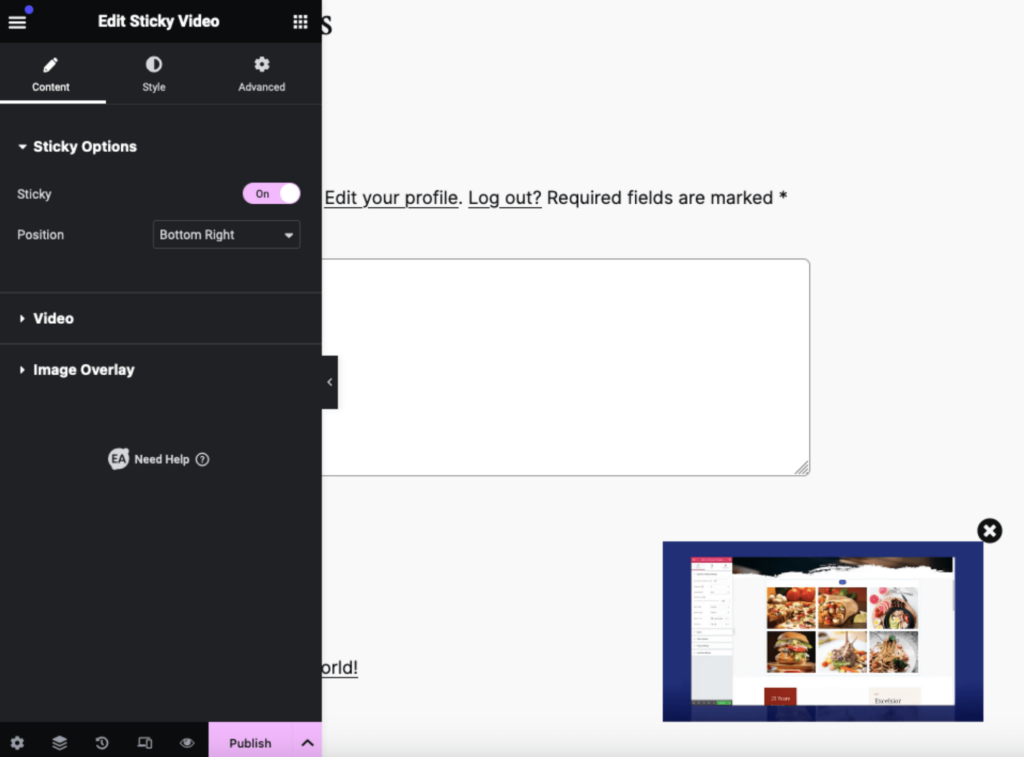
This means that the video remains visible and continues to play even as users scroll through the page.
What’s nice about this element is that it offers extensive customization options, including autoplay, mute, loop, and video bar settings.
You can also add an image overlay, change the play button icon, and adjust the size and appearance of the video player to match your website's design.
Another popular element from Essential Addons is the protected content element:
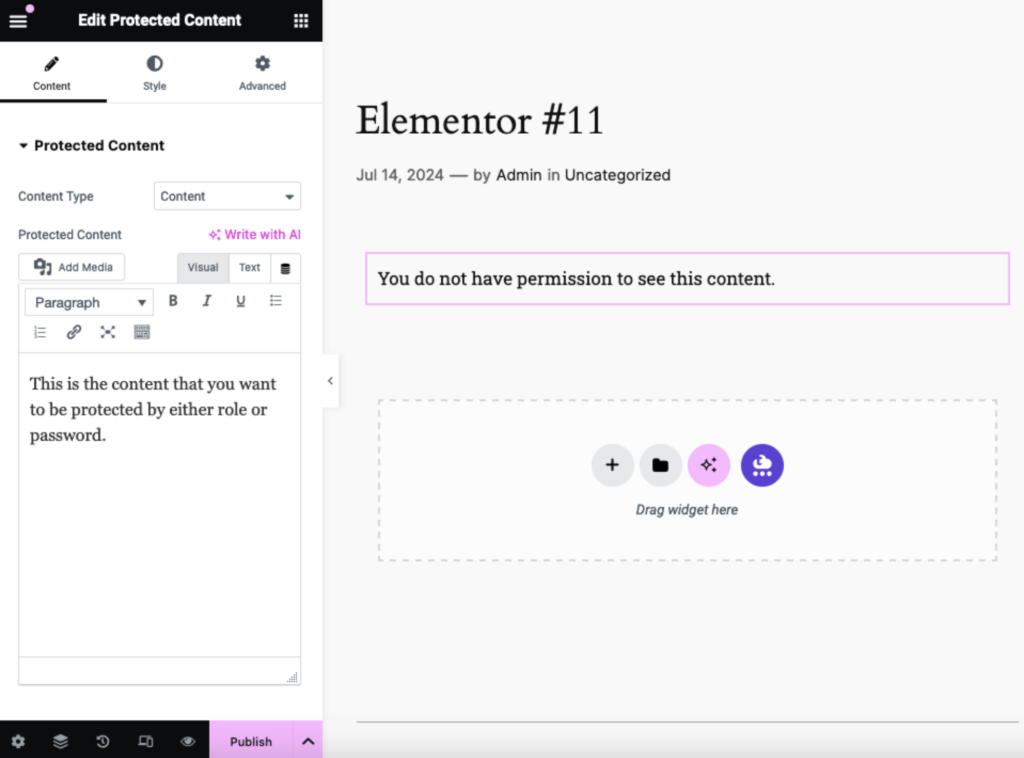
This element allows you to restrict access to specific content on your WordPress site to ensure that sensitive or premium content is only accessible to authorized users.
You can display custom messages to users who don’t have access to the protected content, which could be a simple notification or a prompt to log in or enter a password.
The last element I want to show you is one of Essential Addons’ more recent additions to their array of elements — the interactive circle element:
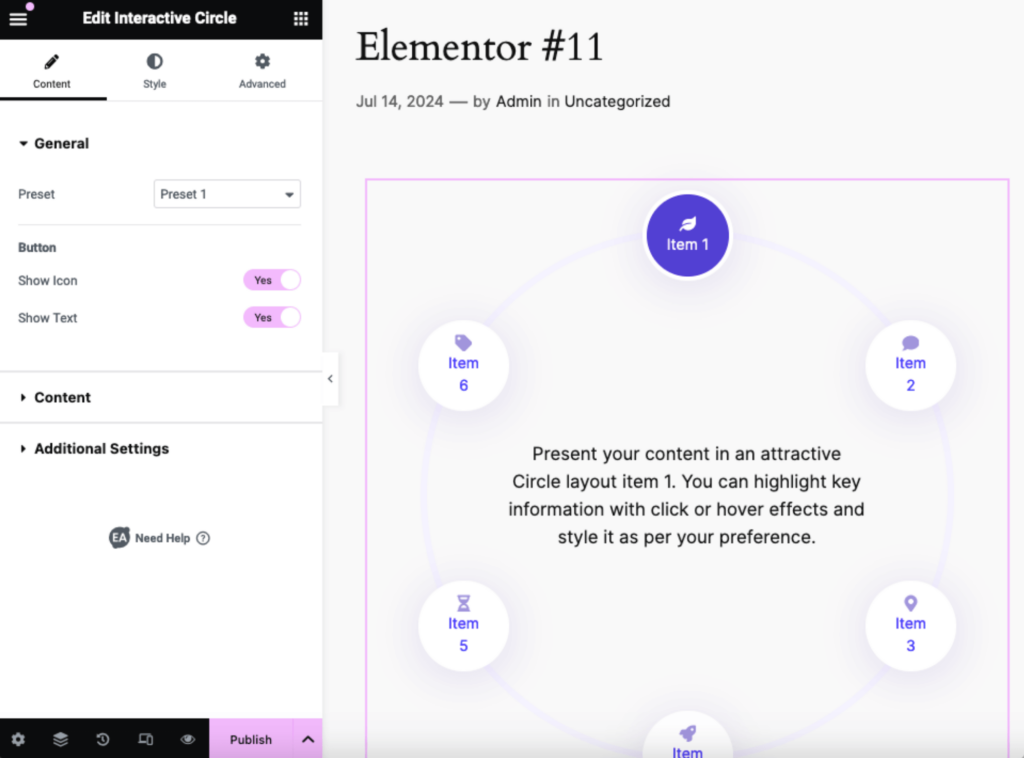
This element is a unique and engaging widget designed to display content in an attractive circular layout.
It’s ideal for:
- Menus
- Infographics
- Other content that benefits from a dynamic presentation
What’s more interesting is you can add mouse effects and hover animations and you can also choose to display icons, text, or both within the circle.
This allows you to create a variety of interactive content presentations, from simple icon-based menus to detailed text descriptions.
2. Extensions
Essential Addons also offers 12 extensions for more advanced customization and interactivity which provide additional capabilities that go beyond the standard widgets.
Some of these extensions are:
- Cross-domain copy paste
- Reading progress bar
- Scroll to top
The cross-domain copy paste, for example, allows users to effortlessly copy content from one Elementor website and paste it into another, even if they’re on different domains.
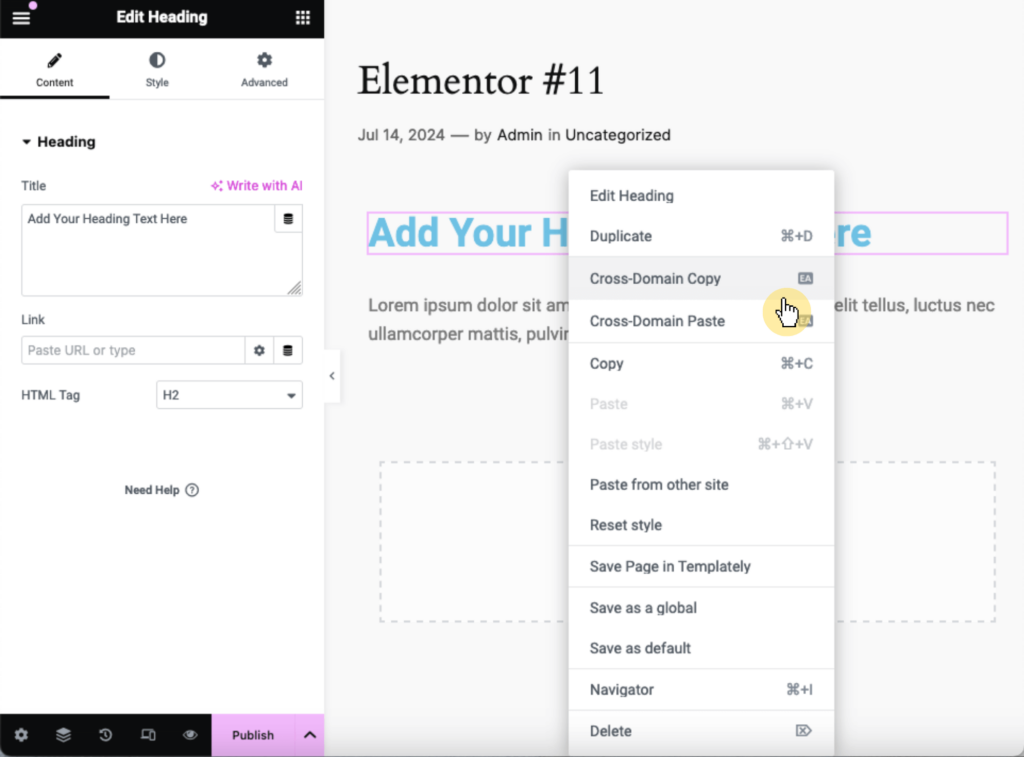
This extension streamlines the process of replicating designs across multiple websites and eliminates the need to manually recreate them.
There’s also the reading progress bar extension which provides a visual indicator of how much content a visitor has read on a page or post.
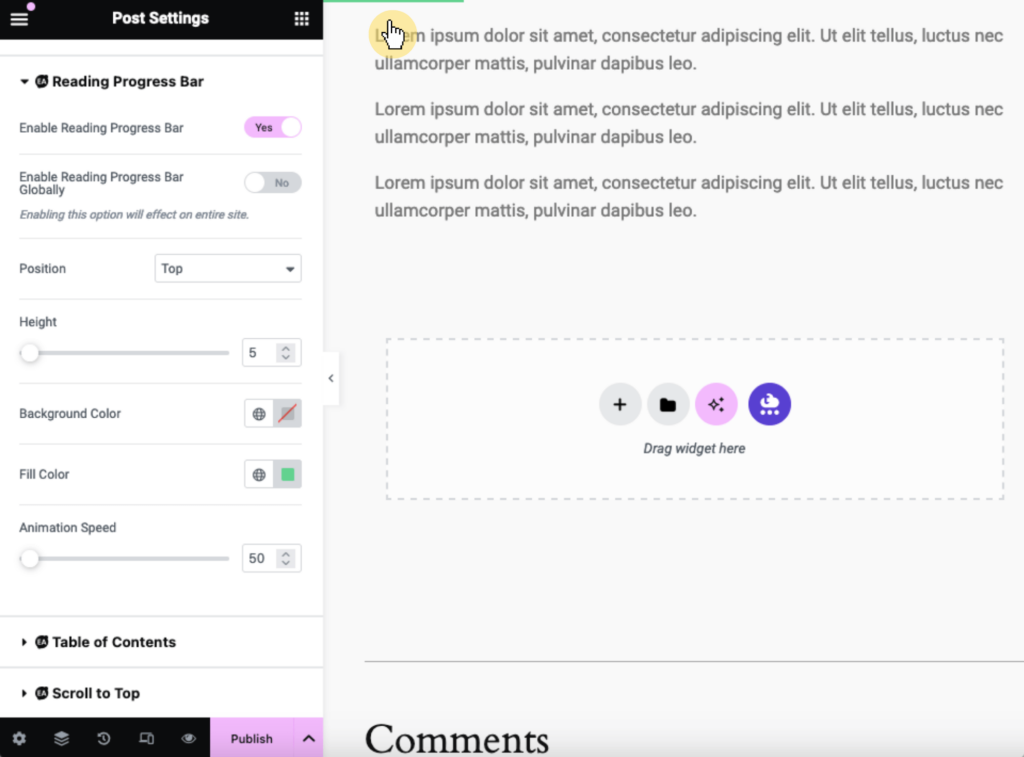
This extension is particularly useful for long-form content, which encourages readers to continue scrolling and stay engaged with the material.
You can customize various aspects of the progress bar, including its:
- Position
- Height
- Animation speed
- Colors
All to match your website’s design and branding.
Finally, there is the scroll to top extension which allows visitors to quickly return to the top of a webpage with a single click.
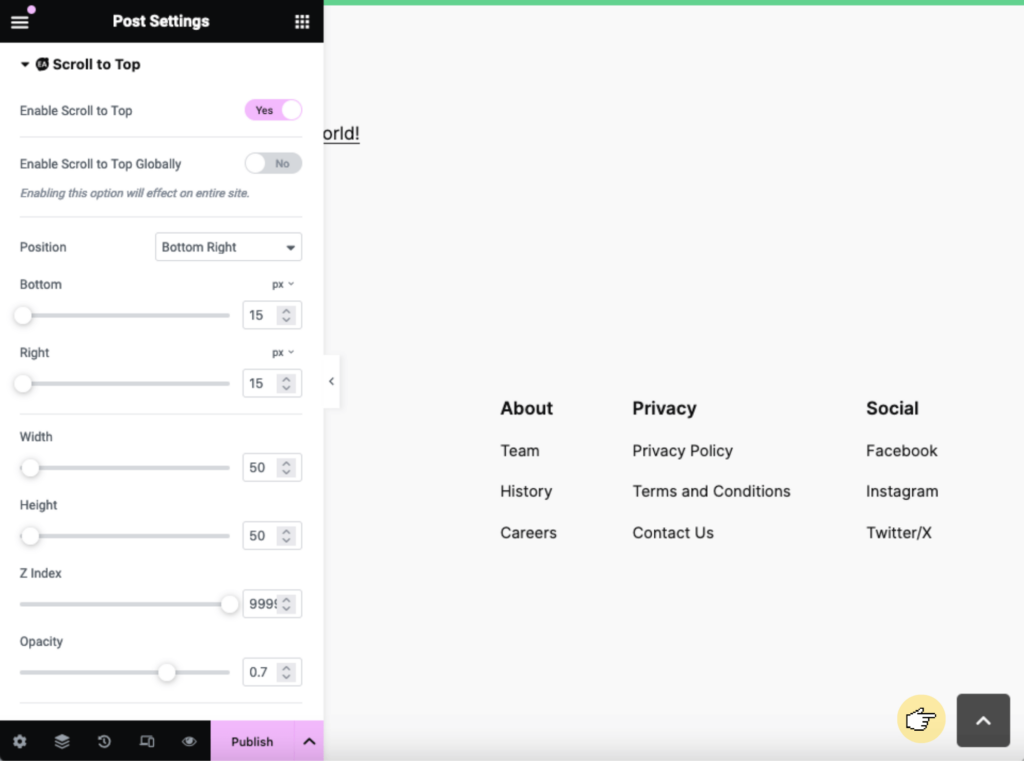
This extension allows you to enable the scroll-to-top button globally across your entire site or configure it for specific pages.
3. Templates
Essential Addons also provides access to over 5,000 pre-made templates and blocks through Templately.
These templates cover various categories, including:
- Landing pages
- Portfolios
- Blogs
- Ecommerce sites
Here’s an example of a template you can use if you have an aerial photography blog or business:
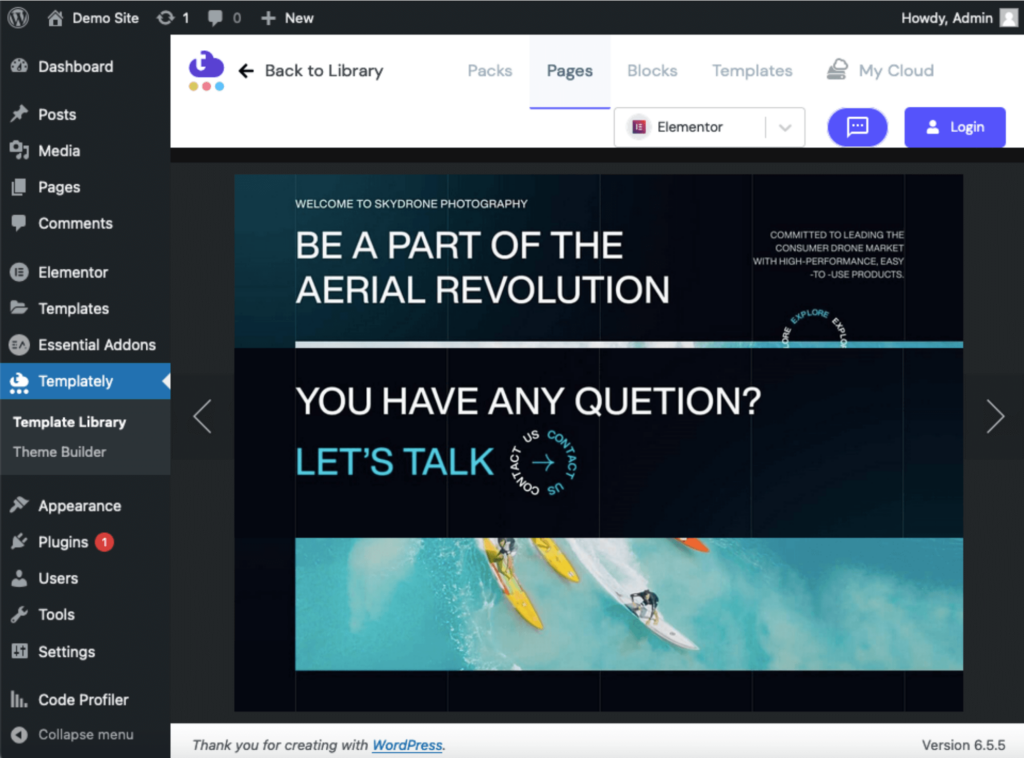
To access this and all other templates, navigate to your dashboard and head to Templately > Template Library.
Like this:
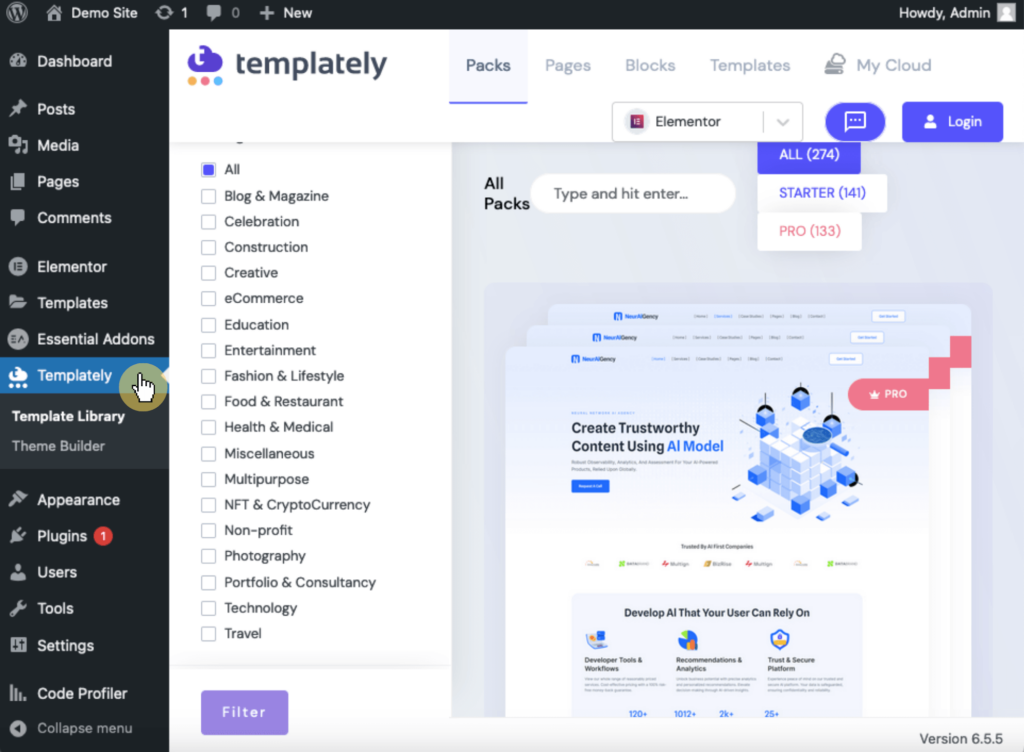
Once you find a template you like, you can import it into your Elementor layout with a single click, which will then add pre-designed sections and elements.
Convenient! 🙂
⚠️ Note: You might notice some templates have prices. That’s because some of them aren’t free and need to be purchased separately.
👋 My thoughts here
After exploring its various features, I’m particularly impressed by several aspects that set it apart from other similar plugins.
Here are three specific features that I find especially valuable:
- The ability to enable or disable individual elements and extensions, as it allows me to optimize my website's performance by only activating the features I need.
- The access to over 5,000 ready-made templates and blocks through Templately is a game-changer (though some templates aren’t free).
- The unique widgets like the protected content and interactive circle are not commonly found in other add-on packages.
Overall, you can find almost everything (if not everything) you need to improve your site’s functionality and improve the user experience.
Reliability
For reliability, I give it 4.5 out of 5.
Here’s why:
- Essential Addons demonstrates excellent performance, using less memory than 64% of other plugins while being faster than 99% of them.
- The lack of dates in the changelog for the pro version makes it difficult for users to track the frequency and timing of updates.
- The frequent updates and consistent maintenance of the lite version show a strong commitment to keeping the plugin reliable.
The overall reliability of Essential Addons is strong, with consistent improvements and bug fixes ensuring it remains a trustworthy tool for web developers and designers.
Performance
For performance, Essential Addons demonstrates strong results in both memory usage and page speed within the website.
Here’s data from WP Hive when they checked version 5.9.24 of Essential Addons using their own test script:
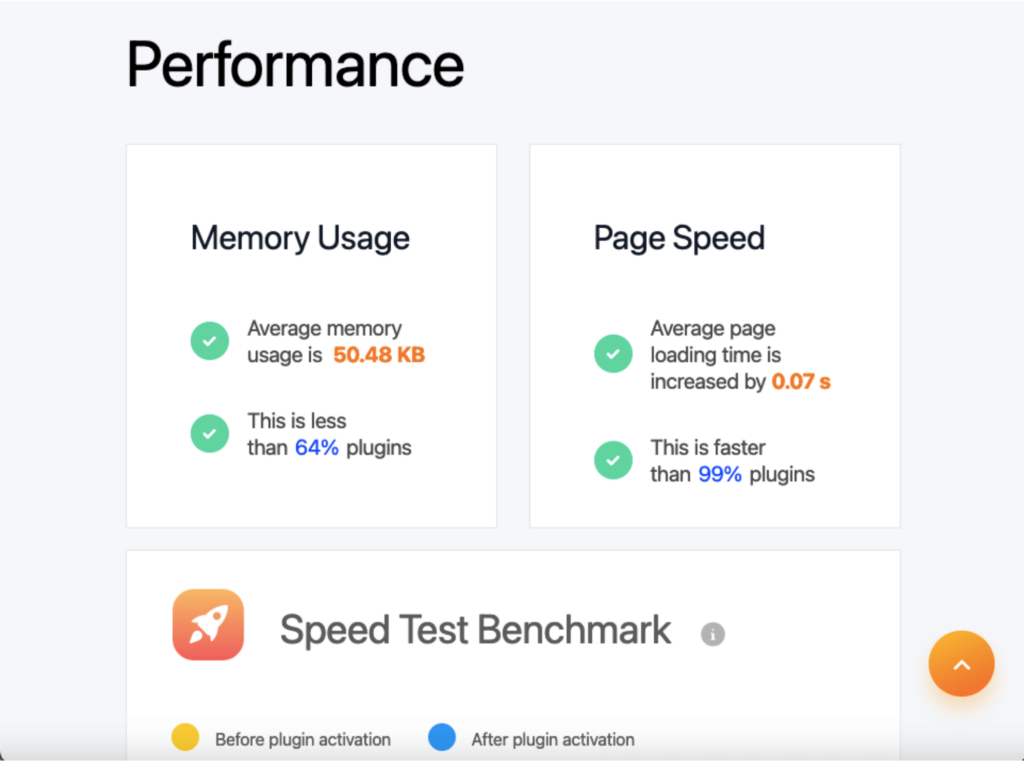
Essential Addons’ memory usage is less than 64% of plugins despite the vast set of features it offers, and it’s faster than 99% of plugins.
I also tested Essential Addons using the Code Profiler plugin, and the results are:
- Website frontend: 0.033
- Admin backend: 0.02
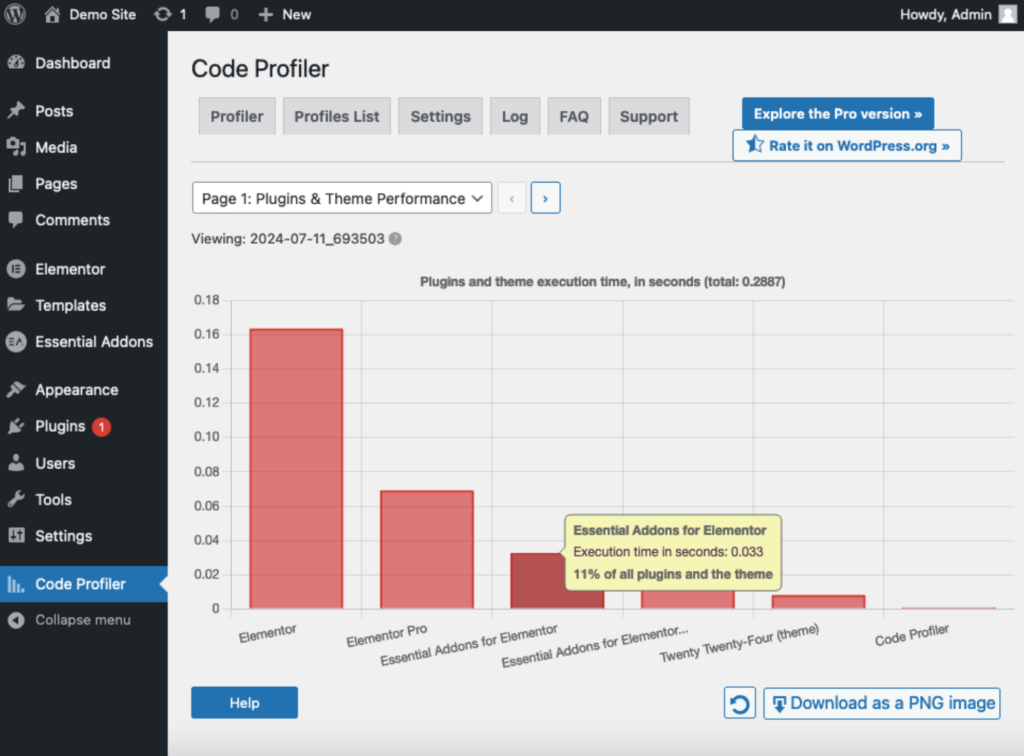
Let’s compare it with Element Pack and Premium Addons:
| Feature | Essential Addons | Element Pack | Premium Addons |
| Page Speed | 0.07 seconds | 0.07 seconds | 0.02 seconds |
| Average Memory Usage | 50.48 KB | 1.74 KB | 31.85 KB |
| Code Profiler (Front) | 0.033 | 0.064 seconds | 0.025 seconds |
There are some minor differences between all three of them — but essentially, in real life, they feel similarly fast.
The only thing that caught my attention though is how Element Pack is so ahead of its pack in terms of average memory usage. 😲
👉 Related: Element Pack Review: Ultimate Elementor Expansion?
Updates and Maintenance
Essential Addons is also doing well in terms of updates and maintenance.
You can check their changelog here:
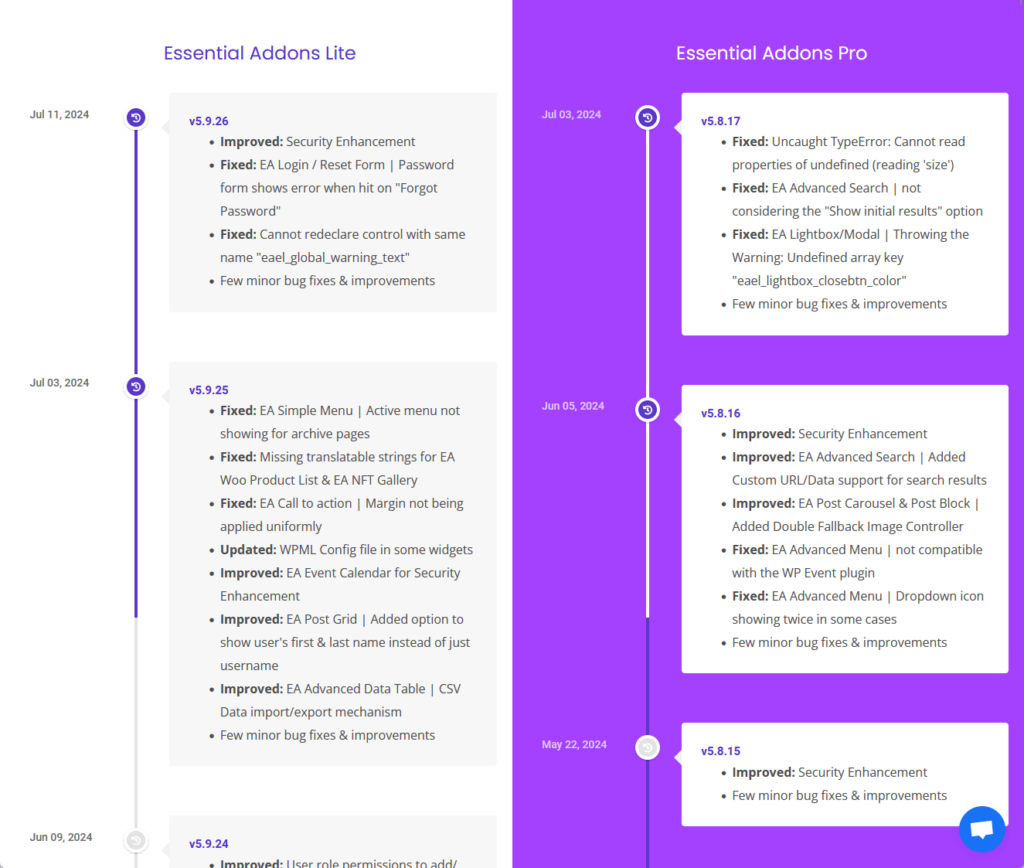
From the screenshot above, you can see that they have changelogs for both lite and pro versions.
Upon scrolling through the changelogs, I noticed that Essential Addons Lite updates 2-4 times per month. 😲
Here are my other observations with the changelog:
- There are no dates indicated in the Essential Addons Pro changelog, which makes it difficult to track the frequency of updates for said version.
- The lite and pro versions get almost the same amount of love from the developers in terms of the number of improvements and bug fixes.
I’m convinced that Essential Addons is keen on delivering the best performance from its products, regardless if it’s the free or paid version. 🙂
👋 My thoughts here
For me (and I’m sure many would agree), Essential Addons demonstrates a high level of reliability in terms of performance, updates, and maintenance.
Here are some of the things that stood out to me:
- Essential Addons takes up very little memory space despite the many features it offers.
- The ability to enable or disable individual elements and extensions not only allows for granular control but also optimizes site performance and loading speed.
- It’s updated regularly to introduce new features, fix bugs, and enhance security.
All told, Essential Addons is doing good in terms of performance and is likely to continue improving given its consistent maintenance.
Support
My rating here is 3.9 out of 5.
Here’s why:
- The knowledge base of Essential Addons is outstanding, offering comprehensive documentation, video tutorials, and a community forum.
- Although there were 16 customer service representatives online, it took 18 minutes to receive a response to a simple query.
- The availability of both live chat and ticket support is a strong point, offering users flexibility in how they seek help.
The combination of extensive resources and multiple support channels makes Essential Addons a reliable option for users needing assistance.
However, there's room for improvement in live chat responsiveness to enhance the overall user experience.
Customer Service
Essential Addons has two options for customer support through the WPDeveloper website:
- Start live chat
- Create a new ticket
Here:
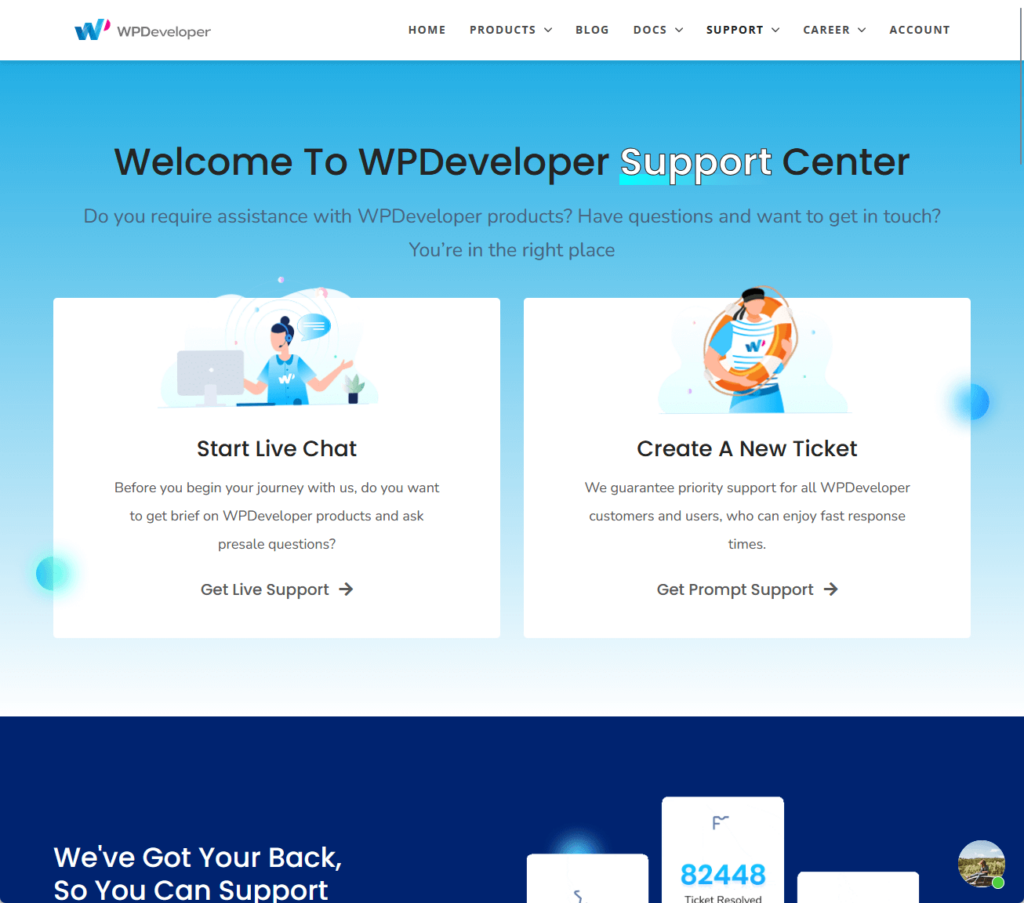
⚠️ Note: If you’re not sure why you’re seeing WPDeveloper, that’s because they’re actually the parent company of Essential Addons. 🙂
Both lite and pro users can access live chat support for pre-sale queries, general inquiries, and instant troubleshooting.
Here’s what the live chat looks like:
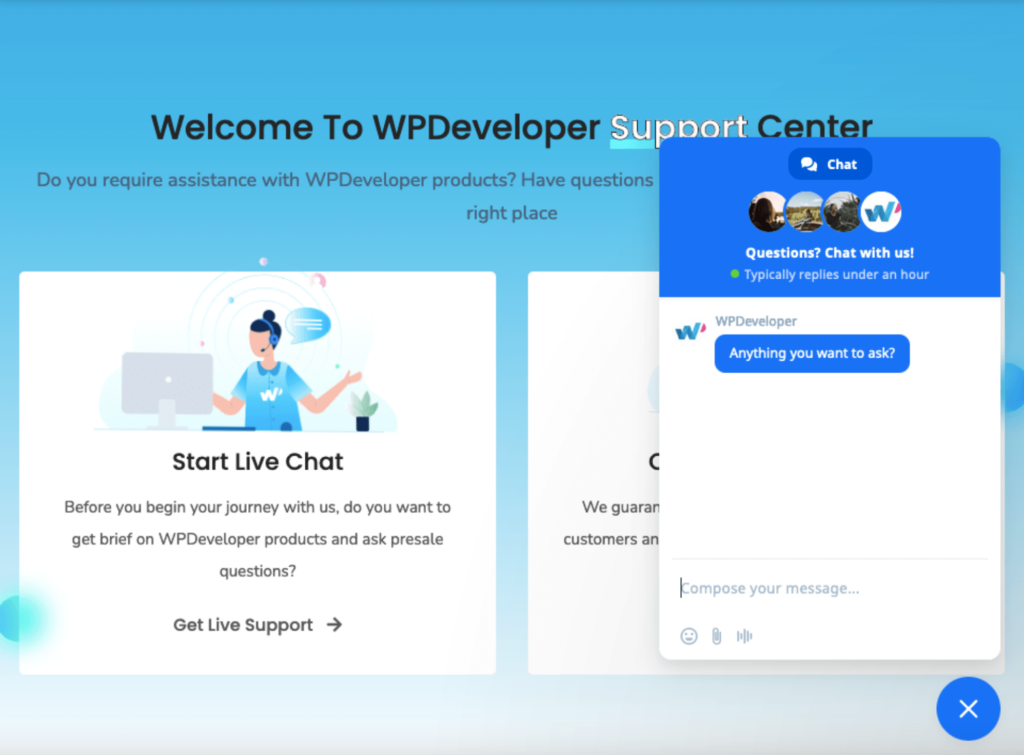
Based on their website, customer support typically replies within an hour and to test this, I tried sending a query to their live chat.
Once you click send, they will ask you for your email (presumably for identity verification follow-up and detailed support).
At the time I sent my query, 16 customer service representatives were online, yet my message was only read after 3 minutes and my query responded to after 18 minutes.
Not the most ideal waiting time, though. 🤷
The other option is to create a new ticket, which is ideal for more complex issues that require detailed investigation and personalized assistance.
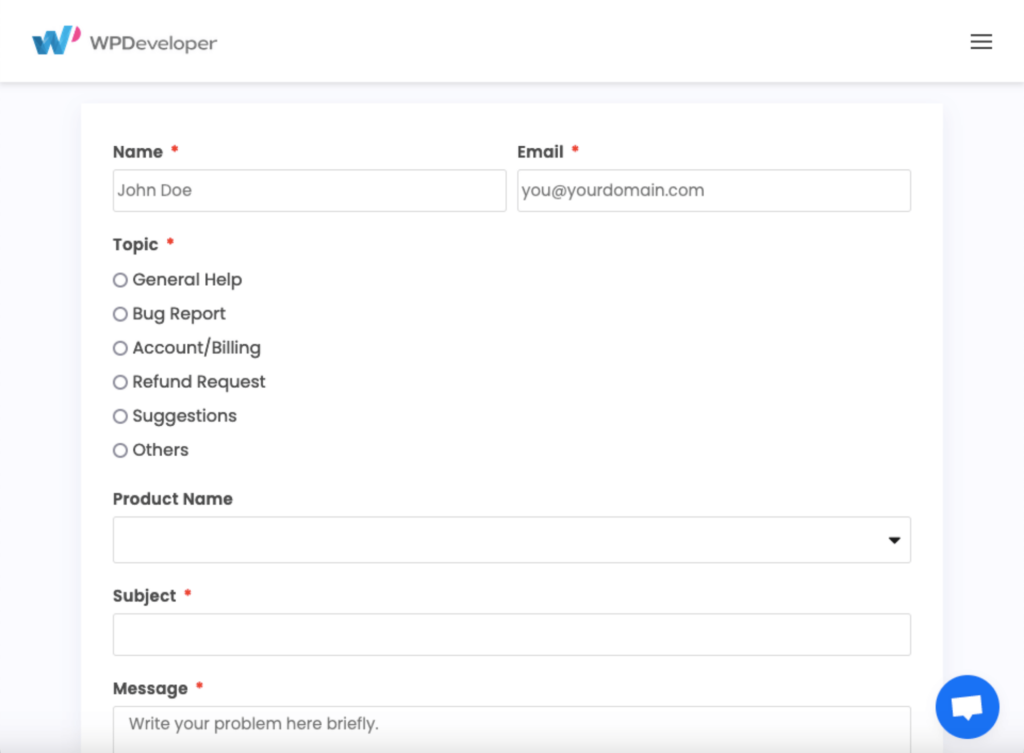
Users can provide comprehensive information about their problems, which helps the support team to offer more accurate and effective solutions.
Knowledge Base
Essential Addons’s knowledge base consists of its comprehensive documentation, video tutorials, and community forums.
The documentation section on their website provides extensive guides on how to use each element, extension, and feature.
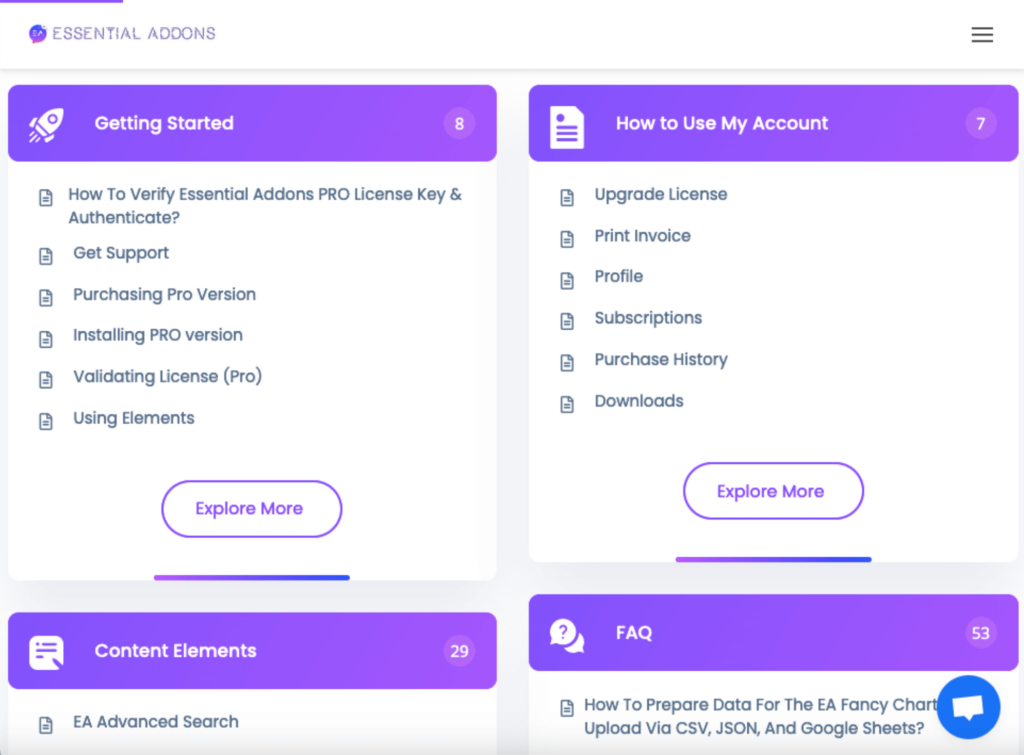
This includes step-by-step instructions, screenshots, and examples to help users understand and implement the features effectively.
This section is organized into various categories, which makes it easy for users to find the specific information they need.
Essential Addons also offers a series of video tutorials (demos) that visually guide users through the installation process, configuration, and usage of different elements and extensions.
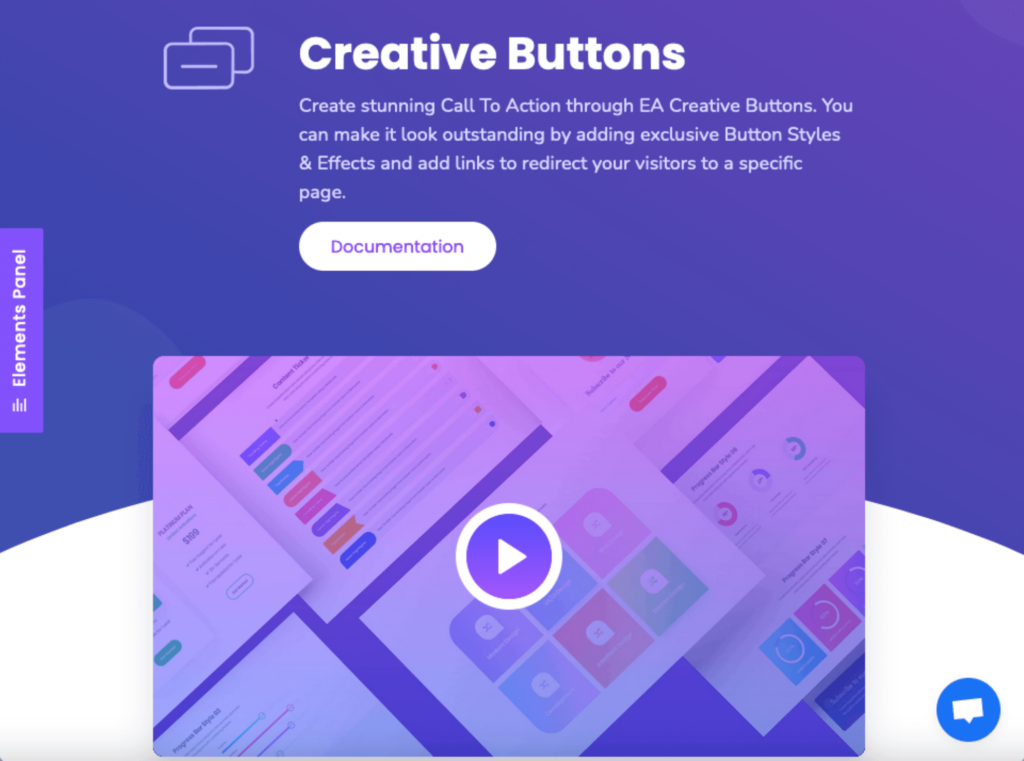
These tutorials are particularly helpful for visual learners who prefer watching demonstrations
There’s also a community forum in the form of a private Facebook group which you can access by clicking the website’s main menu > get help > community.
Users can connect with the community to get help and suggestions, share their experiences, and offer solutions.
Without a doubt, I am very impressed by Essential Addons’ vast and comprehensive knowledge base. 💯
👋 My thoughts here
Here are my thoughts about the support for Essential Addons:
- The knowledge base clearly trumps competitors in terms of comprehensiveness.
- The documentation is complete with screenshots, gifs, and videos, which sets it apart from other competitors.
- However, they could probably work more on customer support response time, as it took a while for them to respond to my simple query.
But in total, however, Essential Addons’ support is still laudable. 👏
Pricing
For pricing, I rate Essential Addons a 4.0 out of 5.
Here’s why:
- The lifetime unlimited plan includes all pro widgets and extensions, support for unlimited websites, and lifetime support and updates.
- The upfront cost of the pro plans might be a barrier for some users, especially those with limited budgets.
- The 14-day money-back guarantee might not be sufficient for users to fully explore all the features and decide whether the investment is worth it.
Overall, it offers a good balance between cost and value, making it a solid investment — provided they can manage the upfront expense. 😅
Cost Breakdown
Essential Addons Pro offers 4 different pricing plans:
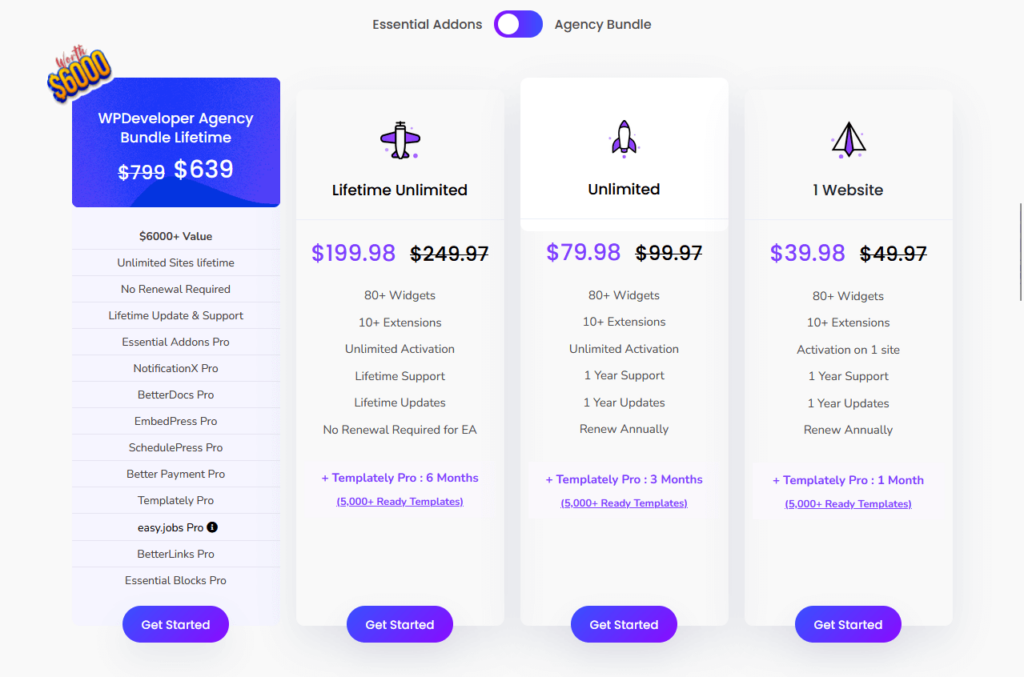
For me, the lifetime unlimited plan stands out for its one-time payment, lifetime access to all pro widgets and extensions, unlimited site activations, and lifetime support and updates.
This plan is a cost-effective solution for long-term users. 👍
If you’re an agency or personnel in need of faster and deeper support, along with customized solutions to meet your needs, you can contact them to avail of the enterprise support.
By the way, you can see above that they have an “agency bundle”, that includes all of their products in addition to Essential Addons.
Money Back Guarantee/Refund
Essential Addons also has a 14-day money-back guarantee policy for all of its plans.
Here’s a look at their refund policy:
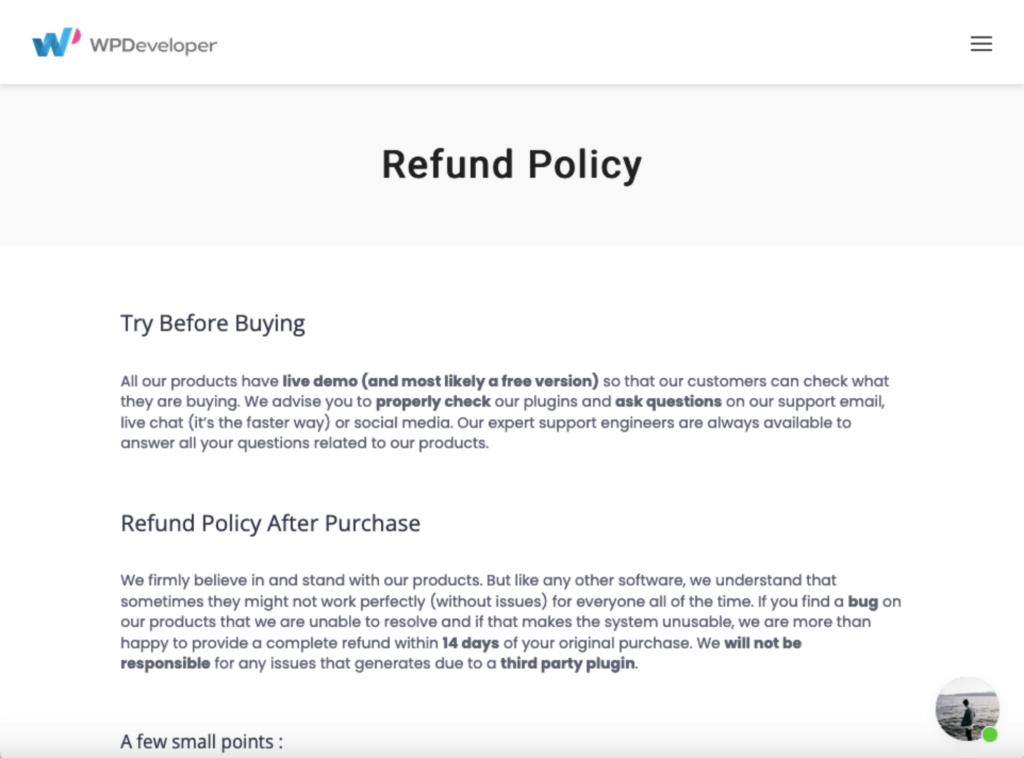
Here are some of the details:
- WPDeveloper cannot provide refunds due to technical issues unless you allow them to adequately try and assist you.
- Refunds may only be issued within 14 days of the purchase date — after 14 days, no refunds can be processed.
- A refund will not be issued for any custom feature that wasn’t present when you bought it.
For most customers, however, who are only trying to test out Essential Addons Pro before committing to it, these shouldn’t be an issue.
👋 My thoughts here
The pricing and refund policy for Essential Addons has its pros and cons.
Here are some of my thoughts about it:
- The free version (which gives access to 40 widgets) is actually comprehensive enough for those who own or handle smaller websites.
- While the plans offer excellent long-term value, the upfront cost can be a barrier for some users, especially those with limited budgets.
- The 14-day money-back guarantee policy may not be long enough for some users to try all of its features.
On the bright side, the pricing plans for Essential Addons are well-structured and offer good value. 🙂
Final Thoughts
When considering Essential Addons, I recommend you start by thoroughly evaluating your current and future website needs.
If you're managing multiple sites or anticipate long-term use, the lifetime unlimited plan offers the best value for money, providing ongoing access to all features without recurring costs.
However, if you're uncertain or on a budget, begin with the free version or a lower-tier plan to test its capabilities.
Keeping your site visually appealing and up-to-date can be a challenge, especially with the constant need for fresh themes and templates.

Darrel Wilson has an incredible offer that you simply can't ignore:
- Get lifetime access to all premium template kits designed for Elementor
- Complete with 2 years of dedicated support
- Only for $99 — that's already for the lifetime access
By investing in these template kits, you will streamline your design workflow.
This makes your site remain modern and engaging without the hassle of frequent updates or additional costs.