
Ease of Use
My rating here is 4 out of 5.
Here’s why:
- The plugin is simple to install and activate, even for beginners.
- While most settings are optimized by default, some essential features, like mobile cache, require manual intervention.
- The dashboard is user-friendly and organized, but certain features, like QUIC.cloud stats, may be irrelevant or overwhelming for users not using LiteSpeed-specific services.
LiteSpeed Cache is almost effortless to use, thanks to its quick setup and intuitive interface.
Initial Setup
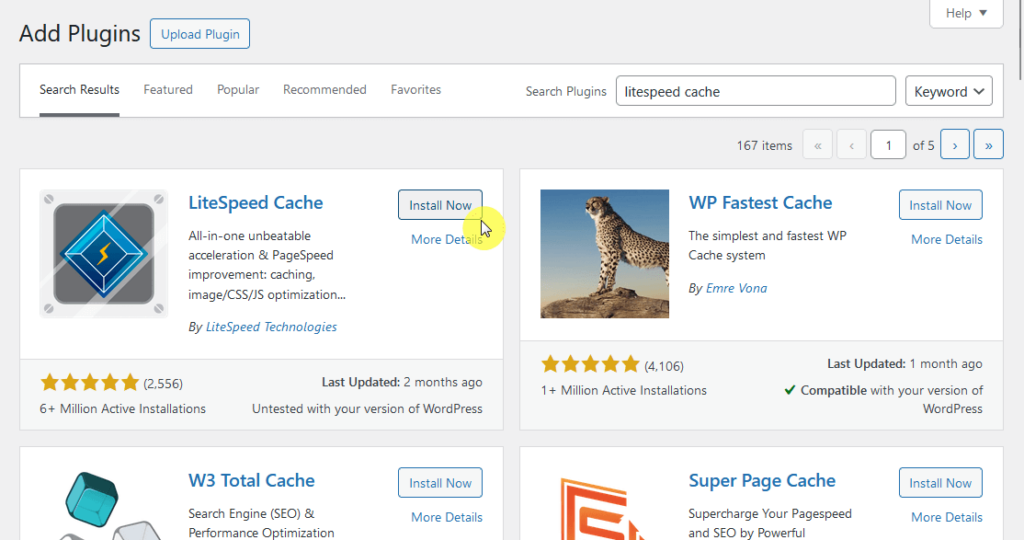
LiteSpeed Cache only has one plugin, which you can easily install from the WordPress plugin repository.
On your site’s admin area, navigate to plugins > add new and search for “litespeed cache” in the search bar.
Then install and activate the plugin:
Nice! 🙂
By default, the regular caching feature (and general features) are enabled even if you’re not using a LiteSpeed server.
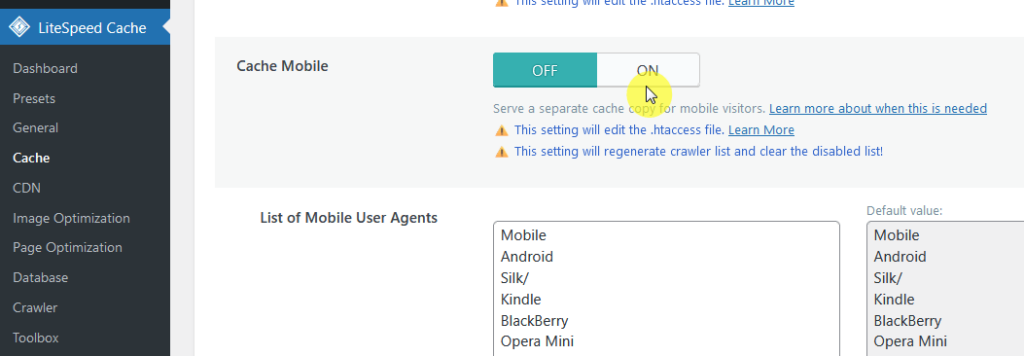
The only thing you may want to enable on your own is the cache mobile, which is under the “Cache” option.
It’s not enabled by default:
After activation, the plugin's default settings are optimized for most sites.
However, you can explore additional features like image optimization and database cleaning for further enhancements.
User Interface
LiteSpeed Cache has an organized user interface, with a dedicated dashboard where you can see and manage the optimization and caching features.
It looks like this:
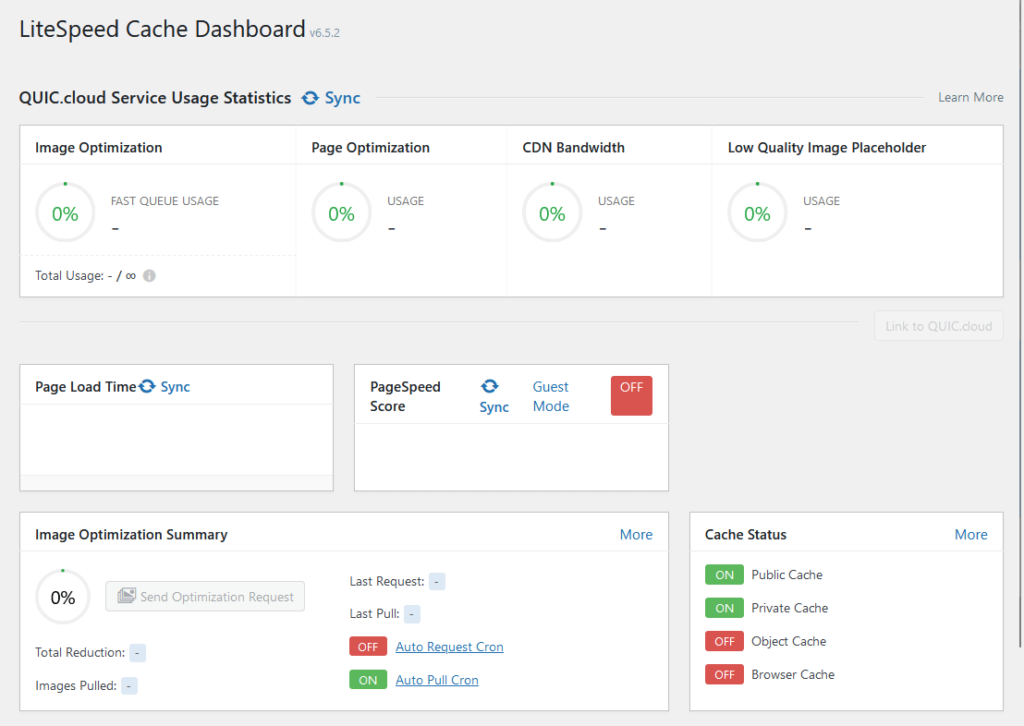
The biggest display here is its QUIC.cloud service usage statistics, which are only relevant to those using LiteSpeed products.
Besides that, I like that it has info here on things like:
- Cache status
- Page load time
- PageSpeed score
- Image optimization summary
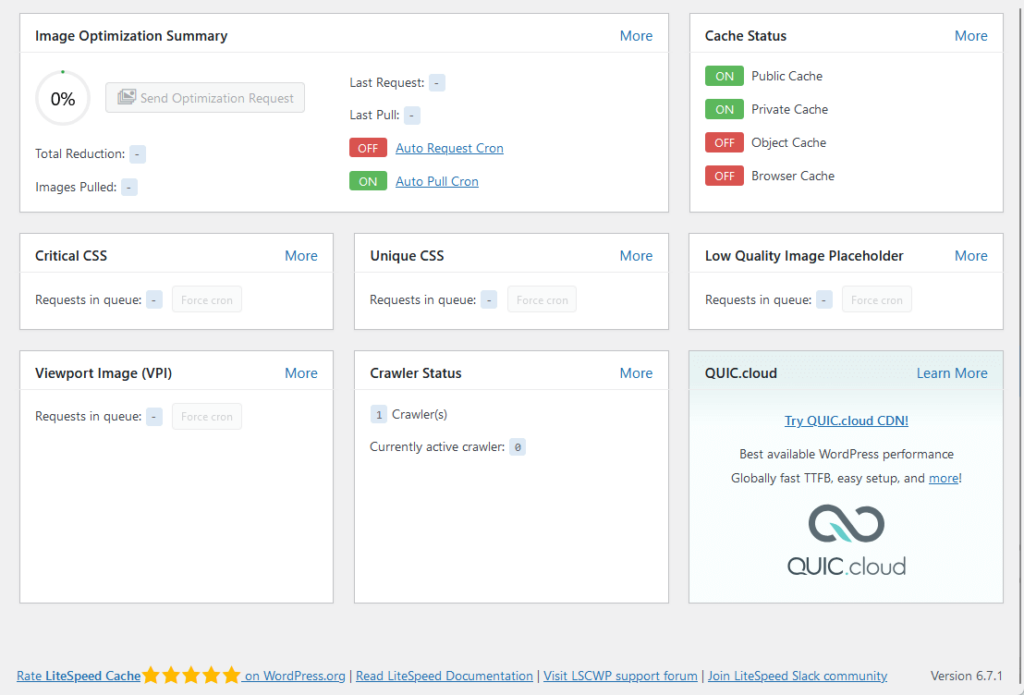
Each of the items in the dashboard has buttons that will take you to the dedicated pages of these features.
For navigation, you can use the buttons in the side panel in the admin dashboard to move to the different pages of the plugin.
👋 My thoughts here
LiteSpeed Cache only has one plugin, so installing and setting it up is a breeze.
Here are my thoughts here:
- The plugin is simple to set up, even for users new to WordPress.
- The default settings work well for most websites, which saves time for beginners while allowing customization for advanced users.
- It has a nice and helpful dashboard complete with summaries.
Personally, I found the experience of setting up and using LiteSpeed Cache to be seamless and straightforward. 😊
It’s clear that a reliable hosting provider is essential for maximizing website performance and efficiency.
Hostinger, with its robust infrastructure, is the perfect partner for LiteSpeed Cache’s powerful optimization features.

Discover the Hostinger advantage for your WordPress site:
- Enjoy a 99.9% uptime guarantee
- Affordable pricing at just $2.49/month (use the code darrel10 to get a discount)
- Global performance and reach with Hostinger's optimized hosting platform
For seamless caching and top-tier optimization, Hostinger delivers the hosting foundation your WordPress site needs.
Best Features
I give its best features a rating of 4.3 out of 5.
Here’s why:
- The pre-configured presets cater to various skill levels, making optimization quick and accessible for all users.
- Features like QUIC.cloud CDN integration is tied to LiteSpeed servers, limiting access for users on non-LiteSpeed hosting.
- While convenient and effective, the feature requires processing through QUIC.cloud, which may involve extra steps for setup or compatibility concerns.
It stands out for its powerful and practical features like presets and image optimization, though some limitations tied to LiteSpeed servers keep it from achieving a perfect score.
Here are some notable features of LiteSpeed Cache:
1. LiteSpeed Cache Configuration Presets
I always love features that might seem small, but can actually save you a lot of time.
This is one of those features, which are simply pre-configured settings made for specific needs so users can get started without extensive technical know-how.
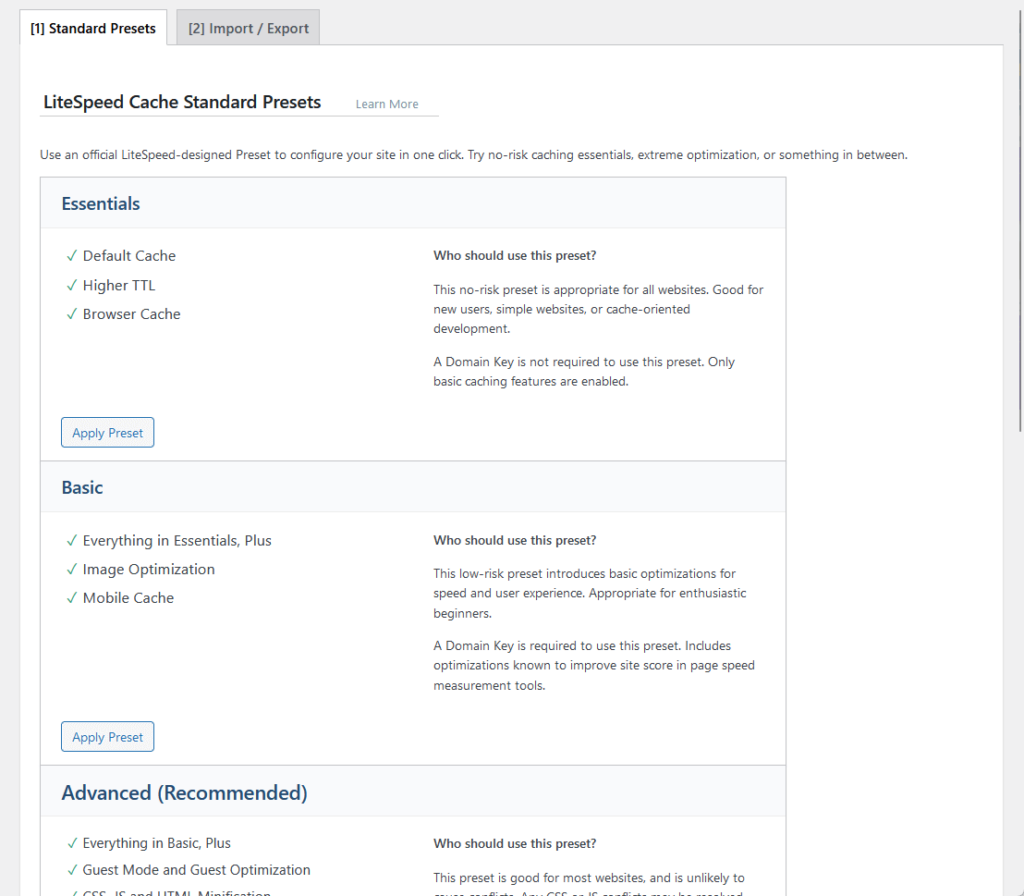
Here are the presets available:
| Preset | Features | Who Should Use It? |
| Essentials | Default cache, higher TTL, browser cache | Ideal for all websites; perfect for beginners and simple setups. |
| Basic | Everything in Essentials, plus image optimization and mobile cache | Great for enthusiastic beginners looking for basic optimizations. |
| Advanced | Everything in Basic, plus Guest Mode, CSS/JS minification, Gravatar cache, and font optimization | Recommended for most websites; balances performance with compatibility. |
| Aggressive | Everything in Advanced, plus CSS/JS combine, critical CSS, and lazy load for iframes | Suited for websites that need strong optimizations but may require some exclusions for CSS/JS conflicts. |
| Extreme | Everything in Aggressive, plus lazy load for images, viewport image generation, and JS delay | Designed for power users aiming for maximum optimization; requires testing for compatibility. |
To use any of the presets here, you simply need to click its “Apply Preset” button (make sure to review the applied settings).
I like these presets are they ensure optimal performance with minimal manual adjustments, nice for those who want quick results without going into every setting.
2. Image Optimization
With this feature, you won’t need to use a third-party image optimization tool.
This feature streamlines the process of reducing image sizes while maintaining quality, improving site performance, and reducing page load times.
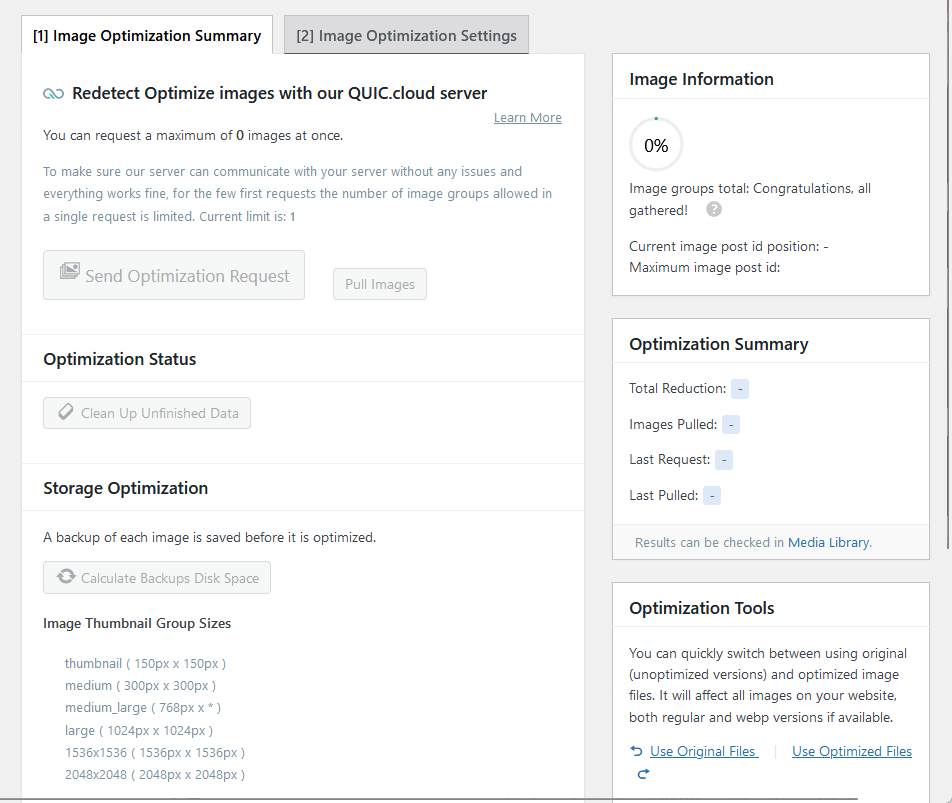
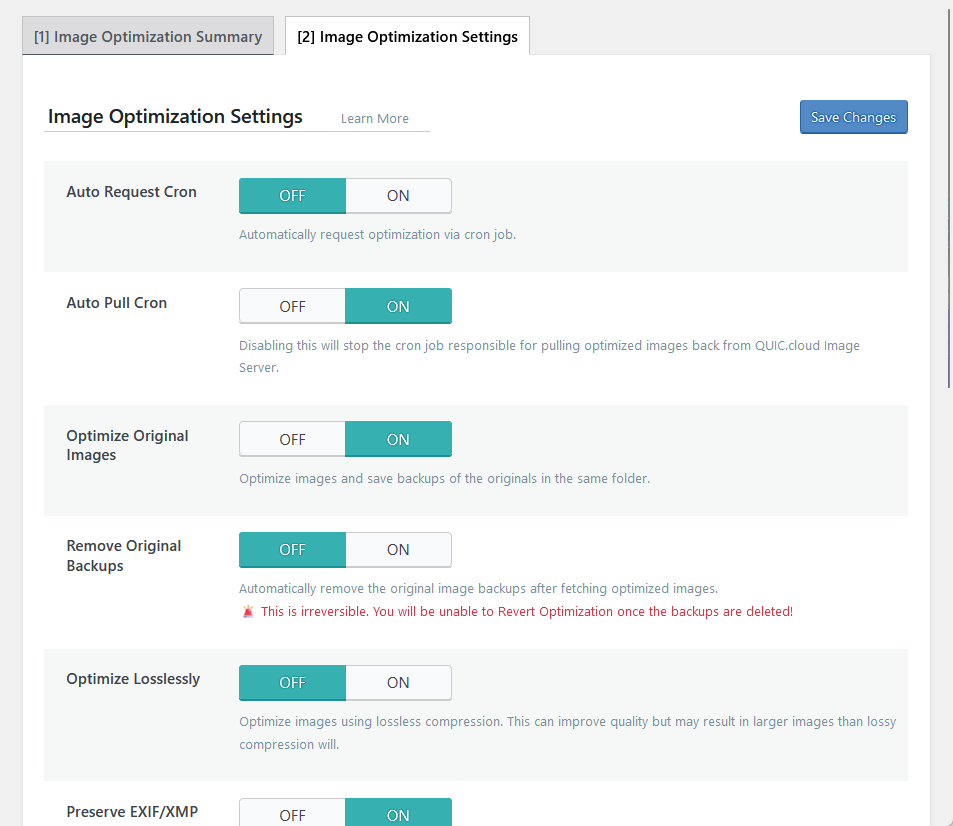
Its key features include:
- QUIC.cloud Server Optimization
- WebP conversion
- Lossless and lossy compression
- Automatic optimization
- Backup management
To use it, simply head over to the image optimization section, request optimization for your images, and select the conversion and compression.
You will be able to review the optimization results directly in the media library, and you can see the status in the dashboard or the image optimization summary page.
3. Database Cleaner and Optimizer
Got another gem here! 💎
This database cleaner and optimizer helps maintain a fast and efficient website by removing unnecessary data and optimizing database performance.
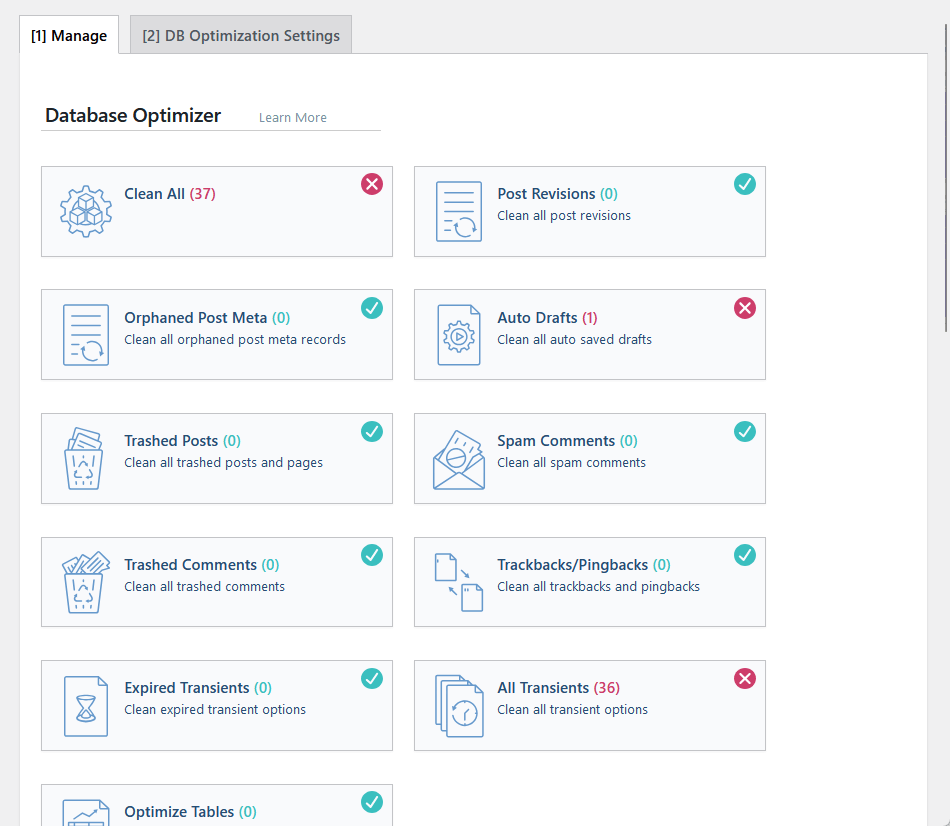
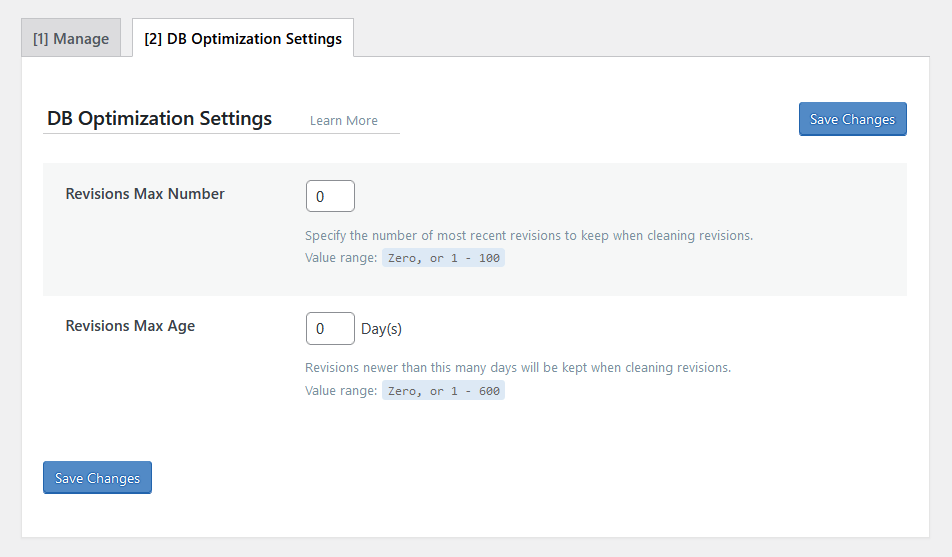
Here are its key features:
- Post and comment cleanup
- Clean expired transient options
- Repair and optimize database tables
- Make your database use the InnoDB engine
- Customizable revision limits
If you want to use it, head over to the “Database” section, and in the “Manage” tab, click the tool that you want to use.
Yes, the boxes in there are literally the buttons for the tools, and when you click on one, it will run that tool right away.
4. QUIC.cloud CDN Integration
LiteSpeed Cache integrates seamlessly with QUIC.cloud CDN for enhanced global content delivery and optimization.
This integration ensures faster loading times by serving cached content through a distributed network.
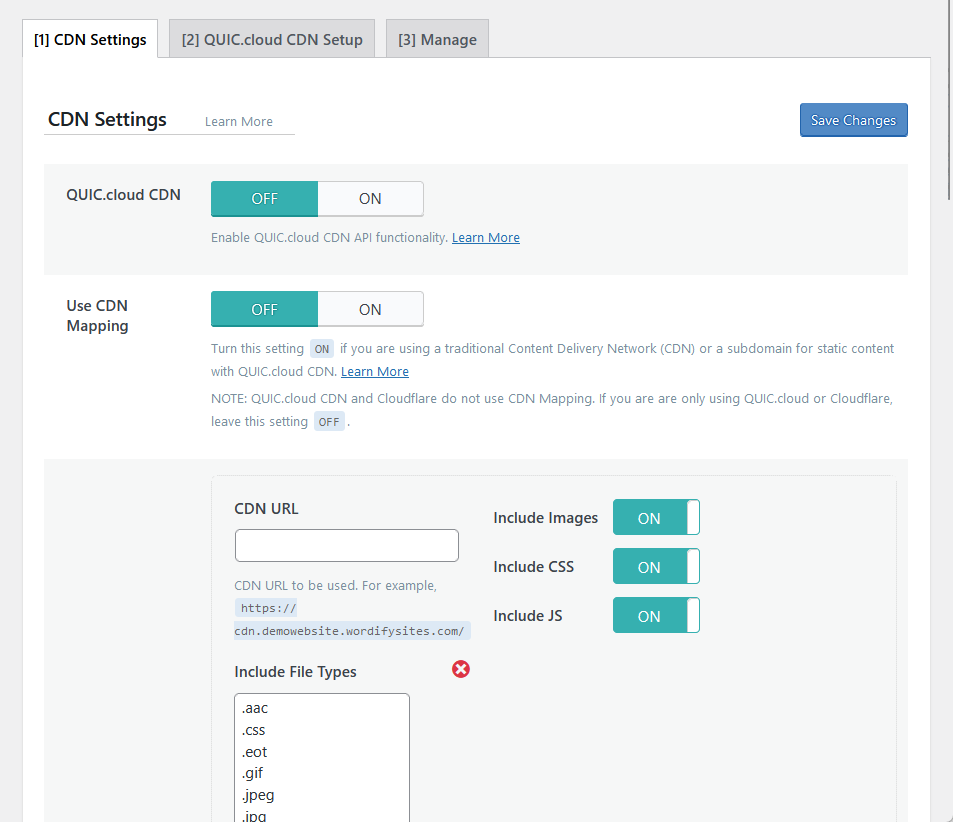
Here are its key features:
- Global content delivery
- Dynamic content acceleration
- Automatic image optimization
- Built-in security features
Take note that you need to register your site with QUIC.cloud and enter your API key for you to use this feature.
In the CDN section, there’s a QUIC.cloud CDN setup tab where you can link to QUIC.cloud and run a CDN setup.
👋 My thoughts here
It’s clear the LiteSpeed Cache has some heavy-duty features.
Here are my thoughts here:
- The configuration presets are a game-changer when it comes to efficiency.
- As I explained earlier, the built-in image optimization eliminates the need for external tools.
- The CDN integration adds a layer of performance optimization.
Unfortunately, you can’t use the QUIC.cloud CDN integration unless you use LiteSpeed servers as well (considering LiteSpeed Cache is free).
Reliability
For reliability, I give it a high 4.6 out of 5.
Here’s why:
- LiteSpeed Cache outperforms competitors with significantly lower execution times for both frontend (0.023 seconds) and backend (0.027 seconds).
- While updates are frequent, some features may rely heavily on them, which could cause slight disruptions if bugs arise or updates are delayed.
- The plugin is actively maintained and updated, but users relying on automatic updates must ensure compatibility with their specific setups after each release.
LiteSpeed Cache is highly reliable, delivering superior performance and regular updates to keep it ahead of competitors.
Minor concerns about update reliance don’t overshadow its consistency and speed. 🚀
Performance
I want to see how the plugin itself performs, so I run Code Profiler, and here are the results:
- Website frontend: 0.023 seconds
- Admin backend: 0.027 seconds
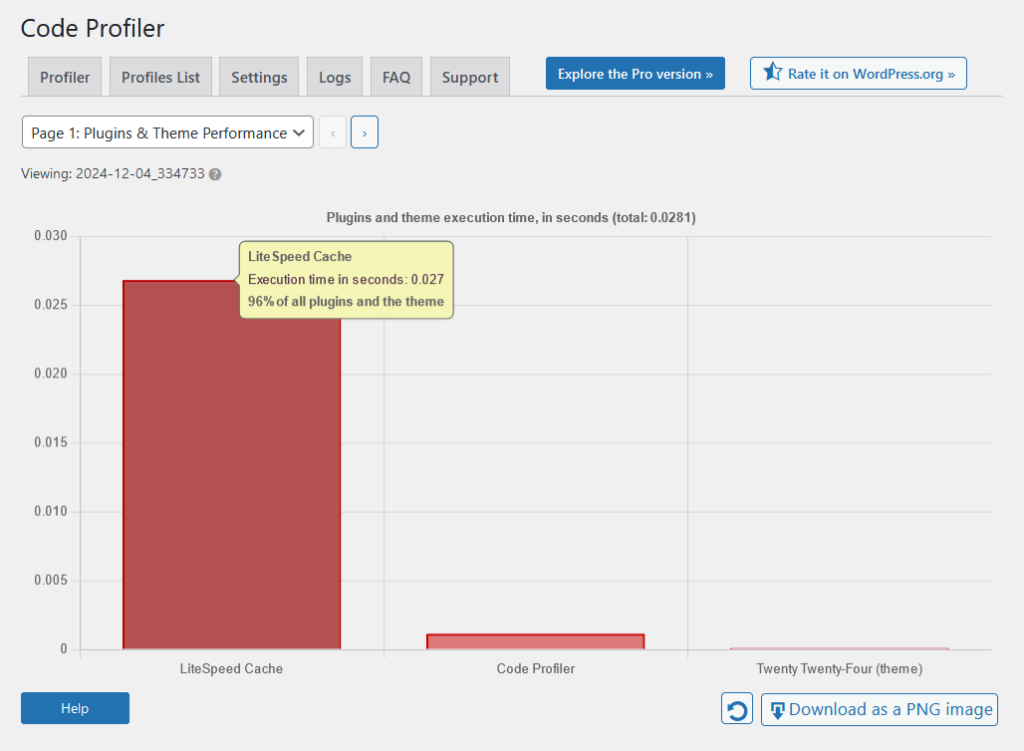
For comparison with its competitors (lower is better):
| Feature | LiteSpeed Cache | W3 Total Cache | WP Rocket |
| Website Frontend | 0.023 seconds | 0.117 seconds | 0.107 seconds |
| Admin Backend | 0.027 seconds | 0.044 seconds | 0.103 seconds |
As you can see, LiteSpeed Cache shows excellent performance on both the website frontend and the admin backend.
This means that LiteSpeed Cache demonstrates a balanced approach to optimizing both the frontend and backend, maintaining low execution times in both areas.
These results highlight LiteSpeed Cache as a high-performing option compared to its competitors, especially for users prioritizing speed.
The performance stats reflect real-world benefits, where faster execution times translate into better user experiences and reduced server strain.
Updates and Maintenance
As you may have guessed, LiteSpeed Cache is actively maintained, with regular updates to enhance functionality and security.
Since it’s a free plugin, you can easily find its changelog on its page on the WordPress plugin repository:
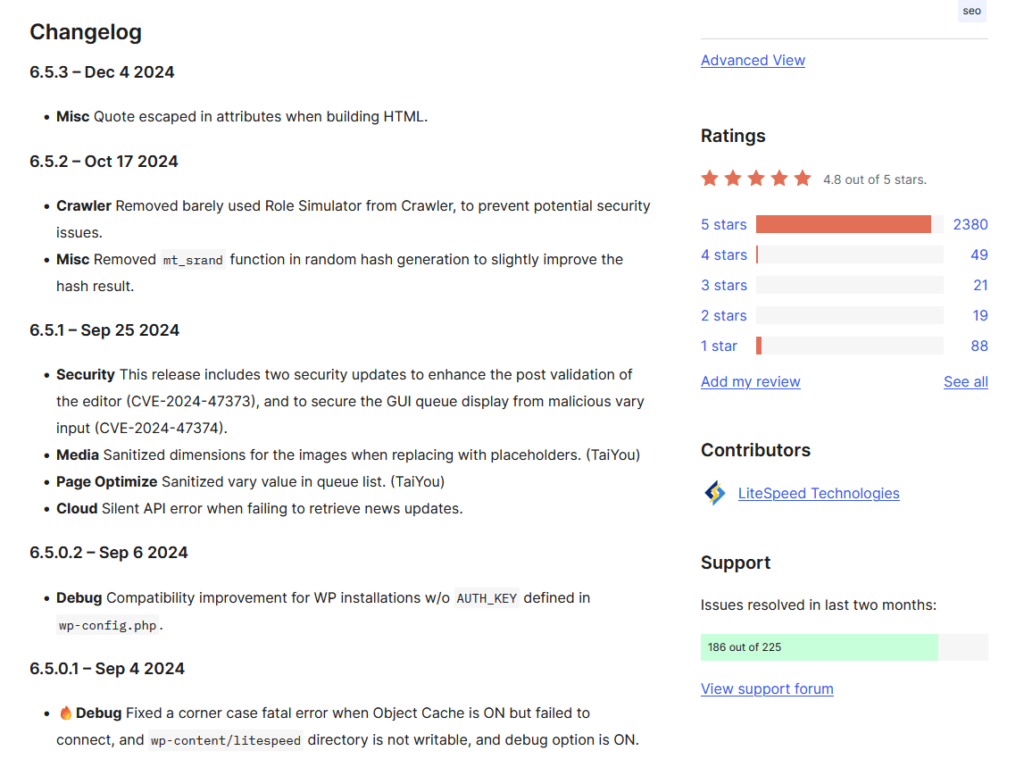
The development team frequently releases new versions, addressing bugs and introducing improvements.
Users can enable automatic updates to receive the latest versions promptly.
LiteSpeed Cache has a green flag here, with checks on:
- Active maintenance
- Frequent updates
- Changelog availability
These updates keep LiteSpeed Cache reliable, secure, and aligned with modern performance standards.
👋 My thoughts here
I’m pretty happy with the results so far for LiteSpeed Cache.
Here are my thoughts here:
- It demonstrates top-tier speed by outperforming competitors on both frontend and backend execution times.
- Its low execution times for both the website frontend and admin backend show a well-rounded approach to performance enhancement.
- Regular updates and a detailed changelog indicate strong developer commitment.
All these points highlight LiteSpeed Cache as a reliable, performance-driven tool with consistent updates and real-world advantages.
Support
For support, I give it a 3.6 out of 5.
Here’s why:
- Users can access documentation, a support forum, and a Slack community, ensuring flexibility in seeking help.
- The plugin’s documentation link points to a 404 page, and much of the content caters to developers, leaving beginners at a disadvantage.
- The WordPress.org forum is responsive and helpful, but the absence of live chat or direct customer support options might frustrate users needing immediate help.
LiteSpeed Cache offers solid support with various channels and an engaged community.
However, some usability gaps, like broken links and technical-heavy documentation, slightly dampen the experience.
Customer Service
LiteSpeed Cache provides several support options to ensure users can resolve issues quickly and efficiently.
On every page in the LiteSpeed Cache plugin, you will see the options at the bottom:

The options are:
- Documentation
- Support forum
- LiteSpeed Slack community
The support forum will bring you to the WordPress.org support forum of LiteSpeed Cache, where the community is actively engaged.
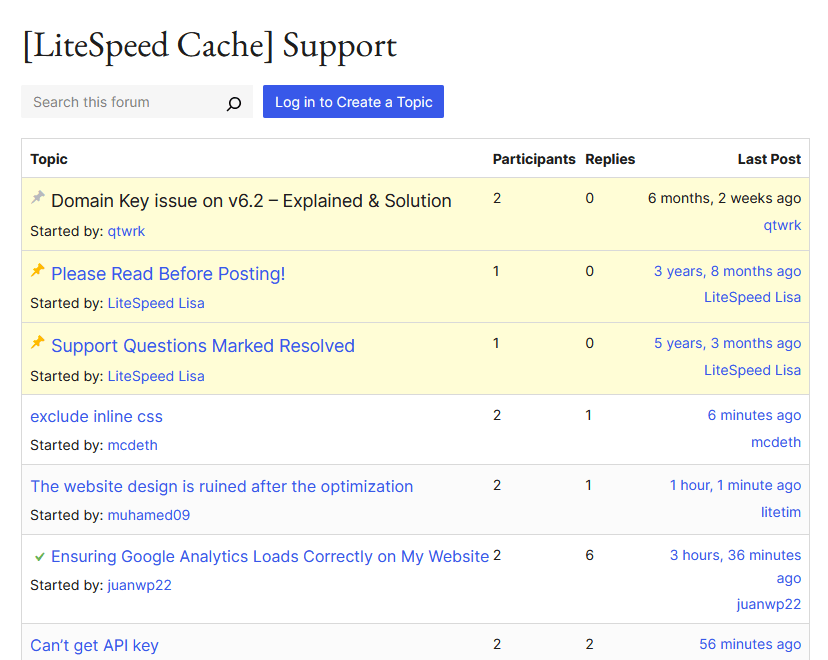
That means you can access the support forum directly from the plugin, and then ask a question there after logging in.
These support options ensure users have multiple channels to resolve their queries, which makes LiteSpeed Cache user-friendly and reliable for troubleshooting.
Documentation
LiteSpeed Cache provides detailed documentation to guide users in setting up and optimizing their websites with the plugin.
Here’s what it looks like:
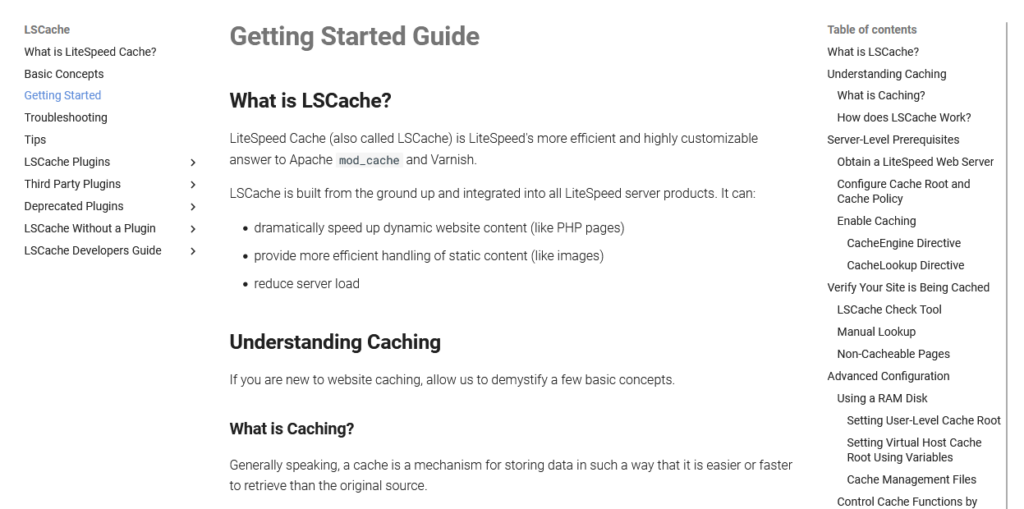
The documentation is thorough and covers nearly all aspects of LiteSpeed Cache.
However, it appears to be written primarily for developers or advanced users, with its heavy focus on technical details and server-level configurations.
For beginners or less technical users, the content might feel overwhelming.
While the basic concepts are covered, the lack of simple, step-by-step guides for everyday tasks could make it less accessible for casual users.
Additionally, there’s an issue with the link provided in the WordPress plugin, which currently points to a 404 page.
Here’s where I landed:

Fortunately, I was able to find my way around, but non-technical users might get frustrated.
LiteSpeed Cache documentation is well-written and valuable for developers and advanced users, but it could benefit from more user-friendly guides for beginners.
👋 My thoughts here
For support, I admit that LiteSpeed Cache started strong, then faltered down. 🙁
Here are my thoughts:
- LiteSpeed Cache offers several support options, including documentation, a support forum, and a Slack community.
- The WordPress.org support forum is actively monitored, making it a great resource for troubleshooting.
- The documentation is detailed and thorough but leans heavily toward developers and advanced users, making it less ideal for beginners.
While the documentation covers many topics, the lack of beginner-friendly, step-by-step guides might leave casual users feeling overwhelmed.
Not to add, the plugin's link to its documentation currently points to a 404 page.
Pricing
This one is quite short, but I give it a 4.2 out of 5.
Here’s why:
- The LiteSpeed Cache plugin itself is free and provides essential optimization tools, making it accessible to all WordPress users.
- Unlocking server-level caching or using QUIC.cloud services can incur additional costs, which may deter budget-conscious users.
- While costs depend on optional services like LiteSpeed Web Server or QUIC.cloud, users can scale their investment based on their website’s needs and growth.
LiteSpeed Cache offers excellent value with its free plugin and optional upgrades.
While advanced features may require additional expenses, the flexibility to scale makes it a great choice for both beginners and growing websites.
Cost Breakdown
LiteSpeed Cache (LSCWP) is a free, all-in-one site acceleration plugin for WordPress.
Now this is important, while the plugin itself is free, certain functionalities may require additional services that could incur costs.
Here's a breakdown:
| Item | Details | Cost |
| LiteSpeed Cache Plugin | Free WordPress plugin offering caching and optimization features. | Free |
| LiteSpeed Web Server | Required for server-level caching; available in free and paid plans. | Free Starter plan; Paid plans start at $10/month. |
| QUIC.cloud Services | Image optimization, CDN, and other cloud-based features. | Free tier available; Paid plans based on usage starting at $5/month. |
| Third-Party CDN | Optional integration for enhanced global content delivery. | Costs vary depending on the CDN provider (e.g., Cloudflare, AWS, etc.). |
While LiteSpeed Cache itself is free and offers robust features, maximizing its potential may involve additional services that come with their own costs.
👋 My thoughts here
The good news is that LiteSpeed Cache is totally free.
Here are my thoughts:
- The plugin itself is free.
- To unlock advanced features like server-level caching and QUIC.cloud optimizations, additional costs may apply.
- The overall cost of using LiteSpeed Cache depends on your specific setup and requirements.
On the bright side, LiteSpeed Cache provides a cost-effective starting point for website optimization, with optional upgrades that allow users to scale as their needs grow.
Final Thoughts
If you're considering LiteSpeed Cache, start with the free plugin to see how well it fits your needs.
For advanced features like QUIC.cloud services or server-level caching, check first if they align with your website's performance goals and budget.
Test the free tiers of these services first to gauge their impact before committing to paid plans.
Boost your website's performance with Darrel Wilson’s Elementor Template Kits, created to simplify professional site building.
These kits make creating sleek, optimized websites fast and easy, no coding required.

Secure lifetime access to all premium Elementor template kits:
- Get lifetime access to all premium template kits designed for Elementor
- Complete with 2 years of dedicated support
- Only for $99 — that's already for the lifetime access
Pairing these kits with LiteSpeed Cache ensures your site looks stunning and runs at peak performance.