
Ease of Use
My rating here is 3.8 out of 5.
Here’s why:
- Even though it's a premium plugin, the steps for setup are simple and easy to follow.
- There is no setup wizard to guide users through the initial configuration.
- The interface is simple and clean with toggle switches and tooltips.
Perfmatters scores high for ease of use thanks to its straightforward installation and clean interface.
However, the lack of a setup wizard and disabled default features might require extra effort from users, especially beginners.
Initial Setup
Perfmatters is a premium plugin , so it doesn’t have a free plugin (fortunately, its installation is straightforward).
Anyway, the first step is to purchase the plugin, and after that, you can download the plugin from your account.
After that:
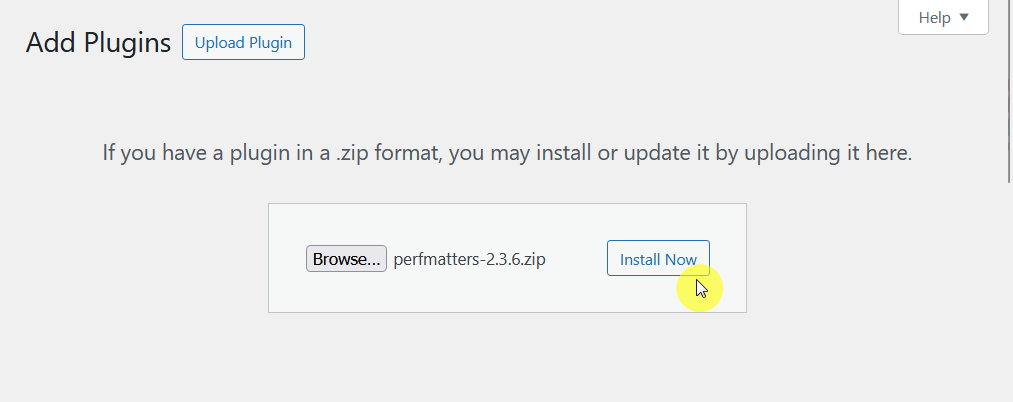
- Go to the plugins > add new page on your website
- Click the upload plugin button
Upload the zip file of the premium plugin to the page and activate it from there:
Nice!
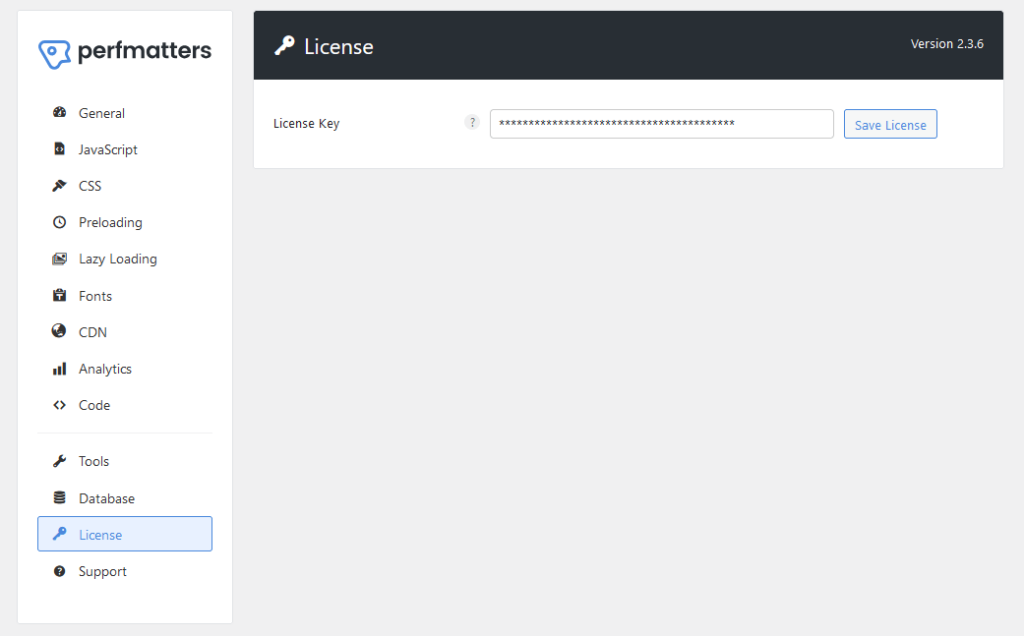
For the license, go to the plugin settings page, which is found on settings and then “Perfmatters”, and then go to the “License” page.
Enter the license that you got in the email or your account on their website.
Now you’re good to go! 🙂
By the way, one thing I noticed is that no setup wizard will guide you through the steps, which I think is vital considering most of the features are off.
But besides that, the initial setup is as smooth as it can get.
User Interface
In a nutshell, the user interface (UI) of Perfmatters is simple and intuitive, designed to be user-friendly for both beginners and experienced users.
For one, it has a side navigation panel with organized menu sections like “General”, “JavaScript”, “CSS”, etc, which makes it easy to find specific features or settings.
It looks like this:
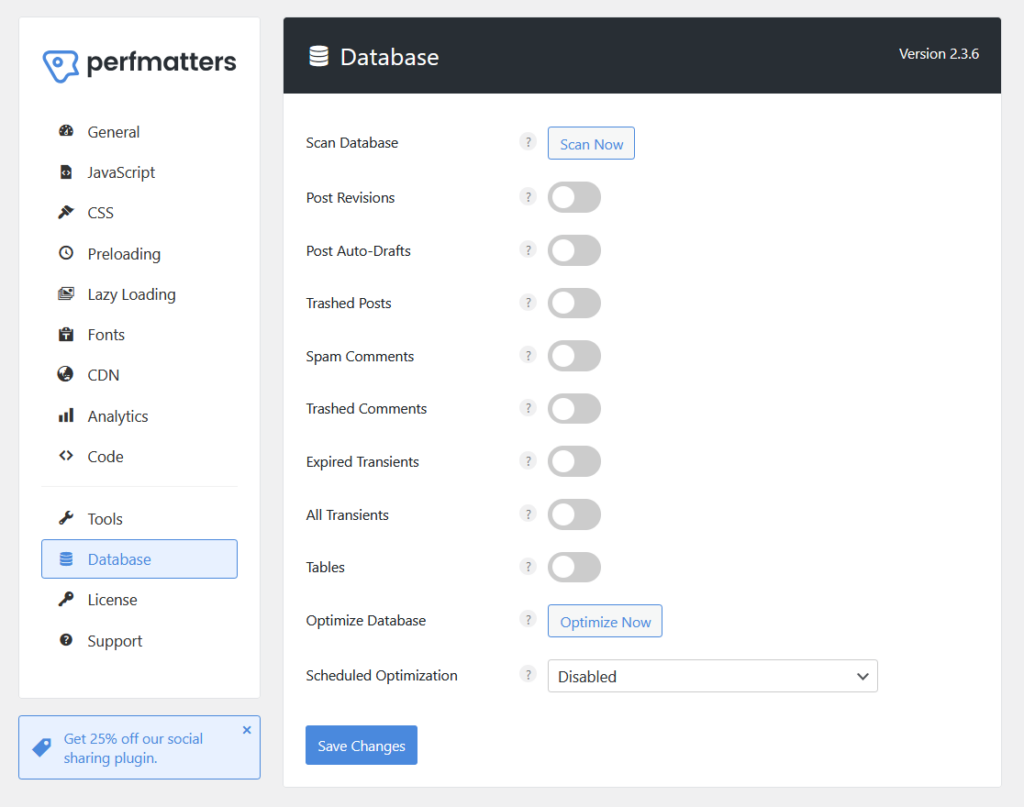
As you can see, most settings use clear toggle switches where all you have to do is turn features on or off with a single click.
Each option also has a small question mark icon (?) that provides a helpful description, which is nice for newbies who might not know what that setting does.
The user interface is simple, but it works. 🙂
👋 My thoughts here
The ease of use is pretty okay.
Here are my thoughts:
- While installation is smooth and easy, there's no guided setup wizard to help users configure the basics.
- The interface uses a clean layout with toggle switches and tooltips, making it accessible even for non-technical users.
- Most features are off upon installation, which can be confusing for users expecting immediate results.
I also like the fact that each setting has a tooltip (the question mark icon) which can provide clear explanations for every option.
It’s clear that optimizing your WordPress site’s performance starts with a reliable hosting foundation.
Hostinger, with its affordable plans and global reach, pairs perfectly with Perfmatters’ speed and optimization tools.

Discover the Hostinger advantage for your WordPress site:
- Enjoy a 99.9% uptime guarantee
- Affordable pricing at just $2.49/month (use the code darrel10 to get a discount)
- Global performance and reach with Hostinger's optimized hosting platform
For faster load times and streamlined site optimization, Hostinger and Perfmatters make the ideal duo for your WordPress site.
Best Features
I give its best features a rating of 4.2 out of 5.
Here’s why:
- The script manager provides granular control over scripts and assets.
- Some features, such as regex support in the script manager, might feel overwhelming for non-technical users who are not familiar with advanced configurations.
- The toggle-based system for disabling unnecessary features is easy to use.
Perfmatters excels in offering powerful and easy-to-use features that boost website performance.
While advanced tools may require some learning, the plugin strikes a great balance between simplicity and functionality.
Here are some notable features of Perfmatters:
1. Script Manager
The script manager is one of its most powerful features, designed to simplify website performance by managing scripts and styles.
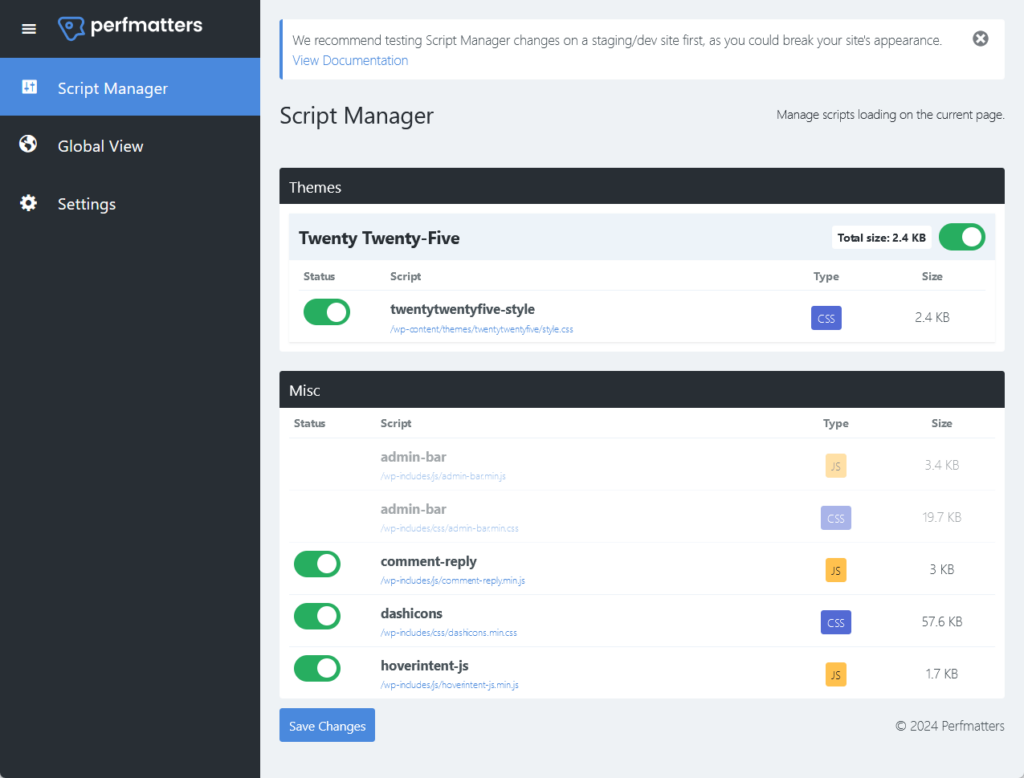
Here’s how it works:
- You can disable unnecessary scripts like plugins or theme assets not used on specific pages.
- Enable or disable scripts for specific devices (desktop or mobile) or for logged-in/out users.
- Disable scripts across your entire site or just on certain pages/posts.
- Support for disabling scripts using Regex patterns for more advanced configurations.
It also has global and page-level options that will allow you to reduce the number of HTTP requests on key pages like your homepage.
It’s a nice tool for anyone who wants to optimize their WordPress site’s speed without any of those complicated coding.
2. Database Optimization
As you might know, clutter accumulates in your database over time, which in turn can slow down your website.
Basically, this feature makes the “cleaning” part simple and effective:
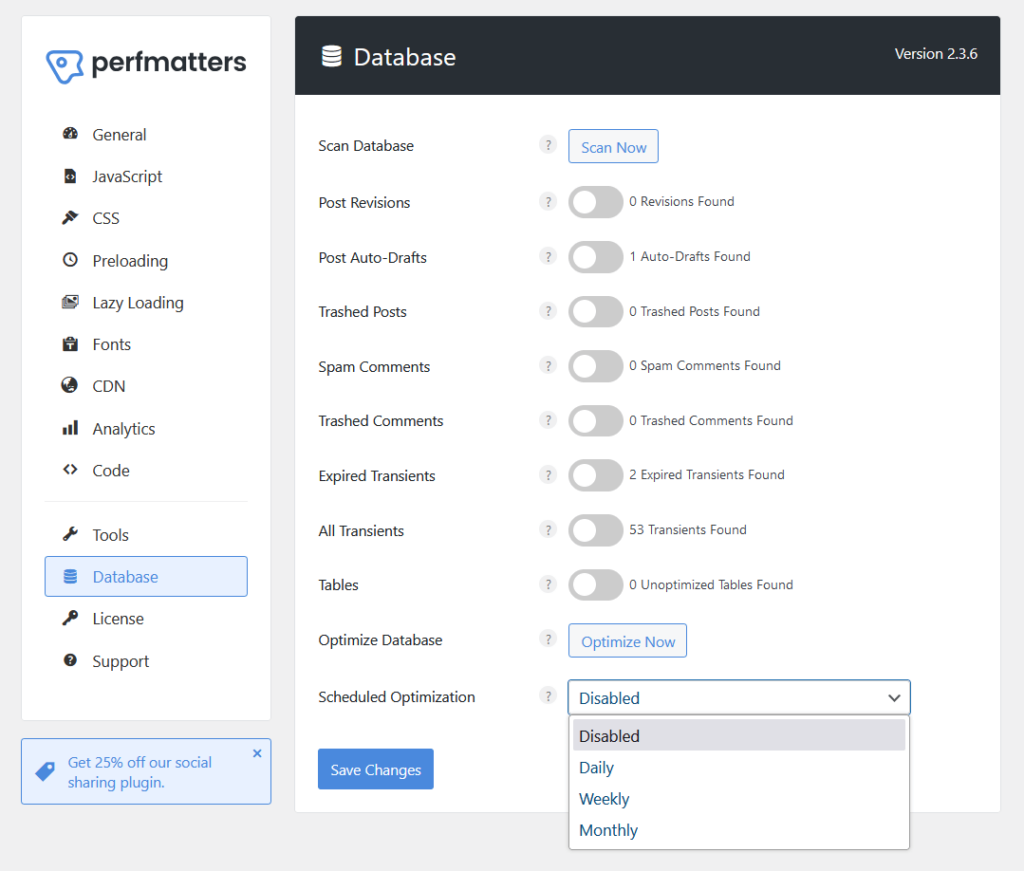
Here are some of its features:
- Scan and identify clutter
- One-click optimization
- Scheduled optimization
- Customizable options
The one-click optimization feature literally includes an “Optimize Now” button that can remove unused data in seconds without manual work.
For schedules, you can automate database cleanups on a daily, weekly, or monthly basis for consistent maintenance.
It will reclaim unused space in your database tables and improve query performance, which also translates to faster page loads.
3. Preloading Resources
This is another powerful feature that can help improve load times by prioritizing essential assets.
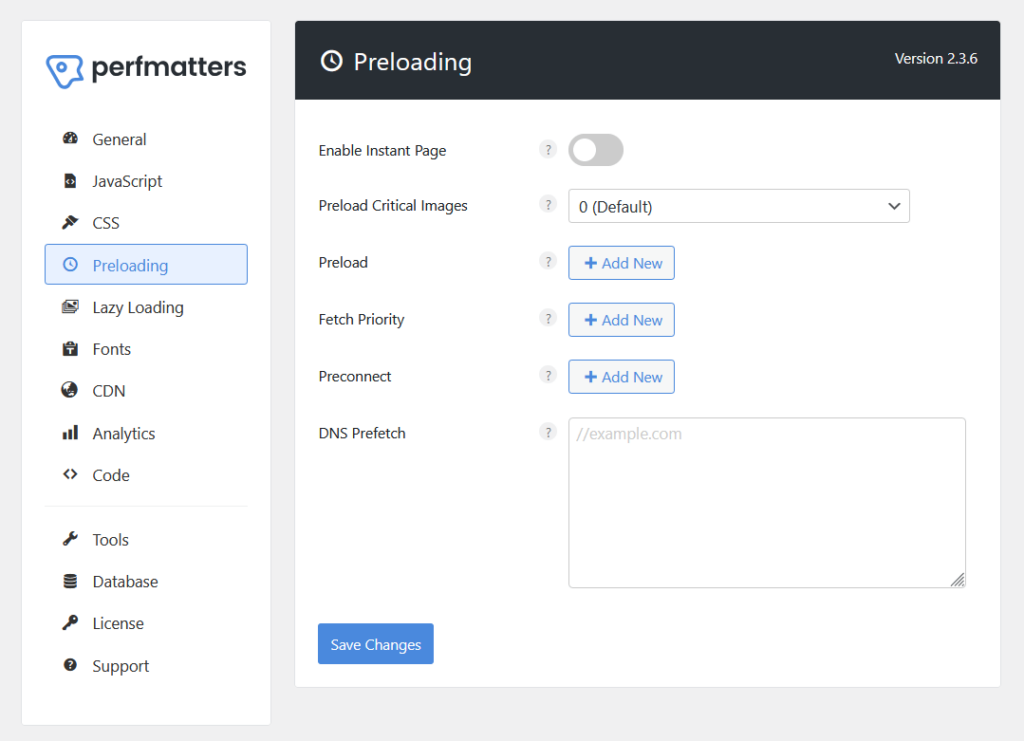
Here’s what it includes:
- Preloads critical images
- Preload fonts and scripts
- DNS prefetch
- Preconnect and fetch priority
DNS prefetch, if you’re unfamiliar, means it will perform DNS lookups in the background for external domains before users access them.
Coupled with fetch priority, which assigns high or low fetch priority to specific resources, could speed up the loading of third-party resources.
4. Disable Unnecessary Features
From the name, it literally means you can turn off unused WordPress features that can slow down your site.
These options are toggle-based, making it easy to customize your site's functionality and improve performance:
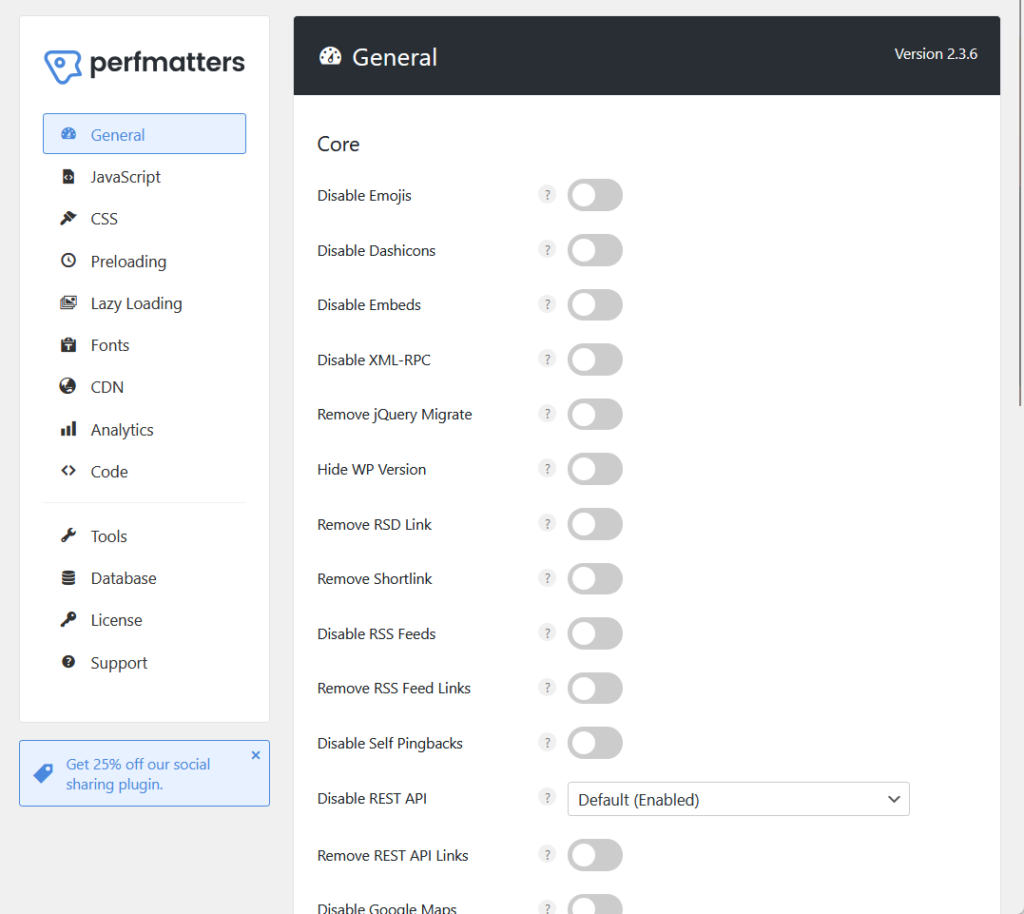
Some of what you can disable include:
- Core features like emojis, embeds, and XML-RPC
- RSS and REST API tweaks
- Frontend features like Google Maps, password strength meter, etc.
- Global styles and separate block styles, Heartbeat API, etc.
Besides disabling, it can remove some things like outdated jQuery compatibility scripts and RSD links and short links, which are all unnecessary metadata.
You can also disable comments and remove comment URLs, which eliminates comment features for non-blog sites and stops spammy author URLs.
👋 My thoughts here
Perfmatters has some beefy features with it, especially its script management and disabling unnecessary features.
Here are my thoughts:
- The script manager gives you granular control over scripts, enabling users to disable unnecessary assets per page, device, or user type.
- The one-click optimization and scheduling features make database cleanup effortless.
- The toggle-based system lets users disable unused WordPress features like emojis, RSS feeds, and REST API links without any coding.
Despite its robust functionality, Perfmatters remains accessible to non-technical users, and for advanced users, there are advanced tools as well.
Reliability
My rating here is 4.2 out of 5.
Here’s why:
- The plugin adds minimal impact on website speed, with only 0.018 seconds on the frontend and 0.02 seconds on the backend.
- While updates are frequent and detailed, some users might find the technical nature of the changelog and hyperlinks a bit overwhelming if they prefer simpler explanations.
- The regular updates ensure ongoing improvements and security.
Perfmatters is a highly reliable plugin that performs consistently and stays up-to-date with WordPress changes.
Its minimal resource usage and regular updates make it a trustworthy choice for anyone focused on speed and long-term performance.
Performance
As for the plugin’s performance itself, I tested it with Code Profiler to see how it affects the website loading speed, and here are the results:
- Website frontend: 0.018 seconds
- Admin backend: 0.02 seconds
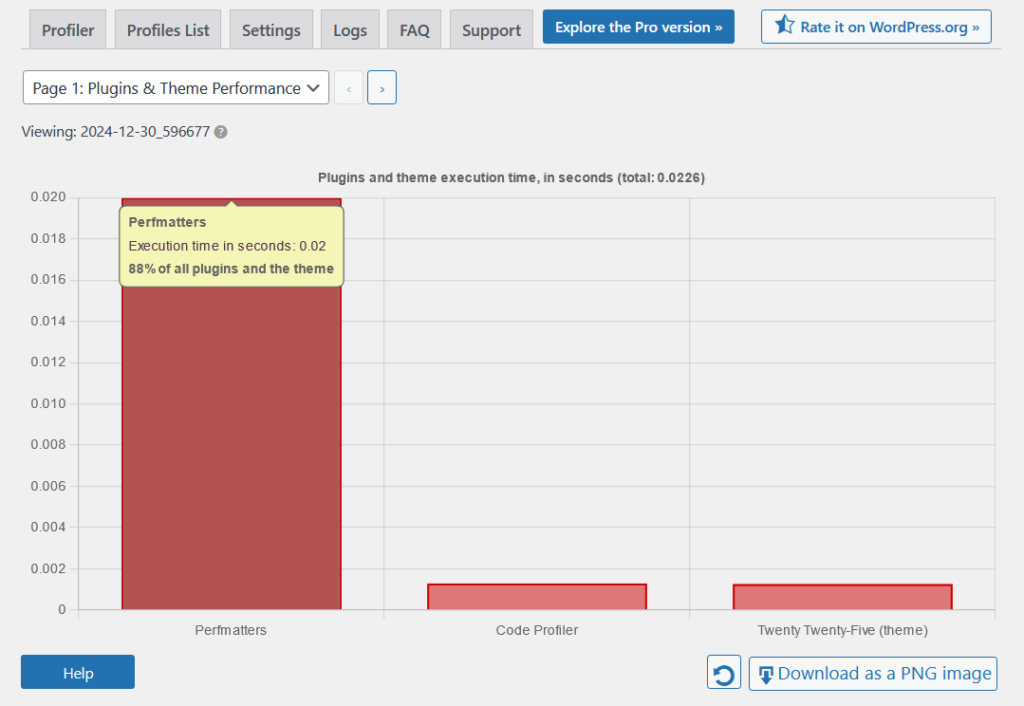
For comparison with its competitors (lower is better):
| Feature | Perfmatters | WP Rocket | LiteSpeed Cache |
| Website Frontend | 0.018 seconds | 0.107 seconds | 0.023 seconds |
| Admin Backend | 0.02 seconds | 0.103 seconds | 0.027 seconds |
As you can see, Perfmatters outpaces popular competitors like WP Rocket and LiteSpeed Cache in terms of both frontend and backend impact.
Its low resource usage makes it a great option for high-traffic or resource-constrained sites, helping them achieve a smooth performance.
What’s nice is that both frontend and backend results reflect a consistent, reliable performance impact, which is ideal for users prioritizing speed.
Updates and Maintenance
Fortunately, Perfmatters is consistently updated, with updates that are frequent, often monthly or bi-monthly.
It also maintains a detailed and transparent changelog:
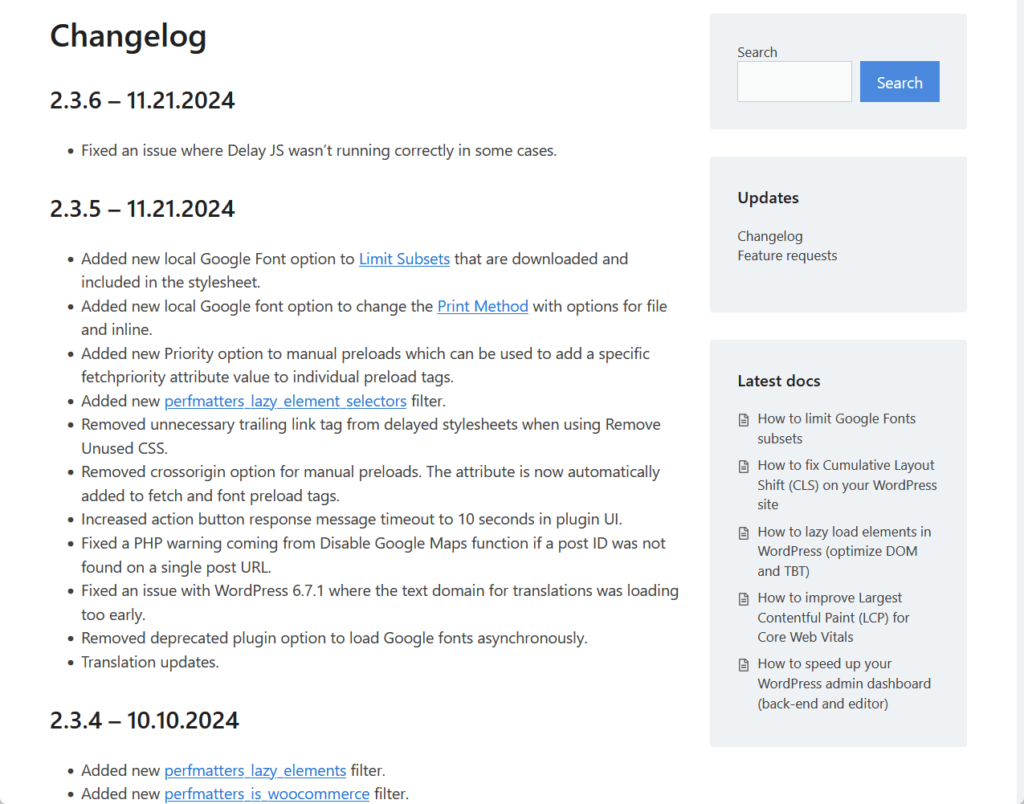
The first thing I noticed about the changelog, and this is quite nice, is that there are hyperlinks to pages that talk about the specific features added.
Anyway, the updates typically focus on:
- New features
- Bug fixes
- Performance improvements
- User experience
Each entry includes specific fixes, features, and even technical adjustments, which shows a commitment to transparency.
I can say that users can rely on Perfmatters for ongoing improvements and security, especially with its proactive development.
👋 My thoughts here
In terms of reliability, Perfmatters seems to be solid.
Here are my thoughts:
- Perfmatters adds only 0.018 seconds to the frontend and 0.02 seconds to the backend, outperforming major competitors.
- Regular updates (monthly or bi-monthly) keep the plugin aligned with WordPress core and popular plugins.
- The changelog is comprehensive, with specific details on new features, fixes, and performance adjustments.
I like the fact that there are hyperlinks in the changelog that lead to additional resources.
Support
I give it a 4 out of 5 rating.
Here’s why:
- The documentation is excellent—well-organized, visually supported, and easy to understand for both beginners and advanced users.
- The absence of live chat or phone support may leave users with urgent issues waiting longer for assistance.
- The support page within the plugin offers quick access to documentation and a contact form, which is convenient.
Perfmatters delivers dependable support through comprehensive documentation and an easy-to-use contact system.
While the lack of live chat or phone support is a drawback, the detailed resources make up for it in most cases.
Customer Service
Perfmatters provides two primary options for customer support, which should make it easy to get help when needed.
Right inside the plugin itself, there’s a dedicated “Support” page with direct buttons to documentation and contact form:
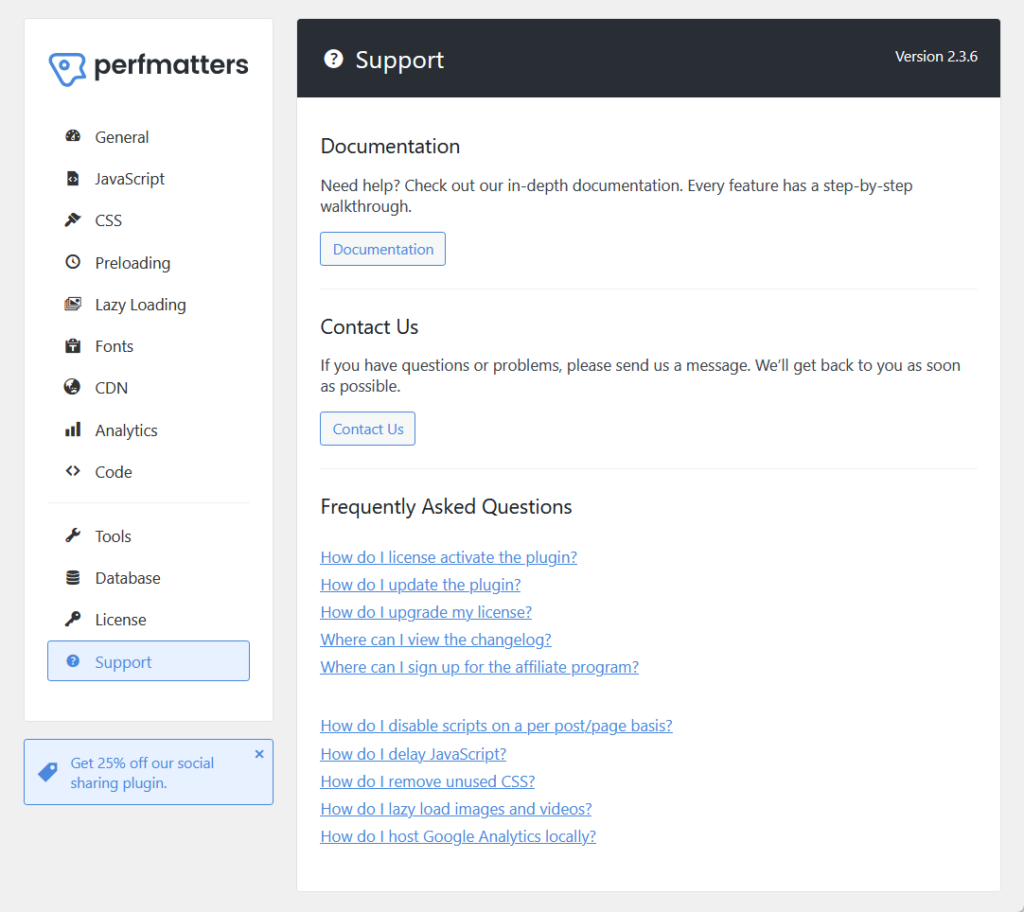
Both buttons will redirect the user to their respective pages on the main website.
The contact form is great for unresolved problems, which would allow users to submit detailed inquiries, including topics like general issues, support, etc.
The FAQs section includes quick links to frequently asked questions such as license activation, disabling scripts, etc. (endpoint is the documentation).
Unfortunately, they don’t have a live chat or phone support, which could be beneficial, especially for those who have immediate concerns.
Documentation
The documentation is well-designed, with a clean and organized layout that makes navigating through various topics effortless.
The homepage categorizes content into sections like general, installation, and tips so users can quickly find what they need.
It looks like this:
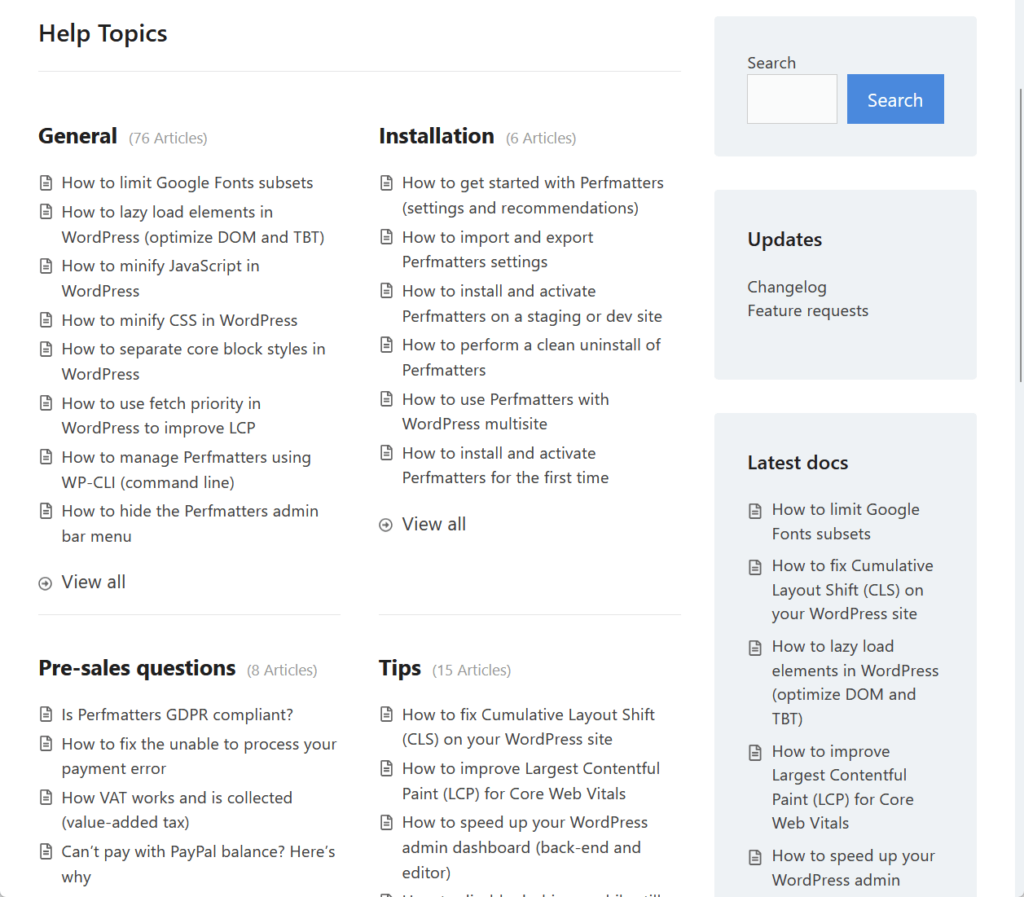
Individual pages, such as tutorials, are structured with headings, step-by-step instructions, and plenty of screenshots and visual aids to clarify the process.
I can also say that the content is well-written, they’re concise, detailed, and avoids jargon, plus there are visual aids like arrows and highlights.
Here’s an example of a documentation page:
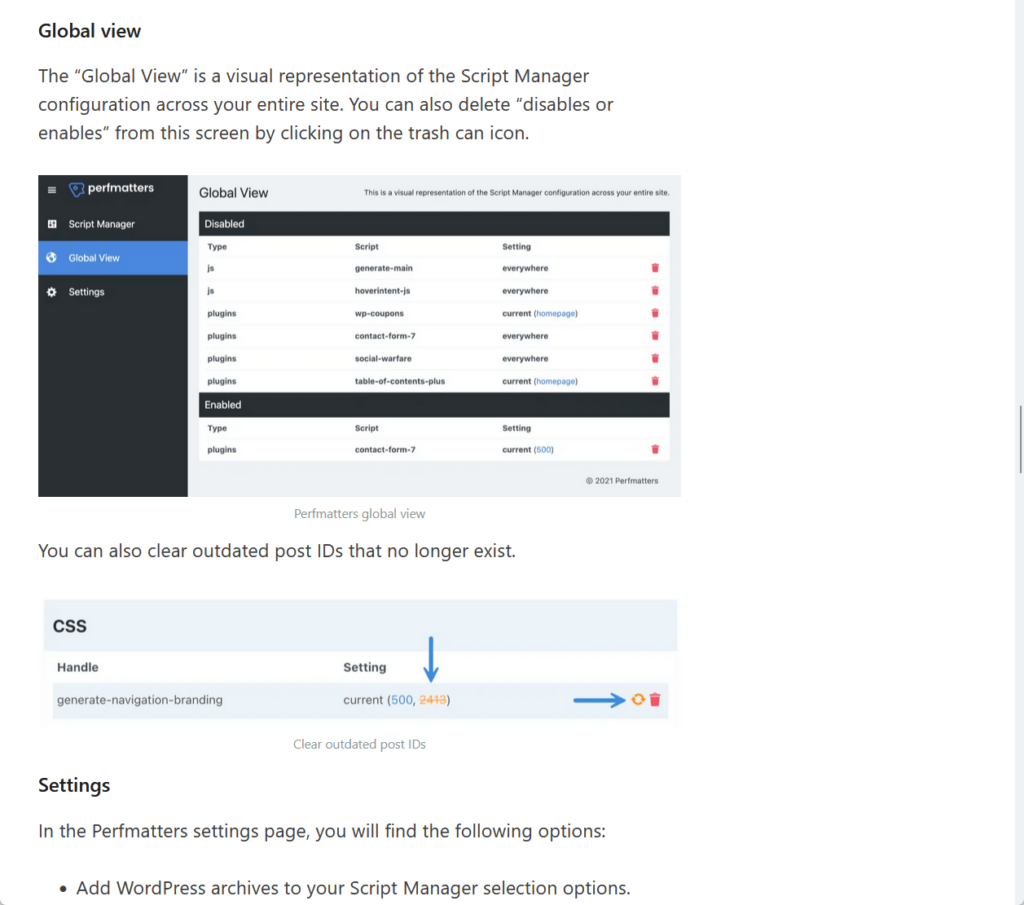
For beginners, the documentation is particularly accessible, as it breaks down complex features into simple steps and adds context where needed.
Advanced users, on the other hand, will appreciate the detailed options and tips provided for customization.
For example, the screenshot above doesn’t only explain how to enable and use the script manager but also delves into advanced settings like disabling scripts globally or by device.
👋 My thoughts here
For the support, I can say that Perfmatters offers the “average” service.
Here are my thoughts here:
- Inside the plugin, there’s a dedicated “Support” page with quick buttons for accessing these resources.
- The contact form allows users to submit specific inquiries about general issues, technical support, or feature requests.
- The lack of live chat or phone support may be limiting for users needing immediate help.
The documentation though is well-organized, complete with clear categories, step-by-step tutorials, and even visual aids like screenshots.
Pricing
My rating here is 3.9 out of 5.
Here’s why:
- The pricing is affordable for all tiers, with the personal plan offering great value for single-site users while still including premium features and support.
- The refund policy excludes issues caused by third-party plugins or renewals, which might frustrate users who face problems related to compatibility.
- Advanced users managing multiple sites may feel the unlimited plan is slightly on the higher side compared to similar plugins.
Perfmatters provides excellent value for its price, with flexible plans and a reassuring 30-day refund policy.
While the pricing might feel slightly steep for large-scale users, the rich features and included premium support make it a worthwhile investment for improving site performance.
Cost Breakdown
Perfmatters offers three flexible pricing plans, which I think are all reasonable and competitive, considering the range of features they include.
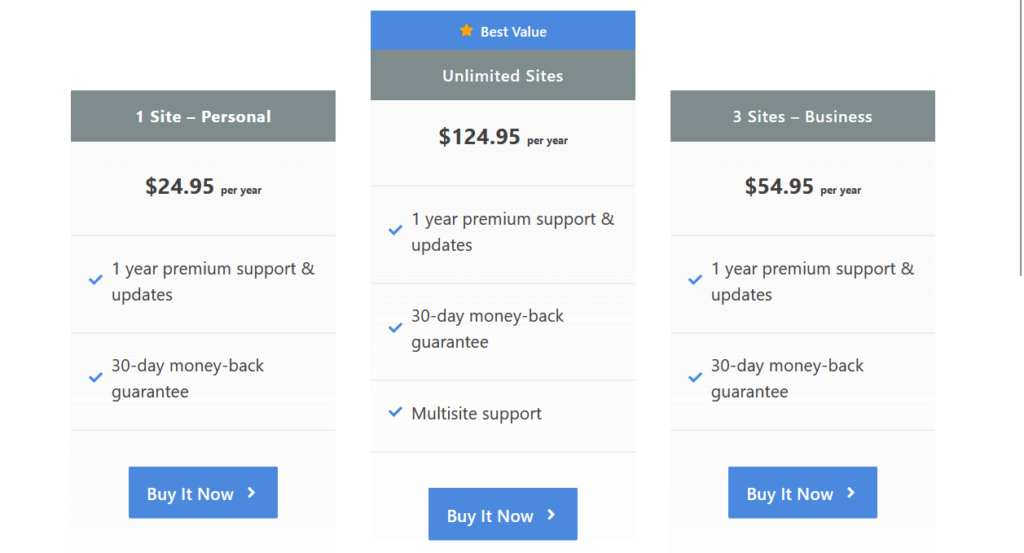
Here’s a summary of their plans:
| Plan | Features | Price |
| 1 Site – Personal | – 1 WordPress site.- 1 year premium support and updates.- 30-day money-back guarantee. | $24.95/year |
| 3 Sites – Business | – 3 WordPress sites.- 1 year premium support and updates.- 30-day money-back guarantee. | $54.95/year |
| Unlimited Sites | – Unlimited WordPress sites.- Multisite support.- 1 year premium support and updates.- 30-day money-back guarantee. | $124.95/year |
The personal plan is a great entry-level option for single-site users, while the next plan is nice for small agencies or those with multiple projects.
Meanwhile, the unlimited sites plan is an excellent choice for developers or larger businesses handling multiple or multisite setups.
What’s nice is that each plan includes premium support, updates, and a 30-day money-back guarantee.
Money Back Guarantee/Refund
Perfmatters offers a 30-day refund policy, standing behind their product while acknowledging it may not work perfectly for everyone.
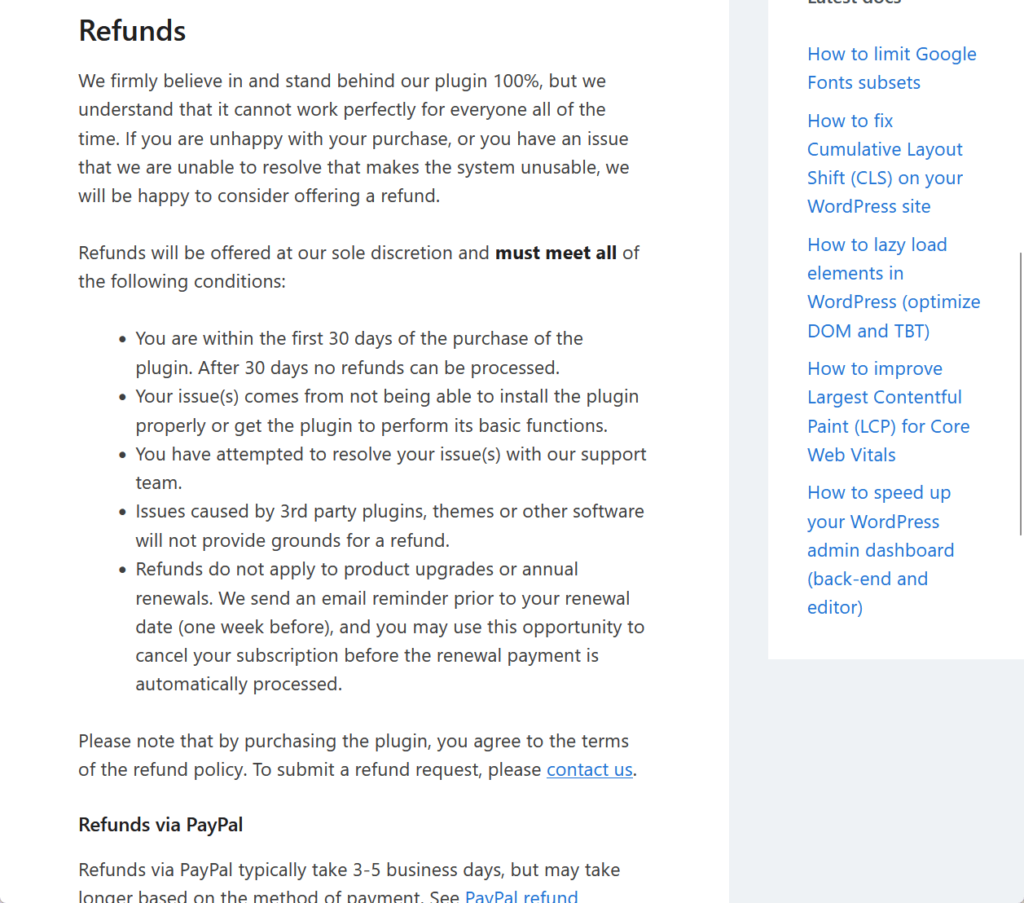
If you are unsatisfied or encounter issues that cannot be resolved, you may request a refund under the following conditions:
- The request is made within 30 days of purchase (refunds cannot be processed after this period).
- The issue stems from the inability to install the plugin or use its basic functions.
- You have actively worked with the support team to resolve the issue.
- Problems caused by third-party plugins, themes, or software are not valid reasons for a refund.
- Refunds do not apply to product upgrades or renewals, and you can cancel your subscription before the renewal date if needed.
Refunds are processed via PayPal or Stripe.
PayPal refunds typically take 3–5 business days to appear on your card, while Stripe refunds may take 5–10 business days to appear.
👋 My thoughts here
Their pricing plan works, and they also have a nice refund policy.
Here are my thoughts:
- Each plan includes one year of premium support and updates, which makes the pricing competitive considering the wide range of features offered.
- The personal plan is affordable for single-site users, where beginners or small-scale users can still access premium performance tools.
- Their 30-day refund policy provides peace of mind, allowing users to test the plugin and request a refund if it doesn’t meet expectations
The refund policy’s detailed conditions ensure fairness while setting clear boundaries, excluding third-party issues and renewals.
Final Thoughts
If you're considering Perfmatters, start with the plan that fits your current needs, like the personal plan for single-site use.
This lets you explore its features without overspending. If you manage multiple sites, upgrading later is seamless.
Before diving in, review your site's needs—focus on features like script management or database optimization to make the most of what Perfmatters offers.
Boost your site’s performance with Perfmatters, and take your web design to the next level with Darrel Wilson’s Elementor Template Kits.
These kits are the perfect way to build sleek, professional websites without touching a single line of code.

Secure lifetime access to all premium Elementor template kits:
- Get lifetime access to all premium template kits designed for Elementor
- Complete with 2 years of dedicated support
- Only for $99 — that's already for the lifetime access
Whether you’re optimizing scripts or creating a stunning design, these kits have everything you need to deliver a flawless user experience.