
Ease of Use
I would rate the ease of use of SiteGround at 4.1 out of 5.
Here's why:
- Big icons and a clear menu on the left pane make navigation simple, even for beginners.
- While the setup process is straightforward, some users might find the number of steps to get started a bit overwhelming.
- This wizard balances between being a boon for beginners and a slight hindrance for advanced users.
Its user-friendly interface, combined with a well-designed setup wizard, makes it an excellent choice for both beginners and experienced users.
While the initial setup process may seem a bit extensive, the clear instructions and easy navigation more than compensate for this minor inconvenience.
User Interface
Darrel made a lot of videos in the past that feature SiteGround and how to set up everything from the start.
Anyway, the dashboard of the client area looks like this:
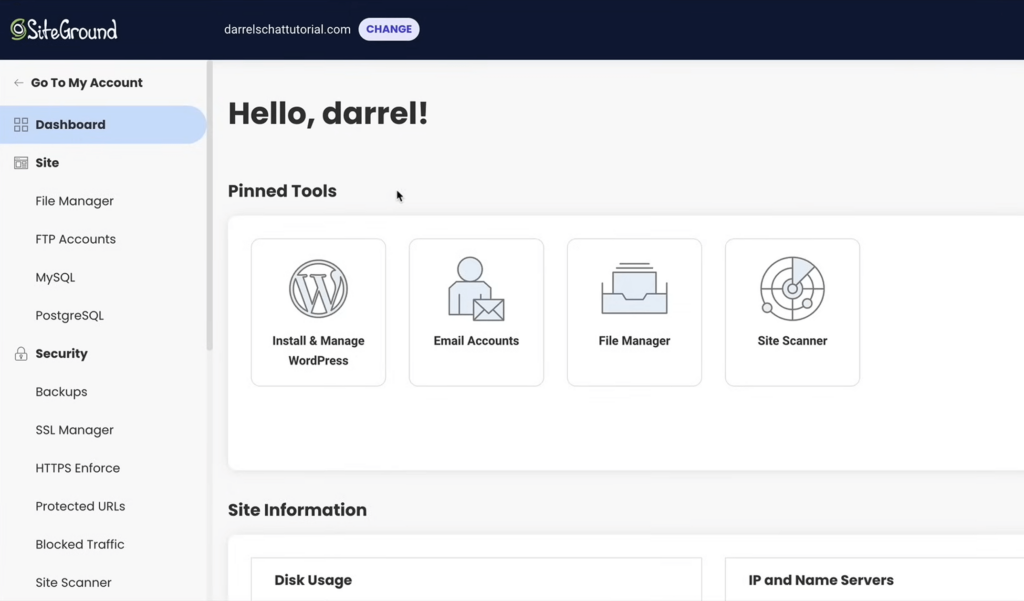
The interface looks good, with a modern accent, big icons, and menu items on the left pane, making things easy to find.
From this page, you will be able to:
- Open the pinned tools directly
- Check the site information
- Go to different features
For new websites, you can see the installation under the install and manage WordPress page in the client area.
Like in here:
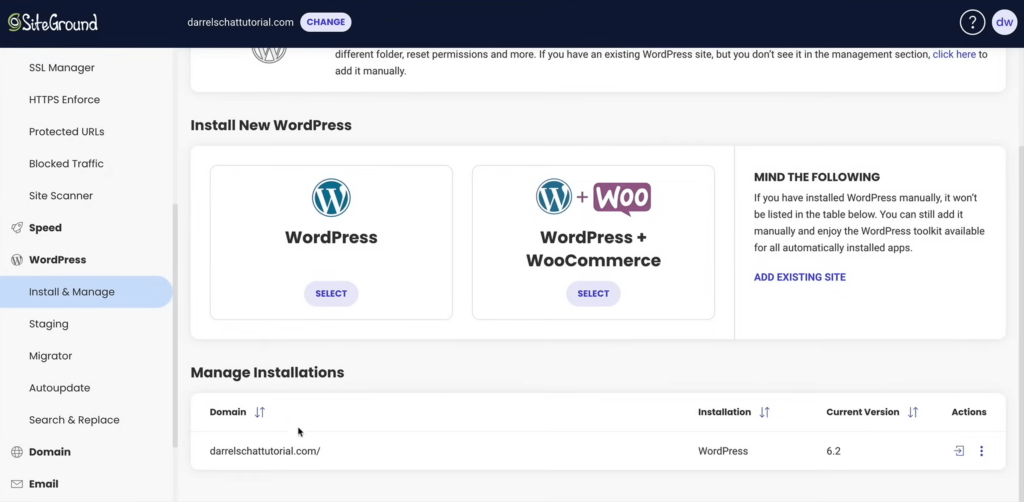
This page will give you information about your installations, like the current version of WordPress, and to log in directly to the admin panel.
Hosting Environment/Setup
If you start from scratch, creating a new website is easy since SiteGround has a setup wizard that will walk you through the process.
Right after selecting a plan, you will be able to choose a domain for your website:
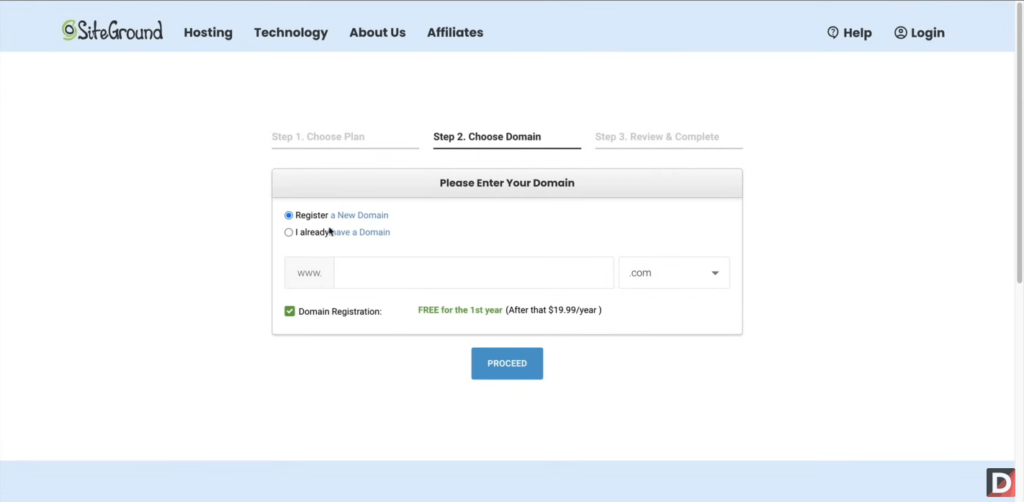
You will then need to complete and review your order and create an account as well.
SiteGround will provide you with instructions in every step of the process, which is perfect for newbies trying to set up their new website.
After logging in for the first time, you will be able to set up your site, which starts with confirming the domain name:
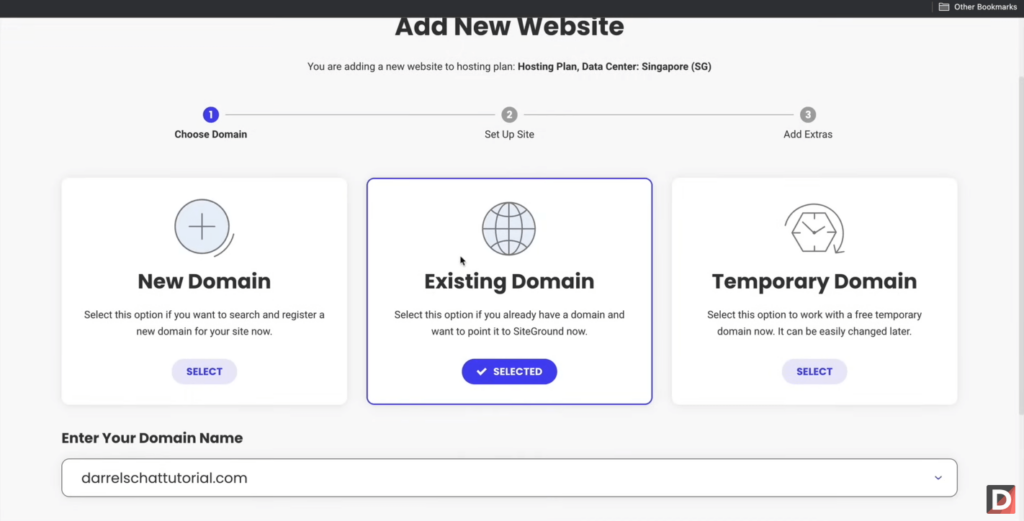
From there, you will be able to select the application to install, which obviously is WordPress, though you can skip this process entirely.
If you skip this process, you will be able to install WordPress easily through the dashboard with the install and manage WordPress tool. 🙂
👋 My thoughts here
SiteGround seems to be one of the easiest hosts to use. 🙂
Here are my thoughts here:
- The user interface is modern and looks good to my eyes — it’s also user-friendly with its big icons and easy-to-use interface.
- Since there’s a process for creating a new website, even those new to creating websites would be able to follow through.
- The entire process of creating a new website takes only about 2-5 minutes especially if the domain you want is available.
Everything looks good here in terms of ease of use.
I kind of understand now why Darrel recommends SiteGround and Hostinger together since they’re some of the best ones around. 🙂
Exploring web hosting options to enhance your site's performance? Hostinger might be the perfect solution you're looking for.

Discover the Hostinger advantage for your WordPress site:
- Enjoy a 99.9% uptime guarantee
- Affordable pricing at just $2.49/month (use the code darrel10 to get a discount)
- Global performance and reach with Hostinger's optimized hosting platform
With Hostinger, you’re not just choosing a web host:
You’re investing in a service dedicated to optimizing your website's performance and user experience.
Best Features
My rating here is 4.0 out of 5.
Here’s why:
- SiteGround offers an extensive range of features, even in the lowest plan.
- Some advanced features like ultrafast PHP implementation are only accessible on higher-tier plans.
- SiteGround's security features are strong, with automated daily backups, unique account isolation, and anti-hack systems.
The inclusion of many features in the lowest plan adds excellent value, making it a strong choice for beginners and budget-conscious users.
However, some advanced features being restricted to higher-tier plans slightly detract from the perfect score.
⚠️ Note: If you’re looking for what each hosting plan brings to the table, you can find them in the pricing section of this review as what I’ll be talking about here are hosting features.
Here are some notable features of SiteGround:
1. Essential features
SiteGround has a lot of interesting features, with most of them present even in the lowest plan available. 🙂
In terms of what they call “essential” features, I find it interesting that SiteGround offers free unlimited email accounts.
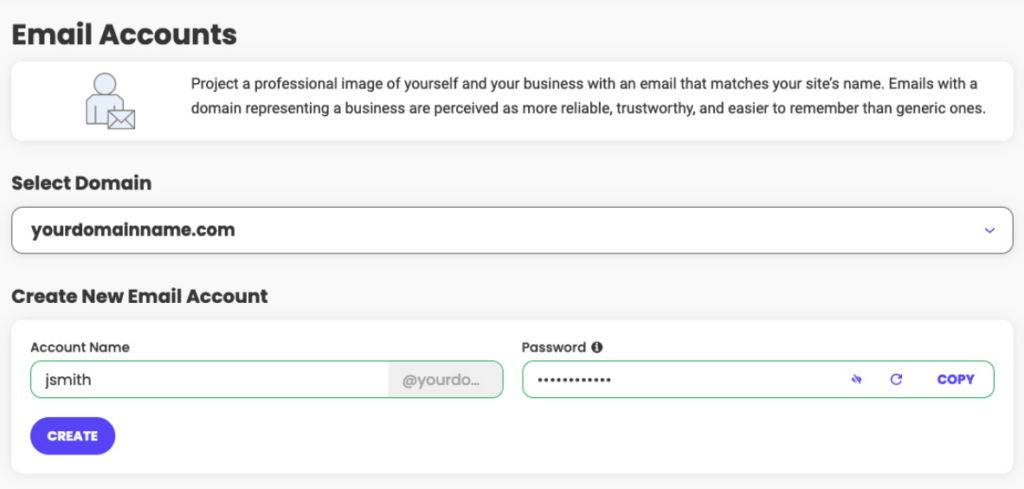
This comes with up to 10 GB of account space and provides you with the capability to use forwarders and aliases.
Besides that, they also offer other features like:
- Free email migrator
- Unlimited MySQL DB
- Friendly site tools
If you’re transferring from another web host and you’re worried about your emails, the migrator tool is great for transferring over your email accounts.
2. Security features
Security is one of the most important elements of a great web hosting service since naturally, we want to protect our websites.
Thankfully, SiteGround has a lot of such features, with my favorite being the automated daily backup feature.
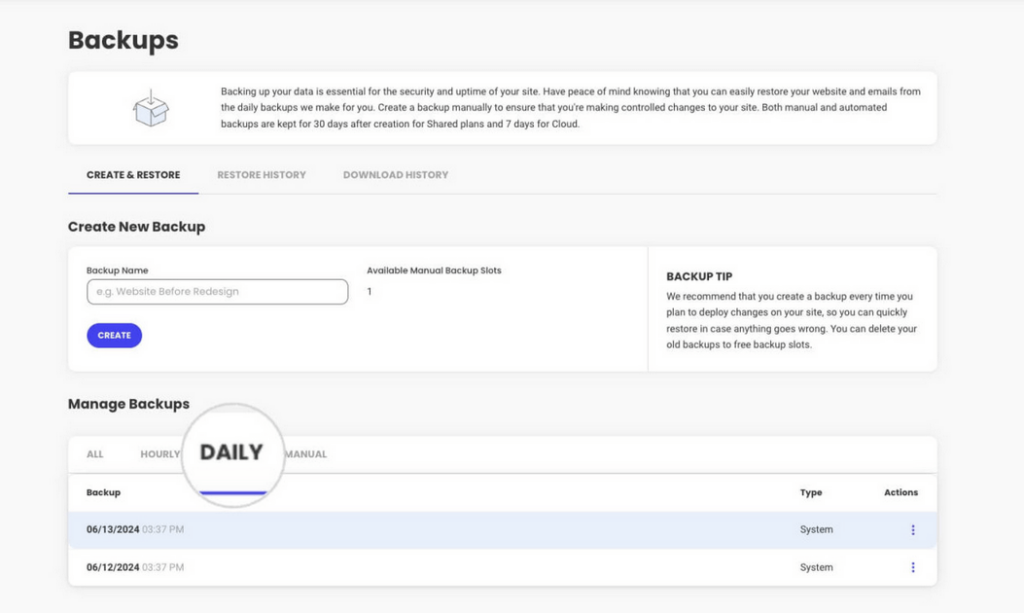
The daily backups will run for 30 days back, so you have at least four weeks to restore your website in case something happens.
Besides this, they also have other security features such as:
- Unique account isolation
- Anti-hack systems
- Spam protection
SiteGround also has an advanced on-demand backup system where you can create an instant backup — though this is only available from the middle tier plan upwards.
3. Performance boosters
As you will see later on, SiteGround is indeed reliable and will give you some of the best possible performance.
This is thanks to its performance boosters, with all except for one, being available even in the lowest plan.
A good example of this is the free CDN that comes with each account:
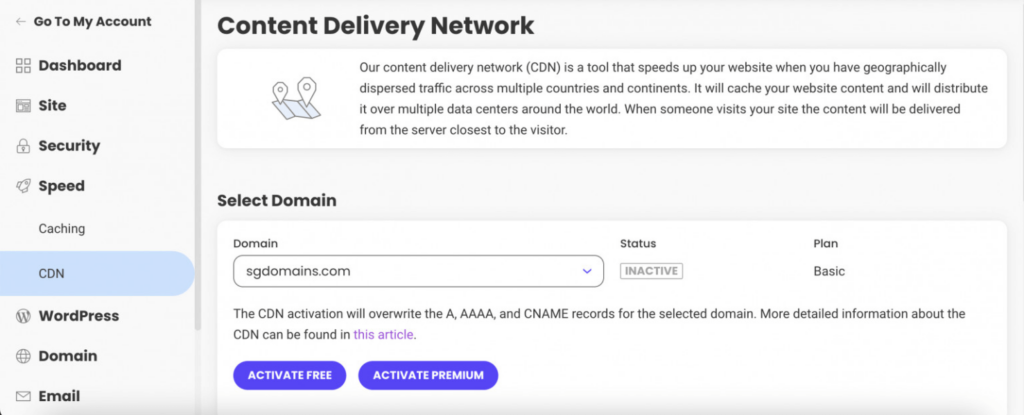
This feature enables websites to load faster anywhere in the world by caching its content and distributing it over numerous data centers.
Besides this feature, SiteGround also offers:
- Customized server setup
- HTTP/2 enabled servers
- SuperCacher
The one I’m referring to that’s not available in the lowest plan is the ultrafast PHP implementation that can make pages load up to 30% faster.
👋 My thoughts here
SiteGround has an impressive plethora of features.
Here are my thoughts here:
- I have reviewed numerous hosts where email features are add-ons, so I’m glad to see SiteGround offering this for free.
- I can say the same with backups, one web host offers this for free but only for the backup the day before. 😅
- Having a free CDN available is great especially if you have a website with pages that have a lot of content.
What I’m impressed the most here is that most of the features in SiteGround are available even in the lowest plan.
That’s some nice customer service. 🎉
Reliability
I would rate its reliability at 4.0 out of 5.
Here’s why:
- SiteGround boasts an impressive uptime of 99.99% over the past year, with only an hour of downtime.
- SiteGround doesn’t provide a system status page but instead, they send notifications in the client area about updates and maintenance.
- SiteGround's performance grade of 76/100 and average load time of 1.73 seconds are decent but not the best compared to competitors.
While the lack of a system status page is a minor drawback, the client area notifications help keep users informed about maintenance.
SiteGround's performance scores and load time are solid, even if not the highest, making it a highly reliable web hosting provider.
Performance
Before anything else, for the performance, I actually keep track of around 20 web hosts that Darrel uses in his hosting videos.
In terms of uptime, SiteGround was up 99.99% of the time for the past year — and it got a downtime of only an hour.
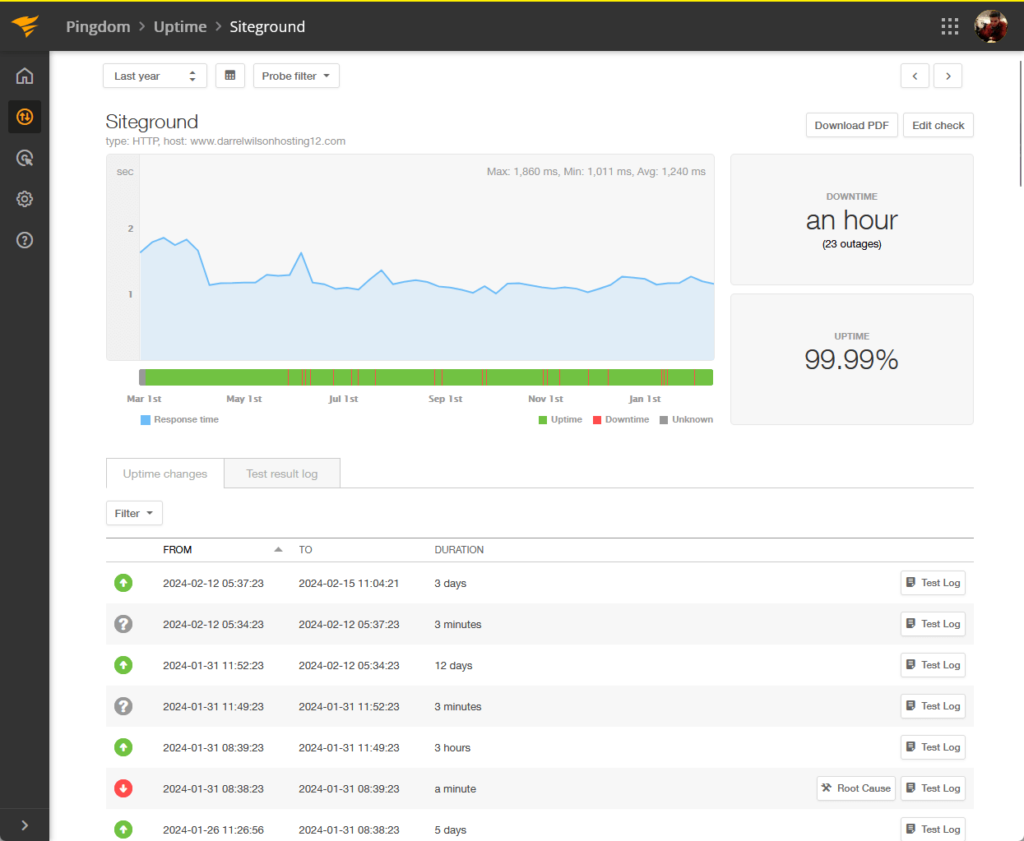
If you don’t know, that’s an amazing uptime and a super low downtime, and there’s only a handful of hosts that can do better.
For the page speed, SiteGround had an average load time of 1.73 seconds and got a 76/100 performance grade from Pingdom.
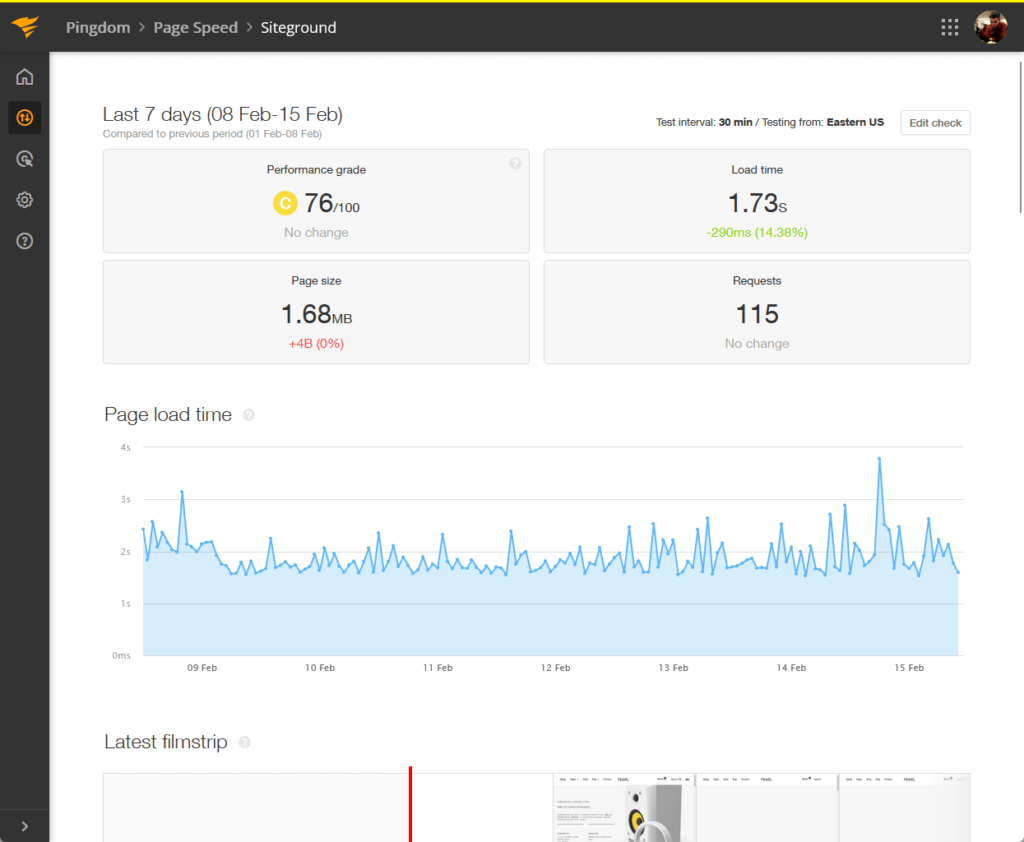
Now let’s compare SiteGround’s performance with the results from other well-known web hosting providers (1 year):
| Web Host | Uptime | Downtime | Performance | Load Time |
| Siteground | 99.99 % | 1 hour | 76/100 | 1.73 seconds |
| Bluehost | 99.92 % | 6 hours | 75/100 | 6.72 seconds |
| Kinsta | 99.99% | 24 minutes | 77/100 | 1.26 seconds |
| Hostinger | 99.96 % | 3 hours | 84/100 | 1.32 seconds |
| Namehero | 99.21% | 1 day | 77/100 | 11.25 seconds |
You can see that SiteGround has some of the best scores around especially in uptime.
Its performance score and load time might not be the highest here, but its difference from the top ones is negligible in real life.
👉 Related: Hostinger Review: Budget-Friendly Hosting Powerhouse?
Updates and Maintenance
But how about updates and maintenance?
Unlike other web hosts, SiteGround doesn’t provide a system status page, but instead sends out notifications in the client area.
They specifically stated this in one of the articles:
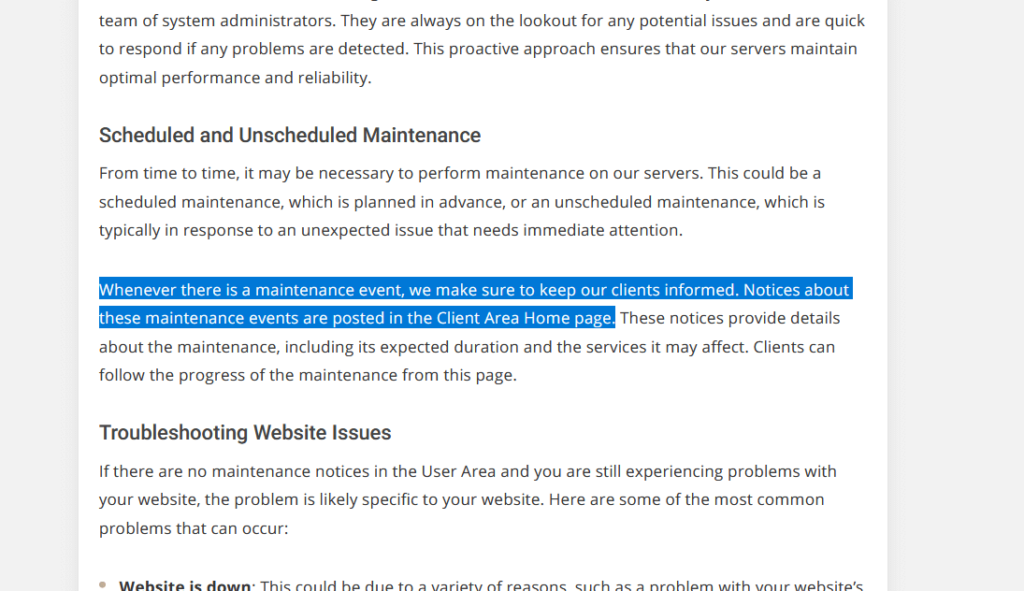
These notifications will include:
- Details about the maintenance
- Expected duration
- What services are affected
There are two sides to this.
The first is that it’s convenient since in case there’s a maintenance, SiteGround will let you know directly in the client area.
On the downside, if SiteGround is down and includes the client area, having a system status page will help confirm which services are down.
👋 My thoughts here
SiteGround has some of the best scores around in terms of reliability.
- Its 99.99% uptime and only an hour of downtime is an encouraging factor that can bring more clients and retain existing ones.
- Although SiteGround is in the middle in terms of performance optimization and load time, the difference isn’t noticeable in the real world.
- It would be good if SiteGround would create a system status page in the future that can be accessed independently.
In addition, only a small number of users will open the client area every time they want to log in to their website.
Most of the time, they would go straight to the website and log in from there (or if it was cached, they would be logged in already).
Support
My rating here is a solid 4.0 out of 5.
Here’s why:
- SiteGround offers multiple ways to get in touch with customer service, including live chat, phone support, and helpdesk tickets.
- The process of contact support involves selecting a category and topic before being presented with contact options.
- The knowledge base and tutorials are well-written and include annotated images, providing valuable information for both beginners and advanced users.
The categorized contact flow, while organized, might feel a bit cumbersome for those seeking quick assistance.
Additionally, the comprehensive knowledge base and tutorials are excellent resources, though some content could benefit from more frequent updates.
Customer Service
SiteGround has some nice customer service options that are useful in helping solve issues that may arise.
If you log in to the client area, there’s a contact us page that looks like this:
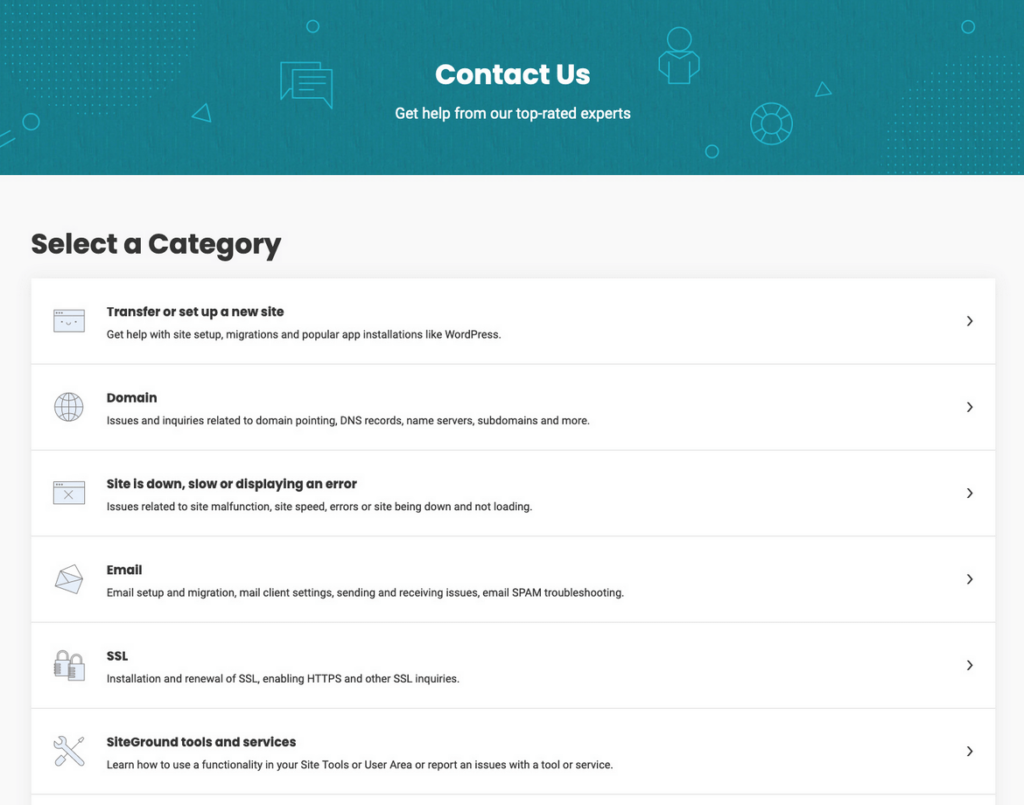
The flow is a little different than what you would normally find from other hosts.
In SiteGround, you will have to select a category first, which can include:
- Transfer or set up a new site
- Domain
- Site is down
After you choose a category, you will have the select the most appropriate topic for what you’re requesting where SiteGround may also ask for more information.
They will then present you with some options to contact them:

There are usually three ways to get in touch with them:
- Live chat
- Phone support
- Helpdesk tickets
What I find unique about here is the fact that SiteGround offers phone support, which is great if you’re the type to panic.
Documentation/Knowledge Base
SiteGround’s knowledge base has two kinds:
- Tutorials
- Knowledge base
The tutorials deal more with setting things up and getting started with WordPress, email, and how to use some of their features.
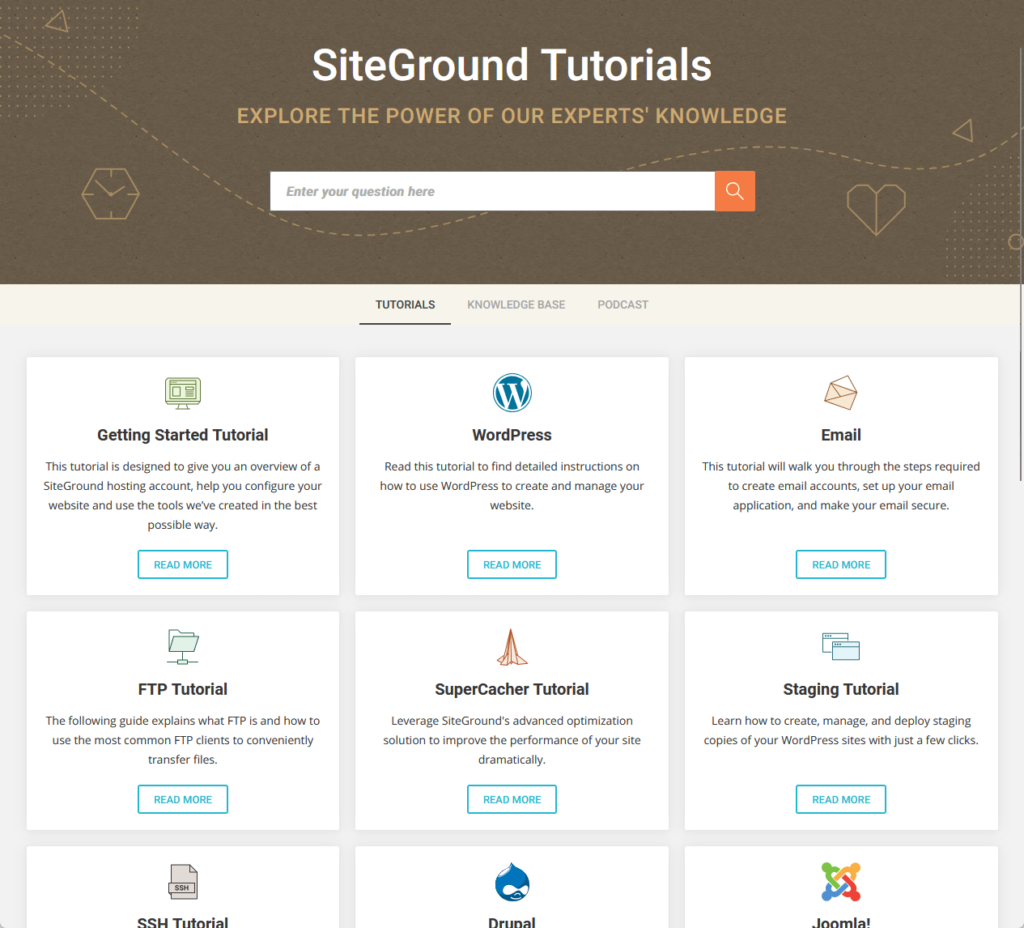
Examples of topics here are:
- How to make a WordPress website
- How to install WordPress
- How to access SiteGround staging
On the other hand, the knowledge base deals more with answering some technical questions and how to fix some issues.
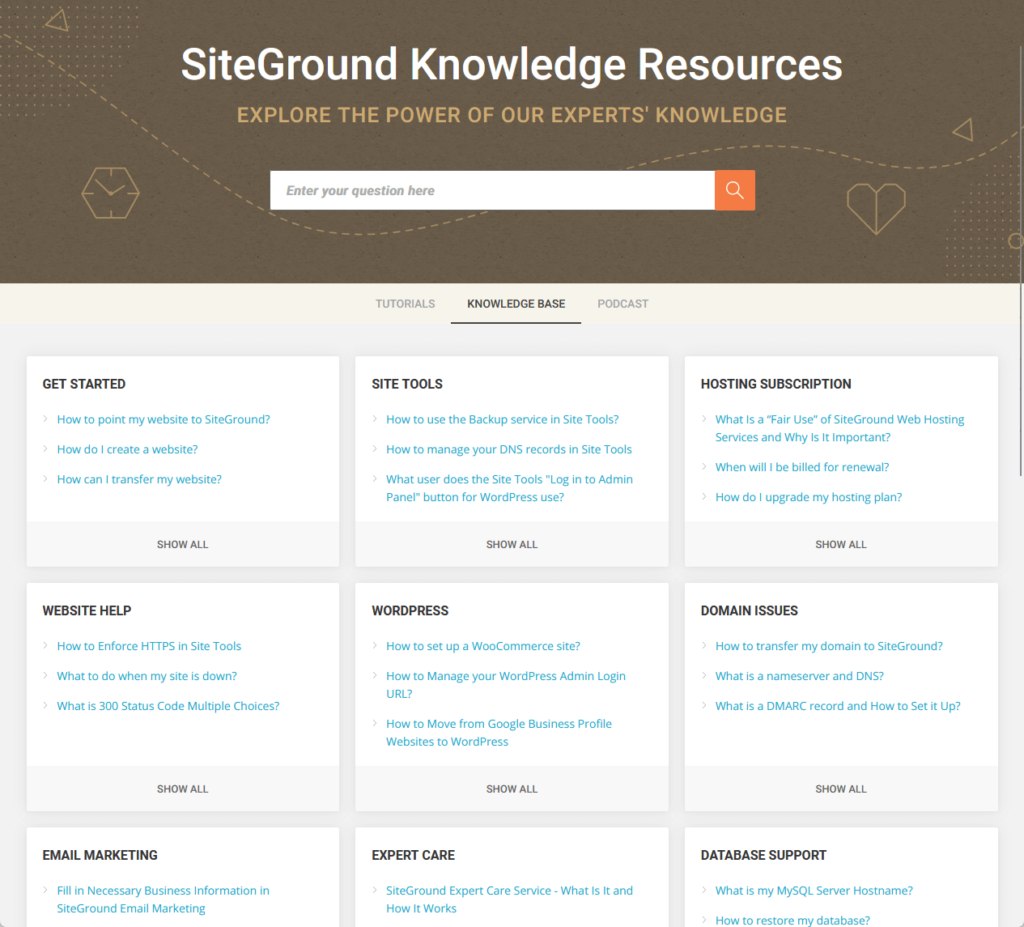
Some of the topics here are:
- How to point my website to SiteGround
- When will I be billed for renewal
- How to restore my database
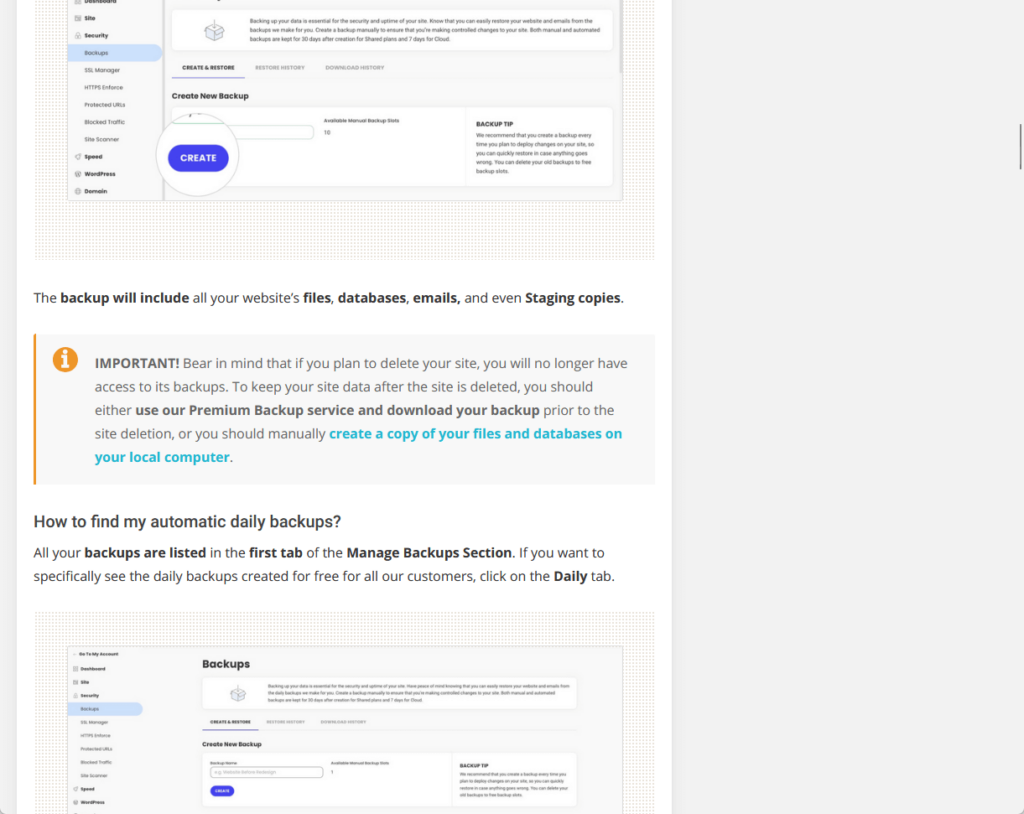
As for the articles themselves, they’re all written well, with emphasis and links to other articles, and some of them include annotated images.
Here’s an example:
In the past, they used to publish podcast episodes as well in addition to tutorials and the knowledge base.
Their last episode though was on April 22, 2021, and they haven’t published anything new (though you can still access and listen to those episodes).
👋 My thoughts here
Here are my thoughts here:
- SiteGround has nice support features here that include a live chat feature and phone support.
- Not only do they have nice documentation meant to answer technical questions and solve issues, but they also have tutorials for those starting.
- The articles in both the knowledge base and tutorial sections are nicely written and complemented by annotated images.
Overall, SiteGround has great support features, especially for those who want to have a direct conversation with customer service.
Pricing
My rating here is 3.9 out of 5.
Here’s why:
- SiteGround offers very attractive initial prices for its hosting plans.
- Renewal rates can be up to four times the discounted initial rates.
- SiteGround provides a wide range of hosting options, from shared and WordPress hosting to cloud and reseller hosting.
SiteGround stands out with its competitive initial pricing, making it a cost-effective choice for new users.
However, the high renewal rates are a significant drawback that users need to be aware of when planning for long-term use.
1. WordPress hosting
SiteGround’s WordPress hosting and web hosting share similar capacities and prices, and vary only in some WordPress-only features.
As you can see below, the lowest plan starts at a very low price:
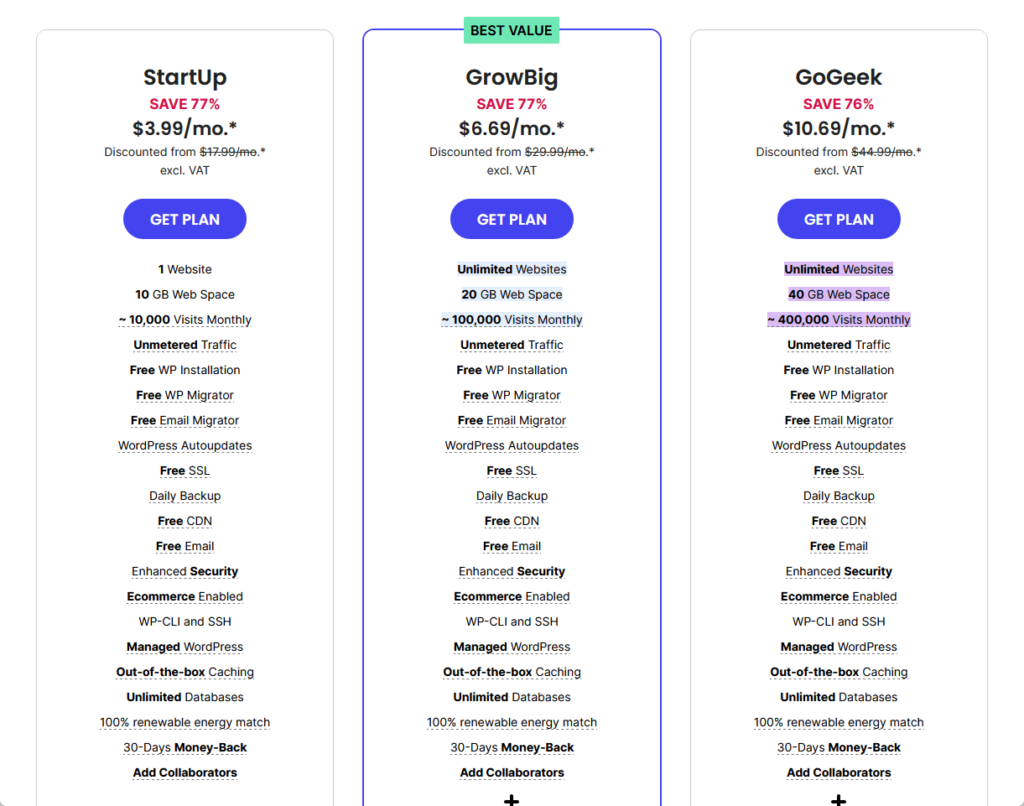
The plans are:
- StartUp: Starting from $3.99/month
- GrowBig: Starting from $6.69/month
- GoGeek: Starting from $10.69/month
Except for the lowest one that only supports one website, the rest allow for unlimited websites to be hosted on SiteGround.
The websites though will share the storage, with the lowest having only 10 GB, the second twice that, and the highest having 40 GB storage.
Other freebies here include:
- Free SSL certificate
- Daily backup
- Free CDN and email
- Out-of-the-box caching
If you ask me, the best value is the middle plan (as usual) since it has middle capacities while being able to host unlimited websites.
⚠️ Note: Take note of the renewal prices. In this case, some of the renewal prices are easily 4x the discounted price.
2. Cloud hosting
If your website needs more resources, then it’s time to move out of shared hosting and on to cloud hosting.
The prices though are a little more expensive than what you can find from other hosts:

The plans are:
- Jump Start: Starting from $100/month
- Business: Starting from $200/month
- Business Plus: Starting from $300/month
- Super Power: Starting from $400/month
Cloud hosting in SiteGround starts from 4 CPU cores, 8 GB memory, 40 GB SSD space, and 5 TB data transfer.
On the bright side, the plans above aren’t set in stone since you can also build your own custom cloud according to the CPU, memory, and SSD space that you need.
For a quick reference on the prices, Hostinger’s cloud hosting starts at $8.89/month while in Nexcess, it starts from $52/month.
👉 Related: Nexcess Hosting Review: Justifying the Premium Costs?
3. Reseller hosting
If you’re a designer or a web developer and you want to resell hosting to your clients, SiteGround has some great reseller plans.
The price of the lowest plan is cheap during its first invoice:
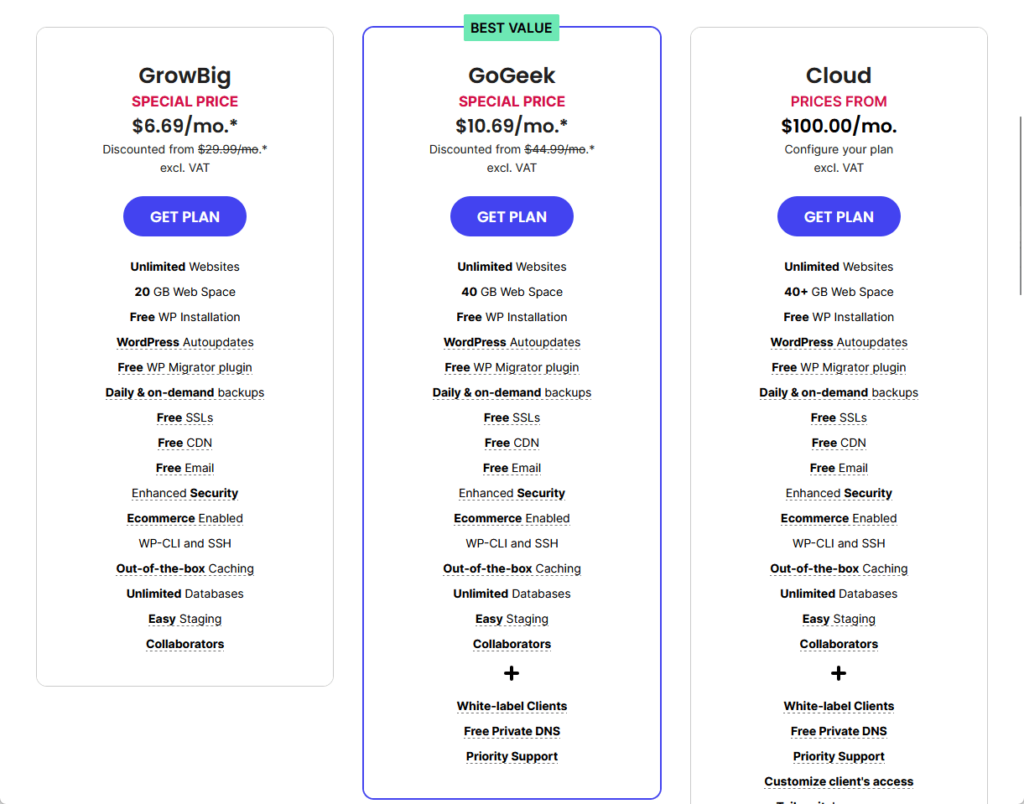
The plans here are:
- GrowBig: Starting from $6.69/month
- GoGeek: Starting from $10.69/month
- Cloud: Starting from $100/month
Basically, the first two plans are similar to the last two WordPress hosting plans, with the same features and pricing.
The only difference here is that when you get the reseller hosting, you will be able to add collaborators who will get their own SiteGround accounts.
⚠️ Note: Take note of the renewal prices. In this case, some of the renewal prices are easily 4x the discounted price.
Money Back Guarantee/Refund
Does SiteGround offer any money-back guarantee?
Yes, they offer a money-back guarantee for their hosting services, and you can read about it on their knowledge base.
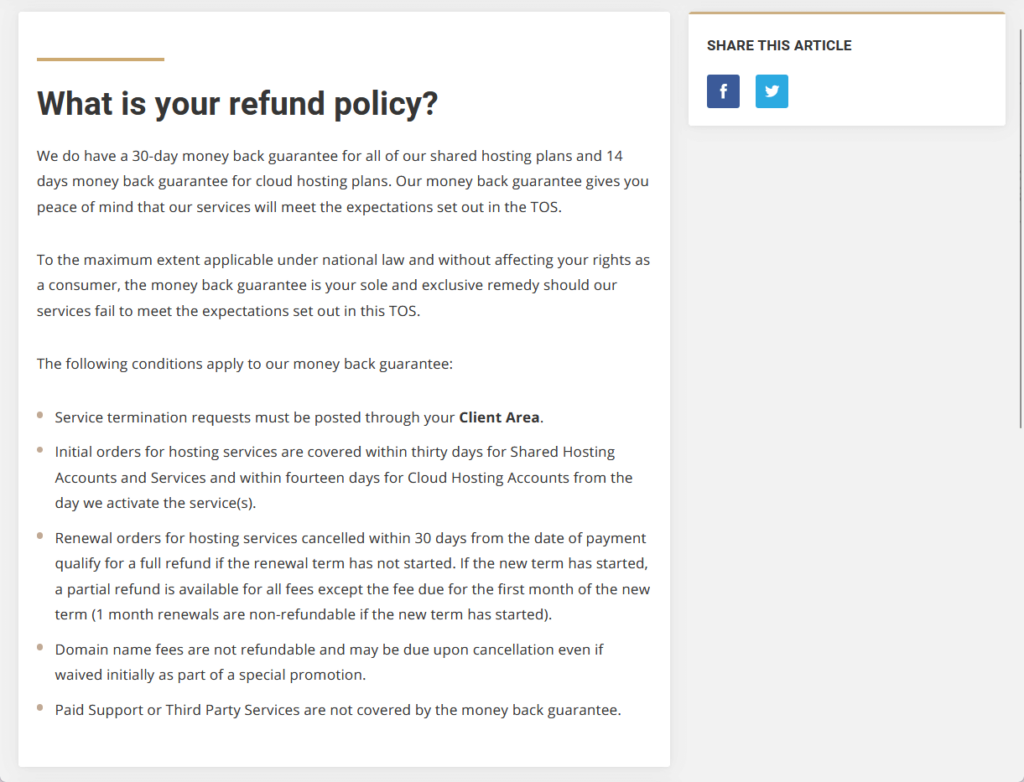
Here’s more information on their refund policy:
- Shared hosting plans have a 30-day money-back guarantee.
- For cloud hosting plans, the guarantee period is only 14 days.
- For renewal orders, you can receive a full refund within 30 days of payment as long as the new term hasn’t started.
- If the new term has begun, you may still get a partial refund for the remaining term, excluding the first month’s fee.
There are non-refundable items though like the domain name fees, paid support, and third-party services.
⚠️ Note: Domain fees may still apply even if they were initially waived as part of a promotion.
👋 My thoughts here
SiteGround has solid pricing for its hosting.
Here are my thoughts:
- Except for the cloud hosting plans, their regular web hosting plans are actually cheaper than many, less dependable hosting.
- Unfortunately, those prices are good only for the first term, and renewal prices are about x4 the discounted prices.
- They do have a money-back guarantee though so users can always test their hosting plans and get a refund in case they don’t like it.
To be honest, SiteGround has some of the best hosting services today.
The initial (discounted) prices are good too, but you need to watch out when you need to renew since you might end up paying quadruple the amount of the discounted price.
Final Thoughts
I can’t blame you if you want to try SiteGround, especially with all the benefits that you would get for the discounted price.
Make sure to opt for a longer initial term to maximize your savings, and then keep a close eye on the renewal prices.
Consider starting with the GrowBig plan to balance features and cost-effectiveness to get the best value with the ability to host multiple websites.
This approach allows you to fully utilize SiteGround's robust offerings while preparing for future cost adjustments.
After making sure that your website is running smoothly, the next step is to level up its design.

Darrel Wilson has an incredible offer that you simply can't ignore:
- Get lifetime access to all premium template kits designed for Elementor
- Complete with 2 years of dedicated support
- Only for $99 — that's already for the lifetime access
This offer revolutionizes your Elementor experience, making your web design journey seamless and cost-effective.