
Ease of Use
I would rate the overall ease of use as a 4.0 out of 5.
Here’s why:
- The process of installing and activating Ultimate Addons for Elementor is straightforward and easy.
- A point of improvement for Ultimate Addons for Elementor is the visibility and accessibility of its plugin settings.
- Whether that was all there is to the settings page indicates a potential for adding more depth or customization options.
Ultimate Addons has a commendable balance of ease of use, straightforward installation, and activation process.
At the same time, there’s room for minor adjustments in user interface intuitiveness and the depth of settings options.
Installation Process
Ultimate Addons for Elementor only has a premium version.
To install Ultimate Addons, purchase a plan first from their website and then download the plugin from your account.
After that, you need to upload and install the plugin:
- Go to plugins > add new plugin > upload plugin
- Browse through your files and select the plugin
- Click the install now button
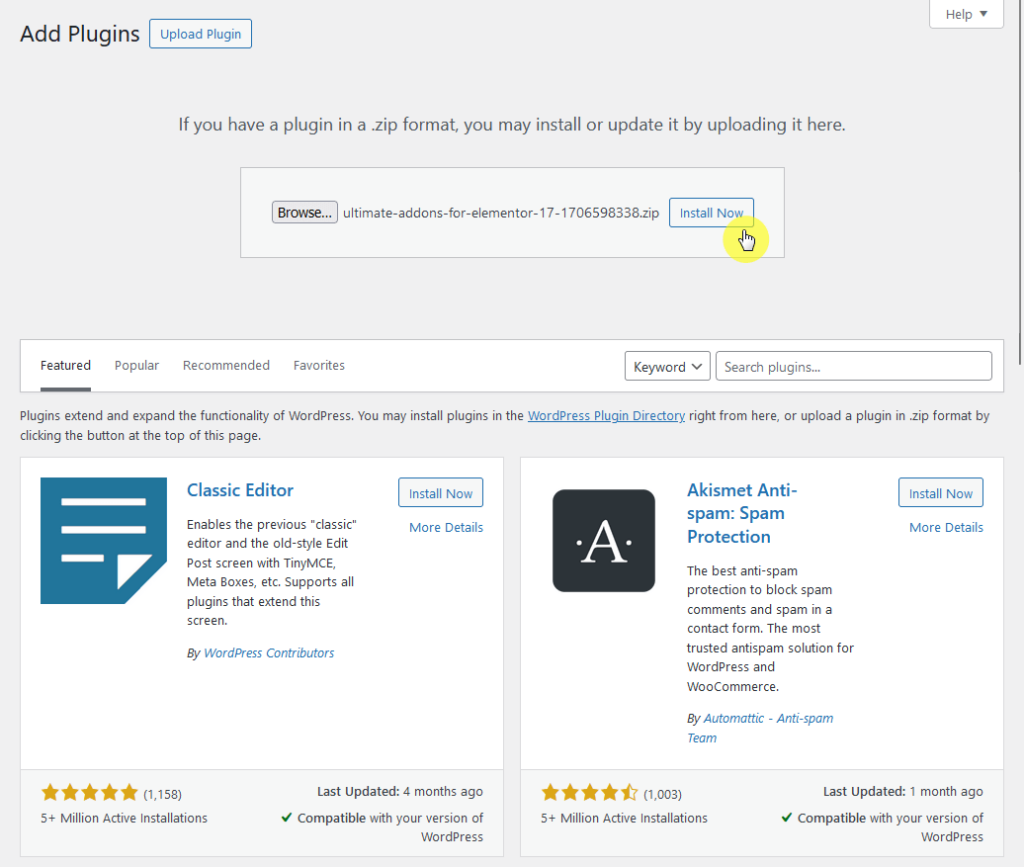
The next step is to activate the plugin .
Get the license key from the licenses page of your account on Ultimate Addons/Brainstorm Force.
Then do the following:
- Head over to the installed plugins page
- Click the activate license button
- Enter the license on the field
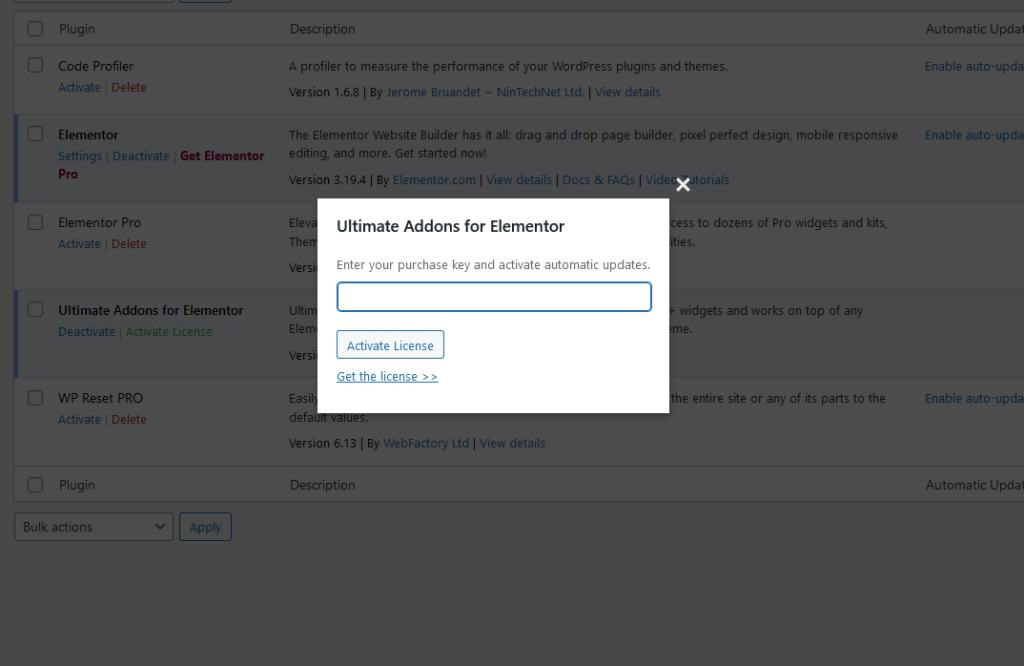
Overall, the installation and activation are straightforward.
Plugin Settings
I almost thought that Ultimate Addons had no plugin settings since I didn’t see any “UA” icon on the left-hand panel.
However, I found “UAE” under the settings and yes, this is where you will see a one-pager plugin settings.
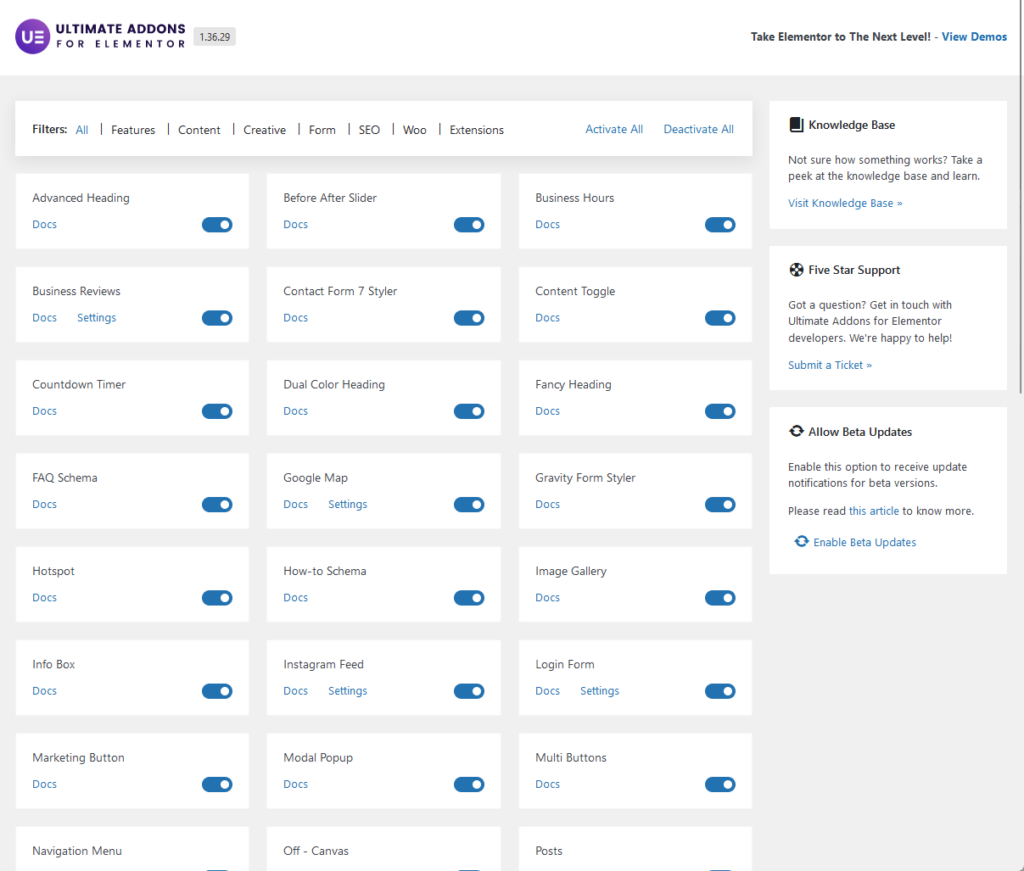
When I saw the settings, I thought that maybe this is why they didn’t put it as a main panel item since it’s just one page. 😅
You will see here all the widgets and extensions that it offers — and you can activate or deactivate all of them as it has a modular architecture.
There’s also a link here towards their knowledge base, to their support ticket system, and allowing beta updates.
👋 My thoughts here
I must say that there were a few things about Ultimate Addons for Elementor that surprised me during the whole process.
Here are a few things on my mind:
- The installation was easy, just download and install the plugin, then activate it with the license key.
- Unless it’s intuitive for you to look directly at the settings item in the panel, then you will spend a few seconds looking for the plugin settings.
- The plugin settings page is the simplest I have seen, not in form, but in content.
In fact, I wanted to ask if that was all. 😅
The bright side here is that despite the simplicity, they still put a button that will enable you to easily activate/deactivate all the features.
Features
My rating for the overall features a 3.5 out of 5.
Here’s why:
- A standout positive aspect of Ultimate Addons is its specialized widgets and the advanced options provided for certain widgets.
- On the downside, it offers one of the fewest numbers of widgets among similar Elementor plugins and addons.
- While the addon offers additional functionalities through extensions, these are somewhat common features that might not set it apart significantly.
Ultimate Addons for Elementor has its strengths in providing specialized widgets and advanced options for website designing.
However, the limited number of widgets and the mixed execution of its extensions suggest there's room for improvement.
1. Elementor Widgets
In terms of how many widgets are available, I’ll say this early on:
Ultimate Addons for Elementor has one of the fewest Elementor widgets available among Elementor plugins and addons — only around 45 so far.
Here they are:
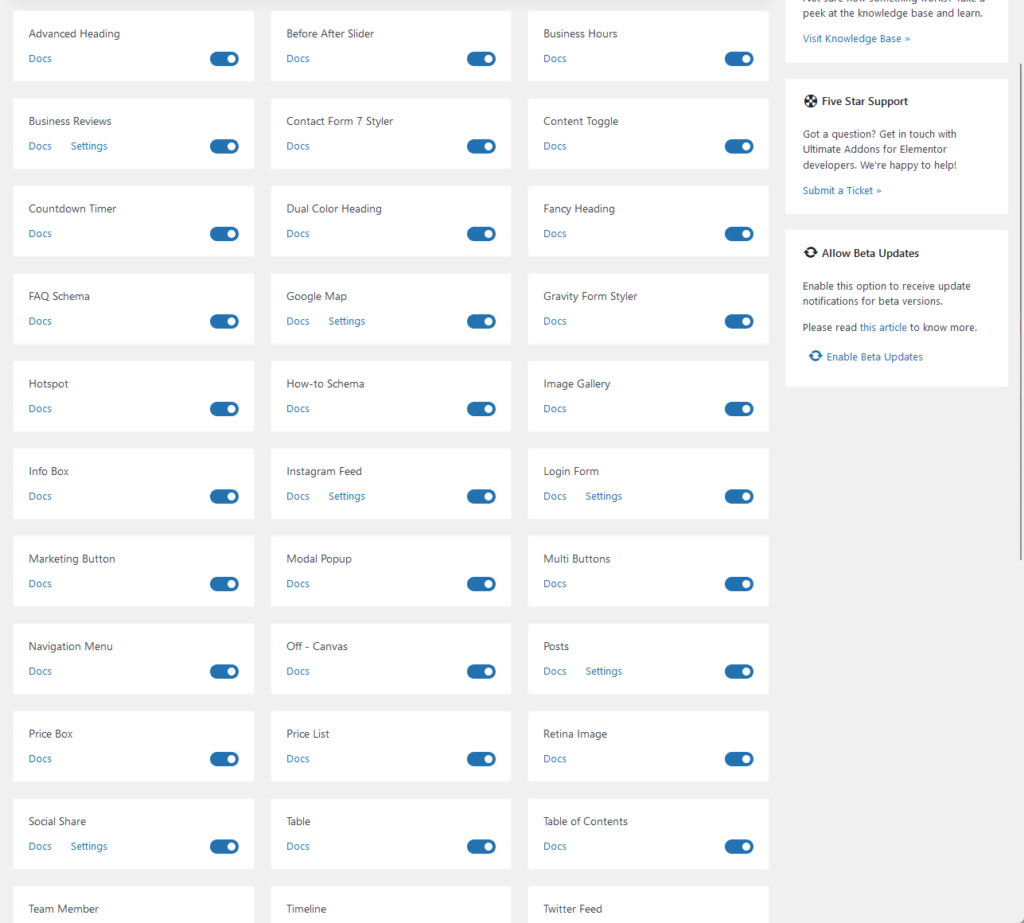
Before writing this review, I thought that Master Addons had the least number of widgets for Elementor (they have around a handful more widgets).
For the actual widgets, I didn’t really find anything that’s unique or uncommon — but at least they have a wide variety of widgets.
Some of their most popular widgets include:
- Modal popup
- Video
- Timeline
These are the content configurations for the modal popup:
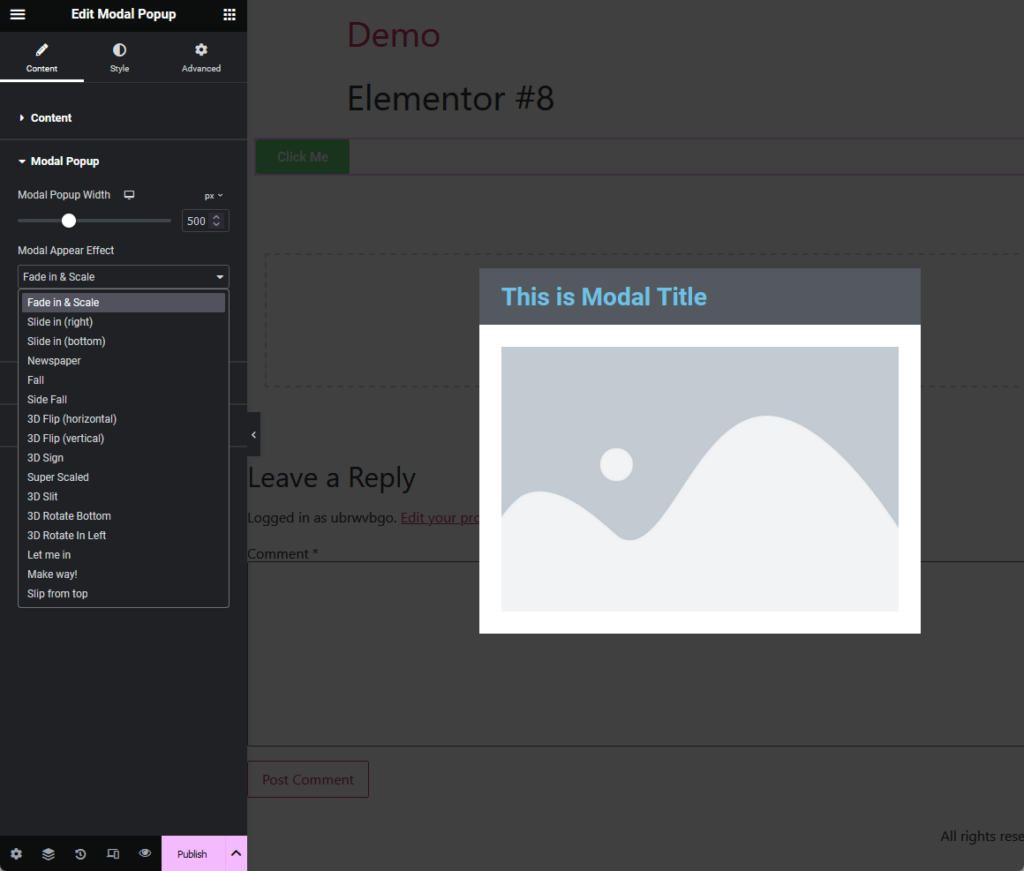
You can see from the image above that the widget includes a lot of appearance effects as well as display settings specific to the modal popup.
The next one is their video widget, which I’ve noticed is a little more advanced than the video widget I have seen from other add-ons.
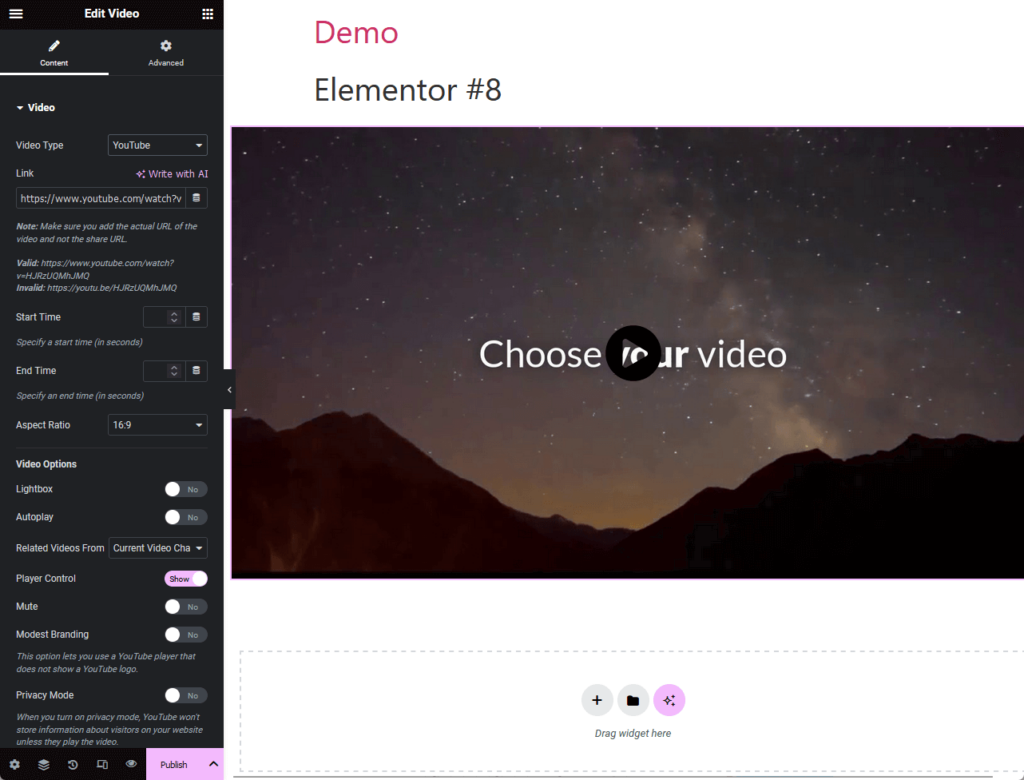
It easily allows you to embed videos from different sources:
- YouTube
- Vimeo
- Wistia
- Self-hosted
Besides the usual video options like autoplay, player control, and privacy mode, there are also settings for thumbnail, overlay, play button, and more.
The next widget is the timeline widget:
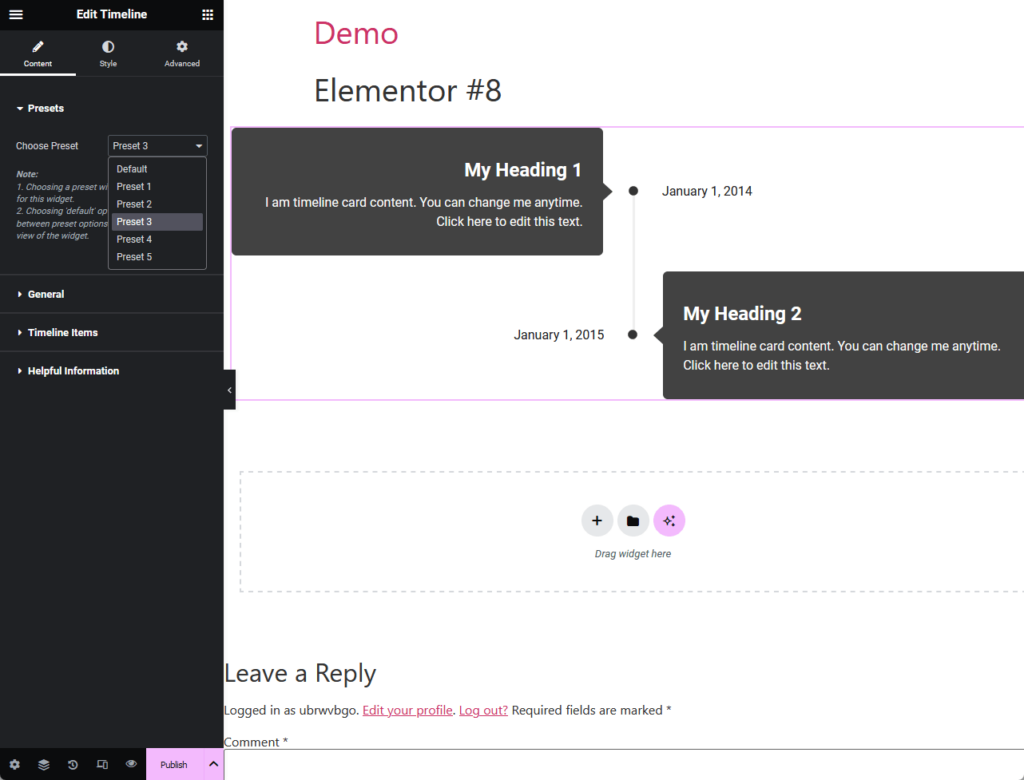
To be honest, I don’t understand why this is one of their most popular widgets — I’m thinking that maybe it’s just one of the most often-used widgets. 🤔
But if there’s one thing I like, it’s the number of presets available here which certainly makes the timeline look more appealing.
⚠️ Note: For the presets to appear, you need to enable this first from the plugin settings (or you can click enable all) of the Ultimate Addons for Elementor.
Besides the widgets above, I have to recognize that they have specialized widgets like styling forms, WooCommerce widgets (online store design), and SEO widgets.
But again, if you’re in the market looking for a lot of choices, you won’t find it here, though it’s nice that they have widgets for specific purposes.
In comparison, here are the total widgets of similar add-ons I reviewed:
- Total Ultimate Addons for Elementor: 45+
- Total Happy Addons widgets: 125+
- Total Master Addons widgets: 50+
Of all the add-ons here, Ultimate Addons for Elementor has the fewest widgets, followed by Master Addons.
👉 Related: The Best Elementor Plugins and Addons: Updated List
Effective web hosting is important for ensuring the optimal performance of these features.
That's where SiteGround steps in, offering a hosting solution that's not just reliable but also fine-tuned.

Discover the Hostinger advantage for your WordPress site:
- Enjoy a 99.9% uptime guarantee
- Affordable pricing at just $2.49/month (use the code darrel10 to get a discount)
- Global performance and reach with Hostinger's optimized hosting platform
Choosing SiteGround means you're backing your site with a hosting provider known for its speed, security, and superior support.
Level up your website's performance and reliability by making SiteGround your hosting partner today.
2. Extensions
Ultimate Addons for Elementor also has extra features, which they call “extensions” that you can enable/disable in the plugin settings.
You will be able to find them easily as they are labeled:
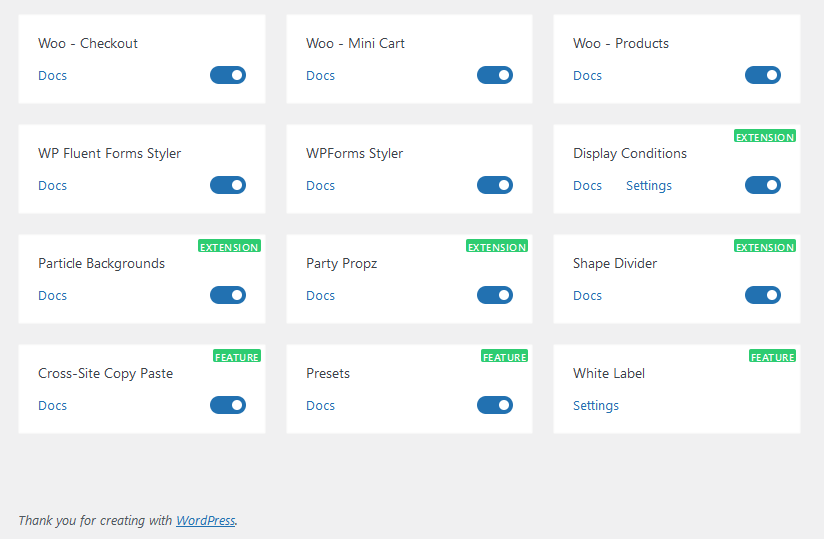
One thing I like here is that if you want to know more about that specific extension, you can simply click the docs button to read more about it.
Currently, there are only seven of them including:
- Party propz
- Display conditions
- Presets
- White label
- Cross-site copy paste
All of them, except for the ones that don’t necessarily apply to a widget, can be found on the advanced tab when editing a widget.
For example, here are the settings for party propz:
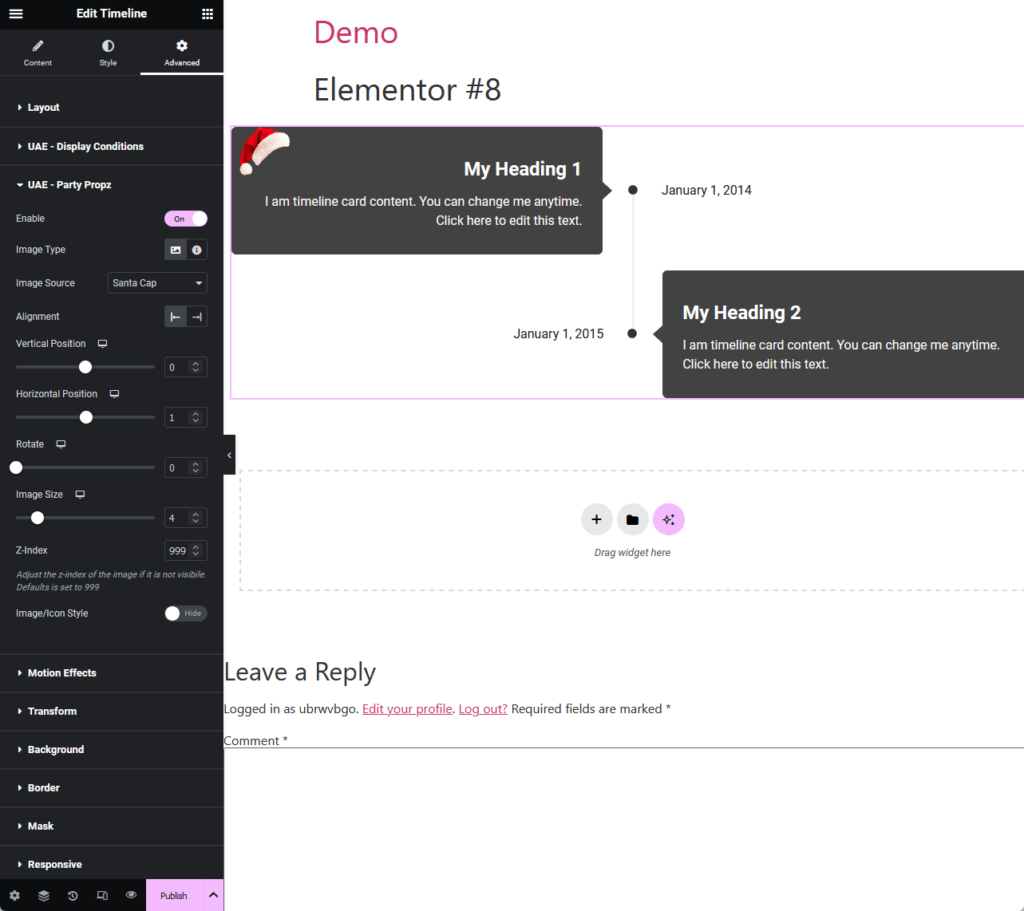
It’s an extension that would add decorations to columns and sections, with premade items for different holidays.
The display conditions extension works similarly with other display conditions features from other Elementor addons.
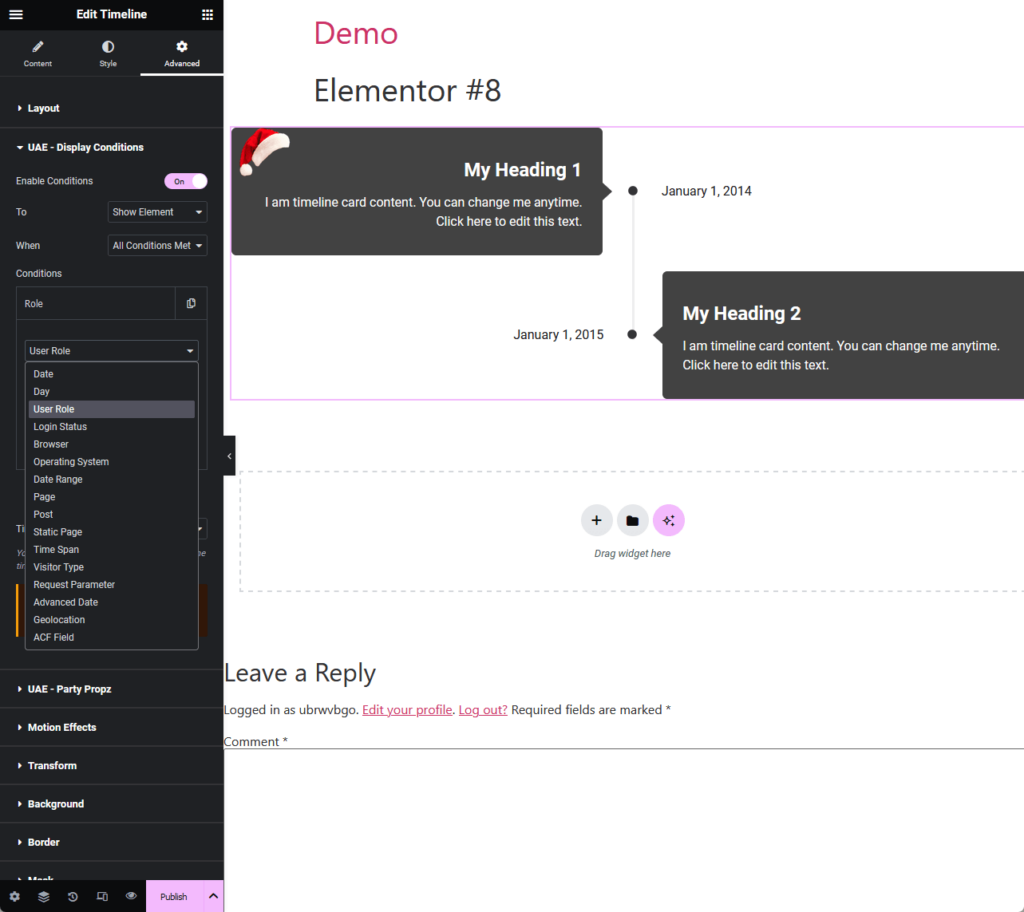
You can see that it would let you select from different conditions like date, user role, visitor type, time span, and even geolocation.
The only problem I noticed is that even if you change the trigger (like using a date range), the choices are still about user roles (maybe this will get fixed on the next patch).
The last one that I want to show you is their white-label feature:
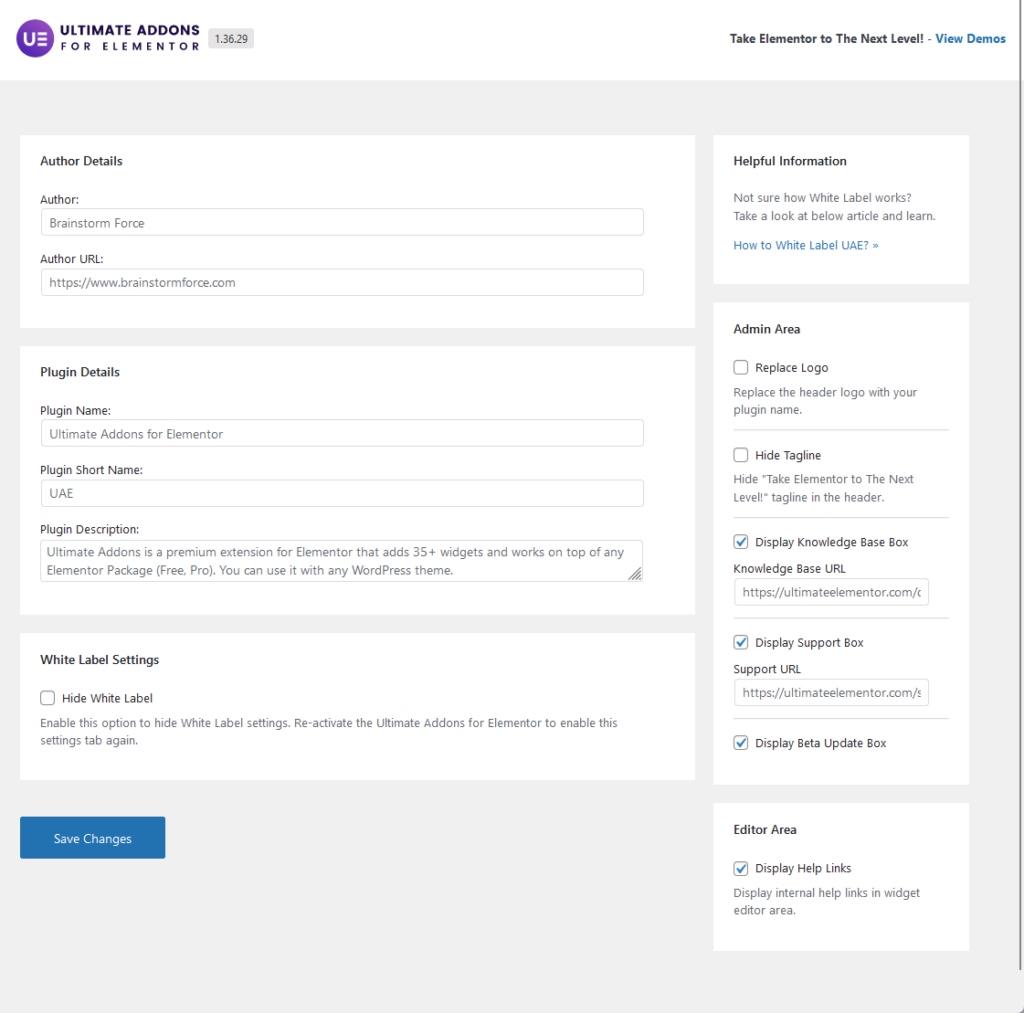
If you’re not sure how I was able to get there, well, on the plugin settings, you will see there is a “settings” button instead of a “doc” button.
You can configure here the white-label settings like the author details, plugin details, admin area, and even an option to hide the white-label setting.
👋 My thoughts here
Ultimate Addons for Elementor almost seems like an insignificant addon when compared with other Elementor Addons.
Here are my thoughts:
- At the very least, they have some widgets that are specialized for certain functions or that work with specific plugins (like form builders).
- Ultimate Addons has one of the fewest widgets for Elementor, with the majority of them very common.
- Their extensions didn’t strike me as “that special” and are common enough that you would find similar ones on other add-ons.
At the very least, they didn’t do a half job on their widgets and extensions as I can see them functioning as they should.
The only exception to that is the display conditions extension that wouldn’t let you pick any choices on the conditions besides user roles.
Reliability
I would rate its overall reliability at 4.2 out of 5.
Here’s why:
- Ultimate Addons showcases commendable performance metrics that contribute positively to its reliability rating.
- Despite its low memory usage, Ultimate Addons has the slowest average page load time compared to its competitors.
- The difficulty in locating the changelog and the long gap since the last significant feature addition (a new widget) may raise concerns.
Ultimate Addons for Elementor earns a solid reliability rating, thanks to its impressive performance metrics and active maintenance.
Performance
Now how does Ultimate Addons for Elementor look on the performance side?
Fortunately, WP Hive has data about Ultimate Addons when they scanned it using their own test script.
Here are the results:
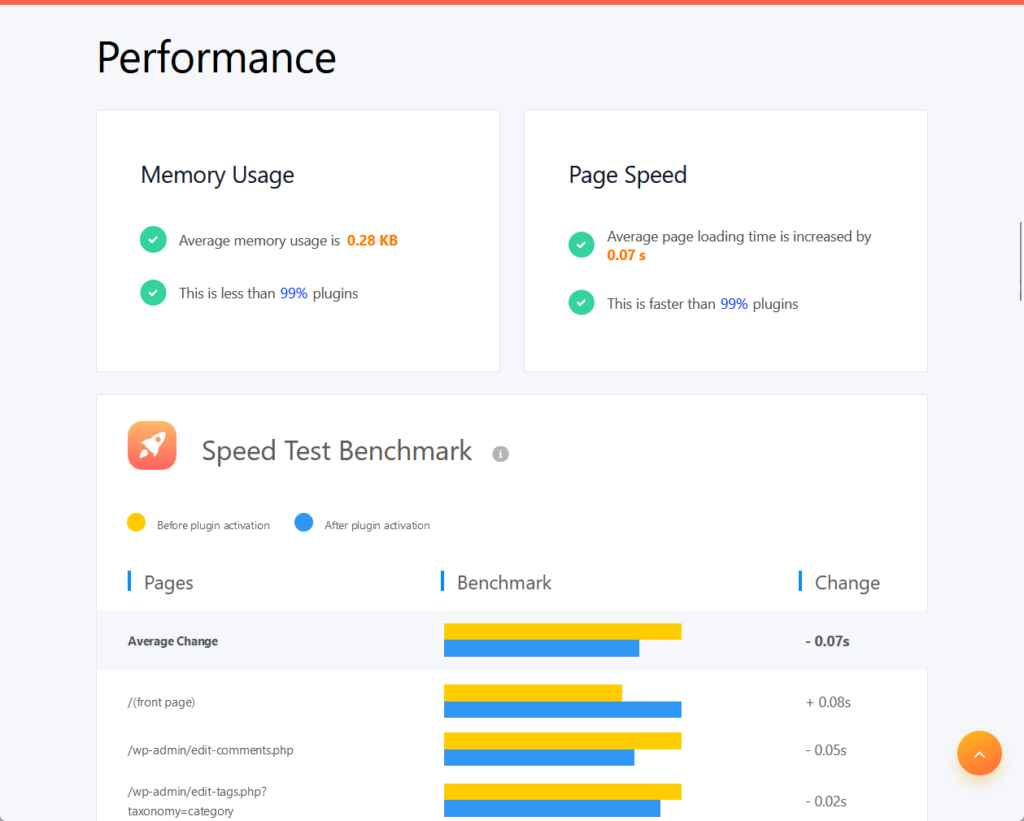
The average memory usage is around 0.28 KB, which is really good — while the average page loading time is increased by only 0.07 seconds.
Since I want to test things myself, I also tested Ultimate Addons using the Code Profiler plugin and I got 0.031 seconds both on the front end and the back end.
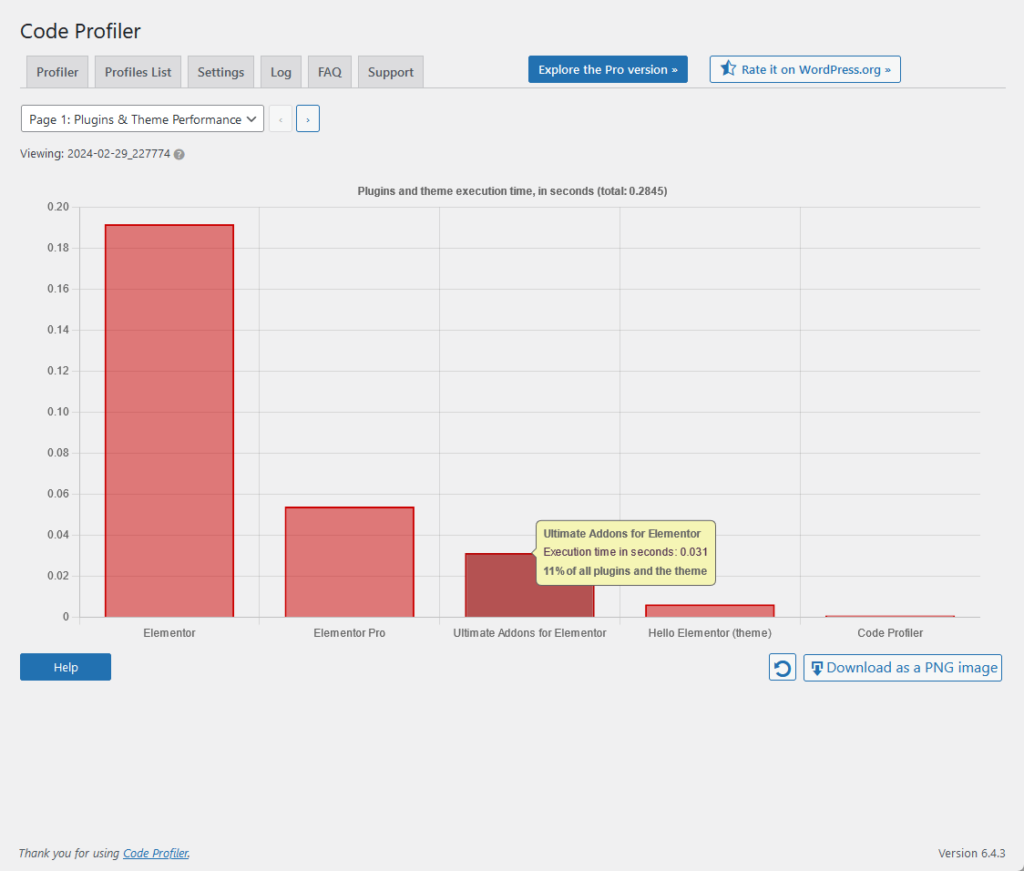
Let’s compare it with how others went:
| Feature | Happy Addons | Master Addons | Ultimate Addons |
| Page Speed | 0.02 seconds | 0.01 seconds | 0.07 seconds |
| Average Memory Usage | 2.92 KB | 64.86 KB | 0.28 KB |
| Code Profiler (Front) | 0.018 seconds | 0.053 seconds | 0.031 seconds |
You can see that Ultimate Addons for Elementor ate the least amount of memory usage (well, it’s so small) although it loaded the slowest on average.
Well, it may have the largest number in page speed but in real life, the difference in milliseconds isn’t noticeable.
Updates and Maintenance
I noticed a bit of a problem:
I know from the plugin itself that it was recently updated, but I had trouble finding the changelog from the website.
But there is a changelog that exists, I just had to use Google search wizardry to find it:
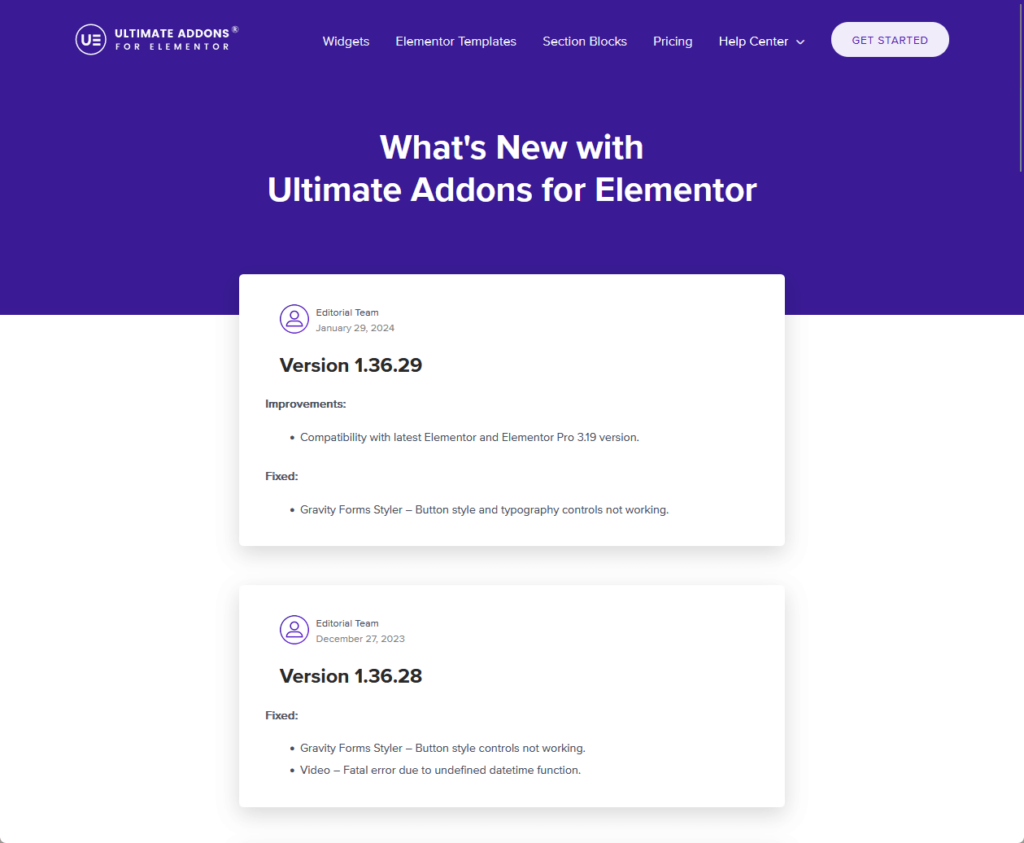
It seems that there really is a link to the changelog right in the footer widgets, but its anchor text is “what’s new”.
Anyway, here are my observations with the highlights:
- There are fixed updates for buttons not working — my thoughts on the display conditions not working properly and getting fixed are right on track.
- Most of their “improvement” updates are about compatibility with issues with Elementor, WordPress, and other plugins.
- The last time they added a new widget was in January 2022, which is a few years back from the time I’m writing this review.
But anyway, at least they’re working on fixing the issues as well as the addon’s compatibility with WordPress and Elementor.
👋 My thoughts here
The performance part is impressive, though I expected as much as soon as I saw the plugin settings and how many widgets are available.
Here are my thoughts here:
- UAE has the least average memory usage, but it also loads the slowest (among its competitors, but still fast in real life).
- I almost thought that they don’t have a changelog on their site — though it was more of a mistake on my part.
- It’s been years since they added anything significant (like a new widget) to their premium addon.
From the updates, I can see that Ultimate Addons for Elementor is still going strong, consistently updating the addon for compatibility and issues.
Support
I would rate its overall support at 3.5 out of 5.
Here’s why:
- The strength of Ultimate Addons for Elementor's support system lies in its comprehensive knowledge base.
- A notable drawback of Ultimate Addons for Elementor's support system is the limited customer service options available to users.
- Their approach to support (a centralized support site for all their products and a heavy reliance on the knowledge base) presents a mixed aspect.
The support system offers valuable resources through its comprehensive knowledge base, contributing to a solid foundation for user support.
However, the lack of diverse and interactive customer service options slightly diminishes the overall effectiveness of the support system.
Customer Service
If you don’t know yet, the guys behind Ultimate Addons for Elementor are also the same guys behind Astra, one of the most popular themes for WordPress.
With this, I expect the customer service to be more or less the same with Astra, and you can check that again right on the plugin settings:
👉 Related: Astra Theme Review: Popular Choice or Just Overhyped?
Basically, the help features include the following:
- Knowledge base
- Ticketing system
- Videos
For the ticketing system, you will have to go through the support search feature first which will go through the articles in the knowledge base.
If you can’t find a solution, a submit ticket button will appear at the bottom of the dropdown:
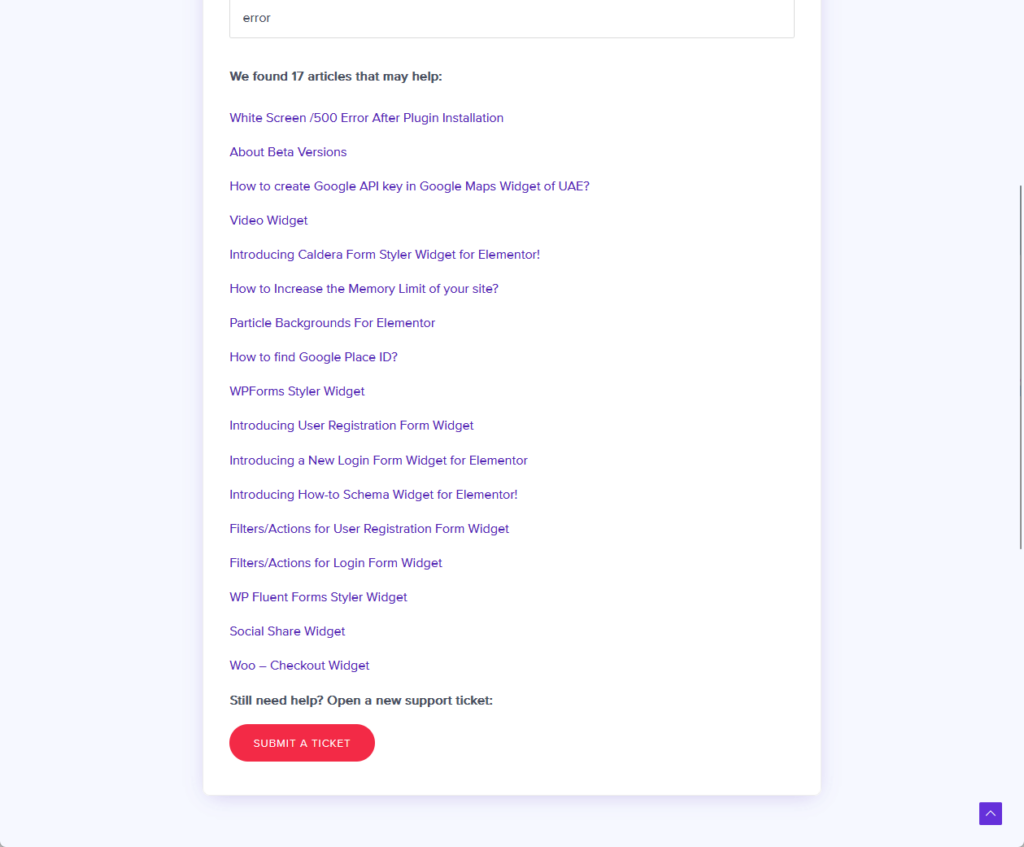
This will then bring you to another support page where you have to click on a button that will bring you to the support page of Brainstorm Force (which requires a login).
They do have a contact form — but you can only use it for:
- Pre-sale questions
- Billing and account problems
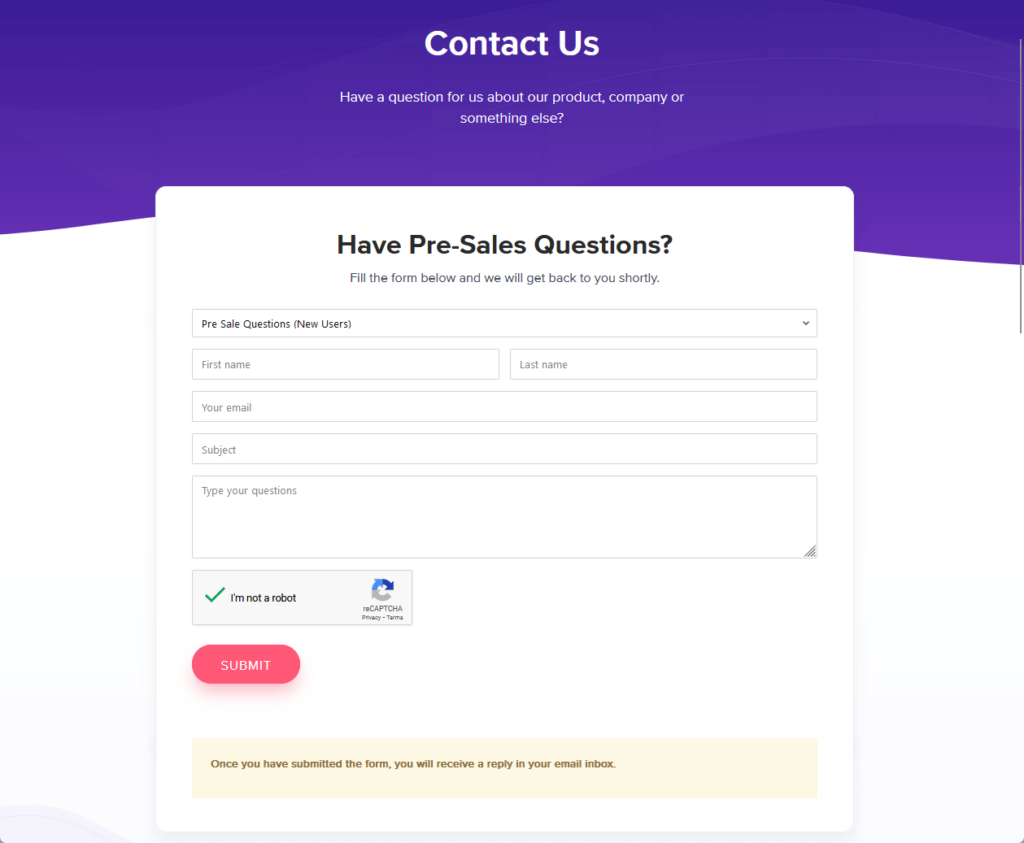
UAE has a Facebook page where people ask questions as comments on their posts (they post once a month).
Unfortunately, it doesn’t seem that they reply to anyone in there — which is a wasted opportunity especially since they already have someone posting on the page.
Knowledge Base
For the knowledge, you can find it easily from their website under the help center menu.
This is the front page of their knowledge base:
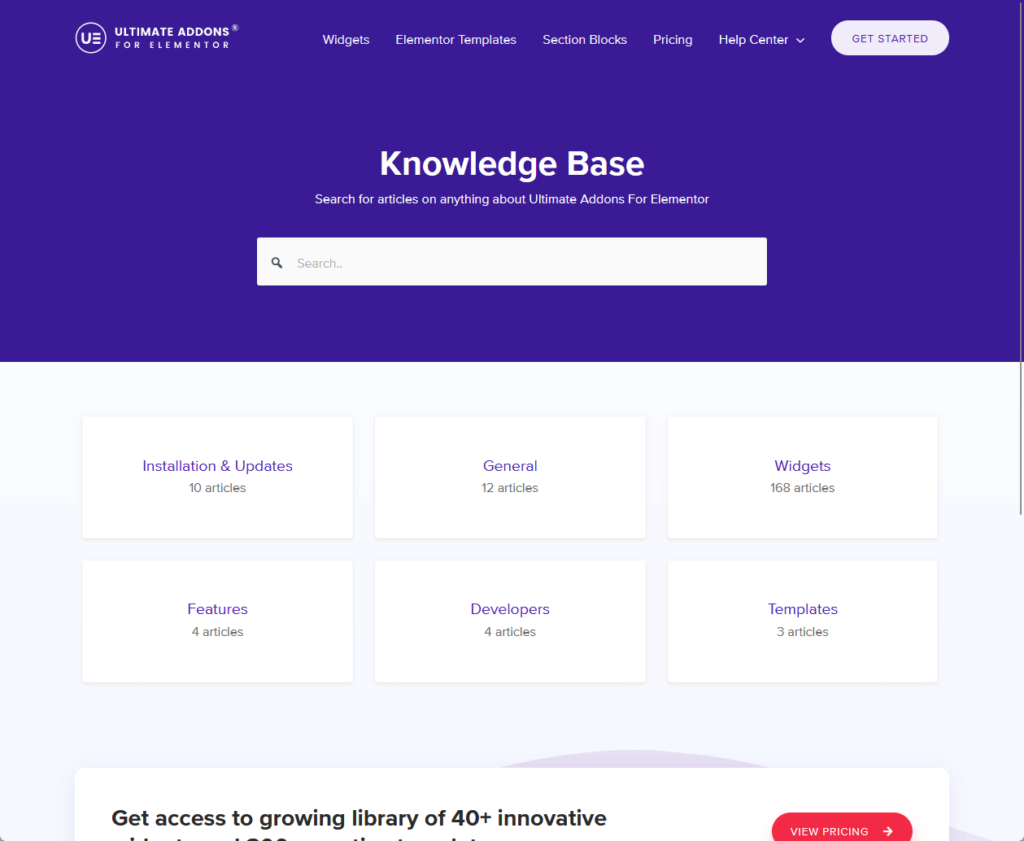
As you can see, they organized the articles into categories like installation, general, widgets, features, etc.
There is also a search feature that automatically shows suggestions that match the search query entered.
Here is an example of one of the articles:
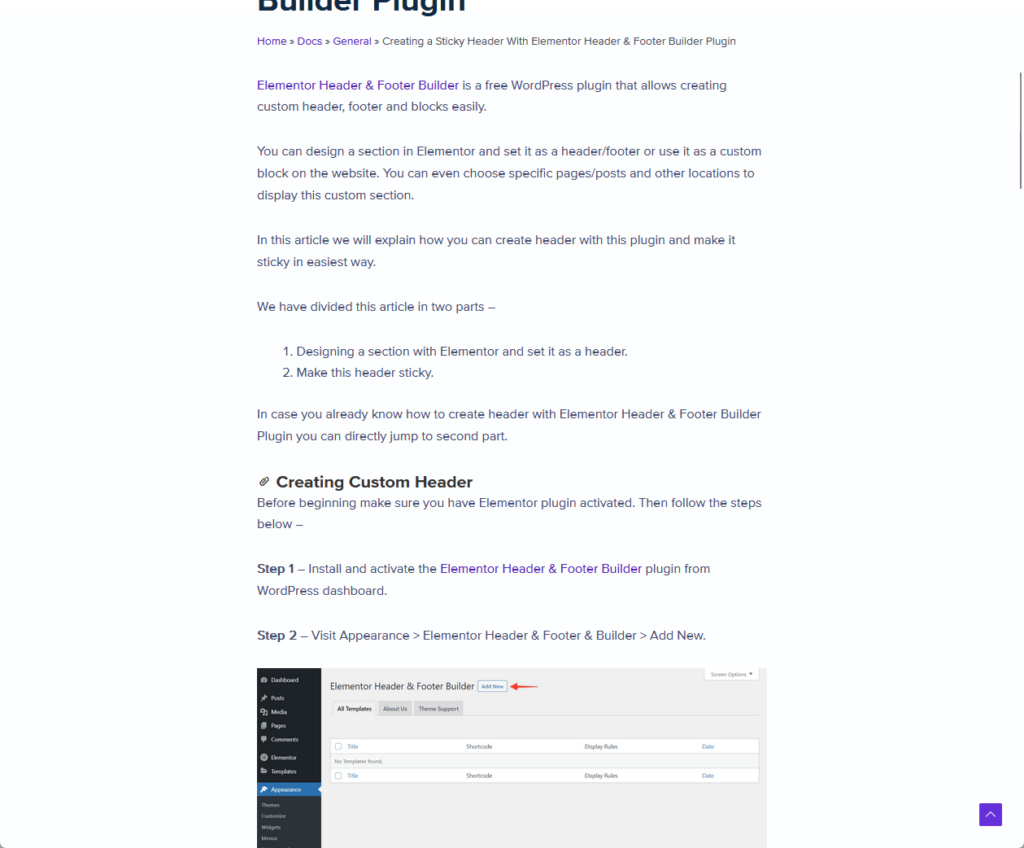
The articles are well-written and have annotated images for easy understanding, links to related articles, as well as source code blocks for related articles.
Despite not having a lot of avenues to ask for help, their knowledge base articles seem to be a good place to check first.
👋 My thoughts here
In terms of support, Ultimate Addons for Elementor is a mixed bag — it has few customer service options but good knowledge articles.
Here are my thoughts:
- It would be great if they have at least a forum or a community where people can answer questions from others.
- They could’ve used the Facebook page for customer service but unfortunately, it’s unlikely that they would do that.
- They do have a centralized support site for all their products like Astra and UAE, which can be a good thing.
It may be possible that they invested more in the knowledge base since it will cost less in the future as it doesn’t need to be actively maintained.
On the other hand, at least they still have a few options for users to contact them — but there’s not much proof as there’s no community to check with.
Pricing
I would rate its overall pricing at 3.0 out of 5.
Here’s why:
- Offering a 14-day money-back guarantee allows users to try the product with the safety net of a refund if it doesn't meet their expectations.
- The primary downside to their pricing is the relatively high cost of access to a limited number of widgets and features.
- Their structured plans, which offer varying levels of access to additional resources and bonuses at different price points, are a mixed aspect.
The rating reflects a cautious balance between its supportive refund policy and the concerns over cost-effectiveness and feature availability.
Cost Breakdown
As I mentioned in the first part of this review, Ultimate Addons is a premium-only addon — no free version.
For the pricing, here are the plans:
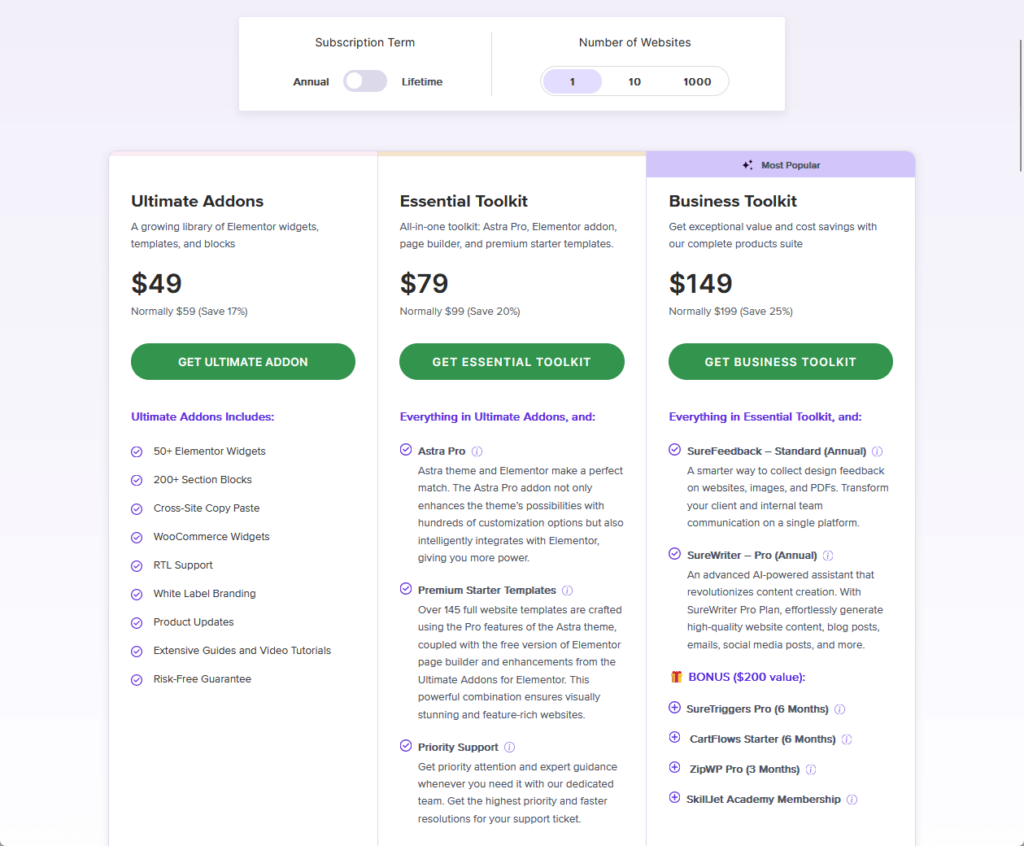
There are three plans available:
- Ultimate Addons: Priced at $49/year with all UAE features
- Essential Toolkit: Priced at $79/year with Astra Pro and templates
- Business Toolkit: Priced at $149/year with more bonuses
All of that is good for a WordPress website alone — 10 sites would add around 20% to 40% of the price.
That’s all good if you plan on using Astra Pro and all its premium starter templates for all your sites forever.
But if you’re here only for the addon itself? It’s not a good price considering how many widgets and features it offers.
Money Back Guarantee/Refund
On the bright side, Ultimate Addons for Elementor offers a refund policy where you can safely try the product.
You can find the refund policy on the terms and conditions page:
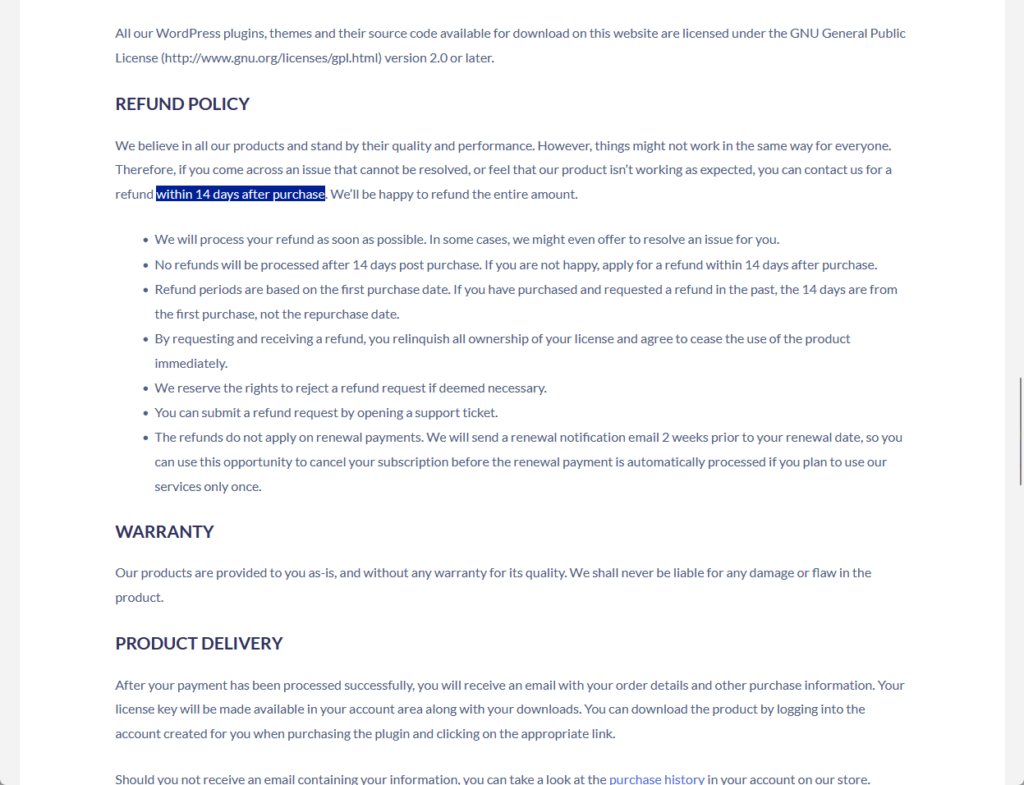
The policy is a bit long, so I’ll give you the key points instead:
- Apply for a refund 14 days after purchase if you’re not happy.
- They reserve the right to reject a refund request if deemed necessary.
- You can submit a refund request by opening a support ticket.
- Refunds do not apply to renewal payments.
Unlike other addons, Ultimate Addons for Elementor will allow you to do a “paid” trial of their product within 14 days.
If you don’t like it, you can request a refund as long as you do it within 14 days after purchasing the addon.
👋 My thoughts here
I like their refund policy as you can safely try the product — unfortunately, I can’t say the same with their pricing.
Here are my thoughts here:
- The price is way too high for a single site per year considering the number of widgets and features they offer.
- Although there’s a chance of the refund request being rejected, it’s unlikely unless you violate any of the terms.
Their policy clearly states that you can safely apply for a refund as long as it’s within the 14-day period after purchase.
Final Thoughts
If you're considering buying Ultimate Addons for Elementor, it's important to weigh your specific needs and expectations against what this addon offers.
Given its unique set of widgets and extensions, it's best suited for those who value quality and efficiency over quantity.
Before making a decision, take advantage of the 14-day money-back guarantee to explore its features thoroughly.
Wrapping up, it's important to remember the foundation of your website's design and functionality—Elementor Template Kits.
Darrel Wilson offers an unbeatable solution to elevate your Elementor experience without the recurring costs and hassle of updates.
You can't ignore this:
- Get lifetime access to all premium template kits designed for Elementor
- Complete with 2 years of dedicated support
- Only for $99 — that's already for the lifetime access
Enhance your Elementor experience with lifetime access to premium template kits today.