
Ease of Use
I would rate its ease of use a 4.0 out of 5.
Here’s why:
- WPvivid makes it easy to get started, with clear instructions for setup and activation.
- While setup is easy, entering a license key after installation adds an extra step.
- The plugin has a customizable settings page with descriptions for each option, but it may feel overwhelming to new users unfamiliar with backup settings.
Its straightforward setup and user-friendly interface make it accessible to a wide range of users.
The minor learning curve around advanced settings is balanced by the plugin's flexibility, making it a great tool for both beginners and experienced site managers alike.
Initial Setup
WPvivid has a straightforward setup for both its free and premium (pro) versions.
For the free version, you simply have to navigate to plugins > add new and search for “wpvivid” in the search bar.
Then install and activate:
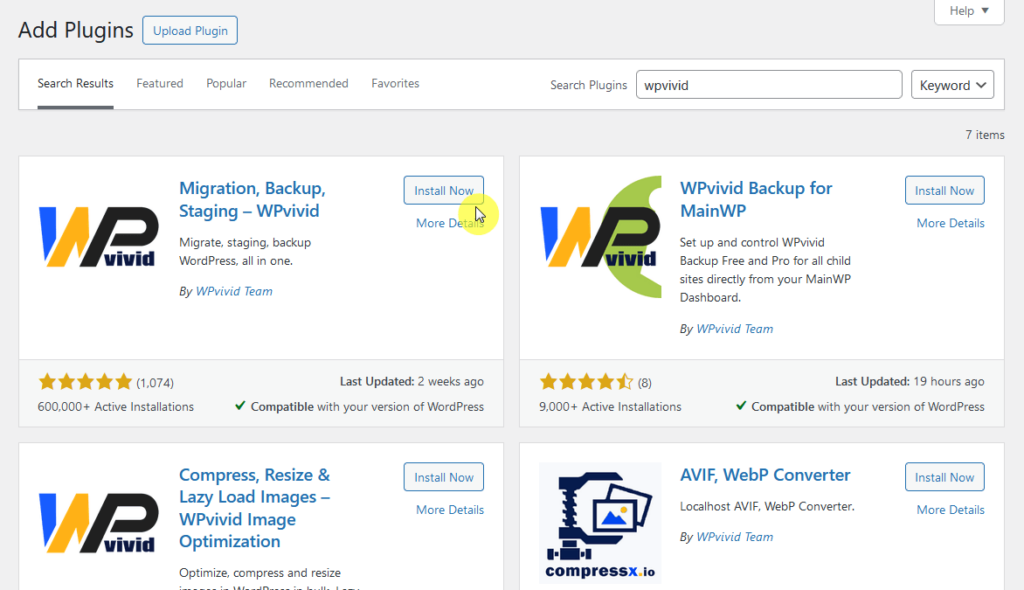
Once activated, it will appear in the WordPress menu.
The WPvivid Pro version offers added functionality, such as incremental backups, advanced migration, and multisite support.
Here’s how to set it up:
- Purchase WPvivid Pro from the official WPvivid website
- Download the pro plugin (.zip) from your account page
- Go to plugins > add new page on your website dashboard
Click the upload plugin button, install, and then activate the plugin:
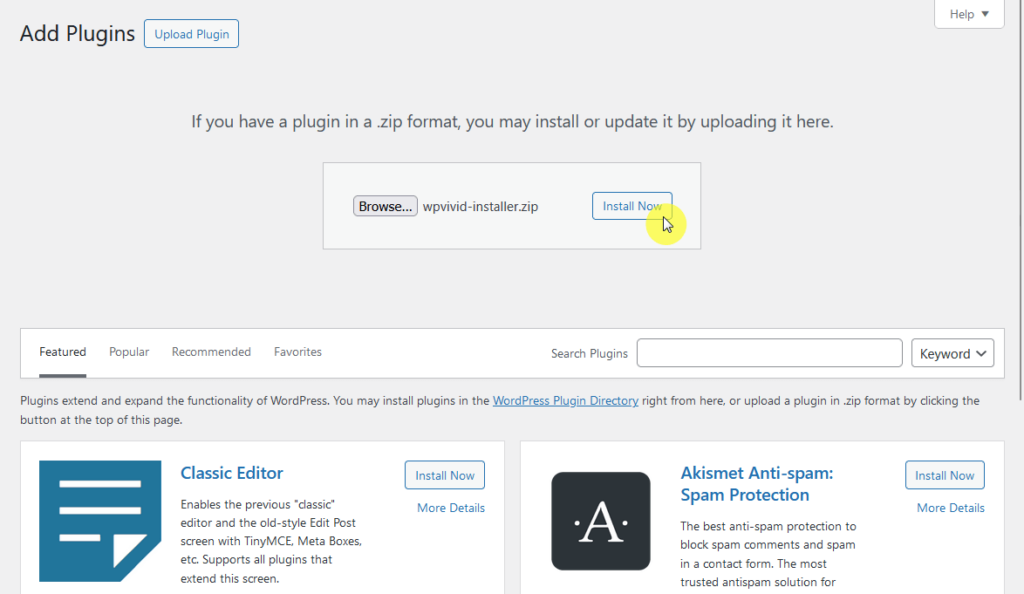
After activation, you will need to enter your license key, which you can find in your WPvivid account.
The pro version will now be accessible from your plugins menu, ready for you to use the premium features.
User Interface
The WPvivid plugin’s interface is designed to be straightforward so both beginners and experienced users can manage backups and migrations easily.
As you can see from the image below, it’s organized, visually clear, and requires no complex configurations to get started.
Here’s what you see after clicking WPvivid from the dashboard panel:
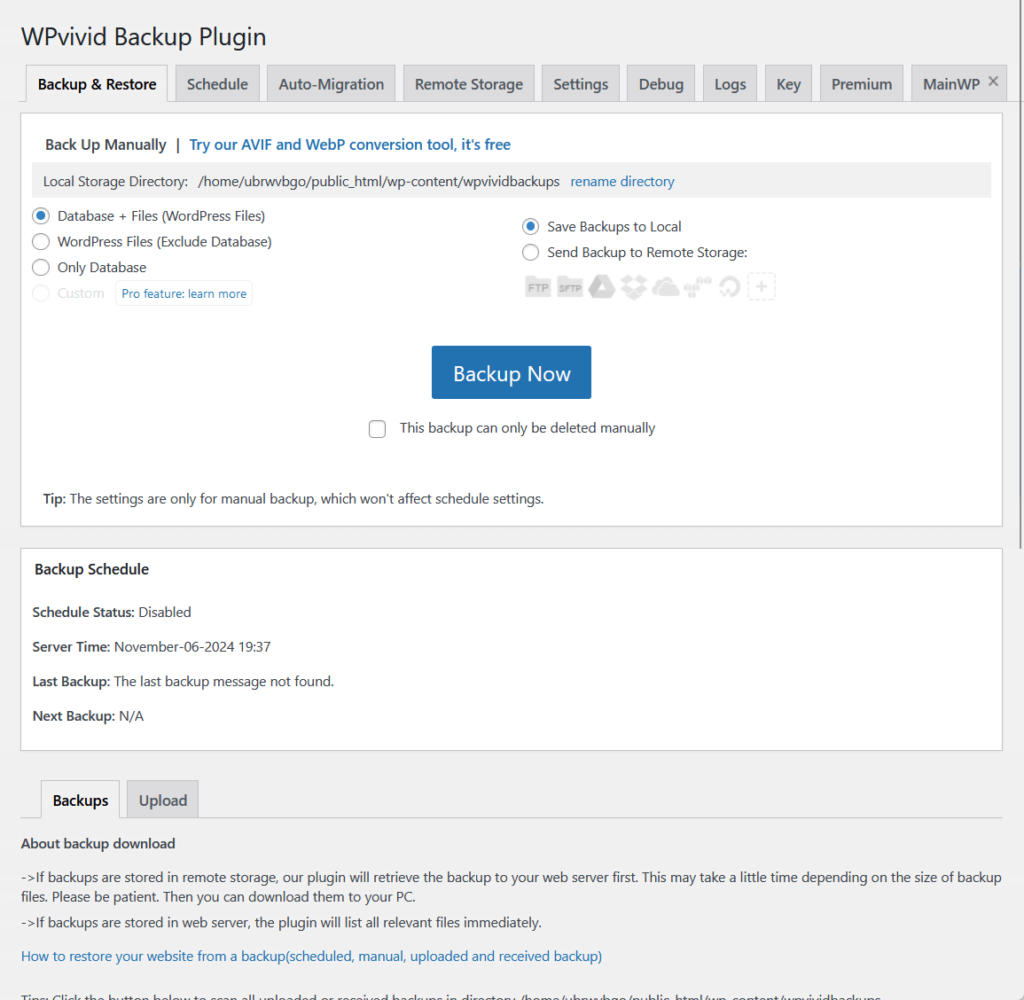
WPvivid is highly user-friendly, with an interface built to be intuitive, with clear icons and tooltips that guide users through each function.
The primary tabs and buttons are self-explanatory, making it simple for new users to find what they need.
If you go to the settings, this is what you will see:
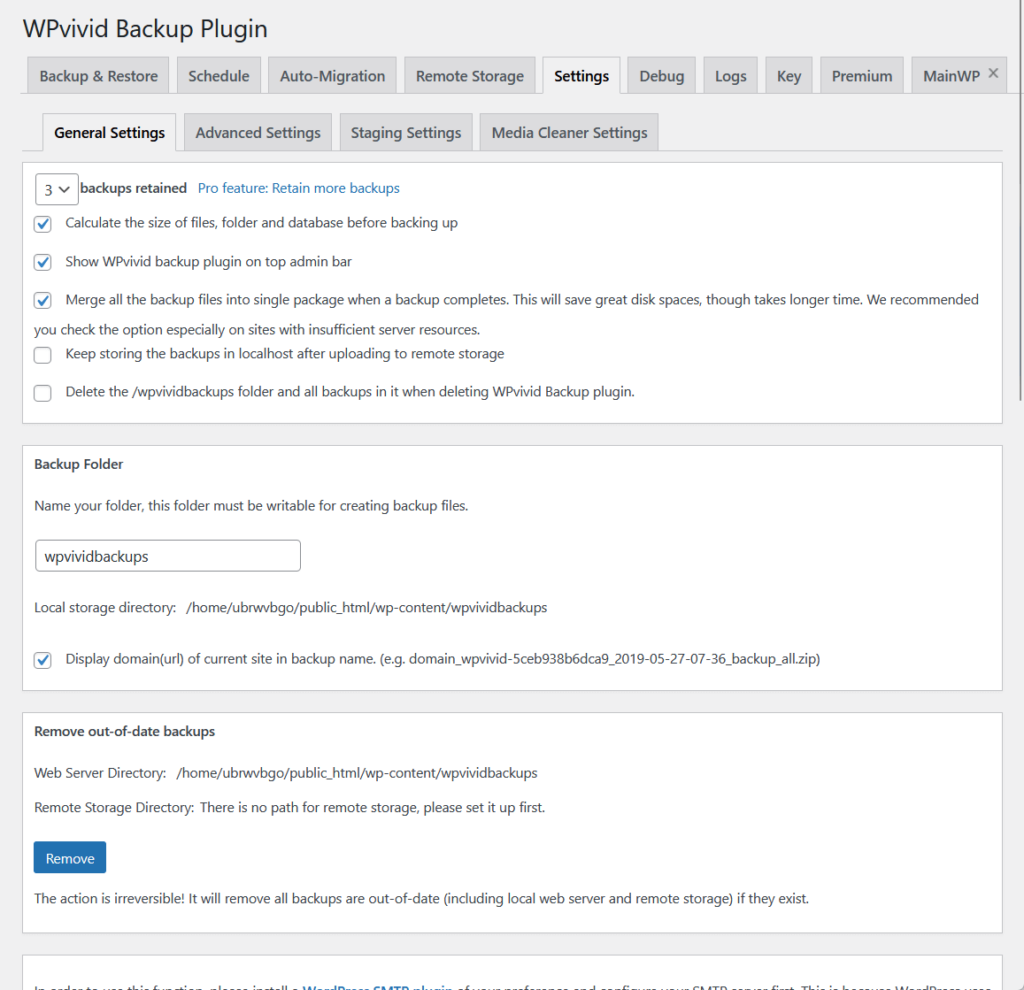
WPvivid provides a variety of options for customization, covering backup schedules, cloud storage locations (like Google Drive), and more advanced features.
The settings are labeled with clear descriptions, which makes it easier to customize without needing advanced technical knowledge.
👋 My thoughts here
WPvivid offers an easy installation process for both its free and pro versions and an easy user interface/experience.
Here are my thoughts:
- The user interface is clean and easy to navigate, with clearly labeled tabs for each feature.
- WPvivid’s settings page is designed with users in mind, with clear descriptions for each option (nice for beginners!).
- The level of customization makes WPvivid accessible for basic users while still meeting the needs of more experienced site managers.
I had a great experience with installing and using WPvivid. 🙂
It’s clear that a solid hosting provider is key to keeping your site running smoothly and securely.
Hostinger, with its affordable plans and reliable service, is the perfect match for WPvivid Pro’s backup and migration features.

Discover the Hostinger advantage for your WordPress site:
- Enjoy a 99.9% uptime guarantee
- Affordable pricing at just $2.49/month (use the code darrel10 to get a discount)
- Global performance and reach with Hostinger's optimized hosting platform
For easy migrations and secure backups, Hostinger provides the dependable hosting foundation your WordPress site deserves.
Best Features
For the features, my rating here is 4.4 out of 5.
Here’s why:
- The simplicity of WPvivid's one-click backup and restore feature stands out, especially for users who want fast, easy site protection without technical hassle.
- While the migration feature offers flexibility, initial setup can be slightly challenging for non-technical users.
- Incremental backups save space and time, especially for content-heavy sites, but they may be overkill for smaller, static sites with fewer updates.
While the migration setup could be smoother, the plugin’s powerful backup and restore capabilities make it a top choice for both new and experienced site managers.
Here are some notable features of WPvivid:
1. One-Click Backup and Restore
WPvivid’s one-click manual backup and restore feature allows users to quickly safeguard their website or recover it from a backup.
From the name itself, with a single click, you can start a full backup or restore your site, simplifying the entire process.
Once you have a backup file, you can immediately restore it in one click:
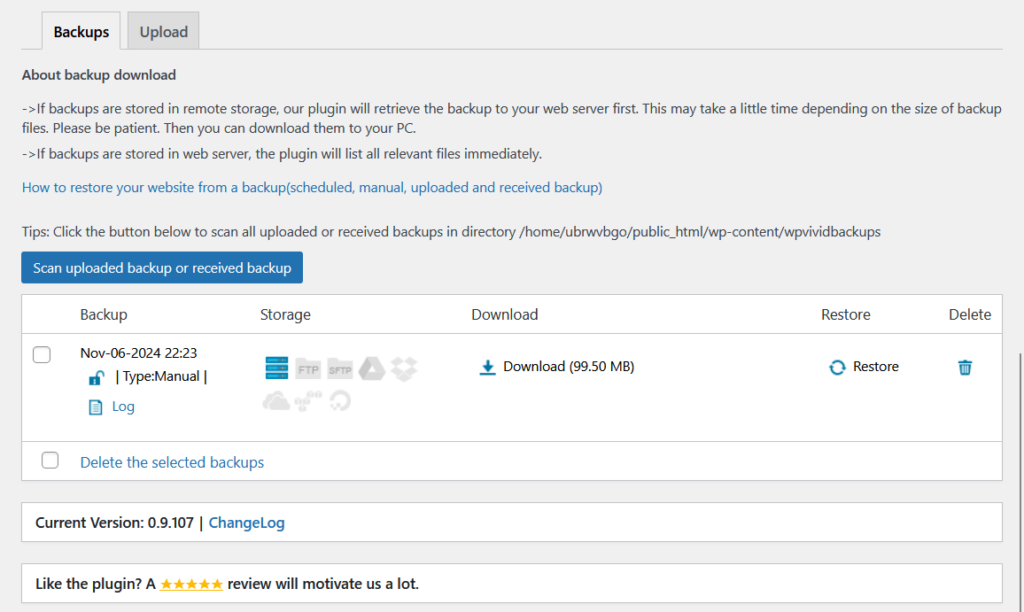
That’s actually the same place where you create the backup (the page that opens when you click WPvivd from the dashboard).
Here’s what makes this feature so handy:
- Save the latest version of your site in seconds with a click.
- Roll back to a previous version if there’s an error or unwanted change.
- No need to configure complicated settings or scripts.
- Alerts appear to confirm when backups and restores are complete.
- View recent backups and restores directly from the dashboard.
This feature is valuable for both new users and experienced site managers.
With one-click functionality, WPvivid makes it easy to protect your site’s data without the need for complex setup or technical expertise.
2. Incremental Backups (Pro)
WPvivid’s incremental backup feature (along with backup schedule), available in the Pro version, is designed to save storage and time by backing up only new changes since the last backup.
This feature is perfect for WordPress websites with frequent updates, as it prevents the need to repeatedly back up the entire site.
Here are the settings available for incremental backups from their documentation:
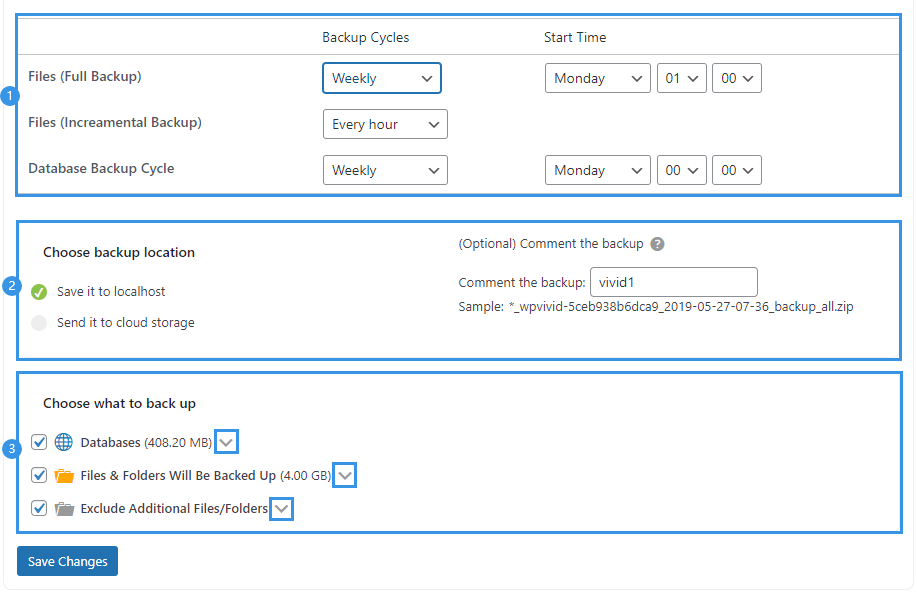
Key benefits of incremental backups include:
- Only new data is backed up, saving space in your storage.
- Smaller backup files mean quicker backup times.
- Ideal for content-rich sites that update regularly.
- Set schedules for incremental backups without manual intervention.
- Incremental backups can be restored just like full backups.
With incremental backups, WPvivid Pro users can maintain up-to-date site copies while minimizing the burden on server resources.
It’s a valuable feature for anyone looking to optimize their backup strategy and make frequent, efficient backups possible.
3. Flexible Site Migration Options
WPvivid is also a migration plugin as it makes site migration a breeze with multiple options that cater to different needs, whether you’re moving to a new domain, server, or creating a staging site.
This flexibility allows users to complete migrations with minimal hassle and no technical expertise, though it might be a little tricky to set up.
Here’s the auto-migration page:
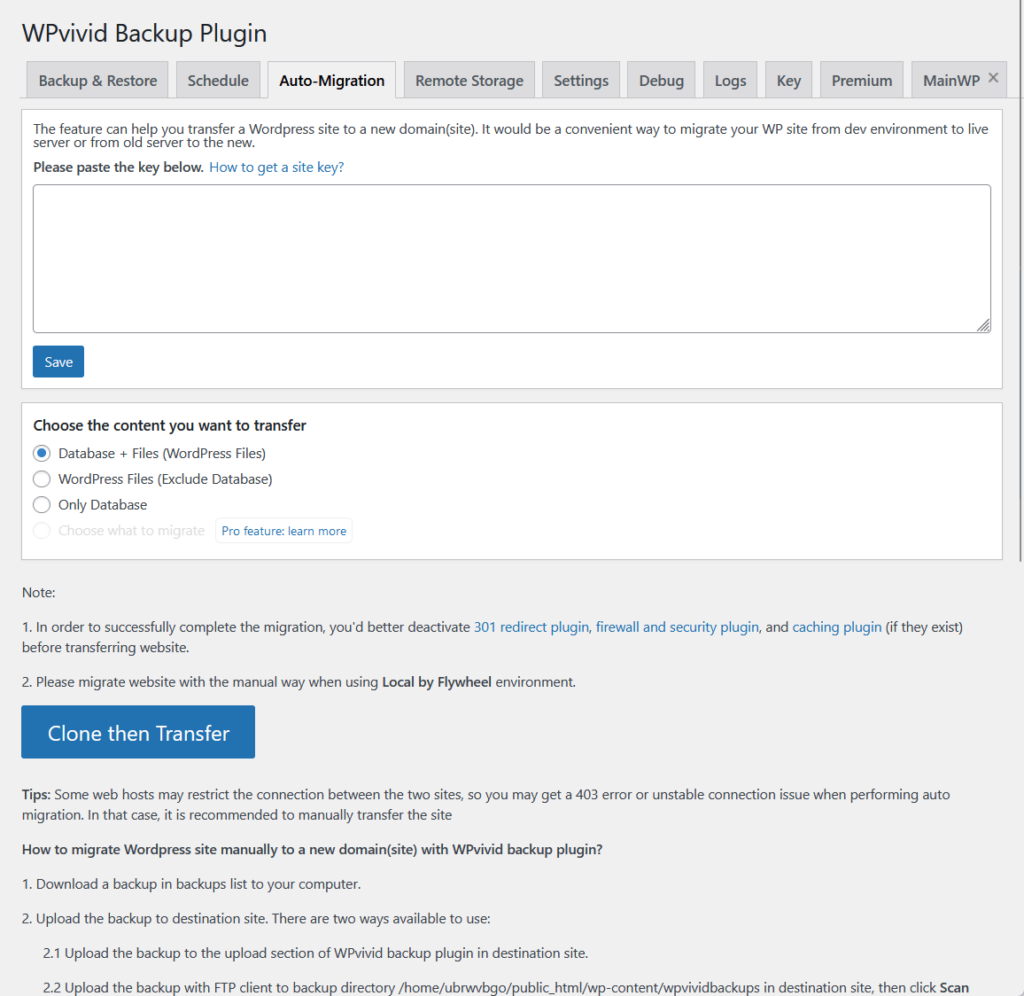
What it can do:
- Move your site directly to another WordPress installation with ease.
- Create a backup, then upload it to the new site for quick migration.
- Clone your site to a staging environment for testing and development.
- Ensures that all site data, including URLs and paths, remains intact post-migration.
- Select specific files or databases to migrate for a tailored approach.
WPvivid’s migration tools offer flexibility and reliability, making it suitable for various scenarios, from complete site moves to testing in staging environments.
This feature helps users save time and ensures a smooth transition, whether moving a site permanently or setting up a temporary clone.
👋 My thoughts here
I have reviewed many backup plugins already, and so far, it can’t be that simpler than what WPvivid offers. 🙂
Here are my thoughts here:
- The one-click backup and restore feature minimizes the risk of data loss without requiring technical setup, making it ideal for all user levels.
- Incremental backups are especially useful for dynamic sites with frequent updates, as it saves both storage space and time.
- Users can choose between direct site-to-site transfer, staging site setup, or customized file migrations, which saves time and reduces setup hassle.
I also want to mention their customizable backup scheduling.
This flexibility allows users to choose a schedule that fits their needs, simply automating backups without manual intervention.
Reliability
My rating for WPvivid’s reliability is around 4.2 out of 5.
Here’s why:
- It demonstrates impressive frontend performance with a low execution time, showing it won't noticeably impact page load times for visitors.
- While the plugin’s backend speed of 0.066 seconds is still efficient, it's slightly slower than some competitors.
- The regular updates show a commitment to quality and responsiveness to user feedback.
WPvivid is a solid choice, offering fast frontend performance and consistent improvements through updates.
Despite minor backend delays, its robust maintenance and optimization make it a dependable option for WordPress website owners who prioritize both speed and reliability.
Performance
Like any plugins I reviewed, I ran WPvivd into Code Profiler, and here’s what I got:
- Website frontend: 0.045 seconds
- Admin backend: 0.066 seconds
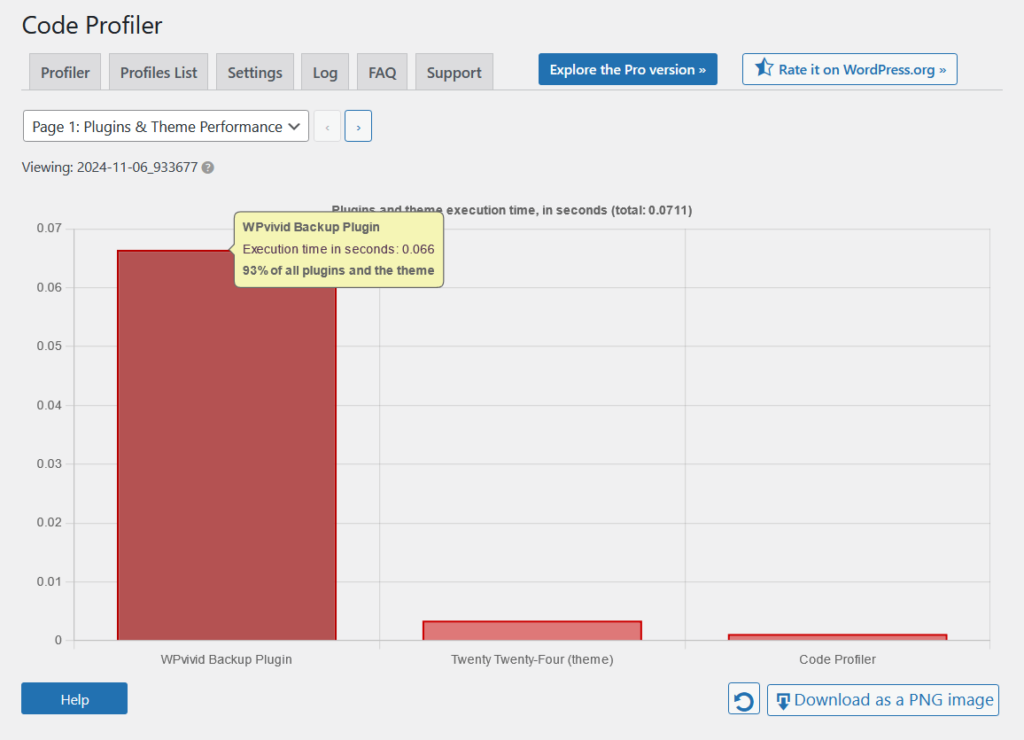
Naturally, this wouldn’t be complete without comparison with its competitors:
| Feature | WPvivid (Free) | Duplicator Pro | UpdraftPlus |
| Website Frontend | 0.045 seconds | 0.108 seconds | 0.045 seconds |
| Admin Backend | 0.066 seconds | 0.121 seconds | 0.057 seconds |
As you can see, WPvivid performs exceptionally well on the website frontend with a low execution time of 0.045 seconds.
WPvivid’s backend execution time on the admin side is 0.066 seconds, which, while slightly slower than UpdraftPlus at 0.057 seconds, still outpaces Duplicator Pro at 0.121 seconds.
Despite WPvivid’s robust features, including flexible migration and incremental backups, its low execution times indicate an optimized codebase.
Updates and Maintenance
WPvivid is actively maintained by its developers, making it compatible with the latest WordPress updates and providing improved functionality over time.
As for the changelog, WPvivid has a separate changelog for its pro version on its website and another for the free version on the WordPress repository.
Here’s what the changelog for the pro version looks like:
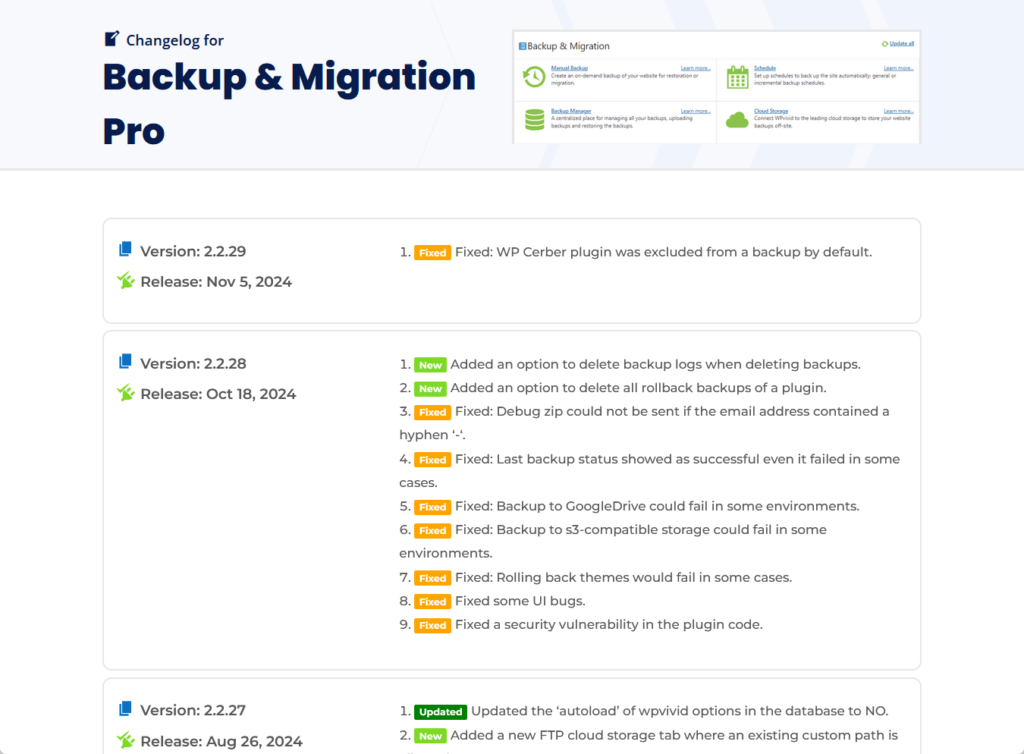
The WPvivid changelog includes details like version numbers, release dates, and a summary of what each update includes (like bug fixes, new integrations, etc.)
Key points on maintenance and updates:
- Frequent updates for bug fixes, new features, and security patches.
- Provides a changelog documenting every version update.
- The free and Pro versions are actively maintained with new features and improvements.
- Updates often reflect user requests and feedback, showing responsiveness from the WPvivid team.
Clearly, both free and pro users can expect regular improvements that address evolving needs and technology trends.
👋 My thoughts here
I’m pretty happy with WPvivid’s performance and maintenance. 🙂
Here are my thoughts:
- WPvivid’s performance on the website frontend is impressive, with a minimal execution time of 0.045 seconds.
- On the backend, while it’s slightly slower than UpdraftPlus, it’s still notably faster than Duplicator Pro.
- WPvivid is actively maintained, with regular updates that address bug fixes, feature enhancements, and security improvements.
Despite offering advanced functionalities like incremental backups and site migration, WPvivid maintains low execution times, which means it has an optimized and efficient codebase.
Support
I would rate its support a 4.0 out of 5.
Here’s why:
- WPvivid provides detailed, user-friendly documentation covering everything from basic setup to advanced features.
- Their support is mainly through a ticketing system or forums, with no live chat or phone support.
- WPvivid staff actively engage in the WordPress community forums, offering free users helpful insights.
The extensive documentation and active community forum presence make it accessible, though the lack of real-time support options can slow down help for urgent needs.
WPvivid’s support structure is strong, especially for users who prefer self-guided solutions.
Customer Service
WPvivid offers a range of customer support options to help users resolve issues and make the most of the plugin’s features.
Anyway, in the plugin, there’s a troubleshooting and how-to sections at the bottom of every page:
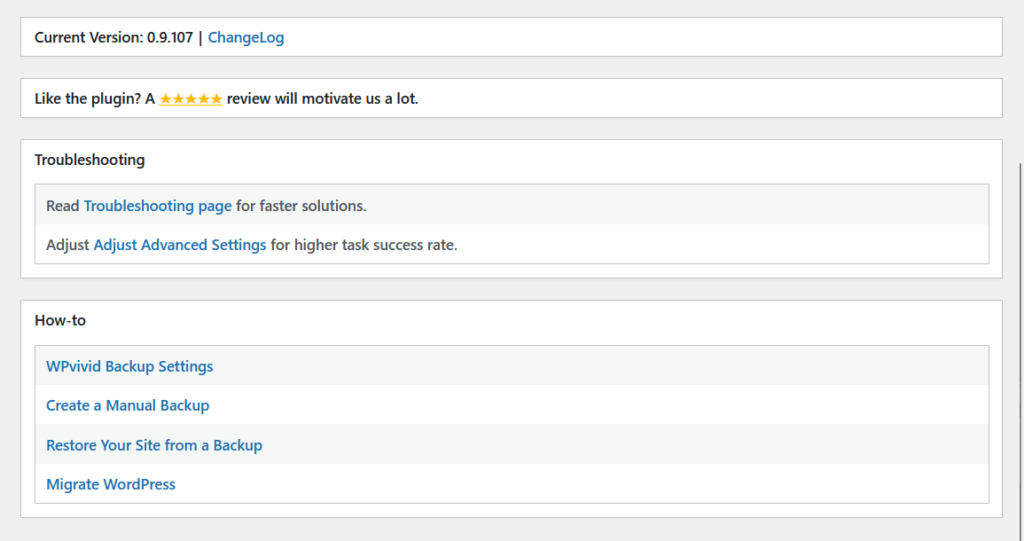
Here’s a breakdown of their customer support options:
- Documentation: The WPvivid website provides detailed guides covering setup, troubleshooting, and feature usage.
- Ticketing system: Pro users can submit a ticket through their website.
- Community forums: Free users can post questions in WordPress community forums, where WPvivid staff and other users often respond.
Support is responsive and accessible, especially for pro users who have access to the ticketing system on the website.
I’ve also checked the support forum in WordPress for WPvivd, and it seems that they’re actively replying to questions from there.
Overall, pretty nice! 🙂
Knowledge Base
WPvivid provides a comprehensive documentation library that covers everything from basic setup to advanced features.
The documentation is well-organized, and divided into clear sections for features like backups, migration, and troubleshooting.
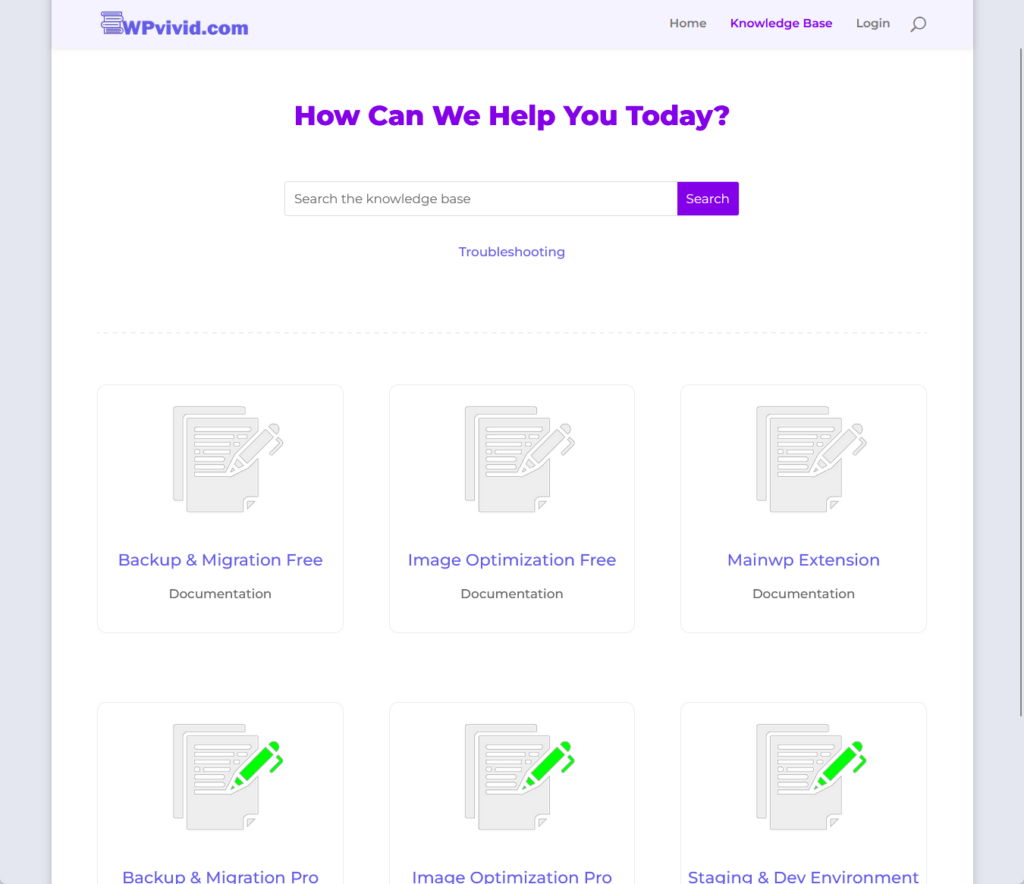
Here’s what to expect from the documentation:
- Each guide is straightforward and written in user-friendly language.
- Detailed steps walk users through each feature, with logical flow and practical tips for setup and customization.
- Many articles include images and screenshots that illustrate key steps.
Here’s an example of an article:
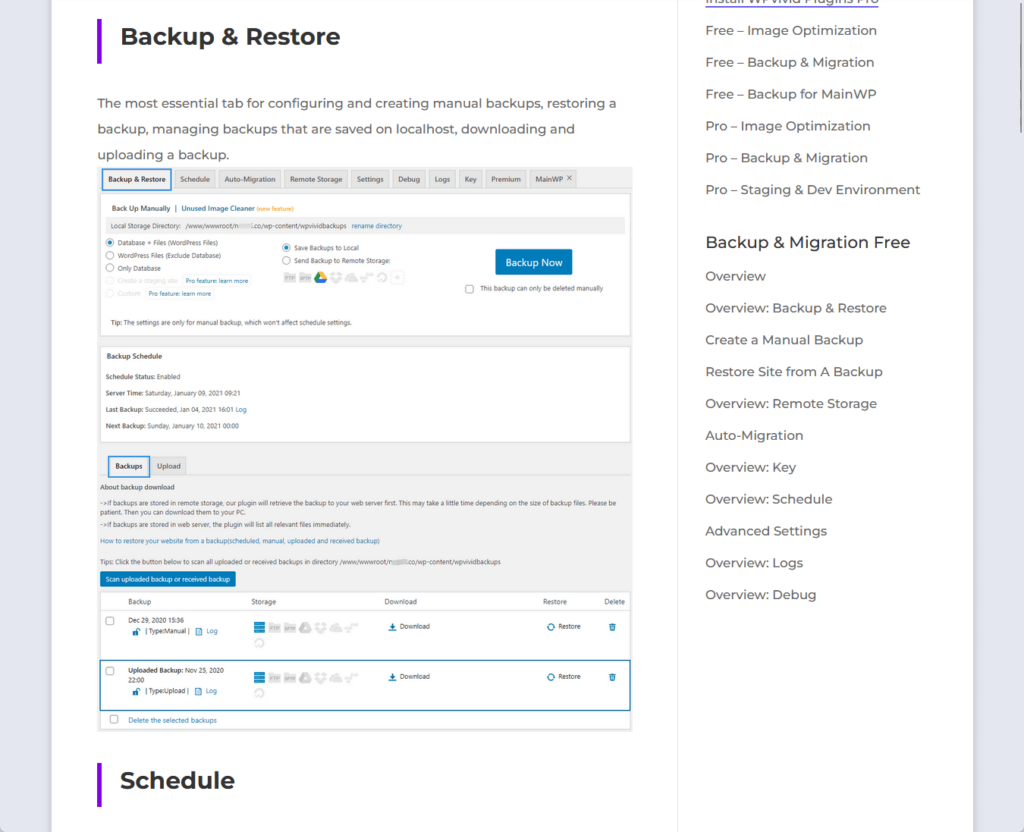
Advanced settings and pro features are also covered, allowing experienced users to take full advantage of the plugin’s functionality.
Overall, WPvivid’s documentation is thorough, well-organized, and visually supportive, a valuable resource for troubleshooting and mastering the plugin’s features.
👋 My thoughts here
For the support, I think it’s okay and pretty standard without any eye-catching options whatsoever.
Here are my thoughts here:
- The documentation is thorough, providing detailed guides on everything from basic setup to advanced features.
- Pro users benefit from a ticketing system, allowing them to submit support requests directly through the WPvivid website.
- WPvivid’s team is actively involved in WordPress community forums, where they respond to free users’ questions and concerns.
This level of engagement helps create a supportive community environment and provides free users with a way to get help when needed.
Pricing
My rating for its pricing is 4.2 out of 5.
Here’s why:
- WPvivid Pro’s lifetime plans provide excellent value for users who prefer a one-time purchase over recurring subscription fees.
- The “Ultimate” plan for unlimited domains is beneficial but might be too high for smaller agencies or freelancers working with many sites.
- The 30-day refund policy is also a plus, but the guarantee is limited to the initial purchase window, which could feel restrictive for those wanting a longer trial period.
The various tiers and lifetime options make it adaptable and cost-effective for different types of users, from individual bloggers to businesses managing multiple sites.
While higher-tier pricing may be a stretch for some, the money-back guarantee and flexibility make WPvivid’s pricing structure highly attractive overall.
Cost Breakdown
WPvivid offers various pricing plans, each customized to different types of users, from bloggers to large businesses.
These plans come in both annual and lifetime options, so users can choose based on their budget and long-term needs.
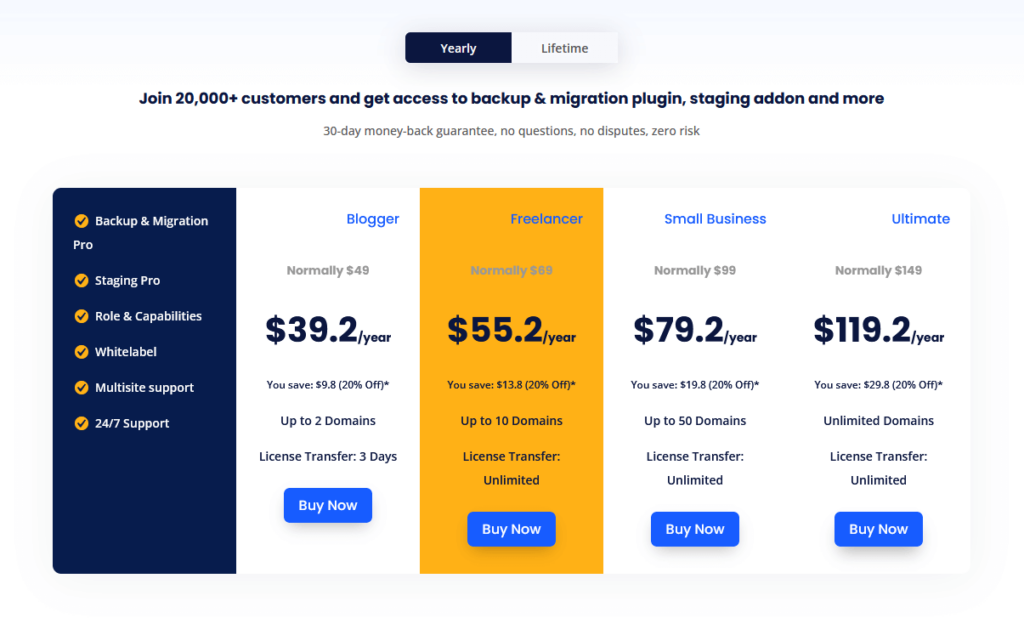
Here are their plans:
- Blogger: $39.20/year or $79.20 lifetime (2 domains)
- Freelancer: $55.20/year or $111.20 lifetime (10 domains)
- Small Business: $79.20/year or $159.20 lifetime (50 domains)
- Ultimate: $119.20/year or $239.20 lifetime (unlimited domains)
Each tier grants access to all pro features (this is nice!), such as incremental backups, advanced migration, priority support, and more.
The main difference lies in the number of supported domains, basically, higher tiers allow for more domains.
For most users, the small business plan offers the best balance of cost and value, supporting up to 50 domains at a moderate price.
But I also want to emphasize that having a lifetime option is gold since many users hate subscriptions and prefer a one-time purchase. 🙂
Money Back Guarantee/Refund
WPvivid provides a 30-day money-back guarantee for users who are unsatisfied with their purchase.
This policy allows customers to try WPvivid risk-free, making sure they only pay if the plugin meets their needs.
Here’s their refund policy:
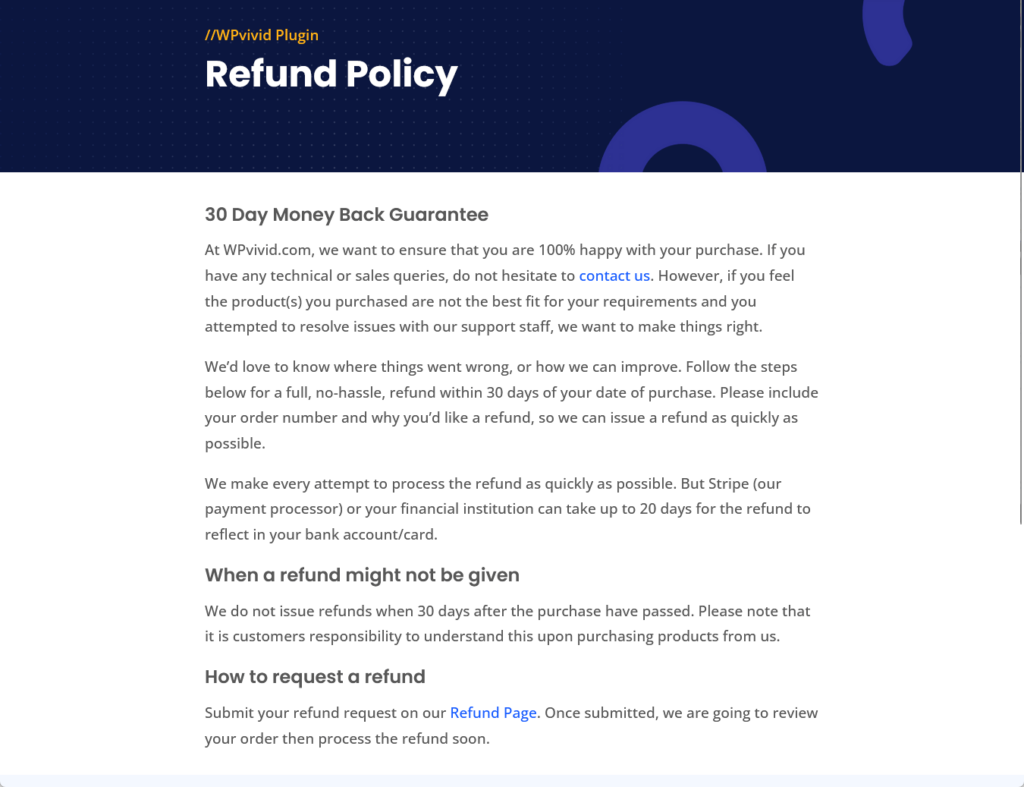
Here’s a closer look at the terms of their refund policy:
- Customers must request a refund within 30 days of their purchase date to be eligible.
- Refund requests need the customer’s order number and a brief explanation of why they are seeking a refund.
- Refund processing may take up to 20 days, depending on the payment provider.
- Refunds are only available within the initial 30-day window — requests made after this period are not eligible.
To submit a refund request, users can go directly to the WPvivid website’s refund request page and follow the provided instructions.
WPvivid’s refund policy allows users to confidently try the plugin, knowing they can get their money back if it doesn’t meet expectations within the first month.
👋 My thoughts here
I like the pricing simply because of the lifetime plans. 🙂
Here are my thoughts here:
- WPvivid offers pricing tiers suited to various types of users, from individual bloggers to large businesses.
- The lifetime plans stand out, especially for users who dislike subscriptions.
- WPvivid’s 30-day money-back guarantee provides a trial period, allowing users to explore the plugin’s features and decide if it meets their needs.
This policy provides extra reassurance, especially for new users, who can confidently test WPvivid without the risk of losing their investment if it doesn’t meet their expectations.
Final Thoughts
When buying WPvivid Pro, consider how many sites you will be managing long-term to choose the best plan.
For users managing only a few sites, the Blogger or Freelancer plans offer strong value, especially with the lifetime option.
However, if you handle a large portfolio, the Ultimate plan’s unlimited domain coverage might save you more over time.
Level up your website design with Darrel Wilson’s Elementor Template Kits, created to make professional web design a breeze.
These kits offer an efficient, user-friendly way to build stunning sites with no coding required.

Secure lifetime access to all premium Elementor template kits:
- Get lifetime access to all premium template kits designed for Elementor
- Complete with 2 years of dedicated support
- Only for $99 — that's already for the lifetime access
Whether you're managing backups or starting a new project, these kits provide all you need to launch a polished, professional website effortlessly.