
Ease of Use
I rate its ease of use a 4.2 out of 5.
Here’s why:
- The setup process is straightforward, whether you're using the free or pro version.
- Pro version installation requires extra steps, like creating a WPMU DEV account and manually uploading the plugin.
- The user interface is sleek and intuitive, but the six-step setup wizard might overwhelm some users who prefer a quicker start or fewer steps.
Hummingbird Pro offers a user-friendly experience with a modern, clean dashboard and straightforward navigation.
While the pro version’s setup demands extra effort, the interface compensates by making ongoing use simple and efficient.
Initial Setup
Hummingbird might seem like a “premium only” plugin, but that’s not the case since you can install a free version.
For the free version, log in to your website’s admin area, go to plugins > add new, and then search for “hummingbird” in the search bar.
From there, simply install and activate the plugin:
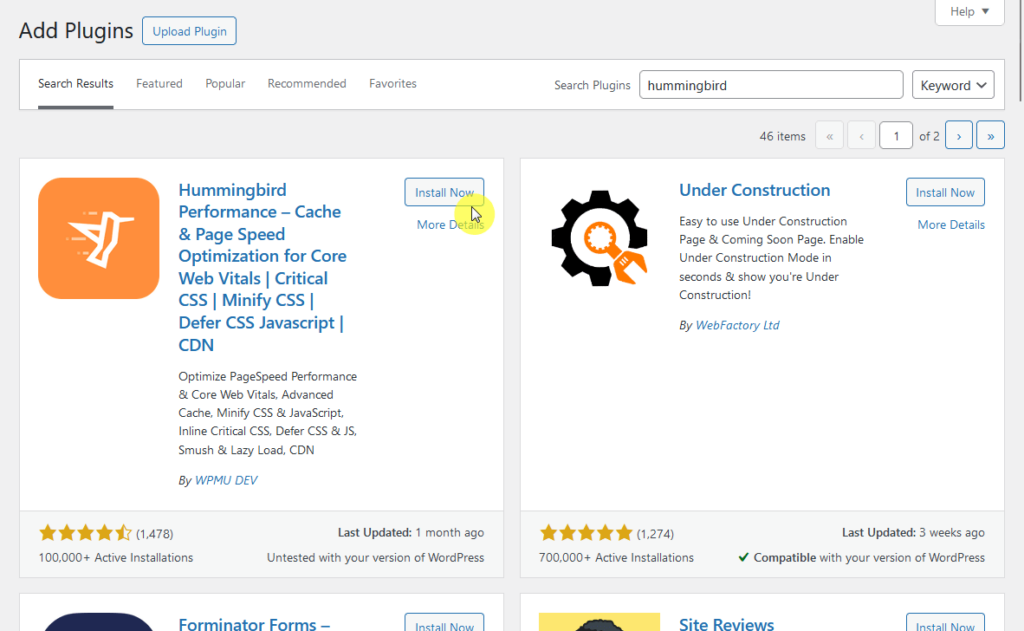
After activating it, you will be redirected to the installed plugins page, and if you click on any Hummingbird option, the setup wizard will start.
For the pro version, you first need to create an account in WPMU DEV and then purchase a subscription to WPMU DEV.
After that:
- Download the pro plugin from WPMU DEV
- Go to the plugins > add new page on your website
- This time, click the upload plugin button
Then, upload the .zip file of the plugin to the page and activate it:
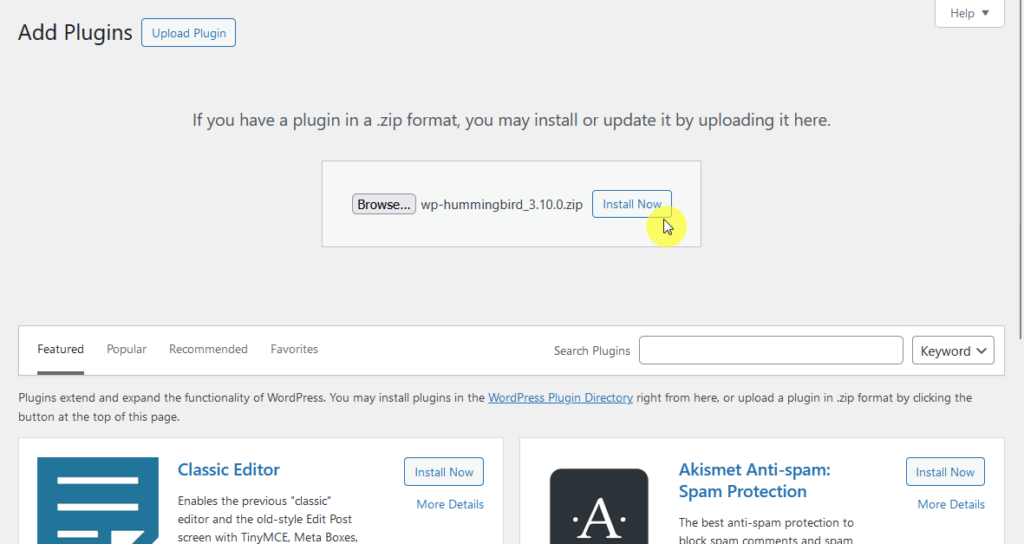
Similar to the free version, the setup wizard will kickstart once you click on any Hummingbird option in the admin area.
User Interface
As I mentioned earlier, the setup wizard will start anytime you click on a Hummingbird item right after activating the plugin.
This is the first page you will see:
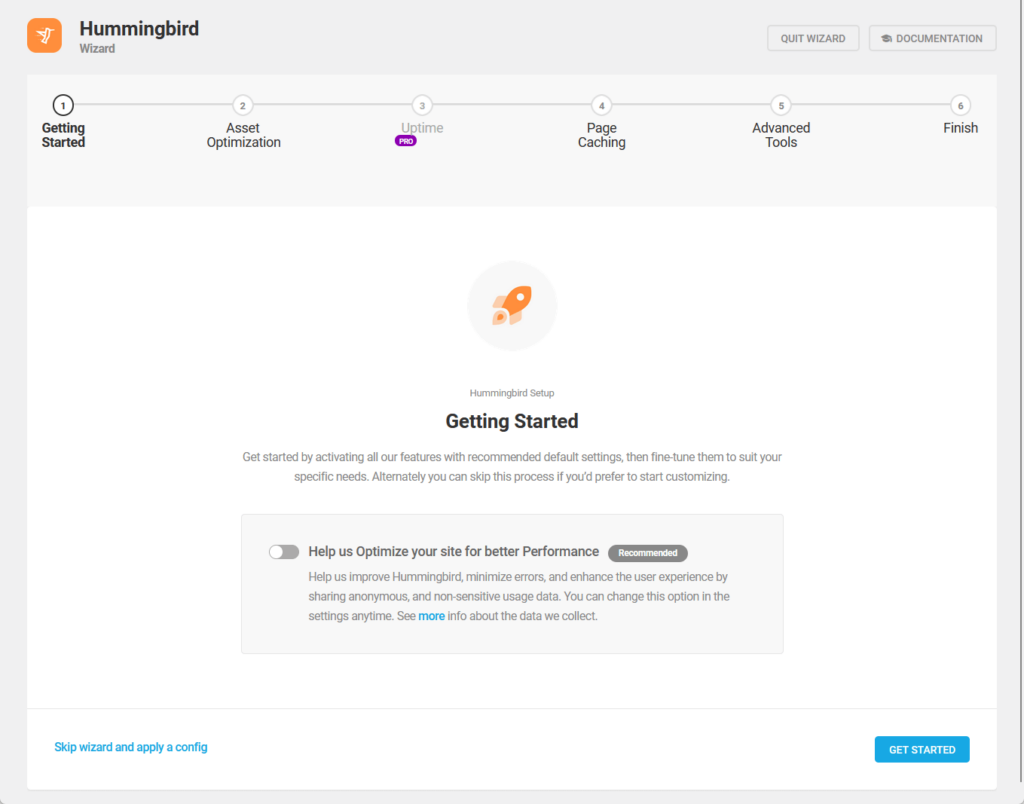
You can proceed to either skip the wizard and go directly to the dashboard or proceed through each step in the setup.
There are six steps here:
- Getting started
- Asset optimization
- Uptime (Pro)
- Page caching
- Advanced tools
- Finish
Here are some screenshots:
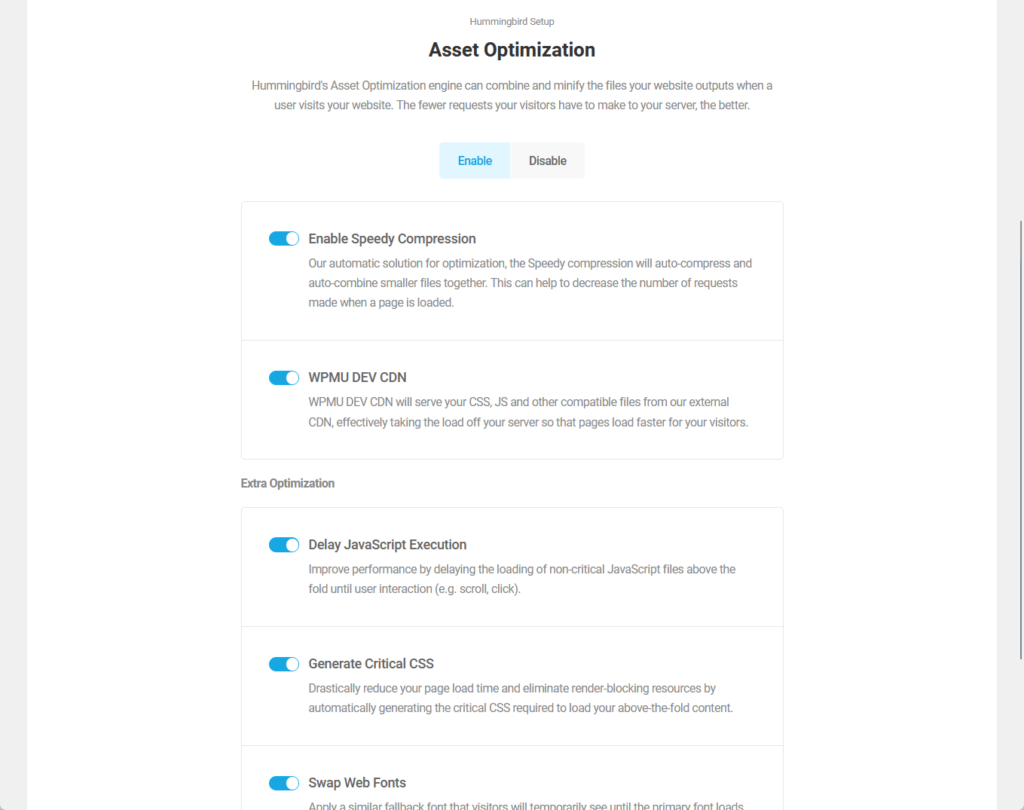
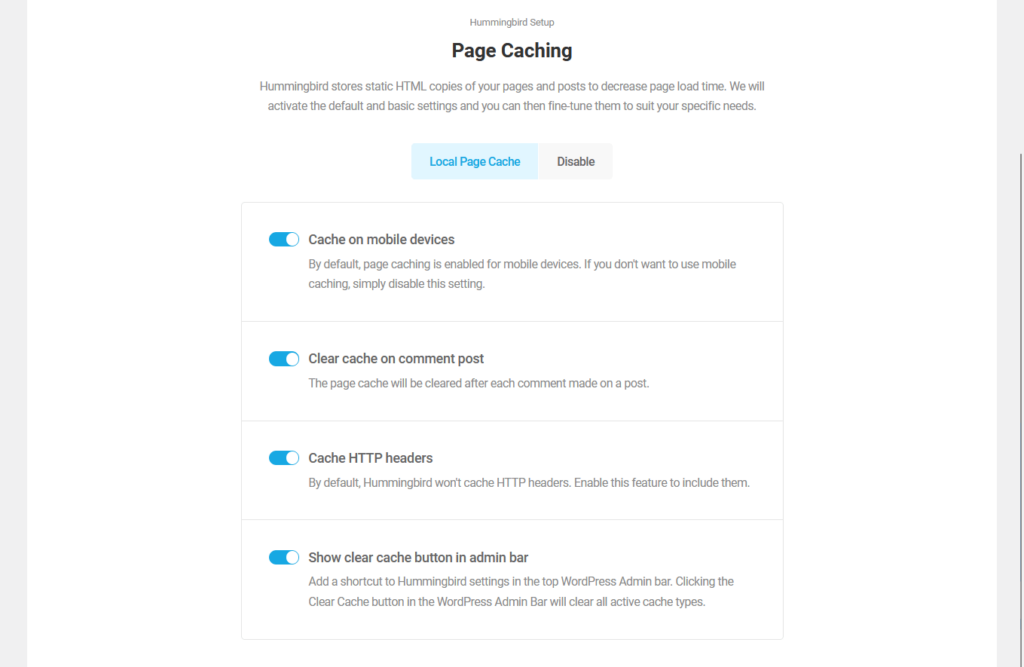
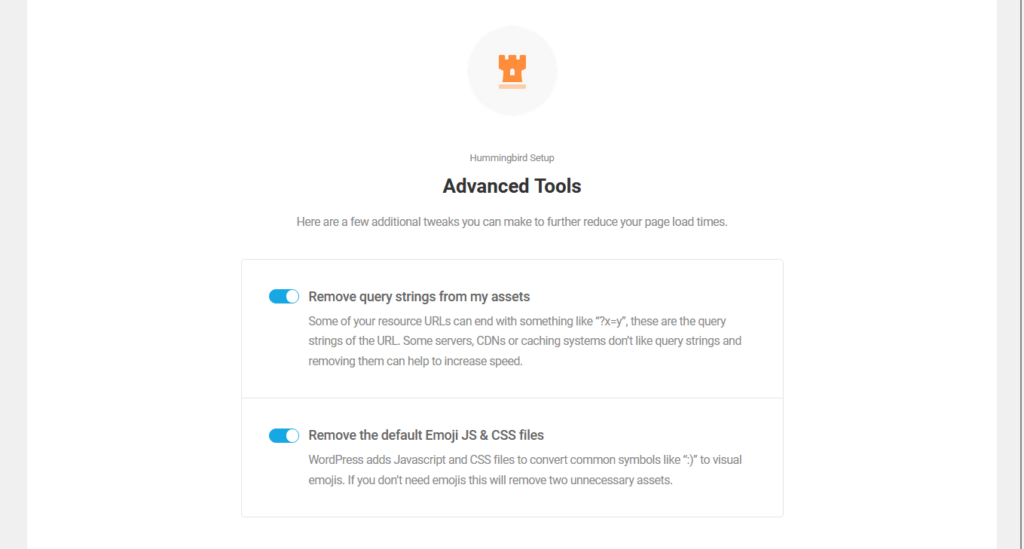
Nice! 🙂
As for the user interface, everything seems pretty good, complete with a dashboard that features a modern and clean layout.
Here:
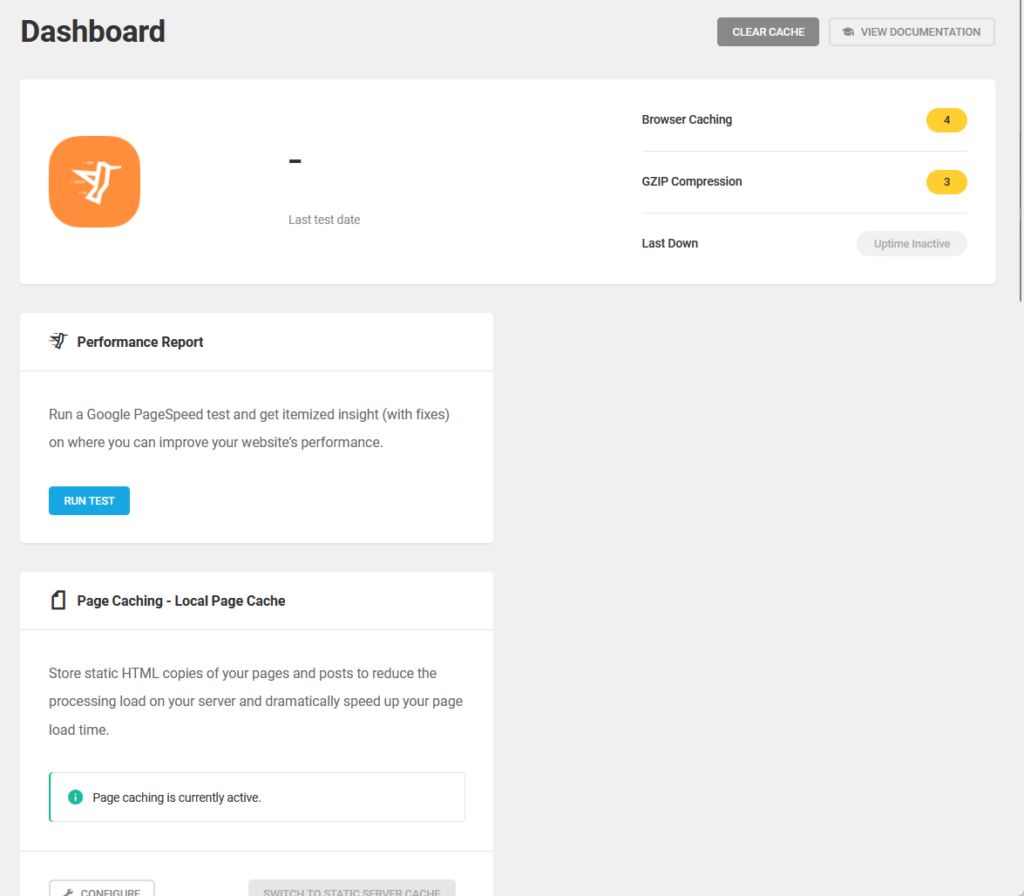
Some of the items you will in the dashboard include:
- Performance report
- Page caching status
- Browser caching status
Each item has a button for you to visit that feature or tool.
That means Hummingbird is easy to navigate, and you can jump between selections and tweak settings without difficulty.
👋 My thoughts here
The installation and setup of Hummingbird seems pretty smooth.
Here are my thoughts:
- The wizard launches automatically after clicking on an option right after activating the plugin.
- Users can choose to skip the wizard and access the dashboard directly.
- The dashboard has a clean layout with easily accessible features.
I can clearly see that the plugin is designed to be easy to navigate, and it sports some of the most modern designs among caching and speed optimization plugins.
It’s clear that a reliable hosting provider is essential for maintaining a fast and secure website.
Hostinger, with its high-speed servers and budget-friendly plans, pairs seamlessly with Hummingbird Pro’s tools.

Discover the Hostinger advantage for your WordPress site:
- Enjoy a 99.9% uptime guarantee
- Affordable pricing at just $2.49/month (use the code darrel10 to get a discount)
- Global performance and reach with Hostinger's optimized hosting platform
For blazing-fast speeds and top-tier optimization, Hostinger provides the perfect hosting platform to complement Hummingbird Pro.
Best Features
My rating here is a good 4.4 out of 5.
Here’s why:
- The plugin offers comprehensive caching tools and advanced optimizations like critical CSS generation and JavaScript delay.
- Some features, like advanced asset optimization and notifications, are locked behind the pro version, limiting their accessibility for free users.
- Performance reports are visually clear and actionable, but interpreting and implementing some advanced suggestions might require technical knowledge.
Hummingbird Pro is packed with features that enhance website speed and efficiency, from robust caching to detailed performance reports.
While certain tools are pro-only, they justify the cost with noticeable performance improvements and ease of automation.
Here are some notable features of Hummingbird:
1. Performance Reports
It’s amazing that Hummingbird has a free performance test and reports feature, which can help you assess and improve your site speed.
Here are some screenshots:
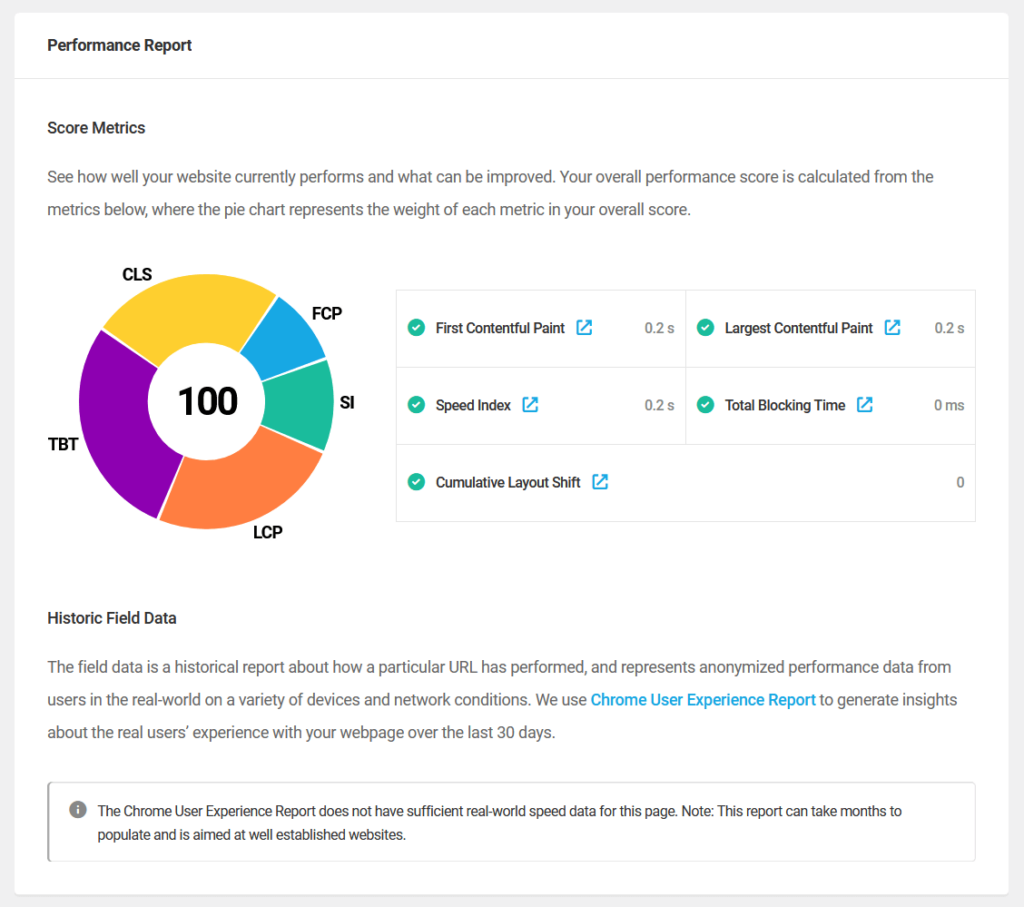
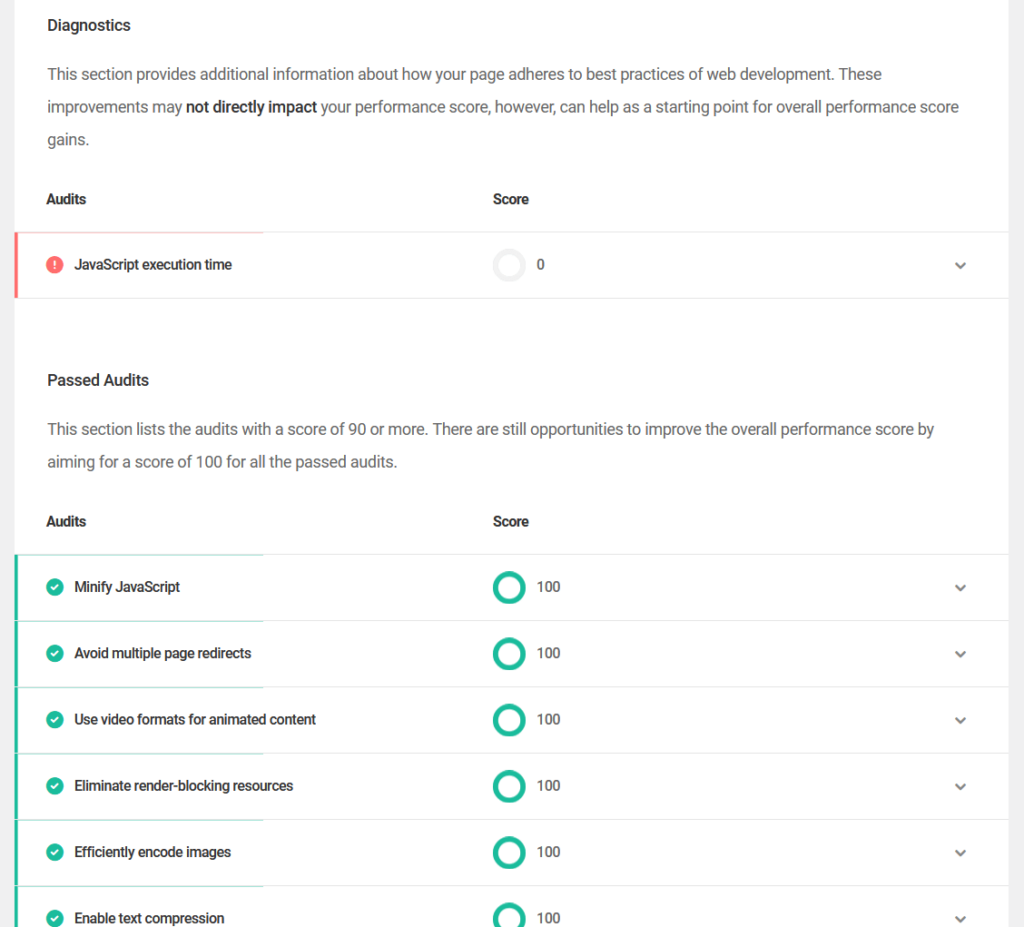
As you can see, the report uses a pie chart to display metric weights, making it easy to interpret scores at a glance.
Some key features here include:
- Quick performance tests
- Performance score metrics
- Historic field data
- Opportunities for improvement
- Passed audits overview
Suggestions for improvement are categorized as opportunities and diagnostics, with actionable tips to refine page performance further.
2. Caching Mechanisms
Hummingbird provides powerful caching options to speed up your WordPress site.
It’s complete with different tools from browser caching to advanced integrations to help with faster load times and optimized server performance.
Some screenshots for this feature:
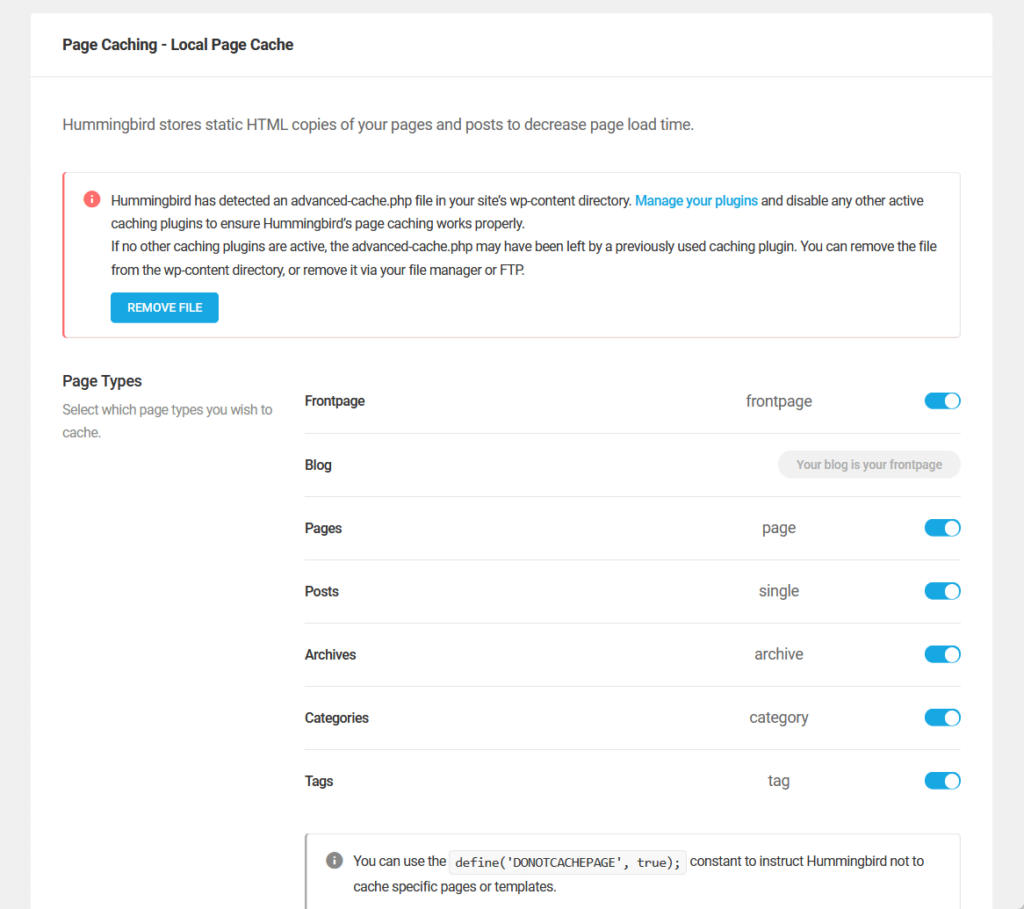
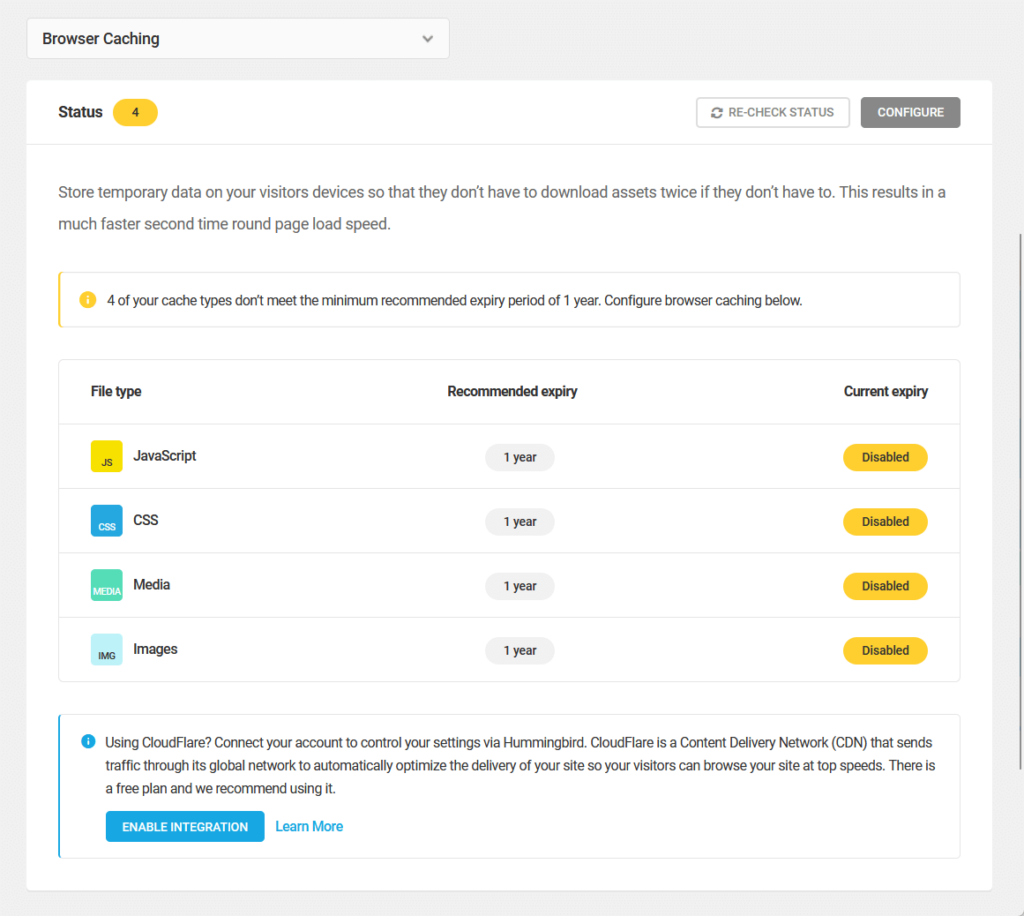
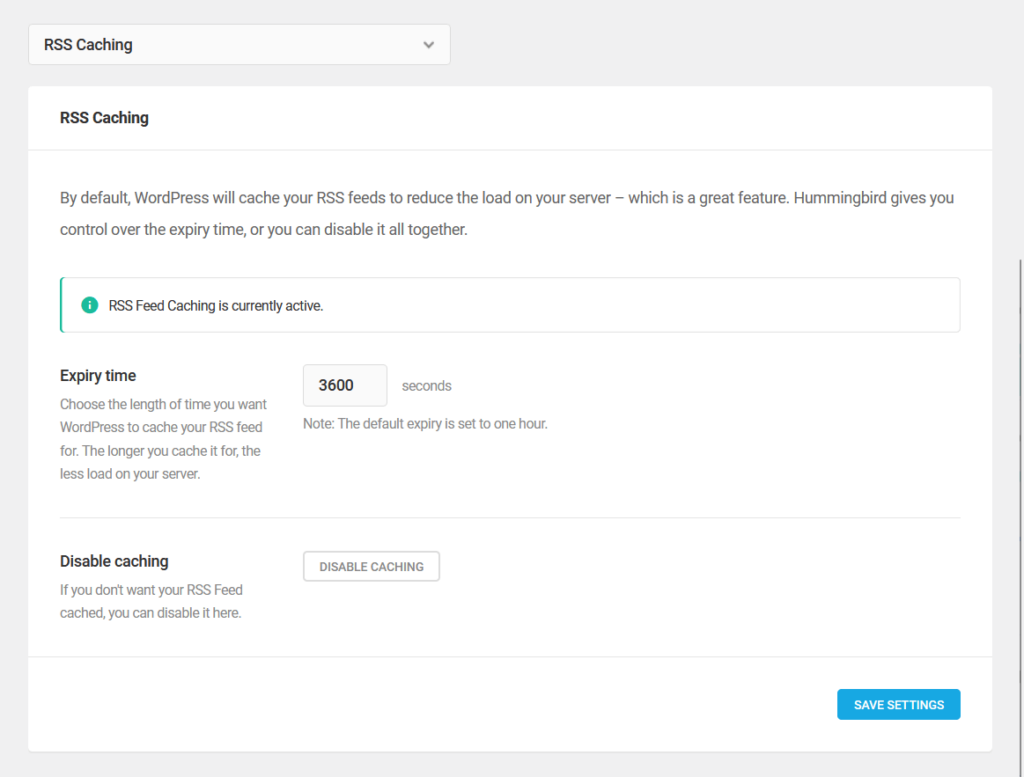
Since there’s a lot of them, here’s a quick rundown of all the core caching features in Hummingbird:
| Caching Type | Description | Key Benefits |
| Page Caching | Stores static HTML versions of your pages to serve them faster. | Users can cache specific page types like front pages, posts, or categories. |
| Browser Caching | Saves static assets like CSS, JavaScript, and images on users' devices. | Enhances load speeds for repeat visitors. |
| Preload Caching | Automatically generates cached versions of pages and posts for faster delivery. | Optimizes speed after updates by preloading critical content. |
| RSS Feed Caching | Controls how long RSS feeds are cached to reduce server load. | Balances content freshness with performance gains. |
| Gravatar Caching | Locally stores avatars from comments and themes. | Reduces external requests, speeding up page loads. |
There are also some advanced settings available like cache management, compression options, exclusions and rules, and debugging.
Hummingbird also supports integrations with providers like Cloudflare and Varnish for improved caching capabilities including automatic purging and fine-tuned cache management.
3. Extra Asset Optimization (Pro)
Under assets optimization, there’s a tab for “extra optimization” with advanced features that can improve your website performance.
These tools focus on reducing render-blocking elements, optimizing font usage, and handling non-critical scripts intelligently.
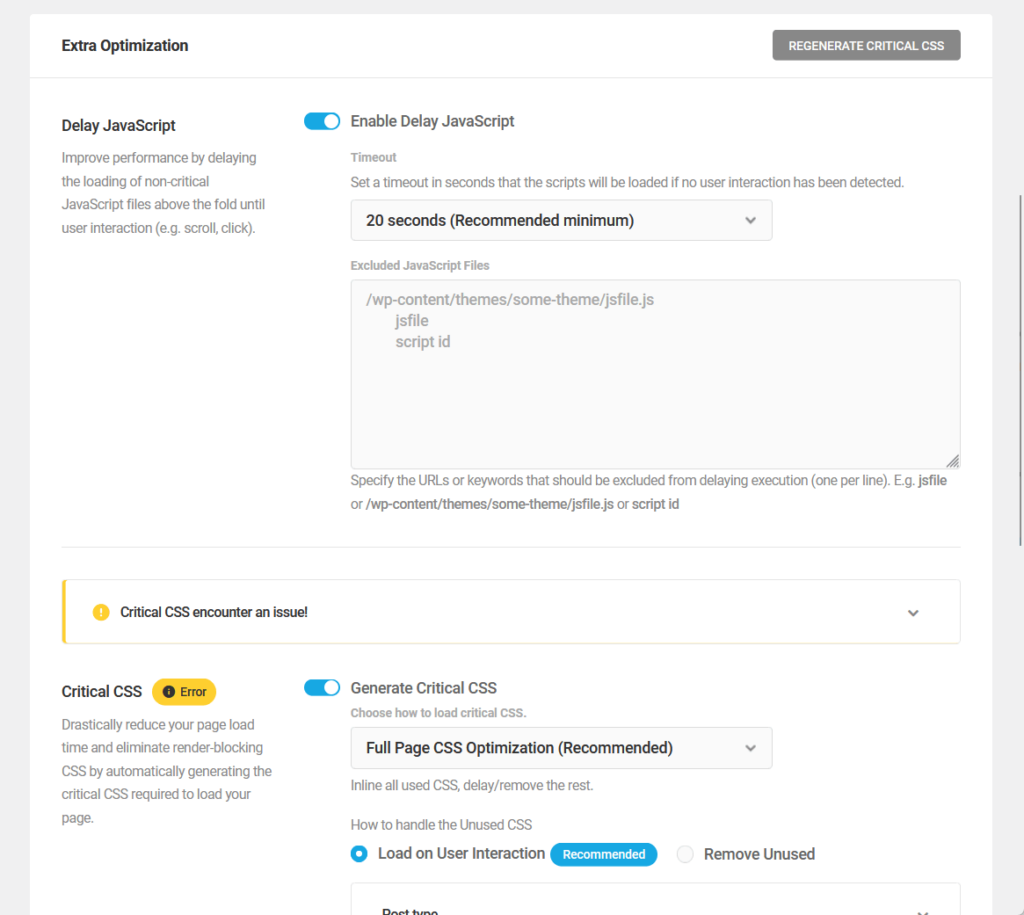
The specific features here include:
- Delay JavaScript execution
- Generate critical CSS
- Font optimization (though this one is available in the free version)
The first one deals with postponing the loading of non-essential JavaScript until the user interacts with the page, such as scrolling or clicking.
The second one is about creating critical CSS to prioritize styles required for above-the-fold content, reducing initial load times.
By focusing on above-the-fold content and intelligently handling assets, these features minimize resource usage while maintaining the site’s functionality and design integrity.
4. Notifications (Pro)
Hummingbird Pro includes a powerful notifications feature that allows you to automate reports and alerts.
You can set up detailed notifications for various performance metrics and tasks so you can stay on top of your website's health and optimization efforts.
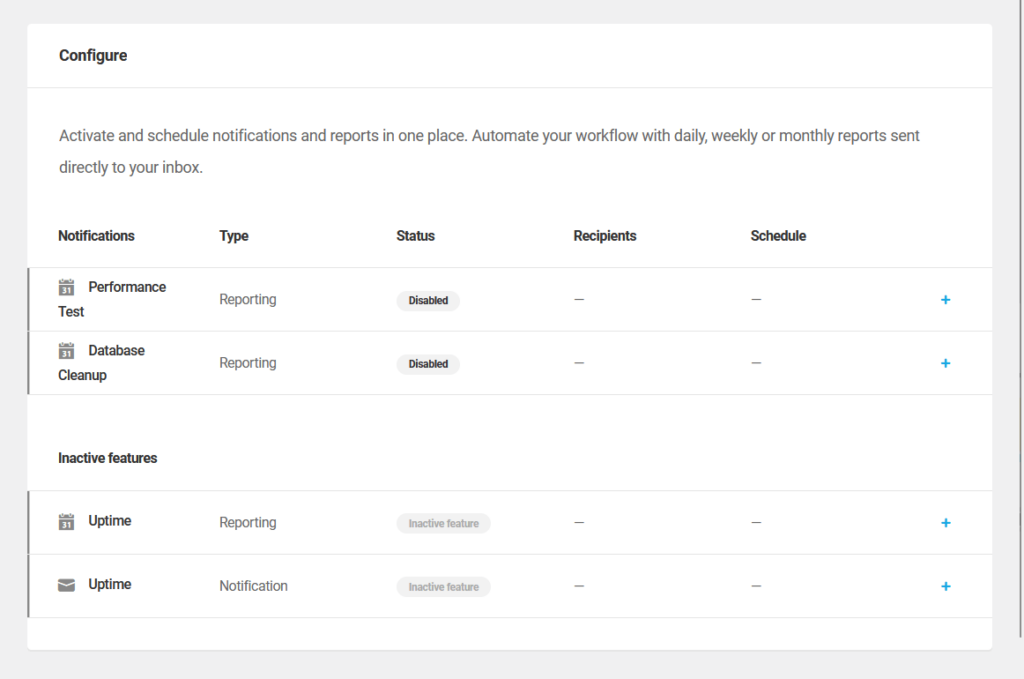
There are three types of notifications available:
- Performance test reports
- Database cleanup reports
- Uptime notifications
You can set the notifications to be scheduled to run daily, weekly, or monthly, and users can choose when (week and time) to receive the reports.
The recipient management allows you to add multiple recipients, which can be selected from registered users or added manually via email.
All these are nice since they help automate important updates and eliminate the need for constant manual monitoring.
👋 My thoughts here
Hummingbird has some of the nicest features I know of when it comes to caching and optimization plugins.
Here are my thoughts:
- I like the fact that they offer free performance tests and reports with actionable insights.
- They have robust caching mechanisms that include page, browser, RSS feed, and Gravatar caching to improve load speeds.
- The automated notifications feature is one of those things that you never thought you needed or wanted.
It adds that flexible scheduling options and multi-user recipient support are making it easy to stay informed.
Pretty good so far! 🙂
Reliability
For reliability, my rating here is 3.9 out of 5.
Here’s why:
- Regular updates and proactive maintenance ensure the plugin stays aligned with modern web performance standards and fixes issues promptly.
- Frontend loading time in performance tests lags behind competitors like LiteSpeed Cache, which may concern users prioritizing speed above all else.
- While the real-world impact on page speed is negligible, users might perceive the slower test results as a drawback compared to competitors.
Hummingbird Pro is a reliable plugin with consistent updates, robust maintenance, and solid backend performance.
Although its frontend loading time isn’t the fastest, the difference is minimal in practical use.
Performance
As for the performance of the plugin itself, I test it out with Code Profiler:
- Website frontend: 0.453 seconds
- Admin backend: 0.075 seconds
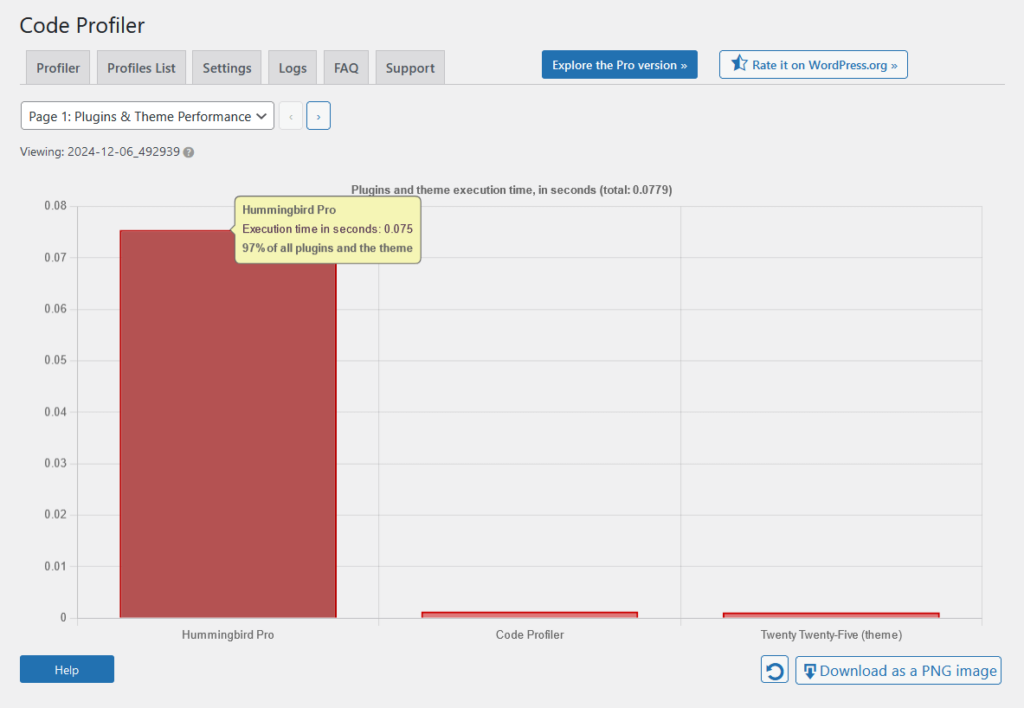
For comparison with its competitors (lower is better):
| Feature | Hummingbird Pro | LiteSpeed Cache | WP Rocket |
| Website Frontend | 0.453 seconds | 0.023 seconds | 0.107 seconds |
| Admin Backend | 0.075 seconds | 0.027 seconds | 0.103 seconds |
For the results, the impact on page speed is still less than a second, which is negligible in real-world experience.
However, we must look at the results and we can see that Hummingbird Pro’s website frontend loading time is slower than its competitors.
On the bright side though, its admin backend time is faster than WP Rocket’s results but slower than LiteSpeed Cache.
Updates and Maintenance
What’s nice is that Hummingbird is regularly updated to introduce new features, enhance existing functionality, and address potential issues.
I have found its changelog on WordPress.org, though it’s unclear if it also covers updates exclusive to the pro version.
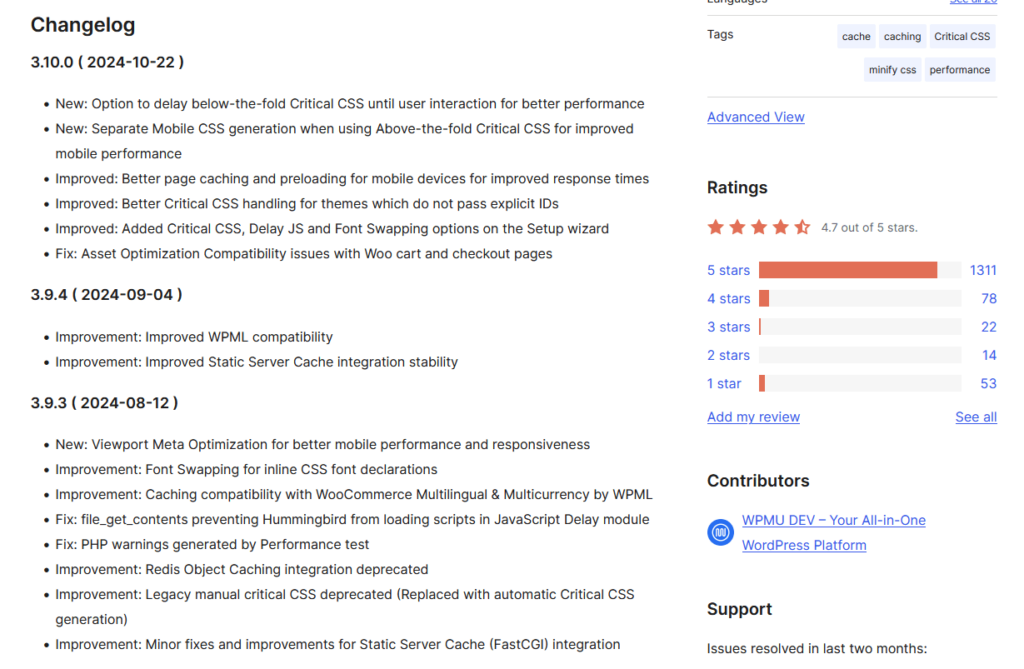
Reviewing the updates, I can see that they focus on:
- Feature enhancements
- Compatibility improvements
- Bug fixes
- Performance optimization
Their updates often include updates aligned with the latest web performance guidelines, like Lighthouse API changes and INP (Interaction to Next Paint) metrics.
Outdated functionalities are also replaced with more efficient solutions, such as the shift to automated Critical CSS generation.
Hummingbird’s commitment to regular updates and proactive maintenance makes it a “well-oiled” tool for both free and pro users.
👋 My thoughts here
Except for the milliseconds difference in its performance, I say Hummingbird Pro is pretty reliable.
Here are my thoughts:
- Despite being slower in specific tests, Hummingbird Pro's impact on page speed is less than a second, which is negligible in real-world scenarios for most users.
- Hummingbird receives regular updates focusing on feature enhancements, bug fixes, compatibility improvements, and alignment with modern web standards.
- The plugin replaces outdated features with newer, efficient solutions, such as automated Critical CSS generation.
No need to be bothered that much though that its frontend loading time is slower than others since it doesn’t really affect much in the real world.
What’s important is that it doesn’t affect the loading speed by more than a second. 🙂
Support
I rate their support a good 4.5 out of 5.
Here’s why:
- The live chat feature offers real-time, personalized support, making it easy to resolve urgent issues quickly.
- Support tickets are restricted to agency members, limiting access to this helpful option for lower-tier plans.
- The documentation is comprehensive and beginner-friendly, but advanced users may sometimes prefer direct guidance over reading through guides.
Hummingbird Pro provides outstanding support with live chat, detailed documentation, and forums.
The availability of ticketed support for higher-tier plans only might limit some users, but the overall experience remains reliable and accessible.
Customer Service
Hummingbird users, particularly those subscribed to WPMU DEV’s Pro membership, benefit from robust customer service and support options.
For starters, they have some links to their support features below most of their pages in the plugin:

In terms of support channels, they have:
- Support tickets
- Live chat
- Documentation
- Forums
I like the fact that they provide real-time support with WPMU DEV staff for personalized assistance with live chat.
As for support tickets, they’re available via the Hub for Agency members, allowing clients or team members to submit and track issues directly.
Note that all support options, including ticketing and live chat, are accessible directly from the WPMU DEV Hub (you need to log in).
Documentation
The documentation for the Hummingbird plugin is a comprehensive guide that walks users through its features and functionalities.
Hosted on the WPMU DEV documentation platform, it provides detailed instructions for setting up and optimizing Hummingbird effectively.
Here’s the home page of the documentation:
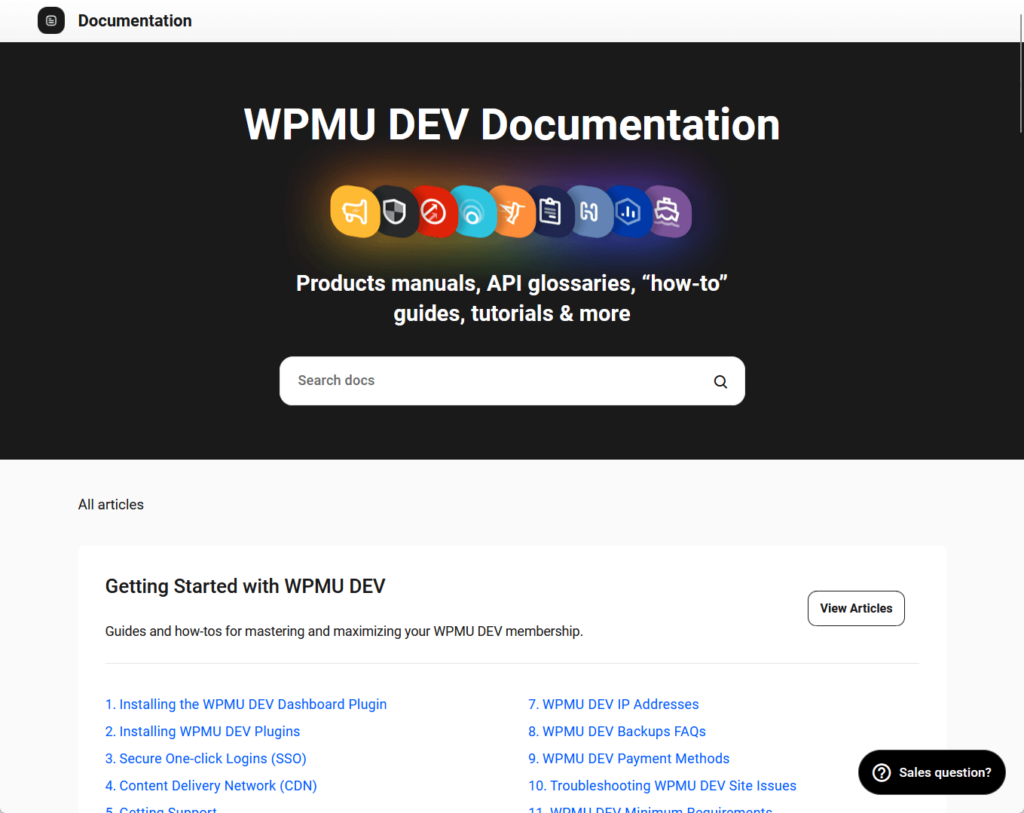
It’s easy to see that the documentation is thoughtfully created to cater to both beginners and advanced users.
The guide also sports all major features like caching, performance tests, asset optimization, and notifications, complete with screenshots.
Here’s an example:
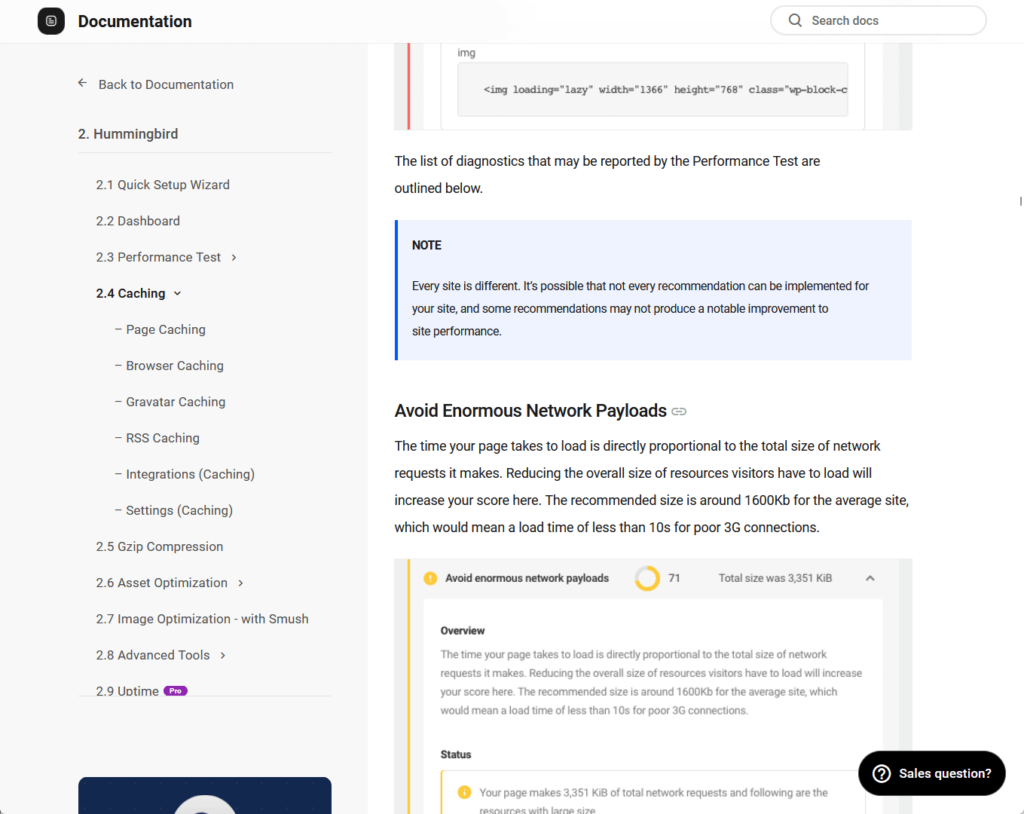
The content is well-written, avoiding overly technical jargon while providing the necessary depth for advanced users.
Troubleshooting guides are included to address potential conflicts, such as compatibility with other plugins or handling resource-heavy pages.
Overall, the Hummingbird documentation is nicely done, with detailed explanations, visual aids, and a user-friendly layout.
👋 My thoughts here
WPMU DEV, the creator of Hummingbird, is well-established, which is why its support is also reliable and extensive.
My thoughts here:
- Users have access to multiple support options, including support tickets, live chat, documentation, and forums.
- Live chat provides immediate, personalized support from WPMU DEV staff, which is highly convenient for resolving urgent issues.
- The Hummingbird documentation is detailed and beginner-friendly, covering all major features like caching and performance tests.
Their support tickets are available only to Agency members though, so there’s kind of an advantage if you get a higher-tier plan.
Pricing
My rating here is 3.7 out of 5.
Here’s why:
- The introductory pricing is very affordable, starting at $3/month for the basic plan, making it accessible for individual users or small projects.
- The regular price after the first year is five times the promotional rate, which can feel steep, especially for smaller budgets.
- The range of plans caters to diverse needs, from single-site users to agencies, but the annual billing requirement may deter those seeking flexibility.
Hummingbird Pro’s pricing is appealing at first glance with low introductory rates and flexible plans.
However, the significant jump in cost after the first year may surprise some users.
Cost Breakdown
Hummingbird Pro is part of the WPMU DEV Pro plugin suite, offered through various subscription plans for different needs.
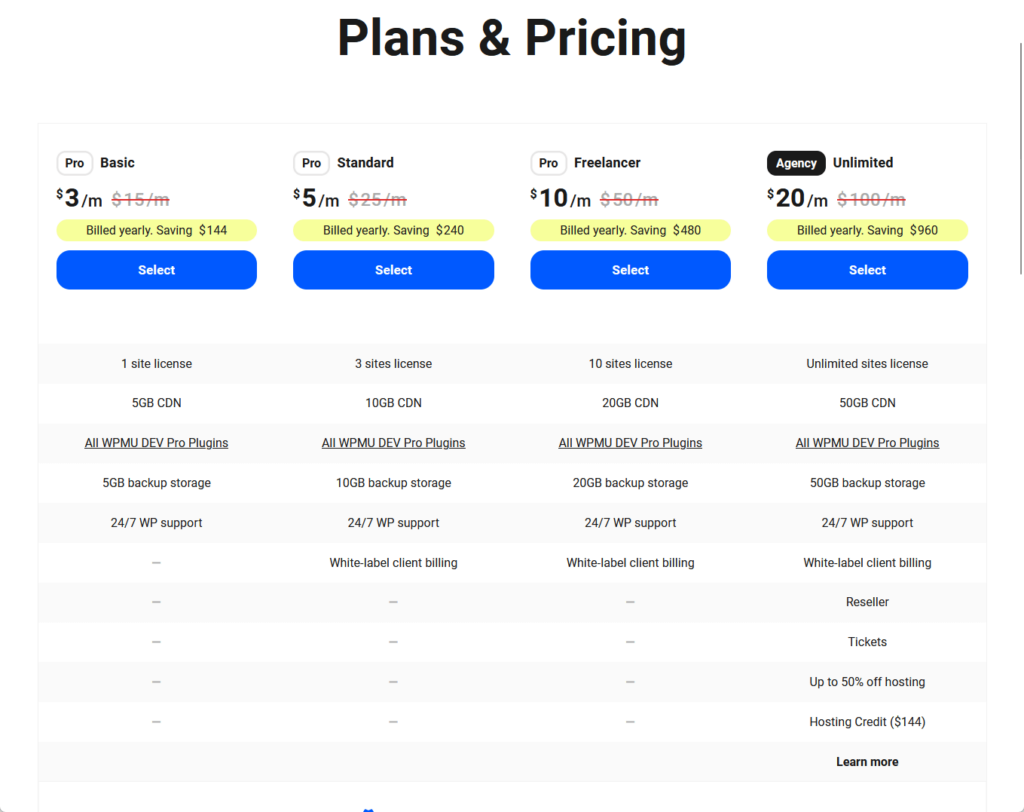
Here’s a breakdown of their plans:
| Plan | Cost | Site Licenses | Key Features |
| Free Plan | $0 | 1 | Basic speed optimization, caching, and limited features. |
| Basic Plan | $3/month (billed yearly at $36) | 1 | All Pro plugins, 5GB CDN, 5GB backups, 24/7 support. |
| Standard Plan | $5/month (billed yearly at $60) | 3 | All Basic Plan features, 10GB CDN, 10GB backups, and white-label client billing. |
| Freelancer Plan | $10/month (billed yearly at $120) | 10 | All Standard Plan features, 20GB CDN, 20GB backups. |
| Agency Plan | $20/month (billed yearly at $240) | Unlimited | All Freelancer Plan features, 50GB CDN, 50GB backups, reseller tools, hosting discounts, and tickets. |
All the paid plans include access to all WPMU DEV Pro plugins, 24/7 live chat support and member forums, CDN, and backup storage.
If you manage a single site, the basic plan is probably the best for you, and you can upgrade once you need more.
However, you need to note that the plans are billed yearly, and the promo is only for the first year, and the regular price is 5x the promo price.
Money Back Guarantee/Refund
WPMU DEV offers a good money-back guarantee.
This ensures a risk-free experience for those who want to try out Hummingbird Pro and other WPMU DEV products.

Here’s a breakdown of the guarantees:
- WPMU DEV provides a no-questions-asked refund within the first 30 days of purchase.
- Whether unsatisfied with Hummingbird Pro or any other Pro tools, you can cancel and get a full refund.
- This policy allows new users to try out the plugin suite, including Hummingbird Pro, with complete peace of mind.
For those utilizing WPMU DEV’s speed optimization or malware removal services, there’s an additional guarantee.
For expert services, if any issues arise within seven days of the service being completed, WPMU DEV promises to resolve them for free.
👋 My thoughts here
There are some ups and downs here, especially with the pricing.
Here are my thoughts:
- The pricing offers a range of plans from free to agency, catering to individual users, freelancers, and agencies.
- The annual billing promo makes the plans highly affordable initially, with the basic plan starting at just $3/month.
- Users should note that the promo price applies only for the first year, and regular pricing is five times higher.
Most of them are okay, but you need to know that the renewal prices would be 5x what you paid the first time. 🙁
Final Thoughts
When considering Hummingbird Pro, focus on your long-term needs and budget.
Take advantage of the introductory pricing to test its features and see if it aligns with your website’s goals (but remember its renewal cost).
If you plan to manage multiple sites or require advanced tools, higher-tier plans might offer better value, while the basic plan is ideal for a single site.
Supercharge your site's performance with Darrel Wilson’s Elementor Template Kits, designed to work perfectly with Hummingbird Pro.
These kits provide a hassle-free way to create stunning, fast-loading sites without touching a single line of code.

Secure lifetime access to all premium Elementor template kits:
- Get lifetime access to all premium template kits designed for Elementor
- Complete with 2 years of dedicated support
- Only for $99 — that's already for the lifetime access
Pair these kits with Hummingbird Pro to deliver a polished, high-performing site that stands out effortlessly.